New Year Special Sale - 70% Discount Offer - Ends in 0d 00h 00m 00s - Coupon code: spcl70

Note! 9A0-095 has been withdrawn.

Practice Free 9A0-095 Adobe Photoshop CS4 Recertification Exam Exam Questions Answers With Explanation

We at Crack4sure are committed to giving students who are preparing for the Adobe 9A0-095 Exam the most current and reliable questions . To help people study, we've made some of our Adobe Photoshop CS4 Recertification Exam exam materials available for free to everyone. You can take the Free 9A0-095 Practice Test as many times as you want. The answers to the practice questions are given, and each answer is explained.

Question # 6

You are configuring the Color Settings dialog box for images intended for output to the Web. Which RGB working space should you choose?

A.

sRGB

B.

ProPhoto RGB

C.

Adobe RGB

D.

ColorMatch RGB

Question # 7

You want to highlight certain menu items in color. What should you do?

A.

Choose Preferences > Interface > Show Channels in Color

B.

Choose Preferences > Interface > Show Tool Tips

C.

Choose Edit > Keyboard Shortcuts and use the Keyboard Shortcuts tab

D.

Choose Edit > Menus and use the Menus tab

Question # 8

While retouching your image you want to control the opacity of the tool. Which should you choose?

A.

Patch Tool

B.

Clone Stamp Tool

C.

Healing Brush Tool

D.

Spot Healing Brush Tool

Question # 9

Which is an essential component of a color managed workflow?

A.

color profiles

B.

variables

C.

smart objects

D.

smart filters

Question # 10

You are creating a new Photoshop document. Which option in the New dialog box should you choose in order to create an HDR document?

A.

Set the bit depth to 32

B.

Set the image resolution to 32 pixels/inch

C.

From the Color Mode popup list, choose LAB Color.

D.

In the Advanced section, select ProPhoto RGB from the Color Profile popup list.

Question # 11

You have a grayscale image that you would like to print. You would like to add a color tint and print the image on two separate plates. Which should you choose?

A.

Image > Mode > Indexed Color

B.

Image > Mode > RGB Color

C.

Image > Mode > CMYK Color

D.

Image > Mode > Duotone

Question # 12

How do you export a JPEG image with all metadata deleted other than copyright and contact information?

A.

Select Optimized in the settings section

B.

Select Edit Output Settings from the settings pop-up menu

C.

Select Copyright and Contact Info from the Metadata pop-up menu

D.

Select None from the Metadata pop-up menu

Question # 13

In the Print dialog box, which two options must be turned off so that you can specify placing the image .25 inches from the left and top edges of the paper on which you are printing? (Choose two.) Select all that apply.

A.

Interpolation

B.

Bounding Box

C.

Center Image

D.

Registration Marks

E.

Scale to Fit Media

Question # 14

You want an action to open a dialog box and wait for input from the user, and without recording the dialog box settings in effect when you create the action.

Which method will achieve the goal?

A.

After you record opening the dialog box, click Cancel.

B.

After you record opening the dialog box, hold down Option (Mac OS) or Alt

(Windows) to change the Cancel button to Reset, and click that button.

C.

Choose Insert Menu Item from the Actions panel menu and select the command you want the action to choose.

D.

After you record opening the dialog box, choose Insert Stop from the Actions panel menu.

Question # 15

In the Photoshop Color Settings dialog box you see a warning that says: Your Creative Suite applications are not synchronized for consistent color. You want consistent color treatment across Photoshop, Illustrator, Acrobat, and InDesign. What should you do?

A.

From the Settings list choose: Monitor Color

B.

From the Settings list choose: Custom

C.

In Bridge, choose Edit > Creative Suite Color Settings and apply a color setting

D.

In Bridge, choose Preferences > Advanced and check the box to Use Software

Rendering

Question # 16

You open a Photoshop document prepared by someone else who created graphics prepared for NTSC DV. There is a large logo in the middle of the frame that's supposed to be circular, but it appears to be distorted into an ellipse. What do you need to do to see the document without distortion?

A.

Choose View > Pixel Aspect Ratio > Square

B.

Choose View > Pixel Aspect Ratio > D1/DV NTSC (0.91)

C.

Choose View > Pixel Aspect Ratio Correction

D.

Choose View > Actual Pixels

Question # 17

You want to apply the same adjustments you have made to one camera raw file to five other images that were taken at the same time and under the same lighting conditions. Which application allows you to use the Synchronize command to make these adjustments?

A.

Bridge

B.

Photoshop

C.

After Effects

D.

Camera Raw

Question # 18

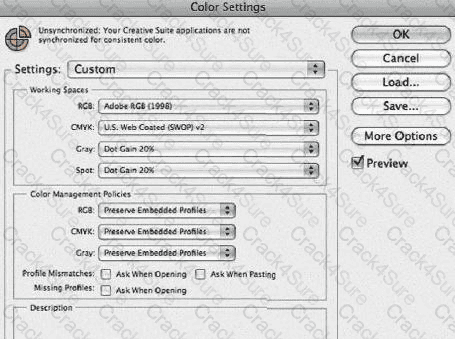
Click the Exhibit button.

9A0-095 question answer

You've standardized your workflow around Adobe RGB (1998). How do you configure the Color Settings dialog box so that you're always alerted when an RGB image you open contains a profile that's different than the RGB working space in the Color Settings dialog box?

A.

In the Working Spaces section, make sure Adobe RGB (1998) is selected in the RGB pop-up menu.

B.

In the Color Management Policies section, choose Convert to Working RGB from the RGB pop-up menu.

C.

In the Color Management Policies section, select the Ask When Opening check box in the Profile Mismatches check box.

D.

In the Color Management Policies section, select the Ask When Opening check box in the Missing Profiles check box.