
Cyber Monday Special Sale - 70% Discount Offer - Ends in 0d 00h 00m 00s - Coupon code: spcl70

Note! 156-115.77 has been withdrawn.

Practice Free 156-115.77 Check Point Certified Security Master Exam Questions Answers With Explanation

We at Crack4sure are committed to giving students who are preparing for the Checkpoint 156-115.77 Exam the most current and reliable questions . To help people study, we've made some of our Check Point Certified Security Master exam materials available for free to everyone. You can take the Free 156-115.77 Practice Test as many times as you want. The answers to the practice questions are given, and each answer is explained.

Question # 6

If the number of Firewall Workers for CoreXL is set higher on one member of a cluster than the other, the cluster will be in what state?

A.

Active/Standby

B.

Active/Ready

C.

Active Attention/Down

D.

Active/Down

Question # 7

What is the best way to see how much traffic went through the firewall that was TCP, UDP and ICMP?

A.

fwaccel conns

B.

fw tab –t connections –p

C.

fwaccel stats

D.

fw ctl pstat

Question # 8

Which command displays FireWall internal statistics about memory and traffic?

A.

fw getifs

B.

cpstat os –f memory

C.

fw ctl pstat

D.

cpstat os –f cpu

Question # 9

What does “cphwd_nat_templates_enabled=1” do when entered into fwkern.conf?

A.

Disables NAT templates when SecureXL is turned on.

B.

Enables NAT templates when SecureXL is turned on.

C.

Enables NAT templates at all times.

D.

Disables NAT templates at all times.

Question # 10

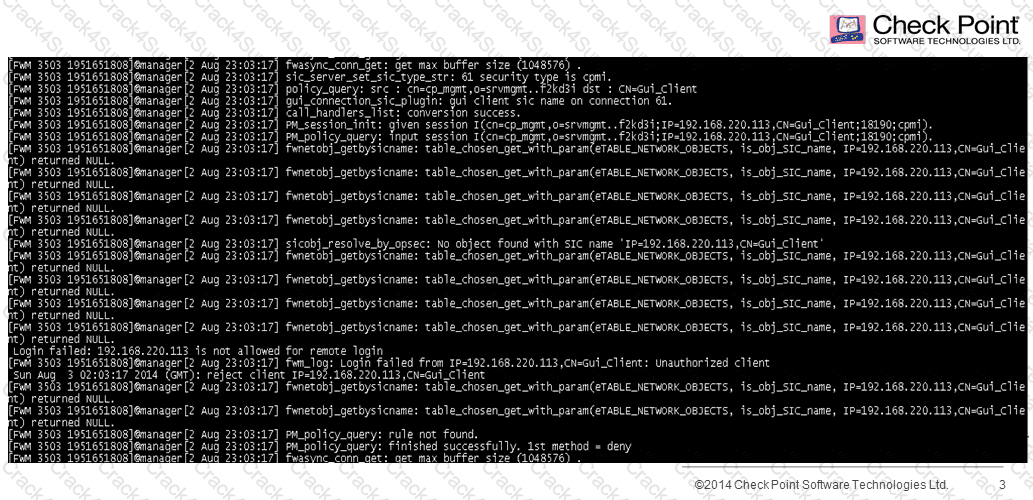
A fwm debug provides the following output. What prevents the customer from logging into SmartDashboard?
156-115.77 question answer

A.

There are not any policy to login in SmartDashboard

B.

FWM process is crashed and returned null to access

C.

User and password are incorrect

D.

IP not defined in $FWDIR/conf/gui-clients

Question # 11

When troubleshooting and trying to understand which chain is causing a problem on the Security Gateway, you should use the command:

A.

fw ctl zdebug drop

B.

fw tab –t connections

C.

fw monitor -e "accept;" -p all

D.

fw ctl chain

Question # 12

John is a Security Administrator of a Check Point platform. He has a mis-configuration issue that points to the Rule Base. To obtain information about the issue, John runs the command:

A.

fw debug fw on and checks the file fwm.elg.

B.

fw kdebug fwm on and checks the file fwm.elg.

C.

fw debug fwm on and checks the file fwm.elg.

D.

fw kdebug fwm on and checks the file fw.elg.

Question # 13

You are running a debugging session and you have set the debug environment to TDERROR_ALL_ALL=5 using the command export TDERROR_ALL_ALL=5. How do you return the debug value to defaults?

A.

fw ctl debug 0x1ffffe0

B.

fw debug 0x1ffffe0

C.

export TDERROR_ALL_ALL

D.

unset TDERROR_ALL_ALL

Question # 14

What would be a reason for changing the “Magic MAC”?

A.

To allow for automatic upgrades.

B.

To allow two or more cluster members to exist on the same network.

C.

To allow two or more clusters to exist on the same network.

D.

To allow the two cluster members to use the same virtual IP address.

Question # 15

When you have edited the local.arp configuration, to support a manual NAT, what must be done to ensure proxy arps for both manual and automatic NAT rules function?

A.

In Global Properties > NAT tree select Merge manual proxy ARP configuration check box

B.

Run the command fw ctl ARP –a on the gateway

C.

In Global Properties > NAT tree select Translate on client side check box

D.

Create and run a script to forward changes to the local.arp tables of your gateway

Question # 16

Which command can be used to see all active modules on the Security Gateway:

A.

fw ctl zdebug drop

B.

fw ctl debug -h

C.

fw ctl chain

D.

fw ctl debug -m

Question # 17

In some situations, switches may not play nicely with a Check Point Cluster and it is necessary to change from multicast to broadcast. What command should you invoke to correct the issue?

A.

set ccp broadcast

B.

cphaconf set_ccp broadcast

C.

cpha_conf set ccp broadcast

D.

This can only be changed via GuiDbEdit.

Question # 18

What is the corresponding connection template entered into the SecureXL connection table from the connection: “10.0.0.100:1024 > 216.239.59.59:80”

A.

“10.0.0.100:1024 > 216.239.59.59:80”

B.

“10.0.0.100:1024 > 216.239.59.59:*”

C.

“10.0.0.100:* > 216.239.59.59:*”

D.

“10.0.0.100:* > 216.239.59.59:80”

Question # 19

The command fwaccel stat displays what information?

A.

Accelerator status, accept templates, drop templates

B.

Accelerated packets, accept templates, dropped packets

C.

Accelerator status, accelerated rules, drop templates

D.

Accelerator status, CoreXL state, drop templates

Question # 20

When optimizing a customer firewall Rule Base, what is the BEST way to start the analysis?

A.

With the command fwaccel stat followed by the command fwaccel stats.

B.

At the top of the Rule Base.

C.

Using the hit count column.

D.

Using the Compliance Software Blade.

Question # 21

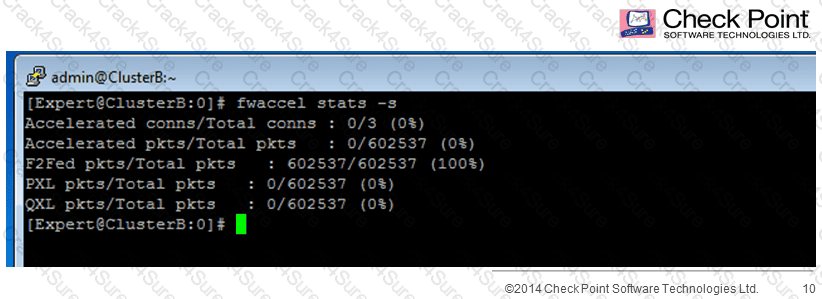
While troubleshooting high CPU usage on cores 3 and 4 on a cluster, you notice the following output of fwaccel stats -s:
156-115.77 question answer

What could be a possible cause of the high CPU usage?

A.

Connections are being partially accelerated by SecureXL, but too many packets are still being processed by the firewall kernel.

B.

The Secure Network Dispatcher (SND) is having to process too much inbound traffic from the NICs.

C.

Connections are not being accelerated by SecureXL, and all packets are being forwarded to firewall kernel instances for inspection.

D.

The Secure Network Dispatcher (SND) is working too hard to distribute the traffic to the acceleration layer.

Question # 22

How do you enable IPv6 support on a R77 gateway running the GAiIA OS?

A.

IPv6 is enabled by default.

B.

Under WebUI go to System Management > System Configuration, turn on IPv6 Support, click apply and reboot.

C.

Enable the IPv6 Software Blade for the gateway in Smart Dashboard.

D.

Run the IPv6 script $FWDIR/scripts/fwipv6_enable and reboot.

Question # 23

What command allows you to monitor IPV6 packets in the kernel module?

A.

ip -6 neigh show

B.

ip -6 addr show

C.

tcpdump -nni eth ip6

D.

fw6 monitor

Question # 24

True or False: It is possible to operate a Security Gateway entirely with IPv6 addressing.

A.

True: All IPv4 features are supported in IPv6’

B.

True: Management can occur over IPv4 or IPv6 thus all gateways can have interfaces configured with valid IP addresses of either type’

C.

False: There are many common IPv4 features that are not supported in IPv6’

D.

False: Management only occurs over IPv4 thus all gateways are required to have interfaces configured with valid IPv4 addresses’

Question # 25

Does R77 SmartDashboard support IPv6?

A.

Yes provided the operating system on which Smart Dashboard is installed is configured with IPv6.

B.

SmartDashboard does not support IPv6.

C.

IPv6 needs to be tunneled through IPv4 to support IPv6.

D.

R77.20 and above provides the support for Smart Dashboard and IPv6 support.

Question # 26

One of IPS Layers’ main functions are to ensure compliance to well-defined protocol standards, detect anomalies if any exist, and assemble the data for further inspection by other components of the IPS engine. Which component is responsible for these functions?

A.

Context Management Interface layer (CMI)

B.

Protections

C.

Protocol Parsers

D.

Passive Streaming Library (PSL)

Question # 27

You are adding a new gateway into your network. You must make sure that it is running the latest Corporate approved IPS profile. How can you get this information to your new gateway?

A.

From the command line, run: ips_import -f [-p ].

B.

IPS profiles must be manually configured on each gateway.

C.

From the command line, run: ips_export_import import -f [-p ].

D.

From the Smart Dashboard IPS tab select import IPS profiles and select the gateway to get the profile from.

Question # 28

How would one enable ‘INSPECT debugging’ if one suspects IPS false positives?

A.

Run command fw ctl set int enable_inspect_debug  1 from the command line.

B.

Toggle the checkbox in Global Properties > Firewalls > Inspection section.

C.

WebUI

D.

Set the following parameter to true using GuiDBedit: enable_inspect_debug_compilation.

Question # 29

Since switching your network to ISP redundancy you find that your outgoing static NAT connections are failing. You use the command _________ to debug the issue.

A.

fwaccel stats misp

B.

fw ctl pstat

C.

fw ctl debug -m fw + nat drop

D.

fw tab -t fwx_alloc -x

Question # 30

Since R76 GAiA, what is the method for configuring proxy ARP entries for manual NAT rules?

A.

WebUI or add proxy ARP ... commands via CLISH

B.

SmartView Tracker

C.

local.arp file

D.

SmartDashboard

Question # 31

The fw tab –t ___________ command displays the NAT table.

A.

loglist

B.

tablist

C.

fwx_alloc

D.

conns

Question # 32

Which flag in the fw monitor command is used to print the position of the kernel chain?

A.

-all

B.

-k

C.

-c

D.

-p

Question # 33

A firewall has 8 CPU cores and the correct license. CoreXL is enabled. How could you set kernel instance #3 to run on processing core #5?

A.

This is not possible CoreXL is best left to manage the Kernel to CPU core mappings. It is only when a daemon is bound to a dedicated core that CoreXL will ignore that CPU core when mapping Kernel instances to CPU cores.

B.

fw ctl affinity -s -k 3 5

C.

Run fwaffinity_apply –t 3 -k 5 and then check that the settings have taken affect with the command fw ctl multik stat.

D.

Edit the file fwaffinity.conf and add the line “k3 cpuid 5”

Question # 34

CoreXL on IPSO R77.20 does NOT support which of the following features?

A.

Check Point QoS

B.

IPv6

C.

Overlapping NAT

D.

Route-based VPN

Question # 35

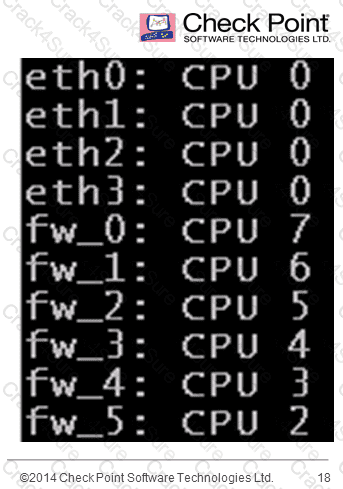
Your customer has a well optimized Rule Base with most traffic accelerated by SecureXL.  They are still seeing slow performance.   They are using an 8 core machine.  They see the following output from fw ctl affinity -l. What could be done to improve performance with this deployment?
156-115.77 question answer

A.

Increase the number of cores dedicated to logging.

B.

Increase the number of Secure Network Dispatchers as the accelerated traffic is not passed to a worker core.

C.

Add more CPU resources to the hardware.

D.

Upgrade to SAM hardware.

Question # 36

What is the method to change the number of cores that CoreXL will use?

A.

cpconfig

B.

SmartDashboard

C.

sysconfig

D.

CoreXL automatically recognizes the number of cores on a system at startup so there is no method or reason to modify the setting.

Question # 37

From a Best Practices perspective, what percentage of your packets should be accelerated?

A.

65%

B.

90%

C.

100%

D.

75%

Question # 38

Under which scenario would you most likely consider the use of Multi-Queue?

A.

When IPS is heavily used.

B.

When most of the traffic is accelerated.

C.

When most of the processing is done in CoreXL.

D.

When trying to increase session rate.

Question # 39

The 'Maximum Entries' value in the GAiA Portal corresponds to the 'gc_thresh3' parameter in the Linux kernel and has value of 1024. Knowing this, you know that gc_thresh2 and gc_thresh1 if are automatically set to the values:

A.

gc_thresh2=256 and gc_thresh1=128

B.

gc_thresh2=512 and gc_thresh1=256

C.

gc_thresh2=1024 and gc_thresh1=1024

D.

gc_thresh1=256 and gc_thresh2=128

Question # 40

Which command will NOT display information related to memory usage?

A.

free

B.

fw ctl pstat

C.

cat /proc/meminfo

D.

memoryinfo.conf

Question # 41

Which of the following is NEVER affected by incorrect OS time and date configuration?

A.

VPN PSK authentication

B.

VPN certificate authentication

C.

SIC

D.

Identity Awareness Kerberos authentication

Question # 42

In the process of troubleshooting traffic issues across a VPN tunnel, you notice on the output of fw monitor -e host(172.21.1.10), accept; that packets are going through the inbound chain (i > I) and then disappearing after the outbound chain (o > __), while you were expecting to see the packet leave on O. What could be causing this issue?

A.

When packets are destined to leave through a VPN tunnel, it is encrypted and encapsulated in an ESP packet, and thus will not show up on a fw monitor.

B.

It’s not showing up on the fw monitor because it is exiting the wrong interface

C.

The packet is getting silently dropped because there is no route for the packet.

D.

The gateway never completed the IKE and IPSec key exchange, and the tunnel does not exist yet.

Question # 43

While troubleshooting a VPN issue between your gateway and a partner site you see an entry in Smartview Tracker that states “Info: encryption failure: Different community ID: possible NAT problem”. Which of the following is the most likely cause?

A.

You have an encryption method mismatch.

B.

Implied rules in global properties such as ICMP and DNS are set to first instead of before last.

C.

You have not created a specific rule allowing VPN traffic.

D.

You have the wrong encryption domains configured.

Question # 44

You are troubleshooting a VPN issue between your gateway and a partner site and you get a drop log on your gateway that states “Clear text packet should be encrypted”. Which of the following would be the best troubleshooting step?

A.

Use the excluded services in the VPN community to exclude this traffic from the VPN or determine why the traffic is leaving the initiating (partner) gateway as clear text.

B.

Use the excluded services in the VPN community to exclude this traffic from the VPN or determine why the traffic is leaving local (your) gateway as clear text.

C.

Your phase one algorithms are mismatched between gateways.

D.

This is management traffic and we need to enable implied rule to address this issue.
