We at Crack4sure are committed to giving students who are preparing for the HP HPE6-A78 Exam the most current and reliable questions . To help people study, we've made some of our Aruba Certified Network Security Associate Exam exam materials available for free to everyone. You can take the Free HPE6-A78 Practice Test as many times as you want. The answers to the practice questions are given, and each answer is explained.
You are deploying an Aruba Mobility Controller (MC). What is a best practice for setting up secure management access to the ArubaOS Web UP
Avoid using external manager authentication tor the Web UI.
Change the default 4343 port tor the web UI to TCP 443.
Install a CA-signed certificate to use for the Web UI server certificate.
Make sure to enable HTTPS for the Web UI and select the self-signed certificate Installed in the factory.
For securing management access to the ArubaOS Web UI of an Aruba Mobility Controller (MC), it is a best practice to install a certificate signed by a Certificate Authority (CA). This ensures that communications between administrators and the MC are secured with trusted encryption, which greatly reduces the risk of man-in-the-middle attacks. Using a CA-signed certificate enhances the trustworthiness of the connection over self-signed certificates, which do not offer the same level of assurance.
Refer to the exhibit.
How can you use the thumbprint?
Install this thumbprint on management stations to use as two-factor authentication along with manager usernames and passwords, this will ensure managers connect from valid stations
Copy the thumbprint to other Aruba switches to establish a consistent SSH Key for all switches this will enable managers to connect to the switches securely with less effort
When you first connect to the switch with SSH from a management station, make sure that the thumbprint matches to ensure that a man-in-t he-mid die (MITM) attack is not occurring
install this thumbprint on management stations the stations can then authenticate with the thumbprint instead of admins having to enter usernames and passwords.
The thumbprint (also known as a fingerprint) of a certificate or SSH key is a hash that uniquely represents the public key contained within. When you first connect to the switch with SSH from a management station, you should ensure that the thumbprint matches what you expect. This is a security measure to confirm the identity of the device you are connecting to and to ensure that a man-in-the-middle (MITM) attack is not occurring. If the thumbprint matches the known good thumbprint of the switch, it is safe to proceed with the connection.
What is one thing can you determine from the exhibits?
CPPM originally assigned the client to a role for non-profiled devices. It sent a CoA to the authenticator after it categorized the device.
CPPM sent a CoA message to the client to prompt the client to submit information that CPPM can use to profile it.
CPPM was never able to determine a device category for this device, so you need to check settings in the network infrastructure to ensure they support CPPM's endpoint classification.
CPPM first assigned the client to a role based on the user's identity. Then, it discovered that the client had an invalid category, so it sent a CoA to blacklist the client.
Based on the exhibits which seem to show RADIUS authentication and CoA logs, one can determine that CPPM (ClearPass Policy Manager) initially assigned the client to a role meant for non-profiled devices and then sent a CoA to the network access device (authenticator) once the device was categorized. This is a common workflow in network access control, where a device is first given limited access until it can be properly identified, after which appropriate access policies are applied.
What is a Key feature of me ArubaOS firewall?
The firewall is stateful which means that n can track client sessions and automatically allow return traffic for permitted sessions
The firewall Includes application layer gateways (ALGs). which it uses to filter Web traffic based on the reputation of the destination web site.
The firewall examines all traffic at Layer 2 through Layer 4 and uses source IP addresses as the primary way to determine how to control traffic.
The firewall is designed to fitter traffic primarily based on wireless 802.11 headers, making it ideal for mobility environments
The ArubaOS firewall is a stateful firewall, meaning that it can track the state of active sessions and can make decisions based on the context of the traffic. This stateful inspection capability allows it to automatically allow return traffic for sessions that it has permitted, thereby enabling seamless two-way communication for authorized users while maintaining the security posture of the network.
How can hackers implement a man-in-the-middle (MITM) attack against a wireless client?
The hacker uses a combination of software and hardware to jam the RF band and prevent the client from connecting to any wireless networks.
The hacker runs an NMap scan on the wireless client to find its MAC and IP address. The hacker then connects to another network and spoofs those addresses.
The hacker connects a device to the same wireless network as the client and responds to the client’s ARP requests with the hacker device’s MAC address.
The hacker uses spear-phishing to probe for the IP addresses that the client is attempting to reach. The hacker device then spoofs those IP addresses.
A common method for hackers to perform a man-in-the-middle (MITM) attack on a wireless network is by ARP poisoning. The attacker connects to the same network as the victim and sends false ARP messages over the network. This causes the victim's device to send traffic to the attacker's machine instead of the legitimate destination, allowing the attacker to intercept the traffic.
You have been instructed to look in the ArubaOS Security Dashboard's client list Your goal is to find clients mat belong to the company and have connected to devices that might belong to hackers
Which client fits this description?
MAC address d8:50:e6:f3;6d;a4; Client Classification Authorized; AP Classification, interfering
MAC address d8:50:e6 f3;6e;c5; Client Classification Interfering. AP Classification Neighbor
MAC address d8:50:e6:f3;6e;60; Client Classification Interfering. AP Classification Interfering
MAC address d8:50:e6:f3;TO;ab; Client Classification Interfering. AP Classification Rogue
In the context of the ArubaOS Security Dashboard, if the goal is to find company clients that have connected to devices potentially operated by hackers, you would look for a client that is classified as 'Interfering' (indicating a security threat) while being connected to an 'AP Classification: Rogue'. A rogue AP is one that is not under the control of network administrators and is considered malicious or a security threat. Therefore, the client fitting this description is:
MAC address: d8:50:e6:f3:70:ab; Client Classification: Interfering; AP Classification: Rogue
Which correctly describes a way to deploy certificates to end-user devices?
ClearPass Onboard can help to deploy certificates to end-user devices, whether or not they are members of a Windows domain
ClearPass Device Insight can automatically discover end-user devices and deploy the proper certificates to them
ClearPass OnGuard can help to deploy certificates to end-user devices, whether or not they are members of a Windows domain
in a Windows domain, domain group policy objects (GPOs) can automatically install computer, but not user certificates
ClearPass Onboard is part of the Aruba ClearPass suite and it provides a mechanism to deploy certificates to end-user devices, regardless of whether or not they are members of a Windows domain. ClearPass Onboard facilitates the configuration and provisioning of network settings and security, including the delivery and installation of certificates to ensure secure network access. This capability enables a bring-your-own-device (BYOD) environment where devices can be securely managed and provided with the necessary certificates for network authentication.
What correctly describes the Pairwise Master Key (PMK) in thee specified wireless security protocol?
In WPA3-Enterprise, the PMK is unique per session and derived using Simultaneous Authentication of Equals.
In WPA3-Personal, the PMK is unique per session and derived using Simultaneous Authentication of Equals.
In WPA3-Personal, the PMK is derived directly from the passphrase and is the same tor every session.
In WPA3-Personal, the PMK is the same for each session and is communicated to clients that authenticate
In WPA3-Enterprise, the Pairwise Master Key (PMK) is indeed unique for each session and is derived using a process called Simultaneous Authentication of Equals (SAE). SAE is a new handshake protocol available in WPA3 that provides better security than the Pre-Shared Key (PSK) used in WPA2. This handshake process strengthens user privacy in open networks and provides forward secrecy. The information on SAE and its use in generating a unique PMK can be found in the Wi-Fi Alliance's WPA3 specifications and related technical documentation.
A company has an Aruba solution with a Mobility Master (MM) Mobility Controllers (MCs) and campus Aps. What is one benefit of adding Aruba Airwave from the perspective of forensics?
Airwave can provide more advanced authentication and access control services for the AmbaOS solution
Airwave retains information about the network for much longer periods than ArubaOS solution
Airwave is required to activate Wireless Intrusion Prevention (WIP) services on the ArubaOS solution
AirWave enables low level debugging on the devices across the ArubaOS solution
Adding Aruba Airwave to an Aruba solution that includes a Mobility Master (MM), Mobility Controllers (MCs), and campus APs offers several benefits, notably in the realm of network forensics. One of the significant advantages is that Airwave can retain detailed information about the network for much longer periods than what is typically possible with just ArubaOS solutions. This extensive data retention is crucial for forensic analysis, allowing network administrators and security professionals to conduct thorough investigations of past incidents. With access to historical data, professionals can identify trends, pinpoint security breaches, and understand the impact of specific changes or events within the network over time.
Device A is contacting https://arubapedia.arubanetworks.com. The web server sends a certificate chain. What does the browser do as part of validating the web server certificate?
It makes sure that the key in the certificate matches the key that DeviceA uses for HTTPS.
It makes sure the certificate has a DNS SAN that matches arubapedia.arubanetworks.com
It makes sure that the public key in the certificate matches DeviceA's private HTTPS key.
It makes sure that the public key in the certificate matches a private key stored on DeviceA.
When a device like Device A contacts a secure website and receives a certificate chain from the server, the browser's primary task is to validate the web server's certificate to ensure it is trustworthy. Part of this validation includes checking that the certificate contains a DNS Subject Alternative Name (SAN) that matches the domain name of the website being accessed—in this case, arubapedia.arubanetworks.com. This ensures that the certificate was indeed issued to the entity operating the domain and helps prevent man-in-the-middle attacks where an invalid certificate could be presented by an attacker. The DNS SAN check is critical because it directly ties the digital certificate to the domain it secures, confirming the authenticity of the website to the user's browser.
Which is a correct description of a Public Key Infrastructure (PKI)?
A device uses Intermediate Certification Authorities (CAs) to enable it to trust root CAs that are different from the root CA that signed its own certificate.
A user must manually choose to trust intermediate and end-entity certificates, or those certificates must be installed on the device as trusted in advance.
Root Certification Authorities (CAs) primarily sign certificates, and Intermediate Certification Authorities (CAs) primarily validate signatures.
A user must manually choose to trust a root Certification Authority (CA) certificate, or the root CA certificate must be installed on the device as trusted.
Public Key Infrastructure (PKI) relies on a trusted root Certification Authority (CA) to issue certificates. Devices and users must trust the root CA for the PKI to be effective. If a root CA certificate is not pre-installed or manually chosen to be trusted on a device, any certificates issued by that CA will not be inherently trusted by the device.
A company has HPE Aruba Networking Mobility Controllers (MCs), campus APs, and AOS-CX switches. The company plans to use HPE Aruba Networking ClearPass Policy Manager (CPPM) to classify endpoints by type. This company is using only CPPM and no other HPE Aruba Networking ClearPass solutions.
The HPE Aruba Networking ClearPass admins tell you that they want to use HTTP User-Agent strings to help profile the endpoints.
What should you do as a part of setting up Mobility Controllers (MCs) to support this requirement?
Create datapath mirrors that use the CPPM's IP address as the destination.
Create an IF-MAP profile, which specifies credentials for an API admin account on CPPM.
Create control path mirrors to mirror HTTP traffic from clients to CPPM.
Create a firewall whitelist rule that permits HTTP and CPPM's IP address.
HPE Aruba Networking ClearPass Policy Manager (CPPM) uses device profiling to classify endpoints, and one of its profiling methods involves analyzing HTTP User-Agent strings to identify device types (e.g., iPhone, Windows laptop). HTTP User-Agent strings are sent in HTTP headers when a client accesses a website. For CPPM to profile devices using HTTP User-Agent strings, it must receive the HTTP traffic from the clients. In this scenario, the company is using Mobility Controllers (MCs), campus APs, and AOS-CX switches, and CPPM is the only ClearPass solution in use.
HTTP User-Agent Profiling: CPPM can passively profile devices by analyzing HTTP traffic, but it needs to receive this traffic. In an AOS-8 architecture, the MC can mirror client traffic to CPPM for profiling. Since HTTP traffic is part of the data plane (user traffic), the MC must mirror the data plane traffic (not control plane traffic) to CPPM.
Option A, "Create datapath mirrors that use the CPPM's IP address as the destination," is correct. The MC can be configured to mirror client HTTP traffic to CPPM using a datapath mirror (also known as a GRE mirror). This involves setting up a mirror session on the MC that sends a copy of the client’s HTTP traffic to CPPM’s IP address. CPPM then analyzes the HTTP User-Agent strings in this traffic to profile the endpoints. For example, the command mirror session 1 destination ip
Option B, "Create an IF-MAP profile, which specifies credentials for an API admin account on CPPM," is incorrect. IF-MAP (Interface for Metadata Access Points) is a protocol used for sharing profiling data between ClearPass and other systems (e.g., Aruba Introspect), but it is not used for sending HTTP traffic to CPPM for profiling. Additionally, IF-MAP is not relevant when only CPPM is in use.
Option C, "Create control path mirrors to mirror HTTP traffic from clients to CPPM," is incorrect. Control path (control plane) traffic includes management traffic between the MC and APs (e.g., AP registration, heartbeats), not client HTTP traffic. HTTP traffic is part of the data plane, so a datapath mirror is required, not a control path mirror.
Option D, "Create a firewall whitelist rule that permits HTTP and CPPM's IP address," is incorrect. A firewall whitelist rule on the MC might be needed to allow traffic to CPPM, but this is not the primary step for enabling HTTP User-Agent profiling. The key requirement is to mirror the HTTP traffic to CPPM, which is done via a datapath mirror, not a firewall rule.
The HPE Aruba Networking AOS-8 8.11 User Guide states:
"To enable ClearPass Policy Manager (CPPM) to profile devices using HTTP User-Agent strings, the Mobility Controller (MC) must mirror client HTTP traffic to CPPM. This is done by creating a datapath mirror session that sends a copy of the client’s HTTP traffic to CPPM’s IP address. For example, use the command mirror session 1 destination ip
Additionally, the HPE Aruba Networking ClearPass Policy Manager 6.11 User Guide notes:
"HTTP User-Agent profiling requires ClearPass to receive HTTP traffic from clients. In an Aruba Mobility Controller environment, configure a datapath mirror to send HTTP traffic to ClearPass’s IP address. ClearPass will parse the HTTP User-Agent strings to identify device types and operating systems, enabling accurate profiling." (Page 249, HTTP User-Agent Profiling Section)
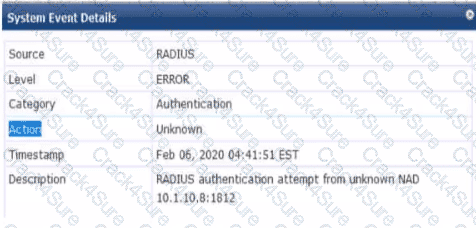
Refer to the exhibit.

You are deploying a new ArubaOS Mobility Controller (MC), which is enforcing authentication to Aruba ClearPass Policy Manager (CPPM). The authentication is not working correctly, and you find the error shown In the exhibit in the CPPM Event Viewer.
What should you check?
that the MC has been added as a domain machine on the Active Directory domain with which CPPM is synchronized
that the snared secret configured for the CPPM authentication server matches the one defined for the device on CPPM
that the IP address that the MC is using to reach CPPM matches the one defined for the device on CPPM
that the MC has valid admin credentials configured on it for logging into the CPPM
Given the error message from the ClearPass Policy Manager (CPPM) Event Viewer, indicating a RADIUS authentication attempt from an unknown Network Access Device (NAD), you should check that the IP address the Mobility Controller (MC) is using to communicate with CPPM matches the IP address defined for the MC in the CPPM's device inventory. If there is a mismatch in IP addresses, CPPM will not recognize the MC as a known device and will not process the authentication request, leading to the error observed.
Your AOS solution has detected a rogue AP with Wireless Intrusion Prevention (WIP). Which information about the detected radio can best help you to locate the rogue device?
The detecting devices
The match method
The confidence level
The match type
In an HPE Aruba Networking AOS-8 solution, the Wireless Intrusion Prevention (WIP) system is used to detect and classify rogue Access Points (APs). When a rogue AP is detected, the AOS system provides various pieces of information about the detected radio, such as the SSID, BSSID, match method, match type, confidence level, and the devices that detected the rogue AP. The goal is to locate the physical rogue device, which requires identifying its approximate location in the network environment.
Option A, "The detecting devices," is correct. The "detecting devices" refer to the authorized APs or radios that detected the rogue AP’s signal. This information is critical for locating the rogue device because it provides the physical locations of the detecting APs. By knowing which APs detected the rogue AP and their signal strength (RSSI) readings, you can triangulate the approximate location of the rogue AP. For example, if AP-1 in Building A and AP-2 in Building B both detect the rogue AP, and AP-1 reports a stronger signal, the rogue AP is likely closer to AP-1 in Building A.
Option B, "The match method," is incorrect. The match method (e.g., "Plus one," "Eth-Wired-Mac-Table") indicates how the rogue AP was classified (e.g., based on a BSSID close to a known MAC or its presence on the wired network). While this helps understand why the AP was classified as rogue, it does not directly help locate the physical device.
Option C, "The confidence level," is incorrect. The confidence level indicates the likelihood that the AP is correctly classified as rogue (e.g., 90% confidence). This is useful for assessing the reliability of the classification but does not provide location information.
Option D, "The match type," is incorrect. The match type (e.g., "Rogue," "Suspected Rogue") specifies the category of the classification. Like the match method, it helps understand the classification but does not aid in physically locating the device.
The HPE Aruba Networking AOS-8 8.11 User Guide states:
"When a rogue AP is detected by the Wireless Intrusion Prevention (WIP) system, the ‘detecting devices’ information lists the authorized APs or radios that detected the rogue AP’s signal. This is the most useful information for locating the rogue device, as it provides the physical locations of the detecting APs. By analyzing the signal strength (RSSI) reported by each detecting device, you can triangulate the approximate location of the rogue AP. For example, if AP-1 and AP-2 detect the rogue AP, and AP-1 reports a higher RSSI, the rogue AP is likely closer to AP-1." (Page 416, Rogue AP Detection Section)
Additionally, the HPE Aruba Networking Security Guide notes:
"To locate a rogue AP, use the ‘detecting devices’ information in the AOS Detected Radios page. This lists the APs that detected the rogue AP, along with signal strength data, enabling triangulation to pinpoint the rogue device’s location." (Page 80, Locating Rogue APs Section)
You are deploying a new wireless solution with an Aruba Mobility Master (MM). Aruba Mobility Controllers (MCs), and campus APs (CAPs). The solution will include a WLAN that uses Tunnel for the forwarding mode and WPA3-Enterprise for the security option.
You have decided to assign the WLAN to VLAN 301, a new VLAN. A pair of core routing switches will act as the default router for wireless user traffic.
Which links need to carry VLAN 301?
only links in the campus LAN to ensure seamless roaming
only links between MC ports and the core routing switches
only links on the path between APs and the core routing switches
only links on the path between APs and the MC
In a wireless network deployment with Aruba Mobility Master (MM), Mobility Controllers (MCs), and Campus APs (CAPs), where a WLAN is configured to use Tunnel mode for forwarding, the user traffic is tunneled from the APs to the MCs. VLAN 301, which is assigned to the WLAN, must be present on the links from the MCs to the core routing switches because these switches act as the default router for the wireless user traffic. It is not necessary for the VLAN to be present on all campus LAN links or AP links, only between the MCs and the core routing switches where the routing for VLAN 301 will occur.
What is a correct guideline for the management protocols that you should use on ArubaOS-Switches?
Disable Telnet and use TFTP instead.
Disable SSH and use https instead.
Disable Telnet and use SSH instead
Disable HTTPS and use SSH instead
In managing ArubaOS-Switches, the best practice is to disable less secure protocols such as Telnet and use more secure alternatives like SSH (Secure Shell). SSH provides encrypted connections between network devices, which is critical for maintaining the security and integrity of network communications. This guideline is aligned with general security best practices that prioritize the use of protocols with strong, built-in encryption mechanisms to prevent unauthorized access and ensure data privacy.
What is one difference between EAP-Tunneled Layer security (EAP-TLS) and Protected EAP (PEAP)?
EAP-TLS creates a TLS tunnel for transmitting user credentials, while PEAP authenticates the server and supplicant during a TLS handshake.
EAP-TLS requires the supplicant to authenticate with a certificate, hut PEAP allows the supplicant to use a username and password.
EAP-TLS begins with the establishment of a TLS tunnel, but PEAP does not use a TLS tunnel as part of Its process
EAP-TLS creates a TLS tunnel for transmitting user credentials securely while PEAP protects user credentials with TKIP encryption.
EAP-TLS and PEAP both provide secure authentication methods, but they differ in their requirements for client-side authentication. EAP-TLS requires both the client (supplicant) and the server to authenticate each other with certificates, thereby ensuring a very high level of security. On the other hand, PEAP requires a server-side certificate to create a secure tunnel and allows the client to authenticate using less stringent methods, such as a username and password, which are then protected by the tunnel. This makes PEAP more flexible in environments where client-side certificates are not feasible.
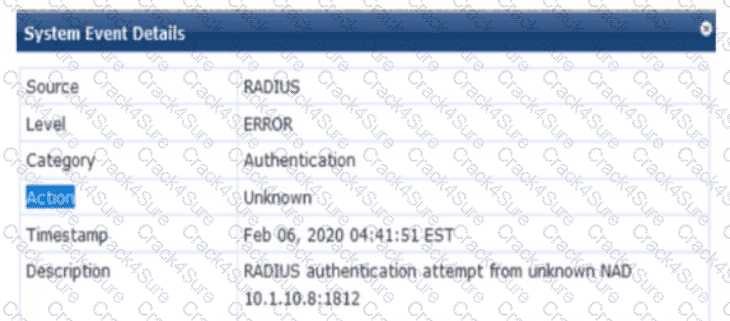
Refer to the exhibit.

You are deploying a new HPE Aruba Networking Mobility Controller (MC), which is enforcing authentication to HPE Aruba Networking ClearPass Policy Manager (CPPM). The authentication is not working correctly, and you find the error shown in the exhibit in the CPPM Event Viewer.
What should you check?
That the IP address that the MC is using to reach CPPM matches the one defined for the device on CPPM
That the MC has valid admin credentials configured on it for logging into the CPPM
That the MC has been added as a domain machine on the Active Directory domain with which CPPM is synchronized
That the shared secret configured for the CPPM authentication server matches the one defined for the device on CPPM
The exhibit shows an error in the CPPM Event Viewer: "RADIUS authentication attempt from unknown NAD 10.1.10.8:1812." This indicates that a new HPE Aruba Networking Mobility Controller (MC) is attempting to send RADIUS authentication requests to HPE Aruba Networking ClearPass Policy Manager (CPPM), but CPPM does not recognize the MC as a Network Access Device (NAD), resulting in the authentication failure.
Unknown NAD Error: In CPPM, a NAD is a device (e.g., an MC, switch, or AP) that sends RADIUS requests to CPPM for authentication. Each NAD must be configured in CPPM with its IP address and a shared secret. The error "unknown NAD 10.1.10.8:1812" means that the IP address 10.1.10.8 (the source IP of the MC’s RADIUS request) is not listed as a NAD in CPPM’s configuration, so CPPM rejects the request.
Option A, "That the IP address that the MC is using to reach CPPM matches the one defined for the device on CPPM," is correct. You need to check that the MC’s IP address (10.1.10.8) is correctly configured as a NAD in CPPM. In CPPM, go to Configuration > Network > Devices, and verify that a NAD entry exists for 10.1.10.8. If the IP address does not match (e.g., due to NAT, a different interface, or a misconfiguration), CPPM will reject the request as coming from an unknown NAD.
Option B, "That the MC has valid admin credentials configured on it for logging into the CPPM," is incorrect. Admin credentials on the MC are used for management access (e.g., SSH, web UI), not for RADIUS authentication. RADIUS communication between the MC and CPPM uses a shared secret, not admin credentials.
Option C, "That the MC has been added as a domain machine on the Active Directory domain with which CPPM is synchronized," is incorrect. Adding the MC as a domain machine in Active Directory (AD) is relevant only if the MC itself is authenticating users against AD (e.g., for machine authentication), but this is not required for the MC to act as a NAD sending RADIUS requests to CPPM.
Option D, "That the shared secret configured for the CPPM authentication server matches the one defined for the device on CPPM," is incorrect in this context. While a shared secret mismatch would cause authentication failures, it would not result in an "unknown NAD" error. The "unknown NAD" error occurs before the shared secret is checked, as CPPM does not recognize the IP address as a valid NAD.
The HPE Aruba Networking ClearPass Policy Manager 6.11 User Guide states:
"The error ‘RADIUS authentication attempt from unknown NAD
Additionally, the HPE Aruba Networking AOS-8 8.11 User Guide notes:
"When configuring a Mobility Controller to use ClearPass as a RADIUS server, ensure that the MC’s IP address is added as a NAD in ClearPass. If ClearPass logs an ‘unknown NAD’ error, verify that the IP address the MC uses to send RADIUS requests (e.g., the source IP of the request) matches the IP address configured in ClearPass under Configuration > Network > Devices." (Page 498, Configuring RADIUS Authentication Section)
A client has accessed an HTTPS server at myhost1.example.com using Chrome. The server sends a certificate that includes these properties:
Subject name: myhost.example.com
SAN: DNS: myhost.example.com; DNS: myhost1.example.com
Extended Key Usage (EKU): Server authentication
Issuer: MyCA_SigningThe server also sends an intermediate CA certificate for MyCA_Signing, which is signed by MyCA. The client’s Trusted CA Certificate list does not include the MyCA or MyCA_Signing certificates.Which factor or factors prevent the client from trusting the certificate?
The client does not have the correct trusted CA certificates.
The certificate lacks a valid SAN.
The certificate lacks the correct EKU.
The certificate lacks a valid SAN, and the client does not have the correct trusted CA certificates.
When a client (e.g., a Chrome browser) accesses an HTTPS server, the server presents a certificate to establish a secure connection. The client must validate the certificate to trust the server. The certificate in this scenario has the following properties:
Subject name: myhost.example.com
SAN (Subject Alternative Name): DNS: myhost.example.com; DNS: myhost1.example.com
Extended Key Usage (EKU): Server authentication
Issuer: MyCA_Signing (an intermediate CA)
The server also sends an intermediate CA certificate for MyCA_Signing, signed by MyCA (the root CA).
The client’s Trusted CA Certificate list does not include MyCA or MyCA_Signing.
Certificate Validation Process:
Name Validation: The client checks if the server’s hostname (myhost1.example.com) matches the Subject name or a SAN in the certificate. Here, the SAN includes "myhost1.example.com," so the name validation passes.
EKU Validation: The client verifies that the certificate’s EKU includes "Server authentication," which is required for HTTPS. The EKU is correctly set to "Server authentication," so this validation passes.
Chain of Trust Validation: The client builds a certificate chain from the server’s certificate to a trusted root CA in its Trusted CA Certificate list. The chain is:
Server certificate (issued by MyCA_Signing)
Intermediate CA certificate (MyCA_Signing, issued by MyCA)
Root CA certificate (MyCA, which should be in the client’s trust store) The client’s Trusted CA Certificate list does not include MyCA or MyCA_Signing, meaning the client cannot build a chain to a trusted root CA. This causes the validation to fail.
Option A, "The client does not have the correct trusted CA certificates," is correct. The client’s trust store must include the root CA (MyCA) to trust the certificate chain. Since MyCA is not in the client’s Trusted CA Certificate list, the client cannot validate the chain, and the certificate is not trusted.
Option B, "The certificate lacks a valid SAN," is incorrect. The SAN includes "myhost1.example.com," which matches the server’s hostname, so the SAN is valid.
Option C, "The certificate lacks the correct EKU," is incorrect. The EKU is set to "Server authentication," which is appropriate for HTTPS.
Option D, "The certificate lacks a valid SAN, and the client does not have the correct trusted CA certificates," is incorrect because the SAN is valid, as explained above. The only issue is the missing trusted CA certificates.
The HPE Aruba Networking AOS-CX 10.12 Security Guide states:
"For a client to trust a server’s certificate during HTTPS communication, the client must validate the certificate chain to a trusted root CA in its trust store. If the root CA (e.g., MyCA) or intermediate CA (e.g., MyCA_Signing) is not in the client’s Trusted CA Certificate list, the chain of trust cannot be established, and the client will reject the certificate. The Subject Alternative Name (SAN) must include the server’s hostname, and the Extended Key Usage (EKU) must include ‘Server authentication’ for HTTPS." (Page 205, Certificate Validation Section)
Additionally, the HPE Aruba Networking Security Fundamentals Guide notes:
"A common reason for certificate validation failure is the absence of the root CA certificate in the client’s trust store. For example, if a server’s certificate is issued by an intermediate CA (e.g., MyCA_Signing) that chains to a root CA (e.g., MyCA), the client must have the root CA certificate in its Trusted CA Certificate list to trust the chain." (Page 45, Certificate Trust Issues Section)
You need to implement a WPA3-Enterprise network that can also support WPA2-Enterprise clients. What is a valid configuration for the WPA3-Enterprise WLAN?
CNSA mode disabled with 256-bit keys
CNSA mode disabled with 128-bit keys
CNSA mode enabled with 256-bit keys
CNSA mode enabled with 128-bit keys
In an Aruba network, when setting up a WPA3-Enterprise network that also supports WPA2-Enterprise clients, you would typically configure the network to operate in a transitional mode that supports both protocols. CNSA (Commercial National Security Algorithm) mode is intended for networks that require higher security standards as specified by the US National Security Agency (NSA). However, for compatibility with WPA2 clients, which do not support CNSA requirements, you would disable CNSA mode. WPA3 can use 256-bit encryption keys, which offer a higher level of security than the 128-bit keys used in WPA2.
A company has Aruba Mobility Controllers (MCs), Aruba campus APs, and ArubaOS-CX switches. The company plans to use ClearPass Policy Manager (CPPM) to classify endpoints by type. The company is contemplating the use of ClearPass’s TCP fingerprinting capabilities.
What is a consideration for using those capabilities?
ClearPass admins will need to provide the credentials of an API admin account to configure on Aruba devices.
You will need to mirror traffic to one of CPPM's span ports from a device such as a core routing switch.
ArubaOS-CX switches do not offer the support necessary for CPPM to use TCP fingerprinting on wired endpoints.
TCP fingerprinting of wireless endpoints requires a third-party Mobility Device Management (MDM) solution.
ClearPass Policy Manager (CPPM) uses various methods to classify endpoints, and one of them is TCP fingerprinting, which involves analyzing TCP/IP packets to identify the type of device or operating system sending them. To utilize TCP fingerprinting capabilities, network traffic needs to be accessible to the CPPM. This can be done by mirroring traffic to CPPM’s span port from a device that can see the traffic, like a core routing switch. This approach allows CPPM to observe the TCP characteristics of devices as they communicate over the network, enabling it to make more accurate decisions for device classification.
What is one way that Control Plane Security (CPSec) enhances security for the network?
It protects management traffic between APs and Mobility Controllers (MCs) from eavesdropping.
It prevents Denial of Service (DoS) attacks against Mobility Controllers' (MCs') control plane.
It protects wireless clients' traffic, tunneled between APs and Mobility Controllers, from eavesdropping.
It prevents access from unauthorized IP addresses to critical services, such as SSH, on Mobility Controllers (MCs).
Control Plane Security (CPSec) is a feature in HPE Aruba Networking’s AOS-8 architecture that secures the communication between Access Points (APs) and Mobility Controllers (MCs). The control plane includes management traffic, such as AP registration, configuration updates, and heartbeat messages, which are critical for the operation of the wireless network.
Option A, "It protects management traffic between APs and Mobility Controllers (MCs) from eavesdropping," is correct. CPSec uses certificate-based authentication and encryption (IPSec tunnels) to secure the control plane communication between APs and MCs. This ensures that management traffic, which includes sensitive information like configuration data and AP status, is encrypted and protected from eavesdropping by unauthorized parties on the network.
Option B, "It prevents Denial of Service (DoS) attacks against Mobility Controllers' (MCs') control plane," is incorrect. While CPSec enhances security by authenticating APs and encrypting traffic, it is not specifically designed to prevent DoS attacks. DoS attacks against the control plane are mitigated by other features, such as rate limiting or firewall policies on the MC.
Option C, "It protects wireless clients' traffic, tunneled between APs and Mobility Controllers, from eavesdropping," is incorrect. CPSec protects the control plane (management traffic), not the data plane (client traffic). Client traffic in a tunneled architecture (e.g., GRE tunnels) is protected by the client’s wireless encryption (e.g., WPA3), not CPSec.
Option D, "It prevents access from unauthorized IP addresses to critical services, such as SSH, on Mobility Controllers (MCs)," is incorrect. CPSec does not control access to services like SSH on the MC. Access to such services is managed by other features, such as access control lists (ACLs) or management authentication settings on the MC.
The HPE Aruba Networking AOS-8 8.11 User Guide states:
"Control Plane Security (CPSec) enhances network security by protecting the management traffic between Access Points (APs) and Mobility Controllers (MCs). When CPSec is enabled, the control plane communication is secured using certificate-based authentication and IPSec encryption, preventing eavesdropping and ensuring that only authorized APs can communicate with the MC. This protects sensitive management data, such as AP configuration and status updates, from being intercepted." (Page 392, CPSec Overview Section)
Additionally, the HPE Aruba Networking CPSec Deployment Guide notes:
"CPSec secures the control plane by encrypting management traffic between APs and MCs, ensuring that attackers cannot eavesdrop on or tamper with this communication. It does not protect client data traffic, which is secured by wireless encryption protocols like WPA3." (Page 8, CPSec Benefits Section)
You have an Aruba solution with multiple Mobility Controllers (MCs) and campus APs. You want to deploy a WPA3-Enterprise WLAN and authenticate users to Aruba ClearPass Policy Manager (CPPM) with EAP-TLS.
What is a guideline for ensuring a successful deployment?
Avoid enabling CNSA mode on the WLAN, which requires the internal MC RADIUS server.
Ensure that clients trust the root CA for the MCs’ Server Certificates.
Educate users in selecting strong passwords with at least 8 characters.
Deploy certificates to clients, signed by a CA that CPPM trusts.
For WPA3-Enterprise with EAP-TLS, it's crucial that clients have a trusted certificate installed for the authentication process. EAP-TLS relies on a mutual exchange of certificates for authentication. Deploying client certificates signed by a CA that CPPM trusts ensures that the ClearPass Policy Manager can verify the authenticity of the client certificates during the TLS handshake process. Trust in the root CA is typically required for the server side of the authentication process, not the client side, which is covered by the client’s own certificate.
A company has HPE Aruba Networking Mobility Controllers (MCs), HPE Aruba Networking campus APs, and AOS-CX switches. The company plans to use HPE Aruba Networking ClearPass Policy Manager (CPPM) to classify endpoints by type. The company is contemplating the use of ClearPass's TCP fingerprinting capabilities.
What is a consideration for using those capabilities?
You will need to mirror traffic to one of CPPM’s span ports from a device such as a core routing switch.
ClearPass admins will need to provide the credentials of an API admin account to configure on HPE Aruba Networking devices.
AOS-CX switches do not offer the support necessary for CPPM to use TCP fingerprinting on wired endpoints.
TCP fingerprinting of wireless endpoints requires a third-party Mobility Device Management (MDM) solution.
HPE Aruba Networking ClearPass Policy Manager (CPPM) uses TCP fingerprinting as a passive profiling method to classify endpoints by analyzing TCP packet headers (e.g., TTL, window size) to identify the operating system (e.g., Windows, Linux). The company in this scenario has Mobility Controllers (MCs), campus APs, and AOS-CX switches, and wants to use CPPM’s TCP fingerprinting capabilities for endpoint classification.
TCP Fingerprinting: This method requires CPPM to receive TCP traffic from endpoints. Since CPPM is not typically inline with network traffic, the traffic must be mirrored to CPPM for analysis. This is often done using a SPAN (Switched Port Analyzer) port or mirror port on a switch or controller.
Option A, "You will need to mirror traffic to one of CPPM’s span ports from a device such as a core routing switch," is correct. For CPPM to perform TCP fingerprinting, it needs to see the TCP traffic from endpoints. This is typically achieved by mirroring traffic from a core routing switch (or another device like an MC) to a SPAN port on the CPPM server. For example, on an AOS-CX switch, you can configure a mirror session with the command mirror session 1 destination interface
Option B, "ClearPass admins will need to provide the credentials of an API admin account to configure on HPE Aruba Networking devices," is incorrect. TCP fingerprinting does not require API credentials. It is a passive profiling method that analyzes mirrored traffic, and no API interaction is needed between CPPM and Aruba devices for this purpose.
Option C, "AOS-CX switches do not offer the support necessary for CPPM to use TCP fingerprinting on wired endpoints," is incorrect. AOS-CX switches support mirroring traffic to CPPM (e.g., using a mirror session), which enables CPPM to perform TCP fingerprinting on wired endpoints. The switch does not need to perform the fingerprinting itself; it only needs to send the traffic to CPPM.
Option D, "TCP fingerprinting of wireless endpoints requires a third-party Mobility Device Management (MDM) solution," is incorrect. TCP fingerprinting is a built-in capability of CPPM and does not require an MDM solution. For wireless endpoints, the MC can mirror client traffic to CPPM (e.g., using a datapath mirror), allowing CPPM to perform TCP fingerprinting.
The HPE Aruba Networking ClearPass Policy Manager 6.11 User Guide states:
"TCP fingerprinting requires ClearPass to receive TCP traffic from endpoints for analysis. A key consideration is that you must mirror traffic to one of ClearPass’s SPAN ports from a device such as a core routing switch or Mobility Controller. For example, on an AOS-CX switch, configure a mirror session with mirror session 1 destination interface
Additionally, the HPE Aruba Networking AOS-8 8.11 User Guide notes:
"For ClearPass to perform TCP fingerprinting on wireless endpoints, the Mobility Controller can mirror client traffic to ClearPass using a datapath mirror. For wired endpoints, an AOS-CX switch can mirror traffic to ClearPass’s SPAN port, enabling TCP fingerprinting without requiring additional support on the switch itself." (Page 351, Device Profiling with CPPM Section)
You are troubleshooting an authentication issue for Aruba switches that enforce 802 IX10 a cluster of Aruba ClearPass Policy Manager (CPPMs) You know that CPPM Is receiving and processing the authentication requests because the Aruba switches are showing Access-Rejects in their statistics However, you cannot find the record tor the Access-Rejects in CPPM Access Tracker
What is something you can do to look for the records?
Make sure that CPPM cluster settings are configured to show Access-Rejects
Verify that you are logged in to the CPPM Ul with read-write, not read-only, access
Click Edit in Access viewer and make sure that the correct servers are selected.
Go to the CPPM Event Viewer, because this is where RADIUS Access Rejects are stored.
If Access-Reject records are not showing up in the CPPM Access Tracker, one action you can take is to ensure that the CPPM cluster settings are configured to display Access-Rejects. Cluster-wide settings in CPPM can affect which records are visible in Access Tracker. Ensuring that these settings are correctly configured will allow you to view all relevant authentication records, including Access-Rejects.
What is a guideline for creating certificate signing requests (CSRs) and deploying server Certificates on ArubaOS Mobility Controllers (MCs)?
Create the CSR online using the MC Web Ul if your company requires you to archive the private key.
if you create the CSR and public/private Keypair offline, create a matching private key online on the MC.
Create the CSR and public/private keypair offline If you want to install the same certificate on multiple MCs.
Generate the private key online, but the public key and CSR offline, to install the same certificate on multiple MCs.
Creating the Certificate Signing Request (CSR) and the public/private keypair offline is recommended when deploying server certificates on multiple ArubaOS Mobility Controllers (MCs). This method enhances security by minimizing the exposure of private keys. By creating and handling these components offline, administrators can maintain better control over the keys and ensure their security before deploying them across multiple devices. This approach also simplifies the management of certificates on multiple controllers, as the same certificate can be installed more securely and efficiently.
What is one way that WPA3-Enterprise enhances security when compared to WPA2-Enterprise?
WPA3-Enterprise implements the more secure simultaneous authentication of equals (SAE), while WPA2-Enterprise uses 802.1X.
WPA3-Enterprise provides built-in mechanisms that can deploy user certificates to authorized end-user devices.
WPA3-Enterprise uses Diffie-Hellman in order to authenticate clients, while WPA2-Enterprise uses 802.1X authentication.
WPA3-Enterprise can operate in CNSA mode, which mandates that the 802.11 association uses secure algorithms.
WPA3-Enterprise enhances network security over WPA2-Enterprise through several improvements, one of which is the ability to operate in CNSA (Commercial National Security Algorithm) mode. This mode mandates the use of secure cryptographic algorithms during the 802.11 association process, ensuring that all communications are highly secure. The CNSA suite provides stronger encryption standards designed to protect sensitive government, military, and industrial communications. Unlike WPA2, WPA3's CNSA mode uses stronger cryptographic primitives, such as AES-256 in Galois/Counter Mode (GCM) for encryption and SHA-384 for hashing, which are not standard in WPA2-Enterprise.
What role does the Aruba ClearPass Device Insight Analyzer play in the Device Insight architecture?
It resides in the cloud and manages licensing and configuration for Collectors
It resides on-prem and provides the span port to which traffic is mirrored for deep analytics.
It resides on-prem and is responsible for running active SNMP and Nmap scans
It resides In the cloud and applies machine learning and supervised crowdsourcing to metadata sent by Collectors
The Aruba ClearPass Device Insight Analyzer plays a crucial role within the Device Insight architecture by residing in the cloud and applying machine learning and supervised crowdsourcing to the metadata sent by Collectors. This component of the architecture is responsible for analyzing vast amounts of data collected from the network to identify and classify devices accurately. By utilizing machine learning algorithms and crowdsourced input, the Device Insight Analyzer enhances the accuracy of device detection and classification, thereby improving the overall security and management of the network.
What is a benefit of deploying HPE Aruba Networking ClearPass Device Insight?
Highly accurate endpoint classification for environments with many device types, including Internet of Things (IoT)
Simpler troubleshooting of ClearPass solutions across an environment with multiple ClearPass Policy Managers
Visibility into devices’ 802.1X supplicant settings and automated certificate deployment
Agent-based analysis of devices’ security settings and health status, with the ability to implement quarantining
HPE Aruba Networking ClearPass Device Insight is an advanced profiling solution integrated with ClearPass Policy Manager (CPPM) to enhance endpoint classification. It uses a combination of passive and active profiling techniques, along with machine learning, to identify and categorize devices on the network.
Option A, "Highly accurate endpoint classification for environments with many device types, including Internet of Things (IoT)," is correct. ClearPass Device Insight is designed to provide precise device profiling, especially in complex environments with diverse device types, such as IoT devices (e.g., smart cameras, thermostats). It leverages deep packet inspection (DPI), behavioral analysis, and a vast fingerprint database to accurately classify devices, enabling granular policy enforcement based on device type.
Option B, "Simpler troubleshooting of ClearPass solutions across an environment with multiple ClearPass Policy Managers," is incorrect. ClearPass Device Insight focuses on device profiling, not on troubleshooting ClearPass deployments. Troubleshooting across multiple CPPM instances would involve tools like the Event Viewer or Access Tracker, not Device Insight.
Option C, "Visibility into devices’ 802.1X supplicant settings and automated certificate deployment," is incorrect. ClearPass Device Insight does not provide visibility into 802.1X supplicant settings or automate certificate deployment. Those functions are handled by ClearPass Onboard (for certificate deployment) or Access Tracker (for authentication details).
Option D, "Agent-based analysis of devices’ security settings and health status, with the ability to implement quarantining," is incorrect. ClearPass Device Insight does not use agents for analysis; it relies on network traffic and active/passive profiling. Agent-based analysis and health status checks are features of ClearPass OnGuard, not Device Insight. Quarantining can be implemented by CPPM policies, but it’s not a direct benefit of Device Insight.
The ClearPass Device Insight Data Sheet states:
"ClearPass Device Insight provides highly accurate endpoint classification for environments with many device types, including Internet of Things (IoT) devices. It uses a combination of passive and active profiling techniques, deep packet inspection (DPI), and machine learning to identify and categorize devices with precision, enabling organizations to enforce granular access policies in complex networks." (Page 2, Benefits Section)
Additionally, the HPE Aruba Networking ClearPass Policy Manager 6.11 User Guide notes:
"ClearPass Device Insight enhances device profiling by offering highly accurate classification, especially for IoT and other non-traditional devices. It leverages a vast fingerprint database and advanced analytics to identify device types, making it ideal for environments with diverse endpoints." (Page 252, Device Insight Overview Section)
What is a benefit of Opportunistic Wireless Encryption (OWE)?
It allows both WPA2-capable and WPA3-capable clients to authenticate to the same WPA-Personal WLAN.
It offers more control over who can connect to the wireless network when compared with WPA2-Personal.
It allows anyone to connect, but provides better protection against eavesdropping than a traditional open network.
It provides protection for wireless clients against both honeypot APs and man-in-the-middle (MITM) attacks.
Opportunistic Wireless Encryption (OWE) is a WPA3 feature designed for open wireless networks, where no password or authentication is required to connect. OWE enhances security by providing encryption for devices that support it, without requiring a pre-shared key (PSK) or 802.1X authentication.
Option C, "It allows anyone to connect, but provides better protection against eavesdropping than a traditional open network," is correct. In a traditional open network (no encryption), all traffic is sent in plaintext, making it vulnerable to eavesdropping. OWE allows anyone to connect (as it’s an open network), but it negotiates unique encryption keys for each client using a Diffie-Hellman key exchange. This ensures that client traffic is encrypted with AES (e.g., using AES-GCMP), protecting it from eavesdropping. OWE in transition mode also supports non-OWE devices, which connect without encryption, but OWE-capable devices benefit from the added security.
Option A, "It allows both WPA2-capable and WPA3-capable clients to authenticate to the same WPA-Personal WLAN," is incorrect. OWE is for open networks, not WPA-Personal (which uses a PSK). WPA2/WPA3 transition mode (not OWE) allows both WPA2 and WPA3 clients to connect to the same WPA-Personal WLAN.
Option B, "It offers more control over who can connect to the wireless network when compared with WPA2-Personal," is incorrect. OWE is an open network protocol, meaning it offers less control over who can connect compared to WPA2-Personal, which requires a PSK for access.
Option D, "It provides protection for wireless clients against both honeypot APs and man-in-the-middle (MITM) attacks," is incorrect. OWE provides encryption to prevent eavesdropping, but it does not protect against honeypot APs (rogue APs broadcasting the same SSID) or MITM attacks, as it lacks authentication mechanisms to verify the AP’s identity. Protection against such attacks requires 802.1X authentication (e.g., WPA3-Enterprise) or other security measures.
The HPE Aruba Networking AOS-8 8.11 User Guide states:
"Opportunistic Wireless Encryption (OWE) is a WPA3 feature for open networks that allows anyone to connect without a password, but provides better protection against eavesdropping than a traditional open network. OWE uses a Diffie-Hellman key exchange to negotiate unique encryption keys for each client, ensuring that traffic is encrypted with AES-GCMP and protected from unauthorized interception." (Page 290, OWE Overview Section)
Additionally, the HPE Aruba Networking Wireless Security Guide notes:
"OWE enhances security for open WLANs by providing encryption without requiring authentication. It allows any device to connect, but OWE-capable devices benefit from encrypted traffic, offering better protection against eavesdropping compared to a traditional open network where all traffic is sent in plaintext." (Page 35, OWE Benefits Section)
What is an Authorized client, as defined by AOS Wireless Intrusion Prevention System (WIP)?
A client that is on the WIP whitelist
A client that has a certificate issued by a trusted Certification Authority (CA)
A client that is NOT on the WIP blacklist
A client that has successfully authenticated to an authorized AP and passed encrypted traffic
The AOS Wireless Intrusion Prevention System (WIP) in an AOS-8 architecture (Mobility Controllers or Mobility Master) is designed to detect and mitigate wireless threats, such as rogue APs and unauthorized clients. WIP classifies clients and APs based on their behavior and status in the network.
Authorized Client Definition: In the context of WIP, an "Authorized" client is one that has successfully authenticated to an authorized AP (an AP managed by the MC and part of the company’s network) and is actively passing encrypted traffic. This typically means the client has completed 802.1X authentication (e.g., in a WPA3-Enterprise network) or PSK authentication (e.g., in a WPA3-Personal network) and is communicating securely with the AP.
Option D, "A client that has successfully authenticated to an authorized AP and passed encrypted traffic," is correct. This matches the WIP definition of an Authorized client: the client must authenticate to an AP that is classified as "Authorized" (i.e., part of the company’s network) and must be passing encrypted traffic, indicating a secure connection (e.g., using WPA3 encryption).
Option A, "A client that is on the WIP whitelist," is incorrect. WIP does not use a client whitelist for classification. The AP whitelist is used to authorize APs, not clients. Client classification (e.g., Authorized, Interfering) is based on their authentication status and connection to authorized APs.
Option B, "A client that has a certificate issued by a trusted Certification Authority (CA)," is incorrect. While a certificate might be used for 802.1X authentication (e.g., EAP-TLS), WIP does not classify clients as Authorized based on their certificate status. The classification depends on successful authentication to an authorized AP and encrypted traffic.
Option C, "A client that is NOT on the WIP blacklist," is incorrect. WIP does use blacklisting (e.g., for clients that violate security policies), but being "not on the blacklist" does not make a client Authorized. A client must actively authenticate to an authorized AP and pass encrypted traffic to be classified as Authorized.
The HPE Aruba Networking AOS-8 8.11 User Guide states:
"In the Wireless Intrusion Prevention (WIP) system, an ‘Authorized’ client is defined as a client that has successfully authenticated to an authorized AP and is passing encrypted traffic. An authorized AP is one that is managed by the Mobility Controller and part of the company’s network. For example, a client that completes 802.1X authentication to an authorized AP using WPA3-Enterprise and sends encrypted traffic is classified as Authorized." (Page 414, WIP Client Classification Section)
Additionally, the HPE Aruba Networking Security Guide notes:
"WIP classifies clients as ‘Authorized’ if they have authenticated to an authorized AP and are passing encrypted traffic, indicating a secure connection. Clients that are not authenticated or are connected to rogue or neighbor APs are classified as ‘Interfering’ or other categories, depending on their behavior." (Page 78, WIP Classifications Section)
You have a network with AOS-CX switches for which HPE Aruba Networking ClearPass Policy Manager (CPPM) acts as the TACACS+ server. When an admin authenticates, CPPM sends a response with:
Aruba-Priv-Admin-User = 1
TACACS+ privilege level = 15What happens to the user?
The user receives auditors access.
The user receives no access.
The user receives administrators access.
The user receives operators access.
HPE Aruba Networking AOS-CX switches support TACACS+ for administrative authentication, where ClearPass Policy Manager (CPPM) can act as the TACACS+ server. When an admin authenticates, CPPM sends a TACACS+ response that includes attributes such as the TACACS+ privilege level and vendor-specific attributes (VSAs) like Aruba-Priv-Admin-User.
In this scenario, CPPM sends:
TACACS+ privilege level = 15: In TACACS+, privilege level 15 is the highest level and typically grants full administrative access (equivalent to a superuser or administrator role).
Aruba-Priv-Admin-User = 1: This Aruba-specific VSA indicates that the user should be granted the highest level of administrative access on the switch.
On AOS-CX switches, the privilege level 15 maps to the administrator role, which provides full read-write access to all switch functions. The Aruba-Priv-Admin-User = 1 attribute reinforces this by explicitly assigning the admin role, ensuring the user has unrestricted access.
Option A, "The user receives auditors access," is incorrect because auditors typically have read-only access, which corresponds to a lower privilege level (e.g., 1 or 3) on AOS-CX switches.
Option B, "The user receives no access," is incorrect because the authentication was successful, and CPPM sent a response granting access with privilege level 15.
Option D, "The user receives operators access," is incorrect because operators typically have a lower privilege level (e.g., 5 or 7), which provides limited access compared to an administrator.
The HPE Aruba Networking AOS-CX 10.12 Security Guide states:
"When using TACACS+ for administrative authentication, the switch interprets the privilege level returned by the TACACS+ server. A privilege level of 15 maps to the administrator role, granting full read-write access to all switch functions. The Aruba-Priv-Admin-User VSA, when set to 1, explicitly assigns the admin role, ensuring the user has unrestricted access." (Page 189, TACACS+ Authentication Section)
Additionally, the HPE Aruba Networking ClearPass Policy Manager 6.11 User Guide notes:
"ClearPass can send the Aruba-Priv-Admin-User VSA in a TACACS+ response to specify the administrative role on Aruba devices. A value of 1 indicates the admin role, which provides full administrative privileges." (Page 312, TACACS+ Enforcement Section)

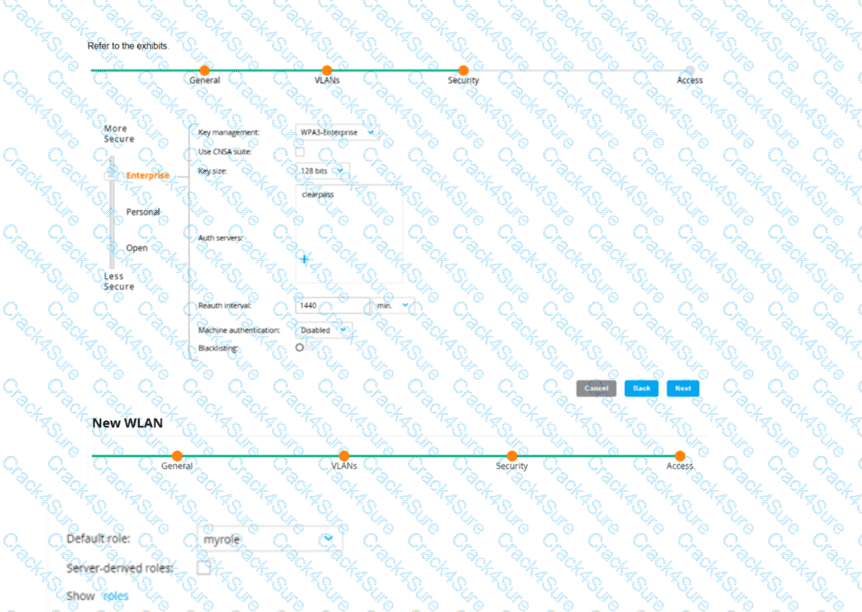
An admin has created a WLAN that uses the settings shown in the exhibits (and has not otherwise adjusted the settings in the AAA profile) A client connects to the WLAN Under which circumstances will a client receive the default role assignment?
The client has attempted 802 1X authentication, but the MC could not contact the authentication server
The client has attempted 802 1X authentication, but failed to maintain a reliable connection, leading to a timeout error
The client has passed 802 1X authentication, and the value in the Aruba-User-Role VSA matches a role on the MC
The client has passed 802 1X authentication and the authentication server did not send an Aruba-User-Role VSA
In the context of an Aruba Mobility Controller (MC) configuration, a client will receive the default role assignment if they have passed 802.1X authentication and the authentication server did not send an Aruba-User-Role Vendor Specific Attribute (VSA). The default role is assigned by the MC when a client successfully authenticates but the authentication server provides no specific role instruction. This behavior ensures that a client is not left without any role assignment, which could potentially lead to a lack of network access or access control. This default role assignment mechanism is part of Aruba's role-based access control, as documented in the ArubaOS user guide and best practices.
A company has an AOS controller-based solution with a WPA3-Enterprise WLAN, which authenticates wireless clients to HPE Aruba Networking ClearPass Policy Manager (CPPM). The company has decided to use digital certificates for authentication. A user's Windows domain computer has had certificates installed on it. However, the Networks and Connections window shows that authentication has failed for the user. The Mobility Controller’s (MC's) RADIUS events show that it is receiving Access-Rejects for the authentication attempt.
What is one place that you can look for deeper insight into why this authentication attempt is failing?
The reports generated by HPE Aruba Networking ClearPass Insight
The RADIUS events within the CPPM Event Viewer
The Alerts tab in the authentication record in CPPM Access Tracker
The packets captured on the MC control plane destined to UDP 1812
The scenario involves an AOS-8 controller-based solution with a WPA3-Enterprise WLAN using HPE Aruba Networking ClearPass Policy Manager (CPPM) for authentication. The company is using digital certificates for authentication (likely EAP-TLS, as it’s the most common certificate-based method for WPA3-Enterprise). A user’s Windows domain computer has certificates installed, but authentication fails. The Mobility Controller (MC) logs show Access-Rejects from CPPM, indicating that CPPM rejected the authentication attempt.
Access-Reject: An Access-Reject message from CPPM means that the authentication failed due to a policy violation, certificate issue, or other configuration mismatch. To troubleshoot, we need to find detailed information about why CPPM rejected the request.
Option C, "The Alerts tab in the authentication record in CPPM Access Tracker," is correct. Access Tracker in CPPM logs all authentication attempts, including successful and failed ones. For a failed attempt (Access-Reject), the authentication record in Access Tracker will include an Alerts tab that provides detailed reasons for the failure. For example, if the client’s certificate is invalid (e.g., expired, not trusted, or missing a required attribute), or if the user does not match a policy in CPPM, the Alerts tab will specify the exact issue (e.g., "Certificate not trusted," "User not found in directory").
Option A, "The reports generated by HPE Aruba Networking ClearPass Insight," is incorrect. ClearPass Insight is used for generating reports and analytics (e.g., trends, usage patterns), not for real-time troubleshooting of specific authentication failures.
Option B, "The RADIUS events within the CPPM Event Viewer," is incorrect. The Event Viewer logs system-level events (e.g., service crashes, NAD mismatches), not detailed authentication failure reasons. While it might log that an Access-Reject was sent, it won’t provide the specific reason for the rejection.
Option D, "The packets captured on the MC control plane destined to UDP 1812," is incorrect. Capturing packets on the MC control plane for UDP 1812 (RADIUS authentication port) can show the RADIUS exchange, but it won’t provide the detailed reason for the Access-Reject. The MC logs already show the Access-Reject, so the issue lies on the CPPM side, and Access Tracker provides more insight.
The HPE Aruba Networking ClearPass Policy Manager 6.11 User Guide states:
"Access Tracker (Monitoring > Live Monitoring > Access Tracker) logs all authentication attempts, including failed ones. For an Access-Reject, the authentication record in Access Tracker includes an Alerts tab that provides detailed reasons for the failure. For example, in a certificate-based authentication (e.g., EAP-TLS), the Alerts tab might show ‘Certificate not trusted’ if the client’s certificate is not trusted by ClearPass, or ‘User not found’ if the user does not match a policy. This is the primary place to look for deeper insight into authentication failures." (Page 299, Access Tracker Troubleshooting Section)
Additionally, the HPE Aruba Networking AOS-8 8.11 User Guide notes:
"If the Mobility Controller logs show an Access-Reject from the RADIUS server (e.g., ClearPass), check the RADIUS server’s authentication logs for details. In ClearPass, the Access Tracker provides detailed failure reasons in the Alerts tab of the authentication record, such as certificate issues or policy mismatches." (Page 500, Troubleshooting 802.1X Authentication Section)
How can ARP be used to launch attacks?
Hackers can use ARP to change their NIC's MAC address so they can impersonate legiti-mate users.
Hackers can exploit the fact that the port used for ARP must remain open and thereby gain remote access to another user's device.
A hacker can use ARP to claim ownership of a CA-signed certificate that actually belongs to another device.
A hacker can send gratuitous ARP messages with the default gateway IP to cause devices to redirect traffic to the hacker's MAC address.
ARP (Address Resolution Protocol) can indeed be exploited to conduct various types of attacks, most notably ARP spoofing/poisoning. Gratuitous ARP is a special kind of ARP message which is used by an IP node to announce or update its IP to MAC mapping to the entire network. A hacker can abuse this by sending out gratuitous ARP messages pretending to associate the IP address of the router (default gateway) with their own MAC address. This results in traffic that was supposed to go to the router being sent to the attacker instead, thus potentially enabling the attacker to intercept, modify, or block traffic.
Your Aruba Mobility Master-based solution has detected a suspected rogue AP. Among other information, the ArubaOS Detected Radios page lists this information for the AP:
SSID = PublicWiFi
BSSID = a8:bd:27:12:34:56
Match method = Plus one
Match method = Eth-Wired-Mac-Table
The security team asks you to explain why this AP is classified as a rogue. What should you explain?
The AP has a BSSID that is close to your authorized APs' BSSIDs. This indicates that the AP might be spoofing the corporate SSID and attempting to lure clients to it, making the AP a suspected rogue.
The AP is probably connected to your LAN because it has a BSSID that is close to a MAC address that has been detected in your LAN. Because it does not belong to the company, it is a suspected rogue.
The AP has been detected using multiple MAC addresses. This indicates that the AP is spoofing its MAC address, which qualifies it as a suspected rogue.
The AP is an AP that belongs to your solution. However, the ArubaOS has detected that it is behaving suspiciously. It might have been compromised, so it is classified as a suspected rogue.
The Match method 'Eth-Wired-Mac-Table' suggests that the BSSID of the rogue AP has been found in the Ethernet (wired) MAC address table of the network infrastructure. This means the AP is physically connected to the LAN. If the BSSID does not match the company's authorized APs, it implies the AP is unauthorized and hence classified as a rogue.
What is a benefit of deploying Aruba ClearPass Device insight?
Highly accurate endpoint classification for environments with many devices types, including Internet of Things (loT)
visibility into devices' 802.1X supplicant settings and automated certificate deployment
Agent-based analysts of devices' security settings and health status, with the ability to implement quarantining
Simpler troubleshooting of ClearPass solutions across an environment with multiple ClearPass Policy Managers
Aruba ClearPass Device Insight offers a significant benefit by providing highly accurate endpoint classification. This feature is particularly useful in complex environments with a wide variety of device types, including IoT devices. Accurate device classification allows network administrators to better understand the nature and behavior of devices on their network, which is crucial for implementing appropriate security policies and ensuring network performance and security.
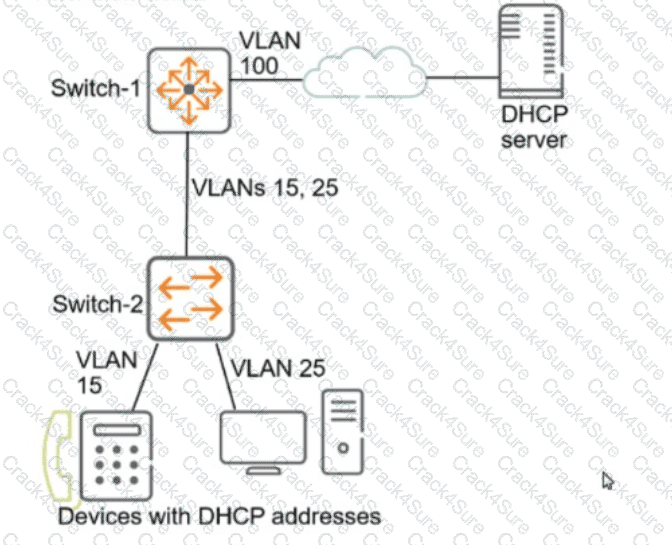
This company has AOS-CX switches. The exhibit shows one access layer switch, Switch-2, as an example, but the campus actually has more switches. Switch-1 is a core switch that acts as the default router for end-user devices.
What is a correct way to configure the switches to protect against exploits from untrusted end-user devices?
On Switch-1, enable ARP inspection on VLAN 100 and DHCP snooping on VLANs 15 and 25.
On Switch-2, enable DHCP snooping globally and on VLANs 15 and 25. Later, enable ARP inspection on the same VLANs.
On Switch-2, enable BPDU filtering on all edge ports in order to prevent eavesdropping attacks by untrusted devices.
On Switch-1, enable DHCP snooping on VLAN 100 and ARP inspection on VLANs 15 and 25.
The scenario involves AOS-CX switches in a two-tier topology with Switch-1 as the core switch (default router) on VLAN 100 and Switch-2 as an access layer switch with VLANs 15 and 25, where end-user devices connect. The goal is to protect against exploits from untrusted end-user devices, such as DHCP spoofing or ARP poisoning attacks, which are common threats in access layer networks.
DHCP Snooping: This feature protects against rogue DHCP servers by filtering DHCP messages. It should be enabled on the access layer switch (Switch-2) where end-user devices connect, specifically on the VLANs where these devices reside (VLANs 15 and 25). DHCP snooping builds a binding table of legitimate IP-to-MAC mappings, which can be used by other features like ARP inspection.
ARP Inspection: This feature prevents ARP poisoning attacks by validating ARP packets against the DHCP snooping binding table. It should also be enabled on the access layer switch (Switch-2) on VLANs 15 and 25, where untrusted devices are connected.
Option B, "On Switch-2, enable DHCP snooping globally and on VLANs 15 and 25. Later, enable ARP inspection on the same VLANs," is correct. DHCP snooping must be enabled first to build the binding table, and then ARP inspection can use this table to validate ARP packets. This configuration should be applied on Switch-2, the access layer switch, because that’s where untrusted end-user devices connect.
Option A, "On Switch-1, enable ARP inspection on VLAN 100 and DHCP snooping on VLANs 15 and 25," is incorrect. Switch-1 is the core switch and does not directly connect to end-user devices on VLANs 15 and 25. DHCP snooping and ARP inspection should be enabled on the access layer switch (Switch-2) where the devices reside. Additionally, enabling ARP inspection on VLAN 100 (where the DHCP server is) is unnecessary since the DHCP server is a trusted device.
Option C, "On Switch-2, enable BPDU filtering on all edge ports in order to prevent eavesdropping attacks by untrusted devices," is incorrect. BPDU filtering is used to prevent spanning tree protocol (STP) attacks by blocking BPDUs on edge ports, but it does not protect against eavesdropping or other exploits like DHCP spoofing or ARP poisoning, which are more relevant in this context.
Option D, "On Switch-1, enable DHCP snooping on VLAN 100 and ARP inspection on VLANs 15 and 25," is incorrect for the same reason as Option A. Switch-1 is not the appropriate place to enable these features since it’s not directly connected to the untrusted devices on VLANs 15 and 25.
The HPE Aruba Networking AOS-CX 10.12 Security Guide states:
"DHCP snooping should be enabled on access layer switches where untrusted end-user devices connect. It must be enabled globally and on the specific VLANs where the devices reside (e.g., dhcp-snooping vlan 15,25). This feature builds a binding table of IP-to-MAC mappings, which can be used by Dynamic ARP Inspection (DAI) to prevent ARP poisoning attacks. DAI should also be enabled on the same VLANs (e.g., ip arp inspection vlan 15,25) after DHCP snooping is configured, ensuring that ARP packets are validated against the DHCP snooping binding table." (Page 145, DHCP Snooping and ARP Inspection Section)
Additionally, the guide notes:
"Dynamic ARP Inspection (DAI) and DHCP snooping are typically configured on access layer switches to protect against exploits from untrusted devices, such as DHCP spoofing and ARP poisoning. These features should be applied to the VLANs where end-user devices connect, not on core switches unless those VLANs are directly connected to untrusted devices." (Page 146, Best Practices Section)
A client is connected to a Mobility Controller (MC). These firewall rules apply to this client’s role:
ipv4 any any svc-dhcp permit
ipv4 user 10.5.5.20 svc-dns permit
ipv4 user 10.1.5.0 255.255.255.0 https permit
ipv4 user 10.1.0.0 255.255.0.0 https deny_opt
ipv4 user any any permit
What correctly describes how the controller treats HTTPS packets to these two IP addresses, both of which are on the other side of the firewall:
10.1.20.1
10.5.5.20
Both packets are denied.
The first packet is permitted, and the second is denied.
Both packets are permitted.
The first packet is denied, and the second is permitted.
In an HPE Aruba Networking AOS-8 Mobility Controller (MC), firewall rules are applied based on the user role assigned to a client. The rules are evaluated in order, and the first matching rule determines the action (permit or deny) for the packet. The client’s role has the following firewall rules:
ipv4 any any svc-dhcp permit: Permits DHCP traffic (UDP ports 67 and 68) from any source to any destination.
ipv4 user 10.5.5.20 svc-dns permit: Permits DNS traffic (UDP port 53) from the user to the IP address 10.5.5.20.
ipv4 user 10.1.5.0 255.255.255.0 https permit: Permits HTTPS traffic (TCP port 443) from the user to the subnet 10.1.5.0/24.
ipv4 user 10.1.0.0 255.255.0.0 https deny_opt: Denies HTTPS traffic from the user to the subnet 10.1.0.0/16, with the deny_opt action (which typically means deny with an optimized action, such as dropping the packet without logging).
ipv4 user any any permit: Permits all other traffic from the user to any destination.
The question asks how the MC treats HTTPS packets (TCP port 443) to two IP addresses: 10.1.20.1 and 10.5.5.20.
HTTPS packet to 10.1.20.1:
Rule 1: Does not match (traffic is HTTPS, not DHCP).
Rule 2: Does not match (destination is 10.1.20.1, not 10.5.5.20; traffic is HTTPS, not DNS).
Rule 3: Does not match (destination 10.1.20.1 is not in the subnet 10.1.5.0/24).
Rule 4: Matches (destination 10.1.20.1 is in the subnet 10.1.0.0/16, and traffic is HTTPS). The action is deny_opt, so the packet is denied.
HTTPS packet to 10.5.5.20:
Rule 1: Does not match (traffic is HTTPS, not DHCP).
Rule 2: Does not match (traffic is HTTPS, not DNS).
Rule 3: Does not match (destination 10.5.5.20 is not in the subnet 10.1.5.0/24).
Rule 4: Does not match (destination 10.5.5.20 is not in the subnet 10.1.0.0/16).
Rule 5: Matches (catches all other traffic). The action is permit, so the packet is permitted.
Therefore, the HTTPS packet to 10.1.20.1 is denied, and the HTTPS packet to 10.5.5.20 is permitted.
Option A, "Both packets are denied," is incorrect because the packet to 10.5.5.20 is permitted.
Option B, "The first packet is permitted, and the second is denied," is incorrect because the packet to 10.1.20.1 (first) is denied, and the packet to 10.5.5.20 (second) is permitted.
Option C, "Both packets are permitted," is incorrect because the packet to 10.1.20.1 is denied.
Option D, "The first packet is denied, and the second is permitted," is correct based on the rule evaluation.
The HPE Aruba Networking AOS-8 8.11 User Guide states:
"Firewall policies on the Mobility Controller are evaluated in order, and the first matching rule determines the action for the packet. For example, a rule such as ipv4 user 10.1.0.0 255.255.0.0 https deny_opt will deny HTTPS traffic to the specified subnet, while a subsequent rule like ipv4 user any any permit will permit all other traffic that does not match earlier rules. The ‘user’ keyword in the rule refers to the client’s IP address, and the rules are applied to traffic initiated by the client." (Page 325, Firewall Policies Section)
Additionally, the guide notes:
"The deny_opt action in a firewall rule drops the packet without logging, optimizing performance for high-volume traffic. Rules are processed sequentially, and only the first matching rule is applied." (Page 326, Firewall Actions Section)
What is an example of passive endpoint classification?
TCP fingerprinting
SSH scans
WMI scans
SNMP scans
Endpoint classification in HPE Aruba Networking ClearPass Policy Manager (CPPM) involves identifying and categorizing devices on the network to enforce access policies. CPPM supports two types of profiling methods: passive and active.
Passive Profiling: Involves observing network traffic that devices send as part of their normal operation, without CPPM sending any requests to the device. Examples include DHCP fingerprinting, HTTP User-Agent analysis, and TCP fingerprinting.
Active Profiling: Involves CPPM sending requests to the device to gather information, such as SNMP scans, WMI scans, or SSH probes.
Option A, "TCP fingerprinting," is correct. TCP fingerprinting is a passive profiling method where CPPM analyzes TCP packet headers (e.g., TTL, window size) in the device’s normal network traffic to identify its operating system. This does not require CPPM to send any requests to the device, making it a passive method.
Option B, "SSH scans," is incorrect. SSH scans involve actively connecting to a device over SSH to gather information (e.g., system details), which is an active profiling method.
Option C, "WMI scans," is incorrect. Windows Management Instrumentation (WMI) scans involve CPPM querying a Windows device to gather information (e.g., OS version, installed software), which is an active profiling method.
Option D, "SNMP scans," is incorrect. SNMP scans involve CPPM sending SNMP requests to a device to gather information (e.g., system description, interfaces), which is an active profiling method.
The HPE Aruba Networking ClearPass Policy Manager 6.11 User Guide states:
"Passive profiling methods observe network traffic that endpoints send as part of their normal operation, without ClearPass sending any requests to the device. An example of passive profiling is TCP fingerprinting, where ClearPass analyzes TCP packet headers (e.g., TTL, window size) to identify the device’s operating system. Active profiling methods, such as SNMP scans, WMI scans, or SSH scans, involve ClearPass sending requests to the device to gather information." (Page 246, Passive vs. Active Profiling Section)
Additionally, the ClearPass Device Insight Data Sheet notes:
"Passive profiling techniques, such as TCP fingerprinting, allow ClearPass to identify devices without generating additional network traffic. By analyzing TCP attributes in the device’s normal traffic, ClearPass can fingerprint the OS, making it a non-intrusive method for endpoint classification." (Page 3, Profiling Methods Section)
How can hackers implement a man-in-the-middle (MITM) attack against a wireless client?
The hacker uses a combination of software and hardware to jam the RF band and prevent the client from connecting to any wireless networks.
The hacker runs an NMap scan on the wireless client to find its MAC and IP address. The hacker then connects to another network and spoofs those addresses.
The hacker uses spear-phishing to probe for the IP addresses that the client is attempting to reach. The hacker device then spoofs those IP addresses.
The hacker connects a device to the same wireless network as the client and responds to the client's ARP requests with the hacker device's MAC address.
A man-in-the-middle (MITM) attack involves an attacker positioning themselves between a wireless client and the legitimate network to intercept or manipulate traffic. HPE Aruba Networking documentation often discusses MITM attacks in the context of wireless security threats and mitigation strategies.
Option D, "The hacker connects a device to the same wireless network as the client and responds to the client's ARP requests with the hacker device's MAC address," is correct. This describes an ARP poisoning (or ARP spoofing) attack, a common MITM technique in wireless networks. The hacker joins the same wireless network as the client (e.g., by authenticating with the same SSID and credentials). Once on the network, the hacker sends fake ARP responses to the client, associating the hacker’s MAC address with the IP address of the default gateway (or another target device). This causes the client to send traffic to the hacker’s device instead of the legitimate gateway, allowing the hacker to intercept, modify, or forward the traffic, thus performing an MITM attack.
Option A, "The hacker uses a combination of software and hardware to jam the RF band and prevent the client from connecting to any wireless networks," is incorrect. Jamming the RF band would disrupt all wireless communication, including the hacker’s ability to intercept traffic. This is a denial-of-service (DoS) attack, not an MITM attack.
Option B, "The hacker runs an NMap scan on the wireless client to find its MAC and IP address. The hacker then connects to another network and spoofs those addresses," is incorrect. NMap scans are used for network discovery and port scanning, not for implementing an MITM attack. Spoofing MAC and IP addresses on another network does not position the hacker to intercept the client’s traffic on the original network.
Option C, "The hacker uses spear-phishing to probe for the IP addresses that the client is attempting to reach. The hacker device then spoofs those IP addresses," is incorrect. Spear-phishing is a delivery method for malware or credentials theft, not a direct method for implementing an MITM attack. Spoofing IP addresses alone does not allow the hacker to intercept traffic unless they are on the same network and can manipulate routing (e.g., via ARP poisoning).
The HPE Aruba Networking AOS-8 8.11 User Guide states:
"A common man-in-the-middle (MITM) attack against wireless clients involves ARP poisoning. The hacker connects a device to the same wireless network as the client and sends fake ARP responses to the client, associating the hacker’s MAC address with the IP address of the default gateway. This causes the client to send traffic to the hacker’s device, allowing the hacker to intercept and manipulate the traffic." (Page 422, Wireless Threats Section)
Additionally, the HPE Aruba Networking Security Guide notes:
"ARP poisoning is a prevalent MITM attack in wireless networks. The attacker joins the same network as the client and responds to the client’s ARP requests with the attacker’s MAC address, redirecting traffic through the attacker’s device. This allows the attacker to intercept sensitive data or modify traffic between the client and the legitimate destination." (Page 72, Wireless MITM Attacks Section)
An AOS-CX switch currently has no device fingerprinting settings configured on it. You want the switch to start collecting DHCP and LLDP information. You enter these commands:
Switch(config)# client device-fingerprint profile myprofile
Switch(myprofile)# dhcp
Switch(myprofile)# lldp
What else must you do to allow the switch to collect information from clients?
Configure the switch as a DHCP relay
Add at least one LLDP option to the policy
Apply the policy to edge ports
Add at least one DHCP option to the policy
Device fingerprinting on an AOS-CX switch allows the switch to collect information about connected clients to aid in profiling and policy enforcement, often in conjunction with a solution like ClearPass Policy Manager (CPPM). The commands provided create a device fingerprinting profile named "myprofile" and enable the collection of DHCP and LLDP information:
client device-fingerprint profile myprofile: Creates a fingerprinting profile.
dhcp: Enables the collection of DHCP information (e.g., DHCP options like Option 55 for fingerprinting).
lldp: Enables the collection of LLDP (Link Layer Discovery Protocol) information (e.g., system name, description).
However, creating the profile and enabling DHCP and LLDP collection is not enough for the switch to start collecting this information from clients. The profile must be applied to the interfaces (ports) where clients are connected.
Option C, "Apply the policy to edge ports," is correct. In AOS-CX, the device fingerprinting profile must be applied to the edge ports (ports where clients connect) to enable the switch to collect DHCP and LLDP information from those clients. This is done using the command client device-fingerprint profile
text
CollapseWrapCopy
Switch(config)# interface 1/1/1
Switch(config-if)# client device-fingerprint profile myprofile
This ensures that the switch collects DHCP and LLDP data from clients connected to the specified ports.
Option A, "Configure the switch as a DHCP relay," is incorrect. While a DHCP relay (using the ip helper-address command) is needed if the DHCP server is on a different subnet, it is not a requirement for the switch to collect DHCP information for fingerprinting. The switch can snoop DHCP traffic on the local VLAN without being a relay, as long as the profile is applied to the ports.
Option B, "Add at least one LLDP option to the policy," is incorrect. The lldp command in the fingerprinting profile already enables the collection of LLDP information. There is no need to specify individual LLDP options (e.g., system name, description) in the profile; the switch collects all available LLDP data by default.
Option D, "Add at least one DHCP option to the policy," is incorrect. The dhcp command in the fingerprinting profile already enables the collection of DHCP information, including options like Option 55 (Parameter Request List), which is commonly used for fingerprinting. There is no need to specify individual DHCP options in the profile.
The HPE Aruba Networking AOS-CX 10.12 Security Guide states:
"To enable device fingerprinting on an AOS-CX switch, create a device fingerprinting profile using the client device-fingerprint profile
Additionally, the HPE Aruba Networking AOS-CX 10.12 System Management Guide notes:
"The device fingerprinting profile must be applied to the ports where clients are connected to collect DHCP and LLDP information. The dhcp and lldp commands in the profile enable the collection of all relevant data for those protocols, such as DHCP Option 55 for fingerprinting, without requiring additional options to be specified." (Page 95, Device Fingerprinting Setup Section)
What distinguishes a Distributed Denial of Service (DDoS) attack from a traditional Denial or service attack (DoS)?
A DDoS attack originates from external devices, while a DoS attack originates from internal devices
A DDoS attack is launched from multiple devices, while a DoS attack is launched from a single device
A DoS attack targets one server, a DDoS attack targets all the clients that use a server
A DDoS attack targets multiple devices, while a DoS Is designed to Incapacitate only one device
The main distinction between a Distributed Denial of Service (DDoS) attack and a traditional Denial of Service (DoS) attack is that a DDoS attack is launched from multiple devices, whereas a DoS attack originates from a single device. This distinction is critical because the distributed nature of a DDoS attack makes it more difficult to mitigate. Multiple attacking sources can generate a higher volume of malicious traffic, overwhelming the target more effectively than a single source, as seen in a DoS attack. DDoS attacks exploit a variety of devices across the internet, often coordinated using botnets, to flood targets with excessive requests, leading to service degradation or complete service denial.
What does the NIST model for digital forensics define?
how to define access control policies that will properly protect a company's most sensitive data and digital resources
how to properly collect, examine, and analyze logs and other data, in order to use it as evidence in a security investigation
which types of architecture and security policies are best equipped to help companies establish a Zero Trust Network (ZTN)
which data encryption and authentication algorithms are suitable for enterprise networks in a world that is moving toward quantum computing
The National Institute of Standards and Technology (NIST) provides guidelines on digital forensics, which include methodologies for properly collecting, examining, and analyzing digital evidence. This framework helps ensure that digital evidence is handled in a manner that preserves its integrity and maintains its admissibility in legal proceedings:
Digital Forensics Process: This process involves steps to ensure that data collected from digital sources can be used reliably in investigations and court cases, addressing chain-of-custody issues, proper evidence handling, and detailed documentation of forensic procedures.
Your company policies require you to encrypt logs between network infrastructure devices and Syslog servers. What should you do to meet these requirements on an ArubaOS-CX switch?
Specify the Syslog server with the TLS option and make sure the switch has a valid certificate.
Specify the Syslog server with the UDP option and then add an CPsec tunnel that selects Syslog.
Specify a priv key with the Syslog settings that matches a priv key on the Syslog server.
Set up RadSec and then enable Syslog as a protocol carried by the RadSec tunnel.
To ensure secure transmission of log data over the network, particularly when dealing with sensitive or critical information, using TLS (Transport Layer Security) for encrypted communication between network devices and syslog servers is necessary:
Secure Logging Setup: When configuring an ArubaOS-CX switch to send logs securely to a Syslog server, specifying the server with the TLS option ensures that all transmitted log data is encrypted. Additionally, the switch must have a valid certificate to establish a trusted connection, preventing potential eavesdropping or tampering with the logs in transit.
Other Options:
Option B, Option C, and Option D are less accurate or applicable for directly encrypting log data between the device and Syslog server as specified in the company policies.
3 Months Free Update
TESTED 15 Dec 2025