Crack4sure Logo

We at Crack4sure are committed to giving students who are preparing for the HP HPE6-A85 Exam the most current and reliable questions . To help people study, we've made some of our Aruba Certified Campus Access Associate Exam exam materials available for free to everyone. You can take the Free HPE6-A85 Practice Test as many times as you want. The answers to the practice questions are given, and each answer is explained.
Which actions help map high-level components to a low-level design?
Choose two
Apply subnetting to the allocated IP addressing space and plan the corresponding VLANs.
Select communication protocols for each device.
Define user roles and permissions.
Define the network topology design or define bandwidth requirements.
Comprehensive and Detailed Explanation
HPE Press guide context | PDF page 220 | HPE Press, Aruba Certified Associate – Campus Access Official Certification Study Guide
Technical Deep Dive — Original Chat Wording
High-level network design establishes the overall infrastructure architecture, including the principal network layers, connectivity models, redundancy strategy, and performance requirements.
Low-level design transforms these architectural decisions into configurations and implementation instructions.
One essential activity is defining the IP addressing structure.
Subnetting the allocated address space and assigning subnets to VLANs establishes the logical organization of the network.
For example, an architect may specify separate networks for employees, guests, and IoT devices.
The low-level design translates these requirements into VLAN IDs, IP prefixes, switched virtual interfaces, and gateway addresses.
Another important activity is selecting the communication protocols required by the design.
A campus implementation may use OSPF for routing, LACP for link aggregation, LLDP for neighbor discovery, and 802.1X for endpoint authentication.
These choices must ultimately be mapped to particular interfaces and devices.
Option D primarily describes high-level decisions—topology and bandwidth requirements—rather than their translation into implementation details.
Option C concerns access-control design and can also form part of a complete low-level security configuration.
However, the two strongest choices for mapping the question's network architecture components into a device-level design are IP/VLAN planning and communication-protocol selection.
Therefore, Options A and B are the best intended answers.
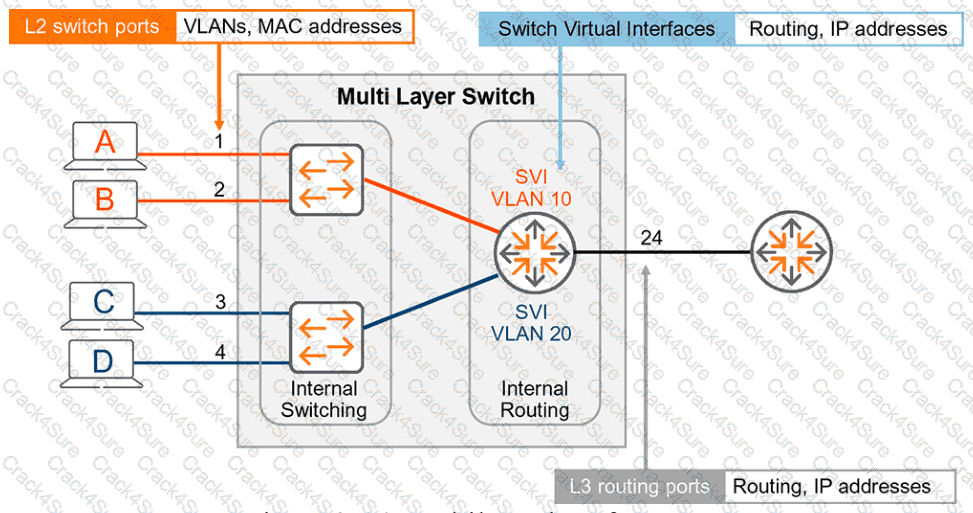
HPE Press study-guide figure / related learning illustration · Q138 Fig 3-14 SVI
Why is it important to monitor audit logs on a regular basis?
Tracking malicious user traffic.
Detecting unusual device activity.
Setting device retention periods.
Reviewing device storage capacity.
Comprehensive and Detailed Explanation
HPE Press guide context | PDF page 680 | HPE Press, Aruba Certified Associate – Campus Access Official Certification Study Guide
Technical Deep Dive — Original Chat Wording
Regular audit-log monitoring is an important operational and security practice.
Audit records provide visibility into administrative operations, configuration changes, and management events.
Reviewing these records can reveal activities that differ from expected operating patterns.
For example, an administrator may discover that an access-control policy was unexpectedly modified or that device settings were changed outside an approved maintenance window.
Such events can indicate configuration mistakes, unauthorized administrative activity, or a security incident requiring investigation.
Audit-log review also helps correlate unexpected network behavior with preceding configuration changes.
If a WLAN becomes unavailable immediately after a policy update, the Audit Trail can help identify the relevant administrative operation.
However, Aruba Central's Audit Trail should not be confused with a complete network-traffic analysis system.
It primarily records management activities rather than every packet transmitted by users or devices.
Consequently, Option A is too specific: identifying malicious user traffic generally requires traffic monitoring, security analytics, and appropriate network telemetry.
Retention periods are established through logging policy rather than by reviewing individual events.
Device storage-capacity monitoring is a separate operational function.
Of the available options, detecting unusual device-related or administrative activity is the strongest purpose for regular audit-log inspection.
Therefore, Option B is correct.
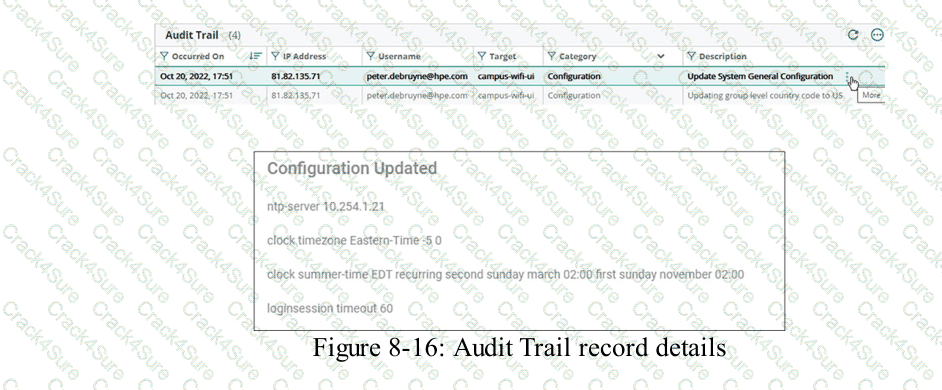
HPE Press study-guide figure / related learning illustration · Q169 Fig 8-16 Audit Details
Which type of insight or card appears on the default HPE Aruba Networking Central dashboard?
Licenses card
Sites card
API Gateway
Network Health card
Comprehensive and Detailed Explanation
HPE Press guide context | PDF page 999 | HPE Press, Aruba Certified Associate – Campus Access Official Certification Study Guide
Technical Deep Dive — Original Chat Wording
HPE Aruba Networking Central provides a consolidated Network Overview dashboard that enables administrators to monitor infrastructure across an organization.
The Sites card summarizes network locations and their operational health. Administrators can identify sites experiencing connectivity or device-health problems and open the relevant site dashboard for further analysis.
For example, an organization operating 30 branches can use the Sites card to identify locations with disconnected switches, degraded wireless service, or other reported conditions.
The Sites card provides a location-oriented operational view rather than requiring administrators to inspect every device individually.
Other dashboard cards present different categories of information.
The Device Health card summarizes infrastructure condition, while the Client Health card focuses on connected endpoints.
The Licenses card provides information about subscription consumption and management entitlements.
The API Gateway is an integration capability, not the dashboard card requested.
Verification qualification: The current HPE guide also explicitly identifies a Licenses card on the default dashboard. Therefore, the original question is ambiguous as a single-answer MCQ.
B is the likely intended selection , but A is also supported by official documentation. The question should specify the *site-health overview card* to make B uniquely correct.
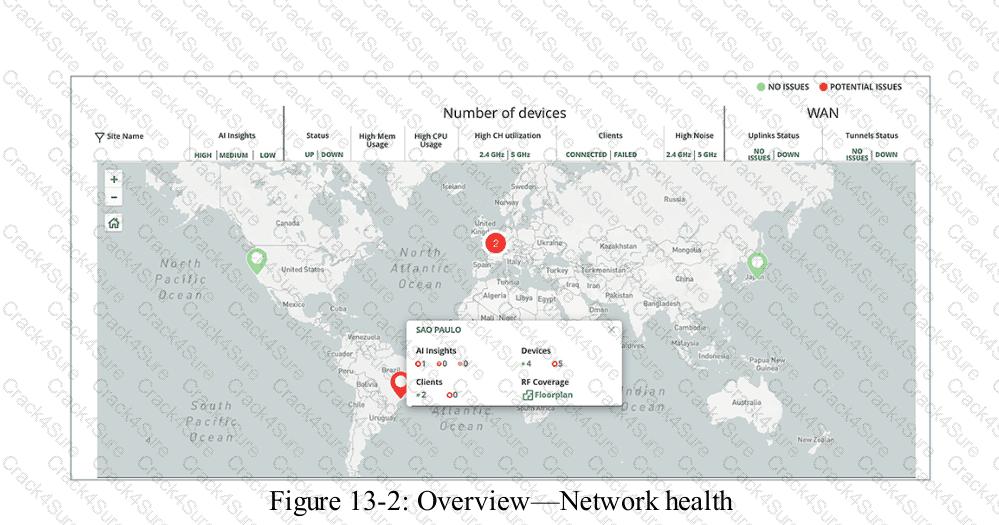
HPE Press study-guide figure / related learning illustration · Q166 Fig 13-2 Network Health
Match each AAA Service to its correct definition. Matches may be used more than once or not at all.
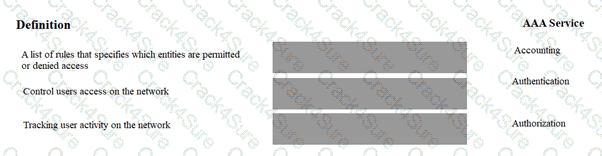
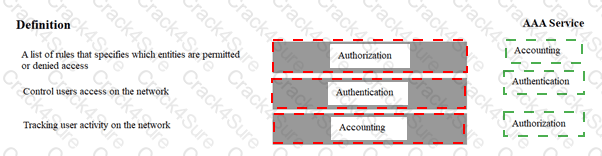
Exhibit item
Correct match
Rules specifying permitted or denied access
Authorization
Controls user access to the network
Authentication
Tracks user activity on the network
Accounting
Comprehensive and Detailed Explanation
HPE Press guide context | PDF page 814 | HPE Press, Aruba Certified Associate – Campus Access Official Certification Study Guide
Technical Deep Dive — Reconstructed (Original Chat Text Not Recoverable)
Authentication establishes identity, authorization decides the resources/actions that identity may access, and accounting records activity for monitoring or audit. The match is: permit/deny rules = Authorization, control user access by identity = Authentication, track user activity = Accounting. ClearPass can provide all three AAA functions.
The exhibit is a matching question: each original item must be paired with the applicable protocol, medium, security function, or address classification. The answer table below records the intended correspondence without changing the source exhibit.
Operational workflows should preserve consistent inventory, authorization, configuration history, and monitoring so that administrators can locate and manage devices predictably.
For example, a cloud-managed infrastructure device may be registered successfully but still require the correct subscription, site, group, and configuration scope.
In production, the decision should be documented and checked against the supported software release and platform model, because interface names, licensing tiers, and management workflows can change across Central and AOS-CX generations.
For practical use, confirm the prerequisite conditions first, then verify the resulting operational state. This separates an intended configuration from a working network service and avoids accepting a misleading result.
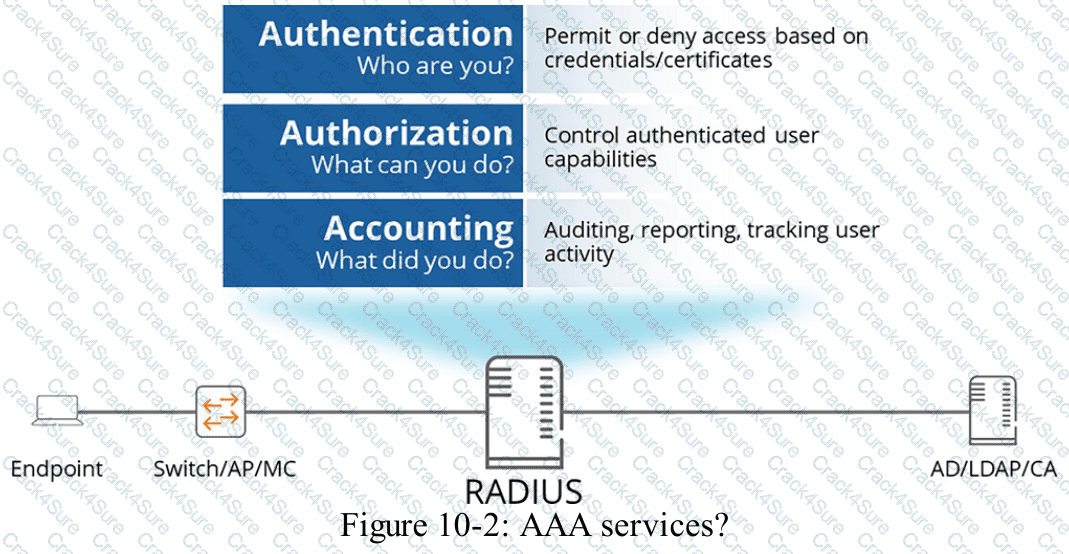
HPE Press study-guide figure / related learning illustration · Q69 AAA
What is one reason to arrange devices into device groups in HPE Aruba Networking Central?
Reduce costs
Simplify management
Decrease security
Enhance performance
Comprehensive and Detailed Explanation
HPE Press guide context | PDF page 589 | HPE Press, Aruba Certified Associate – Campus Access Official Certification Study Guide
Technical Deep Dive — Original Chat Wording
HPE Aruba Networking Central uses device groups to organize infrastructure and simplify centralized configuration management.
A group allows administrators to apply common configuration settings to multiple supported devices rather than configuring each device independently.
For example, an organization may operate 50 branch offices with similar access-switch configurations.
By assigning compatible switches to a common management group, administrators can maintain standardized VLANs, interface policies, and other supported network settings.
Group-based management reduces repetitive work and helps prevent configuration inconsistencies.
The HPE Press guide describes UI-based and template-based configuration methods.
UI-based configuration uses graphical management workflows, while template-based configuration allows reusable CLI configuration templates and device-specific variables.
A group can also support different configuration methods for different device types, depending on the management architecture.
Device groups help administrators organize infrastructure according to functional or operational requirements.
They also provide useful management scopes for configuration, monitoring, reporting, and related workflows.
Grouping devices does not inherently improve network throughput or reduce hardware costs.
However, it can reduce administrative effort and improve configuration consistency.
Similarly, device grouping does not weaken security by design. Appropriate group-level security policies can improve the consistency of security controls.
Therefore, Option B (Simplify management) is correct.
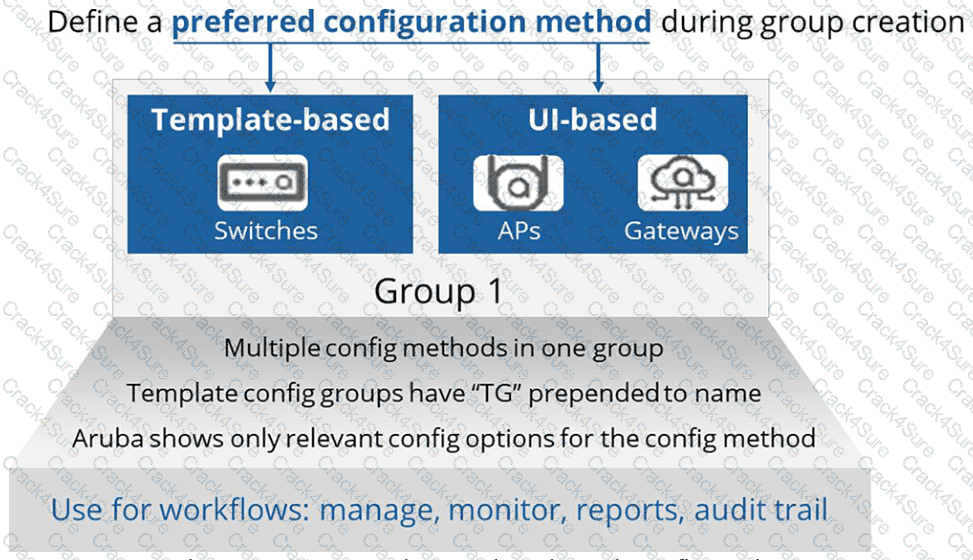
HPE Press study-guide figure / related learning illustration · Q146 Fig 7-21 Groups
What is the common LAN use case for fiber-optic cabling?
Link telephones to a switch
Aggregate traffic for a printer
For connecting network devices over long distances
For connecting indoor AP to switches
Comprehensive and Detailed Explanation
HPE Press guide context | PDF page 43 | HPE Press, Aruba Certified Associate – Campus Access Official Certification Study Guide
Technical Deep Dive — Original Chat Wording
Fiber-optic cabling is commonly used for high-speed network connections over distances that exceed the limits of conventional twisted-pair copper Ethernet.
It transmits data using optical signals instead of electrical signals.
This allows fiber to provide high bandwidth while avoiding electrical interference affecting copper transmission media.
Fiber is frequently deployed between network wiring closets, distribution switches, campus buildings, and data-center equipment.
For example, two buildings separated by 500 meters may be connected using compatible fiber-optic cable and optical transceivers.
Standard twisted-pair Ethernet links generally have a maximum channel length of 100 meters, making fiber a better choice for many longer connections.
Single-mode fiber can support particularly long distances when paired with appropriate optical modules.
Multimode fiber is commonly used for shorter optical connections within buildings and data centers.
Network telephones and indoor access points commonly use twisted-pair copper because it can simultaneously support Ethernet communication and Power over Ethernet (PoE).
Fiber does not provide ordinary PoE delivery to these endpoints.
Connecting a printer normally does not require a long-distance optical link.
Fiber is therefore especially appropriate for infrastructure interconnections where distance, bandwidth, or electrical isolation makes copper impractical.
Therefore, Option C (For connecting network devices over long distances) is correct.
Which statement concerning Dynamic Frequency Selection (DFS) Wi-Fi channels is accurate?
DFS channels are only present on the 5GHz spectrum.
DFS channels should be included in all wireless designs.
DFS channels are required to use channel bonding.
DFS channels should not be used in very-high-density (VHD) systems.
Comprehensive and Detailed Explanation
HPE Press guide context | PDF page 709 | HPE Press, Aruba Certified Associate – Campus Access Official Certification Study Guide
Technical Deep Dive — Original Chat Wording
Dynamic Frequency Selection (DFS) is a regulatory spectrum-sharing mechanism used with designated Wi-Fi channels in the 5 GHz band.
Its purpose is to protect radar systems operating in portions of the same radio spectrum.
When an AP uses a DFS channel, it must satisfy applicable radar-detection requirements.
Before transmitting on certain DFS channels, the AP may need to perform a Channel Availability Check (CAC).
If radar activity is detected, the AP must vacate the affected channel according to the applicable regulatory rules.
This can result in channel changes and temporary connectivity disruption.
However, DFS channels also provide additional spectrum that may reduce co-channel interference in crowded WLAN environments.
Consequently, DFS should not be universally enabled or universally excluded without considering the deployment's regulatory region, radar exposure, client support, and availability requirements.
DFS is not required merely to configure 40 MHz or 80 MHz channel bonding.
Channel bonding can use appropriate non-DFS channels where permitted.
The 2.4 GHz band does not use the 5 GHz Wi-Fi DFS mechanism, and 6 GHz Wi-Fi operation has different spectrum-sharing requirements, including Automatic Frequency Coordination for certain operating classes.
Therefore, among the listed choices, Option A is correct.
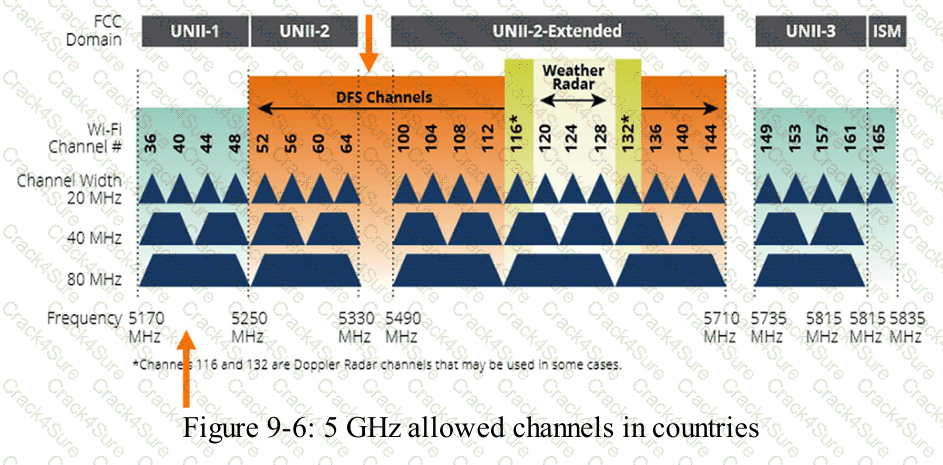
HPE Press study-guide figure / related learning illustration · Q125 Fig 9-6 DFS
Refer to the exhibit.
Based on the topology shown, which configuration would be valid on Switch 1 port 1/1/2 to allow traffic to PC3 if an unmanaged switch is connected between PC3 and Switch 1?
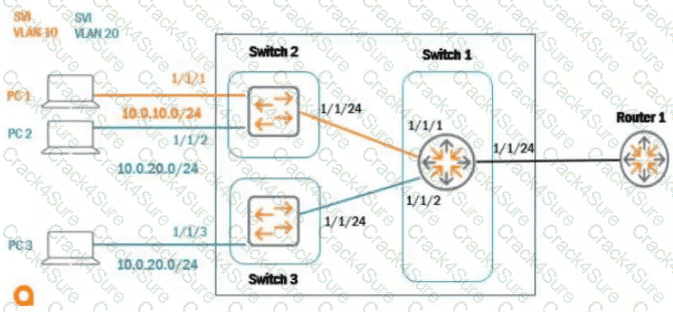
int 1/1/2, trunk allowed vlan 20
int 1/1/2, vlan native 20
int 1/1/2, vlan access 20
int 1/1/2, untagged vlan 20
Comprehensive and Detailed Explanation
HPE Press guide context | PDF page 127 | HPE Press, Aruba Certified Associate – Campus Access Official Certification Study Guide
Technical Deep Dive — Reconstructed (Original Chat Text Not Recoverable)
An unmanaged switch does not understand or preserve multiple VLAN tags as a managed trunk endpoint would. The AOS-CX port feeding it should be a Layer 2 access port in VLAN 20, allowing untagged PC3 traffic to enter the correct broadcast domain. `vlan access 20` is the expected AOS-CX syntax.
The selected answer corresponds to C: int 1/1/2, vlan access 20. This matches the mechanism or management behavior described in the scenario rather than merely a related network feature.
In an AOS-CX or Aruba Central deployment, the relevant settings must be applied in the correct interface, profile, policy, or management scope and then validated operationally.
For example, an apparently healthy physical port may still fail to serve a client when VLAN assignment, AAA policy, or Layer 3 gateway context is wrong.
In production, the decision should be documented and checked against the supported software release and platform model, because interface names, licensing tiers, and management workflows can change across Central and AOS-CX generations.
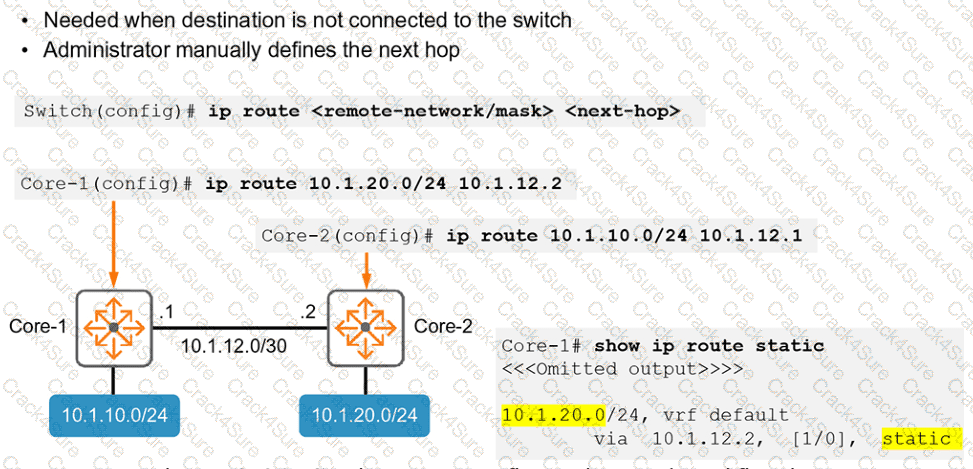
Based on the show ip route output on a CX 8400, what kind of route is 10.1.20.0/24, vrf default via 10.1.12.2, [1/0] ?
local
OSPF
static
connected
Comprehensive and Detailed Explanation
HPE Press guide context | PDF page 231 | HPE Press, Aruba Certified Associate – Campus Access Official Certification Study Guide
Technical Deep Dive — Original Chat Wording
The AOS-CX routing table identifies how the switch reaches remote IP networks.
Each routing entry can contain the destination prefix, route source, next-hop address, administrative distance, and routing metric.
Consider the specified entry:
10.1.20.0/24 via 10.1.12.2 [1/0]
The destination network is 10.1.20.0/24 .
The next-hop address is 10.1.12.2 .
The square-bracket notation represents the administrative distance followed by the route metric.
In this example:
1: Administrative distance
0: Route metric
Under the standard AOS-CX defaults, static routes have an administrative distance of 1.
By comparison, directly connected routes have a default administrative distance of 0, and OSPF routes have a default administrative distance of 110.
A static route is configured manually rather than learned through a dynamic routing protocol.
A representative configuration is:
configure terminal
ip route 10.1.20.0/24 10.1.12.2
Administrators can examine static routing information using:
show ip route
show ip route static
Administrative distance can be customized, so it should not be considered an infallible route-origin identifier in every configuration.
However, the displayed [1/0] values match the ordinary AOS-CX static-route behavior described by the guide.
Therefore, Option C (static) is correct.
HPE Press study-guide figure / related learning illustration · Q149 Fig 3-20 Static
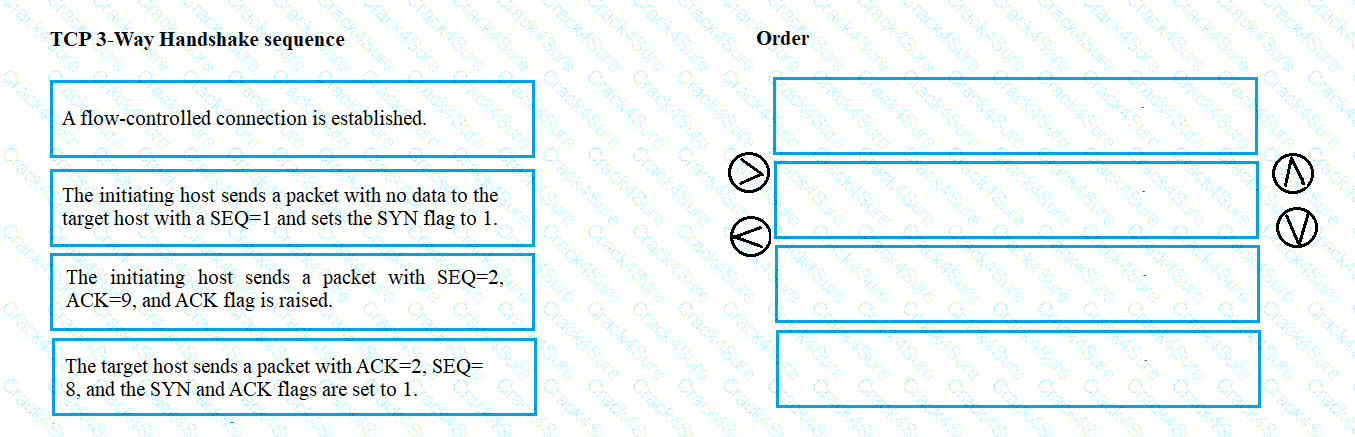
What is the correct sequence for the TCP three-way handshake?
Drag & Drop
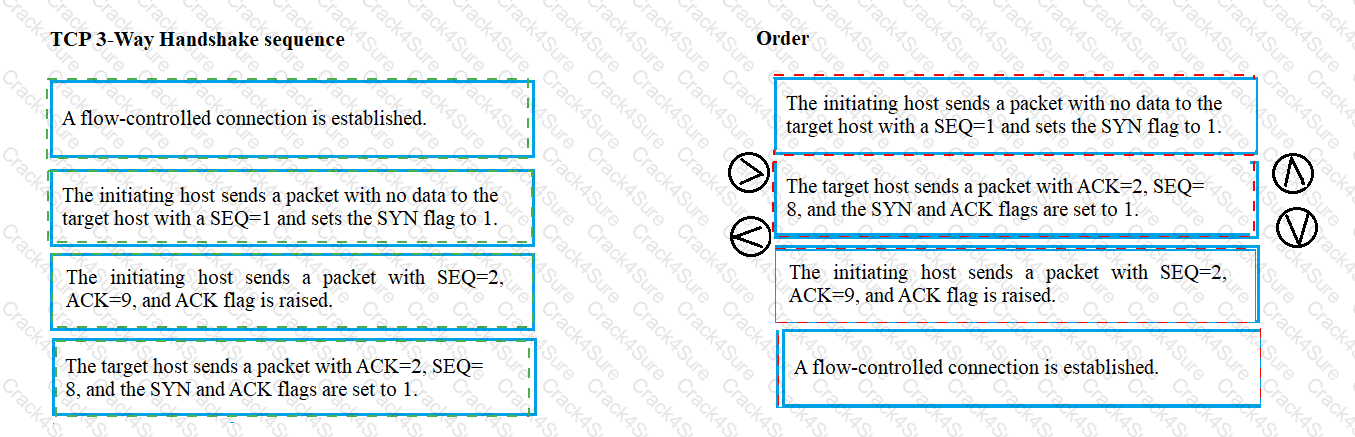
SYN ? SYN-ACK ? ACK
Exhibit item
Correct match
Step 1
Client sends SYN
Step 2
Server sends SYN-ACK
Step 3
Client sends ACK
Comprehensive and Detailed Explanation
HPE Press guide context | PDF page 62 | HPE Press, Aruba Certified Associate – Campus Access Official Certification Study Guide
Technical Deep Dive — Reconstructed (Original Chat Text Not Recoverable)
TCP establishes a normal reliable connection with SYN from the initiator, SYN-ACK from the responder, and ACK from the initiator. The exchange synchronizes initial sequence numbers and confirms bidirectional communication. Subsequent data transfer begins after the connection is established.
The exhibit is a matching question: each original item must be paired with the applicable protocol, medium, security function, or address classification. The answer table below records the intended correspondence without changing the source exhibit.
Operational workflows should preserve consistent inventory, authorization, configuration history, and monitoring so that administrators can locate and manage devices predictably.
For example, a cloud-managed infrastructure device may be registered successfully but still require the correct subscription, site, group, and configuration scope.
In production, the decision should be documented and checked against the supported software release and platform model, because interface names, licensing tiers, and management workflows can change across Central and AOS-CX generations.
For practical use, confirm the prerequisite conditions first, then verify the resulting operational state. This separates an intended configuration from a working network service and avoids accepting a misleading result.
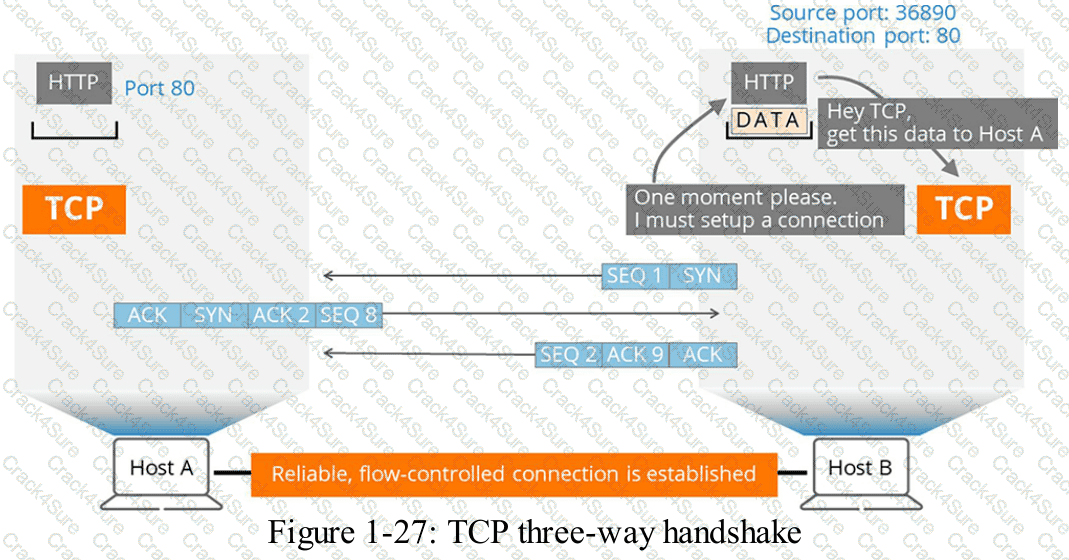
HPE Press study-guide figure / related learning illustration · Q75 TCP 3way
Which capabilities are available to users who are assigned the View Only role in HPE Aruba Networking Central?
Apply network configuration changes
View dashboards, reports, and analytics
Create and schedule new reports
Edit dashboards, reports, and analytics
Comprehensive and Detailed Explanation
HPE Press guide context | PDF page 588 | HPE Press, Aruba Certified Associate – Campus Access Official Certification Study Guide
Short exact extract: “Aruba Central allows you to manage configurations for different device types.”
Technical Deep Dive — Original Chat Wording
Role-Based Access Control (RBAC) is a security mechanism that associates administrative permissions with defined user roles.
HPE Aruba Networking Central uses RBAC to ensure administrators receive access appropriate to their responsibilities.
The View Only role is intended for personnel who need operational visibility without the ability to change network settings.
For example, monitoring personnel may need to review device availability, network-health dashboards, alerts, and reports while investigating service problems.
Providing read-only permissions allows these users to observe the environment without introducing unnecessary configuration risks.
This supports the principle of least privilege.
A View Only user can inspect permitted dashboards, reports, and analytics but does not receive the same capabilities as an administrator.
Applying network configuration changes requires appropriate write permissions.
Creating new reports and scheduling report generation also generally require report-management permissions beyond read-only access.
Editing dashboards, reports, or analytics configuration similarly requires an authorized management role.
Read-only privileges should not be confused with unrestricted access to every resource. Additional scope restrictions can determine which sites and devices a user is permitted to view.
Therefore, Option B (View dashboards, reports, and analytics) is correct.
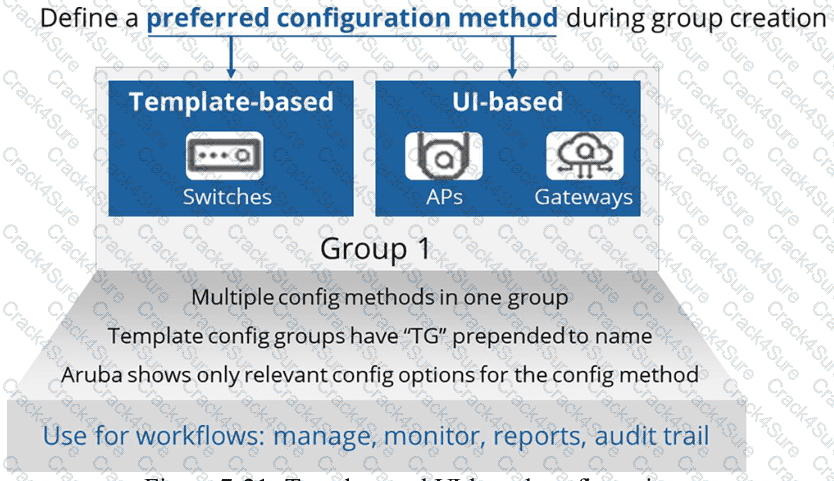
HPE Press study-guide figure / related learning illustration · Q152 Fig 7-21 Groups
Which information must be specified when creating an HPE GreenLake user?
Enter the user's email address.
Enter the user's home telephone number.
Configure the user birth date
Choosing the user time zone
Comprehensive and Detailed Explanation
HPE Press guide context | PDF page 573 | HPE Press, Aruba Certified Associate – Campus Access Official Certification Study Guide
Technical Deep Dive — Original Chat Wording
HPE GreenLake provides identity and access management functions for administering users, workspaces, and supported cloud services.
When creating a new user, an administrator supplies the user's email address.
The email address serves as an important identity attribute and is used for account invitations and other supported account-management communications.
In the documented workflow, an authorized administrator opens the Users page and chooses to add a user.
When creating a new identity, the administrator enters the email address and configures the appropriate role assignments.
Roles determine the user's permissions within the workspace and associated services.
For example, an employee responsible for network monitoring may receive a role permitting operational visibility without broad administrative privileges.
Users requiring configuration permissions should receive only the access necessary for their duties.
Depending on the workspace and identity-management architecture, users may also be imported or selected from an existing identity directory.
In that case, the system can obtain the identity information from the directory.
A home telephone number, birth date, and preferred time zone are not the mandatory identifying field requested by the question.
The email address is the relevant requirement for creating a new GreenLake user.
Therefore, Option A (Enter the user's email address) is correct.
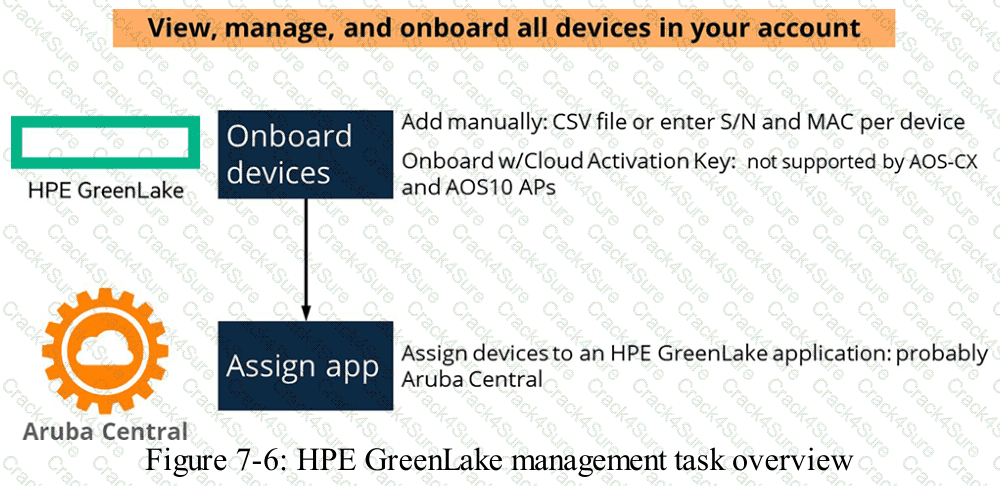
HPE Press study-guide figure / related learning illustration · Q187 Fig 7-6 GreenLake
How does one CX 6300M switch configuration use Layer 3 connectivity to route traffic between switch virtual interfaces 120 and 130?
Delete 'no routing' from the SVI interfaces.
Create static routes between SVI 120 and 130.
Route leaking must be configured in default VRF.
Routing is enabled by default with CX 6300M.
Comprehensive and Detailed Explanation
HPE Press guide context | PDF page 221 | HPE Press, Aruba Certified Associate – Campus Access Official Certification Study Guide
Short exact extract: “The SVIs are virtual layer 3 interfaces, for internal routing.”
Technical Deep Dive — Original Chat Wording
The HPE Aruba Networking CX 6300M is a multilayer switch capable of routing traffic between directly connected VLAN interfaces.
A Switched Virtual Interface (SVI) provides a logical Layer 3 interface associated with a particular VLAN.
For example, VLAN 120 may use subnet 10.1.120.0/24 , while VLAN 130 uses subnet 10.1.130.0/24 .
The switch can be configured as follows:
configure terminal
vlan 120
vlan 130
interface vlan 120
ip address 10.1.120.1/24
no shutdown
interface vlan 130
ip address 10.1.130.1/24
no shutdown
When both SVIs are operational in the same VRF, their connected networks are installed in the routing table.
The switch can then forward traffic between those subnets without requiring static routes between them.
Route leaking is unnecessary because both networks reside in the same routing domain.
The no routing command applies to configuring supported physical Ethernet interfaces for Layer 2 switching and is not the required method for enabling SVI routing.
There is an important distinction: AOS-CX software releases can differ in the default routing mode of physical interfaces. This does not change the fundamental behavior of SVIs as routed logical interfaces.
Administrators can verify the connected routes using:
show ip route
show ip interface brief
Therefore, Option D (Routing is enabled by default with CX 6300M) is the correct intended answer for inter-VLAN routing through configured SVIs.
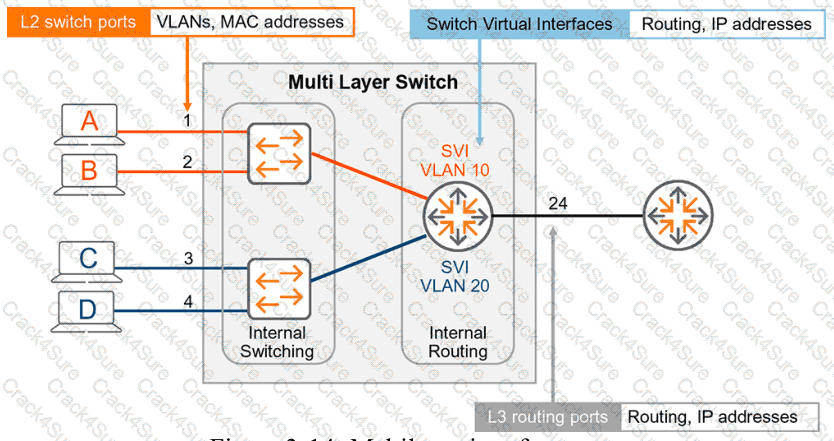
HPE Press study-guide figure / related learning illustration · Q165 Fig 3-14 SVI
A customer with 1,860 employees has just deployed user and device certificates through a company-wide Group Policy Object (GPO).
When authenticating to the network, which EAP method chains user and machine authentication in a single RADIUS session?
EAP-TEAP
EAP-TTLS
EAP-TLS
PEAP
Comprehensive and Detailed Explanation
HPE Press guide context | PDF page 825 | HPE Press, Aruba Certified Associate – Campus Access Official Certification Study Guide
Technical Deep Dive — Reconstructed (Original Chat Text Not Recoverable)
EAP-TEAP performs tunneled user and machine authentication chaining within a single protected exchange, allowing ClearPass to evaluate both identities together. Certificate rollout via GPO supports machine/user certificate availability, but the question targets the specific chained EAP method, not ordinary single-identity EAP-TLS.
The selected answer corresponds to A: EAP-TEAP. This matches the mechanism or management behavior described in the scenario rather than merely a related network feature.
In an AOS-CX or Aruba Central deployment, the relevant settings must be applied in the correct interface, profile, policy, or management scope and then validated operationally.
For example, an apparently healthy physical port may still fail to serve a client when VLAN assignment, AAA policy, or Layer 3 gateway context is wrong.
A strong verification step is to compare the expected outcome with operational status before and after the change. This confirms not only that a configuration was accepted, but also that the required service actually functions.
For practical use, confirm the prerequisite conditions first, then verify the resulting operational state. This separates an intended configuration from a working network service and avoids accepting a misleading result.
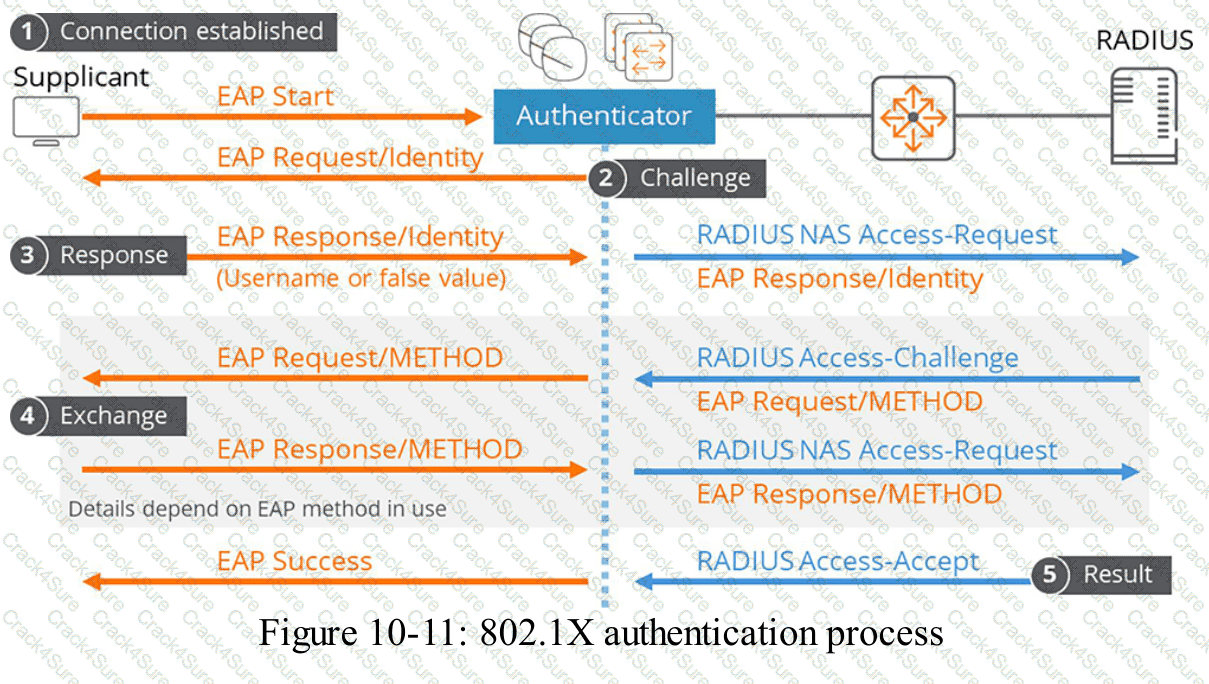
HPE Press study-guide figure / related learning illustration · Fig 10-11 EAP
When the OSFP dynamic routing protocol is used on an AOS-CX switch, what must match on neighboring devices for routes to be exchanged?
OSPF passive configuration
OSPF area
router-id
loopback configuration
Comprehensive and Detailed Explanation
HPE Press guide context | PDF page 241 | HPE Press, Aruba Certified Associate – Campus Access Official Certification Study Guide
Technical Deep Dive — Reconstructed (Original Chat Text Not Recoverable)
OSPF interfaces intended to become neighbors must operate in the same OSPF area and have compatible parameters. Process identifiers are local, router IDs must be unique, and loopback assignments need not match. The configured area determines the link-state database relationship and route exchange boundary.
The selected answer corresponds to B: OSPF area. This matches the mechanism or management behavior described in the scenario rather than merely a related network feature.
Operational workflows should preserve consistent inventory, authorization, configuration history, and monitoring so that administrators can locate and manage devices predictably.
The operational view should be interpreted together with its underlying records: an alert, subscription count, or device status may describe management state rather than physical availability.
The practical deployment consequence is important: a plausible configuration can still fail when the peer interface, device role, licensing scope, or physical medium is mismatched. Checking that surrounding dependency avoids a misleading diagnosis.
When troubleshooting or designing a change, verify compatibility between all participating devices, the management scope, and the applicable software release. The most useful evidence is the state observed on both sides of the affected connection.
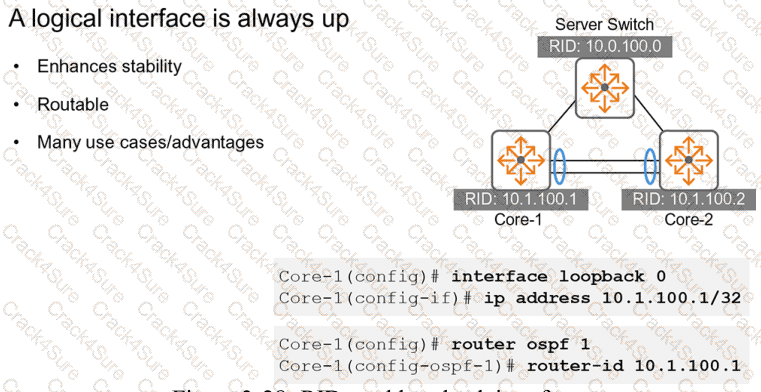
HPE Press study-guide figure / related learning illustration · Fig 3-28 loopback
An AOS-CX switch interface, 1/1/24, is configured with vlan trunk allowed all. After new VLAN ID 100 is created, how does traffic flow on the existing port?
New VLAN is forwarded on the port.
New VLAN requires port shutdown and no shutdown issued.
New VLAN needs to be added to allowed vlan list.
New VLAN needs to be added as Native VLAN.
Comprehensive and Detailed Explanation
HPE Press guide context | PDF page 125 | HPE Press, Aruba Certified Associate – Campus Access Official Certification Study Guide
Technical Deep Dive — Original Chat Wording
The command vlan trunk allowed all configures an AOS-CX trunk to permit traffic associated with all VLANs defined on the switch.
An important characteristic is that the permitted VLAN membership automatically includes subsequently created VLANs.
For example, consider the configuration:
configure terminal
interface 1/1/24
no routing
vlan trunk native 1
vlan trunk allowed all
Initially, the switch may contain VLANs 1, 10, and 20.
If the administrator subsequently creates VLAN 100:
vlan 100
name NEW_USERS
VLAN 100 becomes eligible to traverse interface 1/1/24 without requiring another vlan trunk allowed command.
This differs from explicitly permitting a fixed VLAN list such as 10,20 , where an additional VLAN would need to be added manually.
There is no requirement to shut down and re-enable the interface merely because a VLAN has been created.
There is also no requirement to configure VLAN 100 as the native VLAN.
For successful end-to-end communication, the VLAN must exist where needed, the connected switching devices must permit it, and the relevant forwarding paths must be operational.
The all command permits the new VLAN; it does not independently guarantee connectivity through the entire network.
Therefore, Option A is correct.
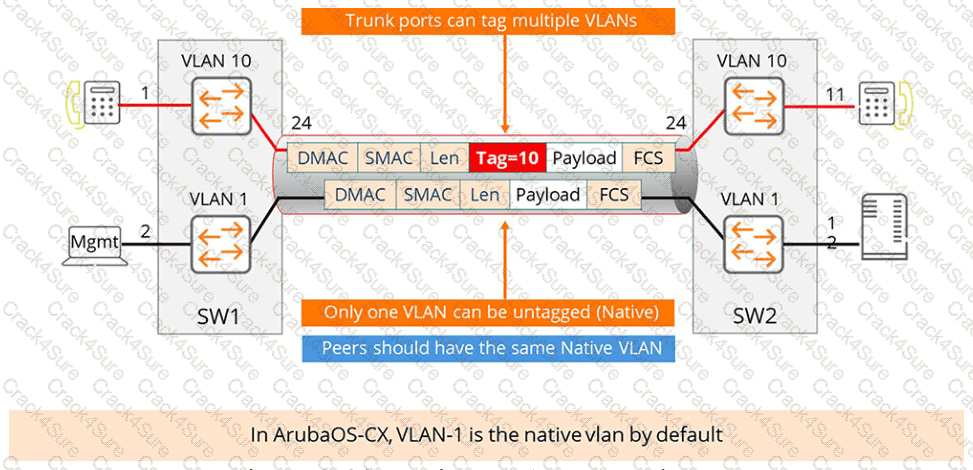
HPE Press study-guide figure / related learning illustration · Q139 Fig 2-33 NativeVLAN
Which option can be used when scheduling reports in HPE Aruba Networking Central?
User permission overrides
Audit log filtering
Regular interval delivery
Regular delivery intervals on a custom time range reports
Comprehensive and Detailed Explanation
HPE Press guide context | PDF page 1030 | HPE Press, Aruba Certified Associate – Campus Access Official Certification Study Guide
Technical Deep Dive — Original Chat Wording
HPE Aruba Networking Central supports report generation for network monitoring, performance analysis, and operational review.
Reports can be generated immediately, scheduled for a later time, or configured to run repeatedly.
Recurring report delivery allows administrators to receive updated network information without manually generating every report.
For example, an organization may schedule a weekly report covering network utilization, wireless-client activity, and infrastructure health.
Administrators can specify a recurrence schedule and configure supported delivery settings.
The resulting reports can be distributed to appropriate recipients through email.
The distinction between a report's data period and its delivery schedule is important.
The data period determines which historical measurements are included.
The recurrence schedule determines when Central generates or delivers the report.
The report-generation interface supports intervals such as daily, weekly, and monthly, depending on report type and software version.
Option D incorrectly combines regular recurrence with a fixed custom historical time range as though that combination were universally supported. HPE documents custom historical ranges separately from the ordinary recurring-report options.
User permission overrides and audit-log filtering are not report-scheduling methods.
Therefore, Option C (Regular interval delivery) is correct.
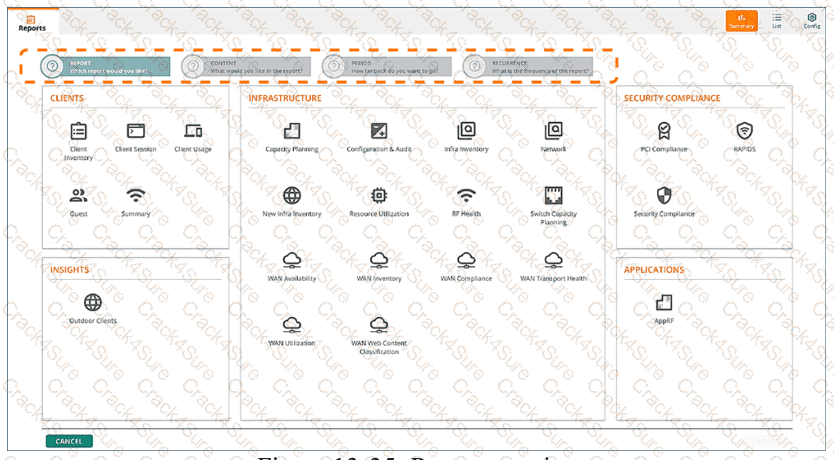
HPE Press study-guide figure / related learning illustration · Q153 Fig 13-35 Reports
Which fiber connector is used most commonly for AOS-CX switches?
SC
LC/APC
LC
ST
Comprehensive and Detailed Explanation
HPE Press guide context | PDF page 42 | HPE Press, Aruba Certified Associate – Campus Access Official Certification Study Guide
Technical Deep Dive — Reconstructed (Original Chat Text Not Recoverable)
LC (Lucent Connector) is the compact optical connector commonly used by SFP and QSFP breakout fiber interfaces in campus switches. LC/APC has an angled polish and is not the ordinary switch transceiver connector. SC and ST exist in legacy fiber deployments, but LC is the standard connector for the optics highlighted in the HPE Press guide.
The selected answer corresponds to C: LC. This matches the mechanism or management behavior described in the scenario rather than merely a related network feature.
Operational workflows should preserve consistent inventory, authorization, configuration history, and monitoring so that administrators can locate and manage devices predictably.
The operational view should be interpreted together with its underlying records: an alert, subscription count, or device status may describe management state rather than physical availability.
The practical deployment consequence is important: a plausible configuration can still fail when the peer interface, device role, licensing scope, or physical medium is mismatched. Checking that surrounding dependency avoids a misleading diagnosis.
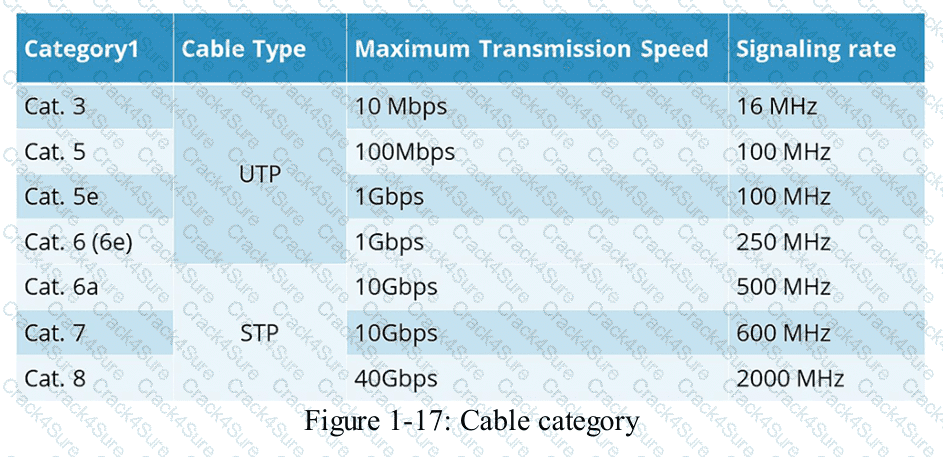
HPE Press study-guide figure / related learning illustration · Q132 Fig 1-17 Cable Cat
Match each IP address range to its correct designation.
Drag & Drop
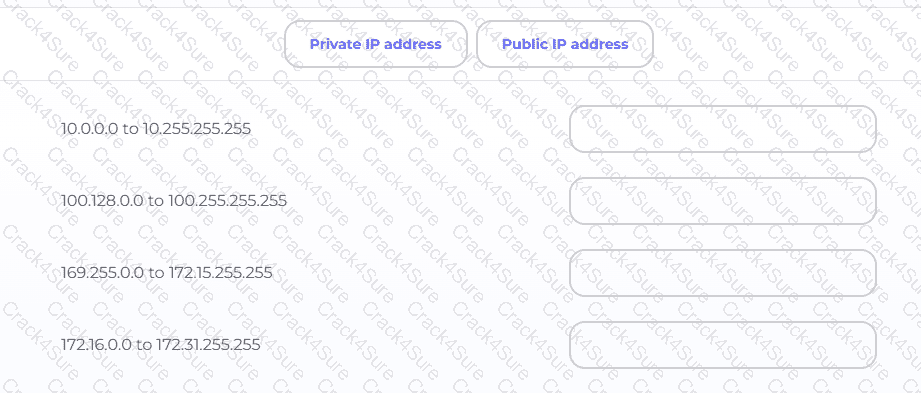
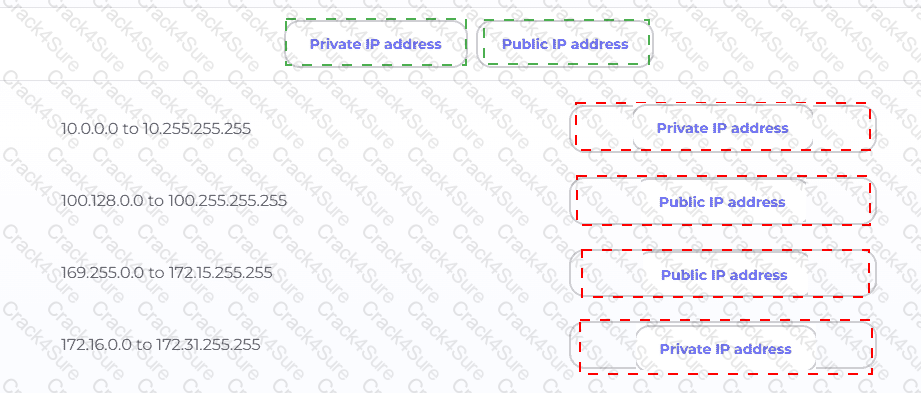
Exhibit item
Correct match
10.0.0.0 to 10.255.255.255
Private
100.128.0.0 to 100.255.255.255
Public (non-RFC1918)
169.255.0.0 to 172.15.255.255
Public (non-RFC1918)
172.16.0.0 to 172.31.255.255
Private
Comprehensive and Detailed Explanation
HPE Press guide context | PDF page 922 | HPE Press, Aruba Certified Associate – Campus Access Official Certification Study Guide
Technical Deep Dive — Original Chat Wording
IPv4 addresses are classified according to their allocation and intended use. RFC 1918 defines three address blocks reserved for private networks.
These addresses can be used internally without being globally unique across organizations. However, they are not intended to be routed directly across the public Internet.
The range 10.0.0.0–10.255.255.255 corresponds to 10.0.0.0/8 , making it private.
The range 172.16.0.0–172.31.255.255 corresponds to 172.16.0.0/12 , also making it private.
The address block 100.128.0.0–100.255.255.255 is outside the RFC 1918 private ranges. It is also outside the special shared-address block 100.64.0.0/10 , used for carrier-grade NAT. It is therefore classified as public address space for this question.
Similarly, 169.255.0.0–172.15.255.255 lies outside the RFC 1918 private blocks. Notably, the IPv4 link-local range is 169.254.0.0/16 , which is not included here.
Private addresses typically require Network Address Translation (NAT) when accessing public Internet resources.
The central principle is that addresses beginning with 172 are not automatically private; only 172.16.0.0/12 is reserved under RFC 1918.
Therefore, the correct sequence is Private, Public, Public, Private .
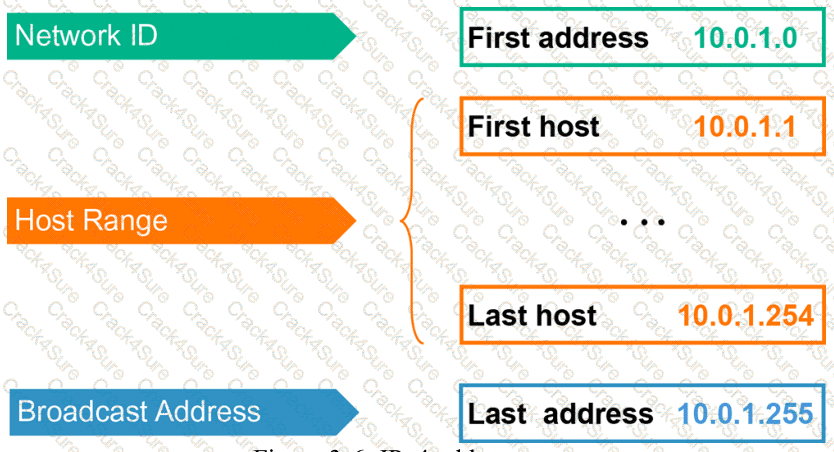
HPE Press study-guide figure / related learning illustration · Q151 Fig 3-6 IP types
Which method is valid for providing device credentials to end users during onboarding?
Push credentials through a software update process.
Share certificates by emailing them to users.
Download certificates using ClearPass Onboard Software.
Upload device credentials using a CSV import.
Comprehensive and Detailed Explanation
HPE Press guide context | PDF page 837 | HPE Press, Aruba Certified Associate – Campus Access Official Certification Study Guide
Technical Deep Dive — Original Chat Wording
HPE Aruba Networking ClearPass Onboard simplifies the provisioning of certificates and network access configurations for supported endpoint devices.
This capability is particularly useful in Bring Your Own Device (BYOD) environments, where administrators may not directly manage every client operating system.
ClearPass Onboard can present an enrollment workflow that allows users to authenticate and register their devices.
Following successful registration, the system can generate or obtain the appropriate device credentials and guide the client through installation.
These credentials can then be used for secure IEEE 802.1X authentication, typically with EAP-TLS.
Certificate-based authentication provides stronger identity assurance than relying solely on shared passwords.
ClearPass can operate with its own certificate authority or integrate with supported enterprise PKI services.
This allows the organization to manage certificate issuance, device identities, and credential revocation.
For example, an employee may use the onboarding portal to register a personal laptop and obtain a device-specific certificate.
The certificate then enables the laptop to authenticate to the corporate WLAN according to the organization's access policy.
Emailing private-key-bearing certificate packages is not the preferred secure enrollment method.
Software updates do not inherently provide an appropriate certificate-enrollment process, and CSV import is not the normal method for delivering individual device credentials to users.
Therefore, Option C (Download certificates using ClearPass Onboard Software) is correct.
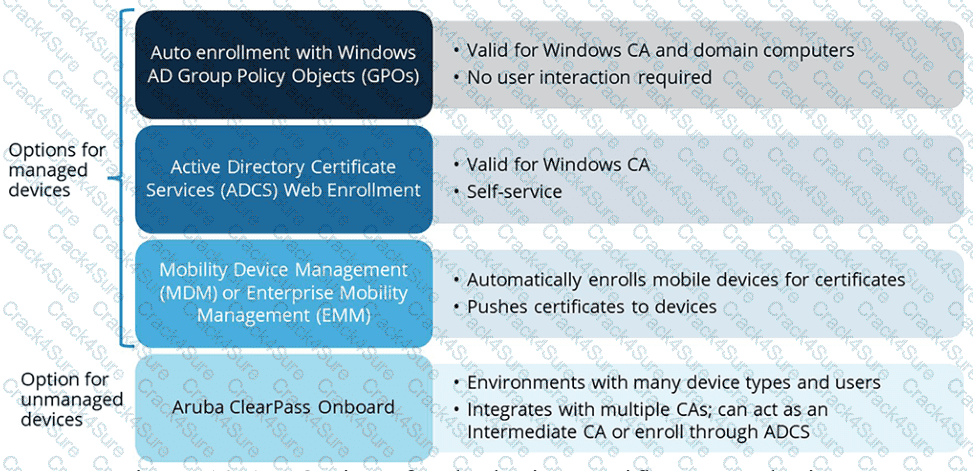
HPE Press study-guide figure / related learning illustration · Q145 Fig 10-17 Cert
Which VSF topologies are recommended?
Choose two
Full mesh plus MAD
Full mesh
Star
Ring
Daisy chain plus MAD
Comprehensive and Detailed Explanation
HPE Press guide context | PDF page 476 | HPE Press, Aruba Certified Associate – Campus Access Official Certification Study Guide
Technical Deep Dive — Reconstructed (Original Chat Text Not Recoverable)
VSF ring topology provides resilient member interconnections and is the recommended primary shape. A daisy chain with appropriate multi-active detection can be supported as an alternative but has less resilience. Star/full-mesh designs are not the standard VSF member-link topologies in this study guide.
The selected answer corresponds to D: Ring; E: Daisy chain plus MAD. This matches the mechanism or management behavior described in the scenario rather than merely a related network feature.
Operational workflows should preserve consistent inventory, authorization, configuration history, and monitoring so that administrators can locate and manage devices predictably.
Consistent RBAC, accurate inventories, and retained audit records simplify support handovers and reduce uncertainty during incident investigations.
When reviewing alternatives, identify which one directly addresses the stated requirement, rather than selecting a related capability that is useful elsewhere but does not fulfill the requested task.
The wrong choices may describe real technologies, but they perform different functions, apply to another layer, or omit a required prerequisite. Select the answer that resolves the exact scenario, not a nearby administrative task.
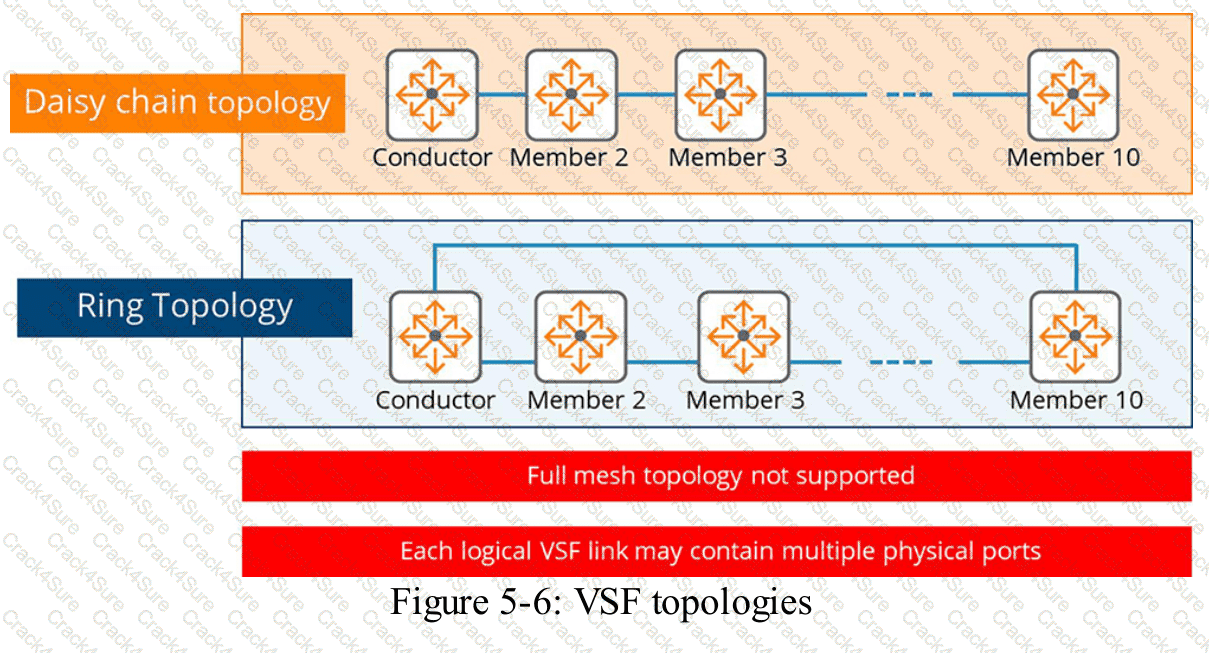
HPE Press study-guide figure / related learning illustration · Fig 5-6 VSF
Based on the show ip route output on a CX 8325, what route type is 10.20.0.0/22, vrf default via 10.1.1.1, [110/200]?
static
local
OSPF
connected
Comprehensive and Detailed Explanation
HPE Press guide context | PDF page 231 | HPE Press, Aruba Certified Associate – Campus Access Official Certification Study Guide
Technical Deep Dive — Reconstructed (Original Chat Text Not Recoverable)
In AOS-CX route output `[110/200]`, the first number indicates administrative distance and the second represents metric. Default OSPF administrative distance is 110; connected routes use 0 and static routes 1. The displayed remote next hop is therefore learned through OSPF in the default case.
The selected answer corresponds to C: OSPF. This matches the mechanism or management behavior described in the scenario rather than merely a related network feature.
A disciplined investigation compares the observed symptom with expected behavior, tests the most likely failure stage, and verifies recovery rather than assuming that a single command has resolved the problem.
Collecting interface counters, event timestamps, configuration history, and service-test results helps determine whether a symptom originates locally or depends on another device.
The answer should be validated against both the control-plane state and the forwarding or management outcome. A successful individual command alone is not proof that the end-to-end requirement is satisfied.
When troubleshooting or designing a change, verify compatibility between all participating devices, the management scope, and the applicable software release. The most useful evidence is the state observed on both sides of the affected connection.
What must be done to ensure that HPE Aruba Networking Central can configure devices?
Assign devices to floor plans.
Assign device functions to devices.
Assign a name to the device.
Create a device inventory record.
Comprehensive and Detailed Explanation
HPE Press guide context | PDF page 567 | HPE Press, Aruba Certified Associate – Campus Access Official Certification Study Guide
Technical Deep Dive — Original Chat Wording
HPE Aruba Networking Central uses device functions to classify infrastructure devices according to their intended network role.
This classification determines which configuration profiles and features can be assigned to the device.
For AOS-CX switches, functions include Access Switch, Aggregation Switch, and Core Switch.
For example, an access switch may require endpoint authentication, port-access policies, and edge-device configurations.
A core switch may instead require routing protocols, high-speed interconnections, and different infrastructure policies.
Central uses the selected device function to ensure that compatible configuration profiles are offered and applied.
In the newer Central onboarding architecture, device functions must be assigned to supported switches before they can be fully configured.
Access points and gateways may receive their functions automatically through the supported onboarding workflow, while switches require explicit assignment.
Device registration remains necessary but is not sufficient by itself.
A device must also satisfy applicable site, group, subscription, and provisioning prerequisites.
Assigning a floor plan improves physical-location visibility but does not determine which configuration profiles a device can use.
Similarly, a device name identifies equipment without establishing its configuration role.
Therefore, Option B (Assign device functions to devices) is correct for the Central configuration architecture described.

HPE Press study-guide figure / related learning illustration · Q137 Fig 7-1 Onboard
When searching for devices in Floor Plan Manager, which fields are available as filters?
Choose two
Site name
Device name
Floor name
Device type
Device model
Comprehensive and Detailed Explanation
HPE Press guide context | PDF page 667 | HPE Press, Aruba Certified Associate – Campus Access Official Certification Study Guide
Technical Deep Dive — Original Chat Wording
HPE Aruba Networking Central Floor Plan Manager allows administrators to organize and position access points within site and building floor plans.
In large deployments, the list of available devices may contain many entries.
Filtering makes it easier to identify the equipment that should be assigned to a particular floor.
The interface provides two relevant structured filtering criteria: device type and device model.
A device-type filter narrows the available devices according to their infrastructure category.
A device-model filter further restricts the results to supported hardware models.
For example, an administrator may select access points and then choose a specific AP model to identify the devices being installed on a floor.
The device-assignment workflow also includes a search field.
The search function can locate devices using information such as name, model, MAC address, or serial number.
However, a free-text search field is distinct from the predefined filtering categories described by the question.
Site selection establishes the location context before opening the floor-assignment workflow.
Floor selection determines the destination floor rather than serving as the device-type filter.
The filtering functionality helps reduce assignment mistakes and improves efficiency when preparing large physical deployments.
Therefore, Options D and E are correct.
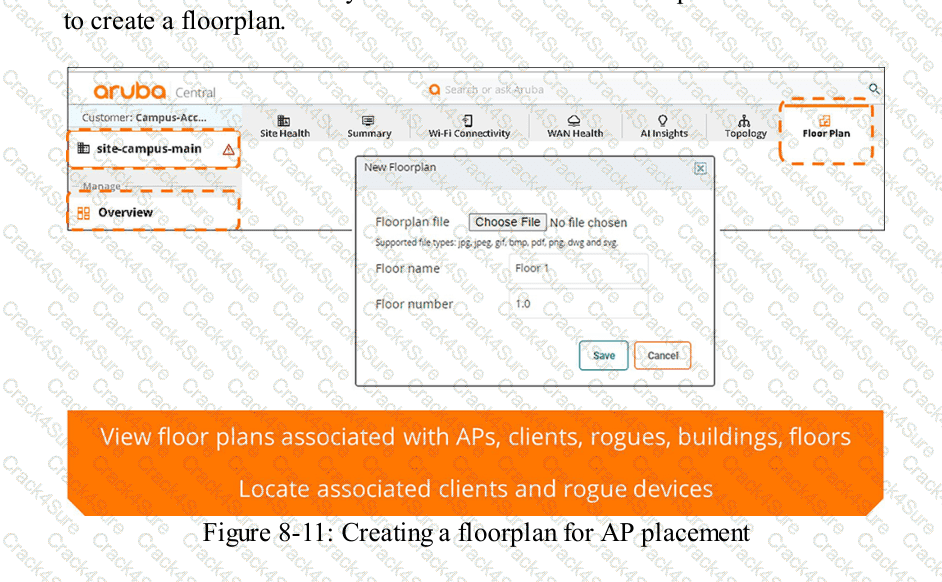
HPE Press study-guide figure / related learning illustration · Q178 Fig 8-11 Floorplan
Which statement is true regarding role-based access control (RBAC) in HPE Aruba Networking Central?
Roles are assigned based on device groups
Permissions are assigned based on user roles
Permissions are granted to individual users directly
RBAC assigns access based on user location
Comprehensive and Detailed Explanation
HPE Press guide context | PDF page 842 | HPE Press, Aruba Certified Associate – Campus Access Official Certification Study Guide
Technical Deep Dive — Original Chat Wording
Role-Based Access Control (RBAC) is an authorization framework that determines which operations users are permitted to perform according to their assigned roles.
In HPE Aruba Networking Central, RBAC helps organizations separate administrative responsibilities and restrict access to sensitive network configuration functions.
Instead of independently defining every permission for every administrator, an organization assigns permissions to roles.
Users are then associated with the appropriate roles according to their operational responsibilities.
For example, an Administrator role can provide broad configuration and management permissions.
An Operator role can permit selected operational and troubleshooting activities without necessarily granting full administrative access.
A View Only role restricts users to permitted read-only operations.
This approach simplifies access management, particularly when organizations have large IT teams with different responsibilities.
RBAC also supports the principle of least privilege, whereby users receive only the permissions necessary to perform their assigned duties.
Modern Central deployments can additionally use scope and resource restrictions to control where those permissions apply.
However, location or device-group membership alone does not define RBAC permissions.
The essential relationship is that permissions belong to roles, and roles are assigned to users .
This distinction improves consistency, reduces administrative errors, and simplifies security auditing.
Therefore, Option B (Permissions are assigned based on user roles) is correct.
What type of knowledge is needed to establish a strong foundation for effective troubleshooting?
personal experience with similar technical problems
step-by-step instructions from product user manuals
detailed familiarity with every available troubleshooting tool
general principles about how systems should work
Comprehensive and Detailed Explanation
HPE Press guide context | PDF page 1059 | HPE Press, Aruba Certified Associate – Campus Access Official Certification Study Guide
Technical Deep Dive — Original Chat Wording
Effective network troubleshooting depends first on understanding how the system is expected to operate.
Without a sound technical model, administrators may collect large quantities of diagnostic information without recognizing which observations are relevant.
For campus networking, foundational knowledge includes Ethernet forwarding, VLANs, ARP, IP addressing, routing, wireless association, authentication, and network-management behavior.
Consider a client that cannot access the internet.
An administrator who understands the networking process can systematically investigate physical connectivity, VLAN assignment, IP addressing, default-gateway reachability, DNS resolution, and application connectivity.
This structured approach helps isolate the fault instead of making unrelated configuration changes.
For example, if a wireless client has a valid IP address and can successfully ping its gateway but cannot resolve domain names, DNS becomes a more likely investigation target than the AP's physical connection.
Experience with similar problems can improve troubleshooting speed, but experience alone may encourage incorrect assumptions.
Vendor documentation provides important commands and product-specific procedures, yet it cannot replace understanding the protocols underlying a failure.
Knowledge of troubleshooting tools is also valuable, but an administrator must understand what each test establishes and what its result does not prove.
Therefore, Option D (General principles about how systems should work) is correct.
After selecting the Available Subscriptions number on the Inventory and Subscriptions card, what information is available to you?
Expiration information for subscription keys and subscriptions.
Firmware versions installed on devices in the subscription list.
Client onboarding success rates across different network segments.
Device assignment history for each onboarding attempt by user.
Comprehensive and Detailed Explanation
HPE Press guide context | PDF page 577 | HPE Press, Aruba Certified Associate – Campus Access Official Certification Study Guide
Technical Deep Dive — Original Chat Wording
HPE Aruba Networking Central uses subscription entitlements to authorize the management of supported switches, access points, and gateways.
The Inventory and Subscriptions card summarizes the number of registered devices and the available management subscriptions.
Selecting Available Subscriptions opens the detailed Subscription Keys page.
This page allows administrators to review subscription-related information, including available entitlements and their expiration status.
For example, a company may have multiple subscription keys purchased at different times.
Each key can have a different expiration date, making centralized subscription tracking important.
Administrators can identify subscriptions approaching expiration and plan renewals before management-service entitlements are interrupted.
The interface also helps organizations distinguish between available subscription capacity and subscriptions already assigned to managed devices.
Firmware versions are managed through device inventory and firmware-management functions.
Client onboarding success rates concern network-access performance and authentication processes.
Device assignment history may be recorded through applicable audit functions, but it is not the information specifically exposed by selecting Available Subscriptions.
Understanding subscription expiration is particularly important for networks that rely on continuous cloud-based infrastructure management.
Therefore, Option A (Expiration information for subscription keys and subscriptions) is correct.
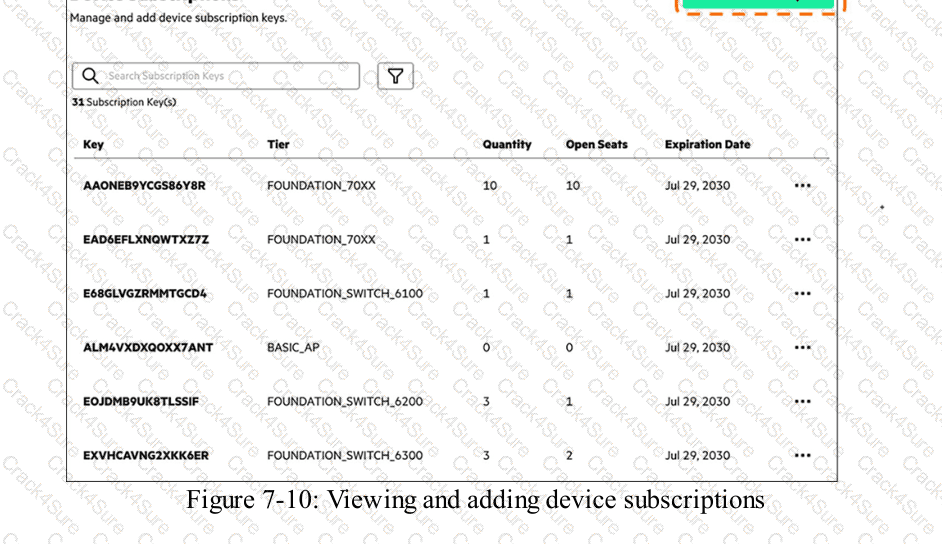
HPE Press study-guide figure / related learning illustration · Q168 Fig 7-10 Subscriptions
You are helping a friend configure a network in a multi-story shopping mall. You need the network to carry traffic for multiple VLANs while using fewer cables between switches. Which step follows best practices for using trunk ports and VLAN tagging?
Set trunk ports to untagged mode so they automatically identify which VLAN traffic belongs to on each frame.
Use trunk ports to carry traffic from multiple VLANs over a single physical link between switches.
Assign each trunk port to only one VLAN to ensure that each VLAN remains isolated in the network.
Configure access ports with VLAN tagging instead of using trunk ports to carry several VLANs.
Comprehensive and Detailed Explanation
HPE Press guide context | PDF page 124 | HPE Press, Aruba Certified Associate – Campus Access Official Certification Study Guide
Technical Deep Dive — Original Chat Wording
IEEE 802.1Q VLAN tagging allows multiple logically separated networks to share the same physical Ethernet connection.
This capability is essential in multi-story buildings where access switches serving different floors connect to distribution switches through a limited number of uplink cables.
An Ethernet trunk carries frames belonging to several VLANs. VLAN tags identify the originating broadcast domain so that receiving switches can forward traffic appropriately.
For example, VLAN 10 may carry employee traffic, VLAN 20 may carry guest traffic, and VLAN 30 may carry surveillance traffic.
Instead of deploying three separate uplinks, a single appropriately sized trunk can transport all three VLANs.
On an AOS-CX switch, a representative configuration is:
configure terminal
interface 1/1/49
no routing
vlan trunk native 1
vlan trunk allowed 10,20,30
no shutdown
The connected switch must have compatible VLAN and trunk configuration.
Most traffic on a standard 802.1Q trunk is tagged, while native-VLAN handling follows the configured trunk mode.
Access ports ordinarily associate untagged endpoint traffic with one VLAN and are not intended to transport multiple independently tagged endpoint VLANs.
Therefore, Option B is correct.
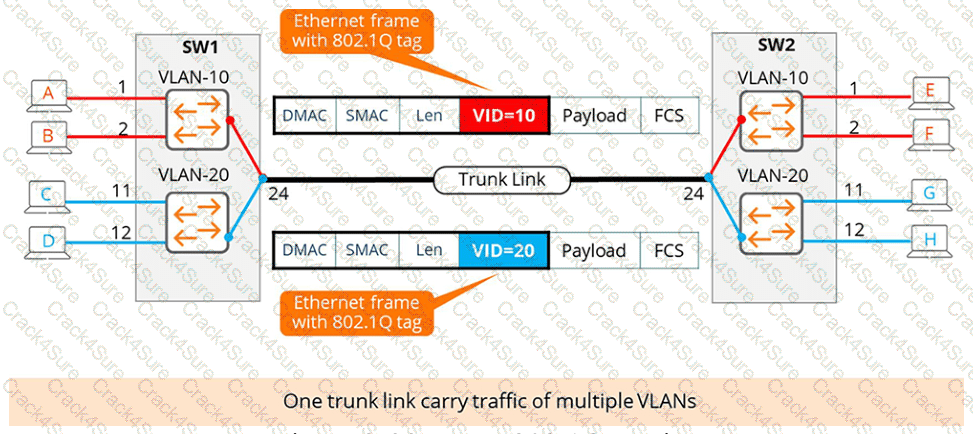
HPE Press study-guide figure / related learning illustration · Q136 Fig 2-32 8021Q
Which connections can be used to perform the initial setup of an AOS-CX switch?
Choose two
Bluetooth dongle and the HPE Aruba Networking location app
an RJ45 cross-cable and HPE Aruba Networking EasySetup
a USB-C cable plus PuTTY and a Windows-USB Driver
a serial cable to the RJ45 console port and a Terminal software like TeraTerm set to a Baud rate of 115200
the orange HPE Aruba Networking console cable and HPE Aruba Networking Switch Multi-Edit Software
Comprehensive and Detailed Explanation
HPE Press guide context | PDF page 87 | HPE Press, Aruba Certified Associate – Campus Access Official Certification Study Guide
Technical Deep Dive — Original Chat Wording
Initial configuration of an AOS-CX switch is commonly performed through its dedicated serial-console interface.
The console provides out-of-band management access without requiring the switch to have an operational IP address.
Depending on the switch model, the console interface may use USB-C, RJ-45 serial connectivity, or supported alternatives.
For a USB-C console, the administrator connects a compatible USB-C cable between the switch and a computer.
The operating system must recognize the resulting serial interface. A suitable driver may be required on some Windows systems.
Terminal-emulation software such as PuTTY can then establish the session.
For an RJ-45 serial console, the administrator uses the appropriate console cable and a compatible computer serial interface or adapter.
TeraTerm can establish the serial session using the required settings.
The standard configuration is:
Baud rate: 115200 bps
Data bits: 8
Parity: None
Stop bits: 1
Flow control: None
The guide also mentions Bluetooth-based initial management using the Aruba CX Mobile app , not the location app specified in Option A.
An RJ-45 crossover Ethernet cable does not replace the serial-console mechanism, and Switch Multi-Edit is not the terminal application described for this procedure.
Therefore, Options C and D are correct.
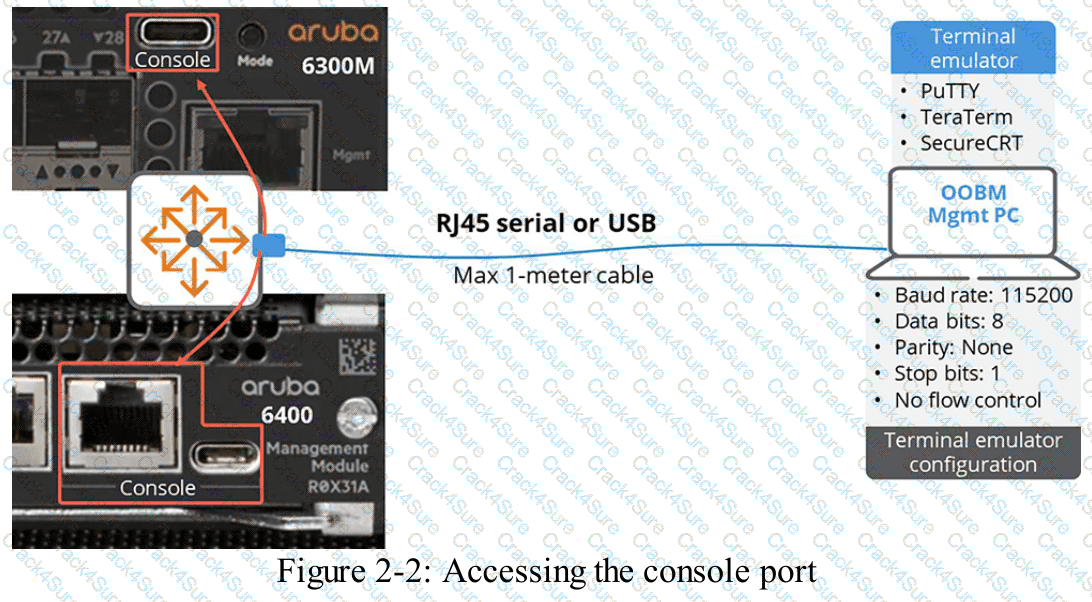
HPE Press study-guide figure / related learning illustration · Q200 Fig 2 2 Console Connection
Which command can be used to verify that all four 10G links in an LACP-LAG are operating correctly?
show interface lag verbose
show interface lag brief
show lacp
show link-aggregation summary
Comprehensive and Detailed Explanation
HPE Press guide context | PDF page 154 | HPE Press, Aruba Certified Associate – Campus Access Official Certification Study Guide
Technical Deep Dive — Reconstructed (Original Chat Text Not Recoverable)
The AOS-CX `show interface lag brief` command displays the active LAG interface and aggregate operational speed, which should be consistent with four active 10-Gb/s members. `show lacp interfaces` adds per-member partner and synchronization details. Generic commands from other switch vendors should not be assumed valid on AOS-CX.
The selected answer corresponds to B: show interface lag brief. This matches the mechanism or management behavior described in the scenario rather than merely a related network feature.
Operational workflows should preserve consistent inventory, authorization, configuration history, and monitoring so that administrators can locate and manage devices predictably.
The operational view should be interpreted together with its underlying records: an alert, subscription count, or device status may describe management state rather than physical availability.
The practical deployment consequence is important: a plausible configuration can still fail when the peer interface, device role, licensing scope, or physical medium is mismatched. Checking that surrounding dependency avoids a misleading diagnosis.
When troubleshooting or designing a change, verify compatibility between all participating devices, the management scope, and the applicable software release. The most useful evidence is the state observed on both sides of the affected connection.
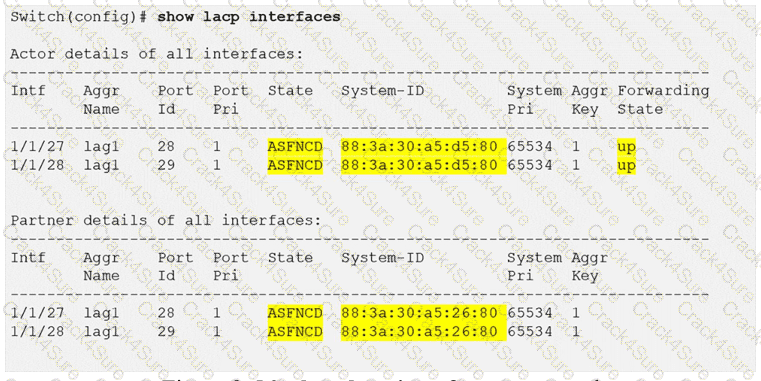
HPE Press study-guide figure / related learning illustration · Fig 2-56 LACP state
What action should you take after resolving an issue that triggered a network alert?
Acknowledge the alert in the monitoring system.
Defer the alert to review it later.
Clear the alert from the active alerts list.
Set the alert to a lower priority level.
Comprehensive and Detailed Explanation
HPE Press guide context | PDF page 1028 | HPE Press, Aruba Certified Associate – Campus Access Official Certification Study Guide
Technical Deep Dive — Original Chat Wording
An alert indicates that a monitored network condition has met the criteria for administrative attention.
After investigating and resolving the underlying problem, the administrator should confirm that normal operation has been restored.
For example, if an AP-disconnection alert was caused by a failed switch port, the technician should verify that the AP reconnects and that client connectivity has recovered.
Acknowledgment allows the administrator to mark the reported alert as reviewed.
In the documented Central interface, acknowledged alerts move to a separate view, preserving their history while removing them from the normal open-alert workflow.
However, acknowledging an alert does not independently repair the network.
If the underlying condition remains active, the monitoring system may continue collecting events and generating notifications according to its configured behavior.
Some alerts are automatically acknowledged when their triggering conditions clear.
Consequently, a technician should avoid manually dismissing alerts without confirming that the associated fault has been resolved.
Deferral postpones attention and is inappropriate when the issue has already been corrected.
Reducing priority changes the alert's urgency but does not establish closure.
The documented operator action that best matches the question is acknowledgment.
Therefore, Option A (Acknowledge the alert in the monitoring system) is correct.
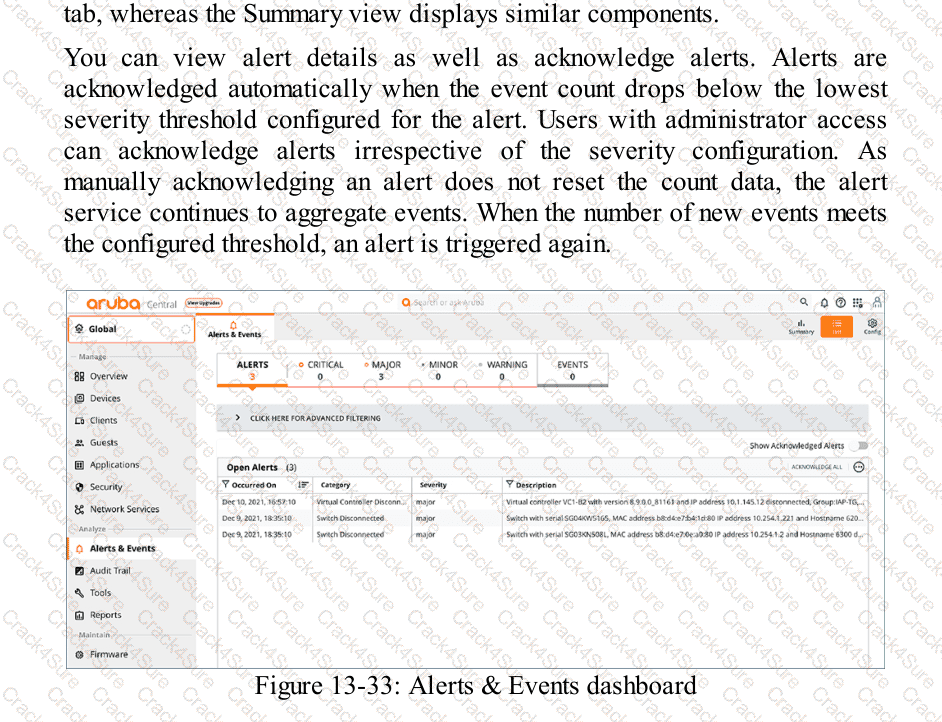
HPE Press study-guide figure / related learning illustration · Q176 Fig 13-33 Alerts
Which action helps apply WLAN best practice to secure a wireless network for employees?
Enable MAC authentication for employee access.
Provided an assigned pre-shared key for each employee.
Use 802.1X authentication for employee access.
Use a shared passphrase for all users.
Comprehensive and Detailed Explanation
HPE Press guide context | PDF page 818 | HPE Press, Aruba Certified Associate – Campus Access Official Certification Study Guide
Technical Deep Dive — Original Chat Wording
IEEE 802.1X provides port-based network access control and is a standard approach for securing enterprise wireless networks.
It uses three main components: the supplicant, authenticator, and authentication server.
The supplicant is the employee's endpoint, such as a laptop or smartphone.
The authenticator is typically the wireless access point, while the authentication server commonly uses RADIUS.
In an HPE Aruba Networking deployment, ClearPass Policy Manager can provide centralized authentication and authorization services.
When an employee attempts to connect, the AP exchanges EAP authentication information between the client and authentication server.
The server evaluates the credentials and determines whether access should be granted.
The resulting authorization can include user roles, VLAN information, or other supported policy attributes.
Certificate-based EAP-TLS is particularly suitable for managed enterprise devices because it provides strong mutual authentication.
MAC authentication is weaker because MAC addresses can be observed and spoofed.
Individual PSKs can improve security in certain environments, but enterprise 802.1X provides more comprehensive identity-based control.
A shared passphrase for all employees introduces unnecessary credential-sharing and revocation risks.
Therefore, Option C (Use 802.1X authentication for employee access) is correct.
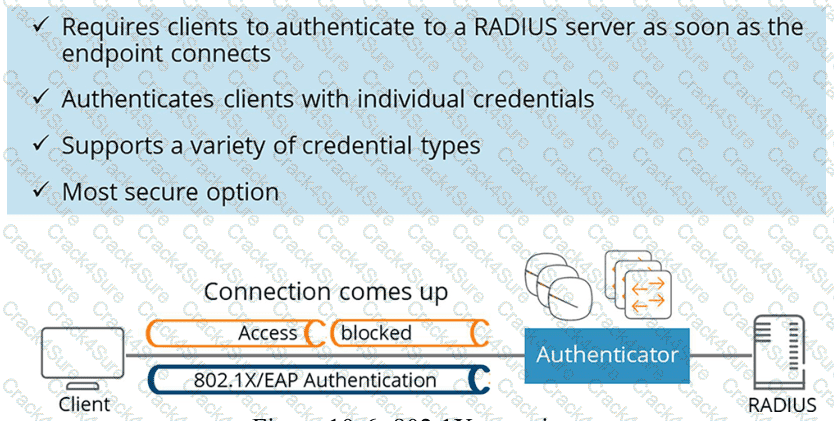
HPE Press study-guide figure / related learning illustration · Q162 Fig 10-6 8021x
Which action explains how to carry out a hard reset on a switch?
Press and hold the Reset button for exactly two seconds, then release it immediately.
Press and hold the Reset button for more than five seconds, then release it.
Hold the Reset button while turning the switch on to trigger the reset process.
Press and release the Reset button quickly and wait for the switch to restart.
Comprehensive and Detailed Explanation
HPE Press guide context | PDF page 1008 | HPE Press, Aruba Certified Associate – Campus Access Official Certification Study Guide
Technical Deep Dive — Original Chat Wording
A hard reset forces a network switch to restart in a manner comparable to cycling its power.
It is particularly useful when the switch has become unresponsive and cannot be rebooted through the ordinary operating-system interface.
On supported AOS-CX switches, the Reset button is recessed to reduce the likelihood of accidental activation.
An administrator can use a suitable pointed tool to operate it.
The duration for which the button remains pressed determines the reset operation.
Soft reset: Release before 5 seconds
Hard reset: Release between 5 and 20 seconds
Factory reset: Release between 20 and 25 seconds, where enabled
A soft reset attempts a controlled system restart.
A hard reset performs a more forceful restart, which may be appropriate when the CPU or operating system is not responding.
A factory reset is different because it can remove the switch's configuration and restore factory-default operation.
Therefore, engineers must avoid holding the Reset button longer than necessary.
A hard reset interrupts forwarding while the switch restarts and should be performed only when operationally appropriate.
The original answer states only that the button should be held for more than five seconds. For technical accuracy, the release should occur before 20 seconds .
Therefore, Option B is correct, subject to that timing requirement.
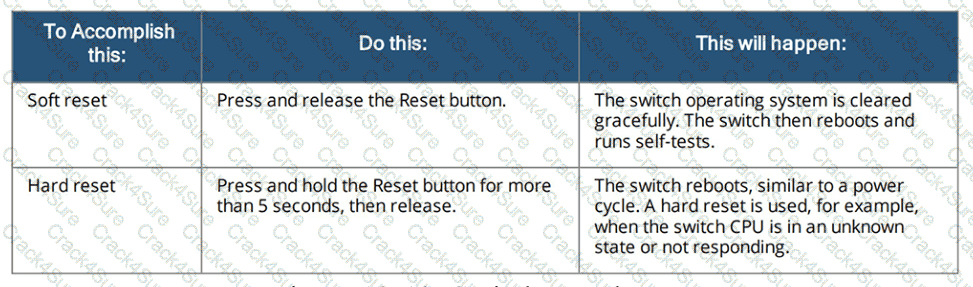
HPE Press study-guide figure / related learning illustration · Q147 Fig 13-13 Reset
You are configuring a network device’s system settings. Which foundational network service should be included to ensure connectivity to HPE Aruba Networking Central?
SSH for secure access.
DNS for name resolution.
Syslog for log storage.
SNMP for device monitoring.
Comprehensive and Detailed Explanation
HPE Press guide context | PDF page 609 | HPE Press, Aruba Certified Associate – Campus Access Official Certification Study Guide
Technical Deep Dive — Original Chat Wording
Domain Name System (DNS) is a foundational network service that translates hostnames into IP addresses.
HPE Aruba Networking Central-managed devices commonly communicate with cloud services identified by fully qualified domain names.
DNS resolution enables a device to identify the IP addresses associated with those management-service endpoints.
For example, a switch may need to resolve the hostname of an Aruba Central service before establishing its management connection.
Without functioning name resolution, hostname-based service connections may fail even when ordinary IP routing is operational.
AOS-CX supports explicit DNS server configuration through commands such as:
configure terminal
ip dns server-address 10.254.1.21
Administrators should verify DNS reachability, default routing, and permitted outbound connectivity.
SSH provides secure command-line management but is not the hostname-resolution service used to locate Central endpoints.
Syslog delivers event records to logging destinations.
SNMP supports device monitoring and management information exchange.
Neither Syslog nor SNMP substitutes for DNS.
An important distinction is that the study-guide version of the AOS-CX Central client includes a default DNS resolver for its own cloud communication.
Therefore, a manually configured global DNS server is not universally required in every supported deployment.
Nevertheless, working DNS resolution remains important when Central services are identified through hostnames.
Therefore, Option B (DNS for name resolution) is correct.
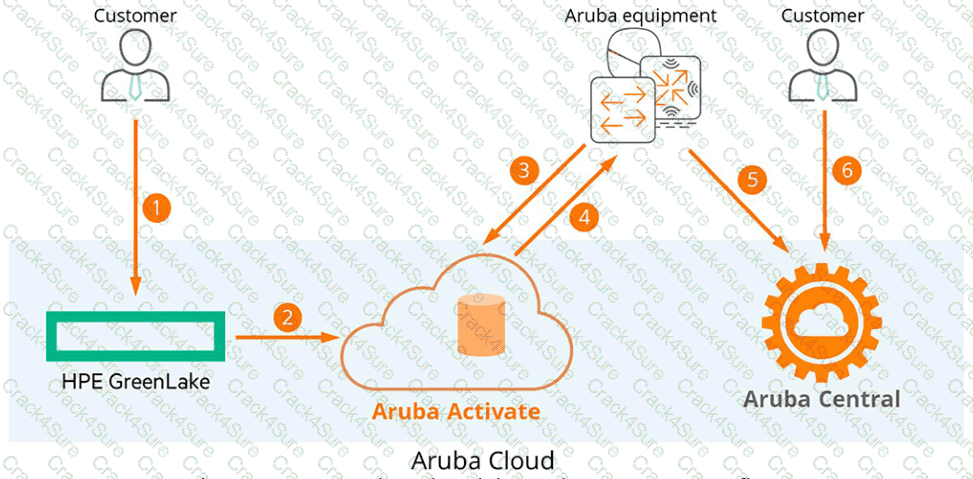
HPE Press study-guide figure / related learning illustration · Q148 Fig 7-7 Central
Match each Open Systems Interconnection (OSI) layer to its function.
Drag & Drop
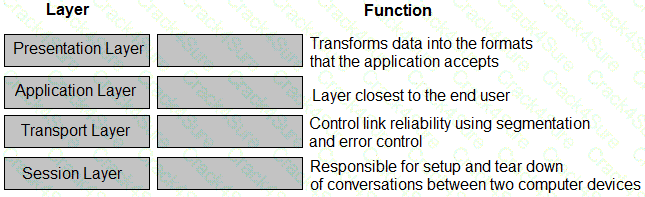
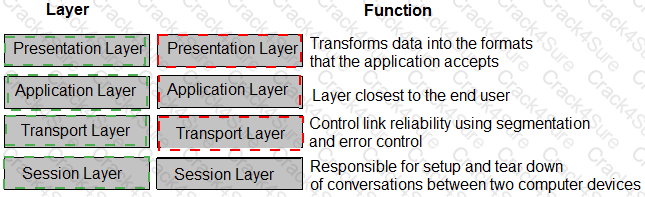
See mapping
Exhibit item
Correct match
Presentation layer
Transforms data into formats applications understand
Application layer
Layer closest to the end user
Transport layer
Controls reliability using segmentation and error control
Session layer
Responsible for setting up and tearing down conversations
Comprehensive and Detailed Explanation
HPE Press guide context | PDF page 29 | HPE Press, Aruba Certified Associate – Campus Access Official Certification Study Guide
Technical Deep Dive — Reconstructed (Original Chat Text Not Recoverable)
The application layer supplies network services close to the user; presentation handles representation and encoding; session handles conversation setup and teardown; and transport performs segmentation, end-to-end reliability, and port multiplexing. The exhibit maps each OSI layer to the matching function. Layer 3 routes packets and Layer 2 frames local-hop traffic.
The exhibit is a matching question: each original item must be paired with the applicable protocol, medium, security function, or address classification. The answer table below records the intended correspondence without changing the source exhibit.
Operational workflows should preserve consistent inventory, authorization, configuration history, and monitoring so that administrators can locate and manage devices predictably.
For example, a cloud-managed infrastructure device may be registered successfully but still require the correct subscription, site, group, and configuration scope.
In production, the decision should be documented and checked against the supported software release and platform model, because interface names, licensing tiers, and management workflows can change across Central and AOS-CX generations.
A network technician has successfully connected to the employee SSID using 802.1X. Which RADIUS message should you look for to confirm a successful connection?
Authenticated
Success
Access-Accept
Authorized
Comprehensive and Detailed Explanation
HPE Press guide context | PDF page 818 | HPE Press, Aruba Certified Associate – Campus Access Official Certification Study Guide
Technical Deep Dive — Reconstructed (Original Chat Text Not Recoverable)
RADIUS Access-Accept is the affirmative authentication response from the server to the network access device. In a supported 802.1X workflow it can include role, VLAN, and other enforcement attributes. The words Authenticated, Success, and Authorized are concepts or status descriptions, not the RADIUS response code used here.
The selected answer corresponds to C: Access-Accept. This matches the mechanism or management behavior described in the scenario rather than merely a related network feature.
Operational workflows should preserve consistent inventory, authorization, configuration history, and monitoring so that administrators can locate and manage devices predictably.
The operational view should be interpreted together with its underlying records: an alert, subscription count, or device status may describe management state rather than physical availability.
The answer should be validated against both the control-plane state and the forwarding or management outcome. A successful individual command alone is not proof that the end-to-end requirement is satisfied.
When troubleshooting or designing a change, verify compatibility between all participating devices, the management scope, and the applicable software release. The most useful evidence is the state observed on both sides of the affected connection.
Which two statements accurately distinguish multimode fiber links from single-mode fiber links?
Choose two
Multimode fiber costs more and serves longer distances.
Single-mode fiber costs more and reaches longer distances.
Multi-mode fiber costs less and is used over shorter distances.
Single-mode fiber costs less but supports shorter distances.
Multi-mode fiber has a thicker core and is used for outdoor installations.
Comprehensive and Detailed Explanation
HPE Press guide context | PDF page 43 | HPE Press, Aruba Certified Associate – Campus Access Official Certification Study Guide
Technical Deep Dive — Original Chat Wording
Fiber-optic networking transmits information as optical signals through glass or plastic fiber.
Two widely used fiber types are multimode fiber (MMF) and single-mode fiber (SMF).
Multimode fiber has a relatively large core, commonly 50 or 62.5 micrometers. This permits multiple propagation modes within the fiber.
Different optical paths can introduce modal dispersion, limiting achievable transmission distances at particular data rates.
Multimode fiber is commonly used for shorter building and data-center connections.
Single-mode fiber has a much smaller core, typically around 9 micrometers, and supports a single principal propagation mode.
This significantly reduces modal dispersion and enables long-distance transmission using suitable optical transceivers.
Single-mode connections are common between buildings, across campuses, and in metropolitan or carrier networks.
The study guide describes multimode as less expensive and single-mode as more expensive. In practice, total link cost depends on both cabling and transceiver selection; single-mode optics can carry a price premium even when single-mode cable itself is competitively priced.
Option E is incorrect because a thicker core does not determine whether fiber is suitable for outdoor installation. Environmental suitability depends on cable construction and installation requirements.
Therefore, Options B and C accurately reflect the study-guide comparison.
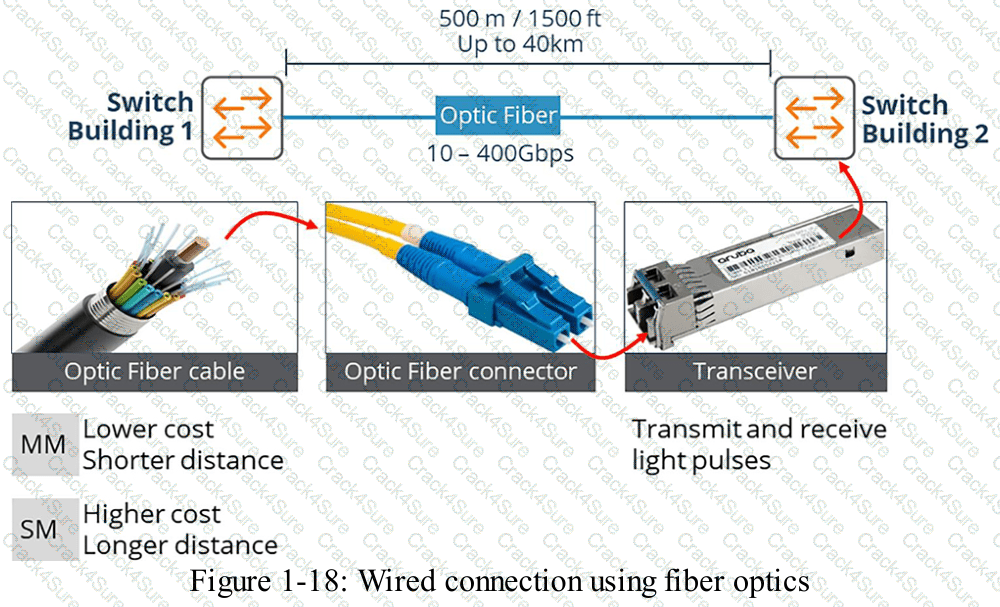
HPE Press study-guide figure / related learning illustration · Q182 Fig 1-18 fiber
How do UXI probes assist when HPE Aruba Networking Central issues a high-severity alert?
They use live traffic analysis to identify and remediate potentially misconfigured devices
They correlate device logs with recent changes to identify potential misconfigurations
They run synthetic tests to quickly diagnose the scope and root cause of the problem
They provide logs for incident tracking and recommendations to prevent similar alerts
Comprehensive and Detailed Explanation
HPE Press guide context | PDF page 1035 | HPE Press, Aruba Certified Associate – Campus Access Official Certification Study Guide
Technical Deep Dive — Original Chat Wording
HPE Aruba Networking User Experience Insight (UXI) provides endpoint-perspective monitoring through physical sensors and supported software agents.
Its purpose is to reproduce user connectivity and application transactions so administrators can identify problems that conventional infrastructure monitoring may overlook.
UXI sensors perform synthetic tests that simulate ordinary user activity.
These can include wireless association, authentication, DHCP address acquisition, DNS resolution, gateway connectivity, and application access.
When HPE Aruba Networking Central identifies a high-severity network event, UXI measurements can provide additional evidence about the user-facing impact.
For example, an AP may remain operational while users experience intermittent DNS failures.
UXI can independently test DNS resolution and identify whether the failure affects a particular service or broader network connectivity.
Similarly, synthetic application tests can help determine whether an issue originates from the WLAN, local network, internet transport, or an application endpoint.
The resulting measurements support troubleshooting through time-based performance information, connectivity-stage analysis, and service availability results.
UXI does not normally modify device configurations automatically to remediate problems.
It also differs from ordinary configuration audit logging, which records changes rather than actively testing the user experience.
By measuring the same network services that users depend upon, UXI helps administrators narrow the scope of an incident and identify likely causes.
Therefore, Option C is correct.
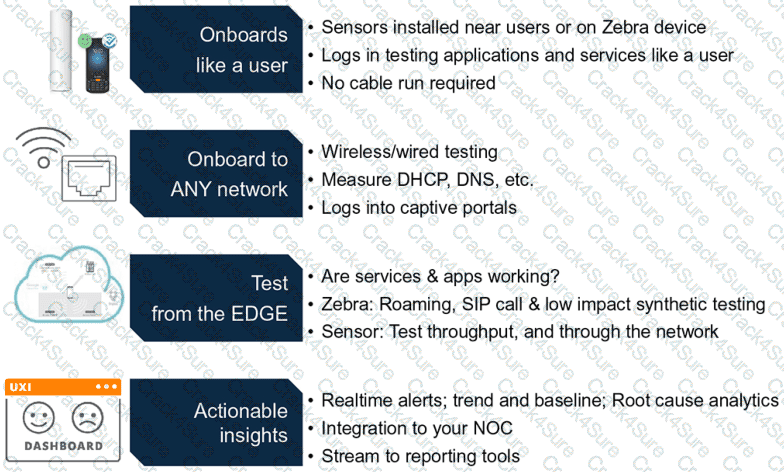
HPE Press study-guide figure / related learning illustration · Fig 13-39 UXI Process
Match each switching technology to its appropriate use case.
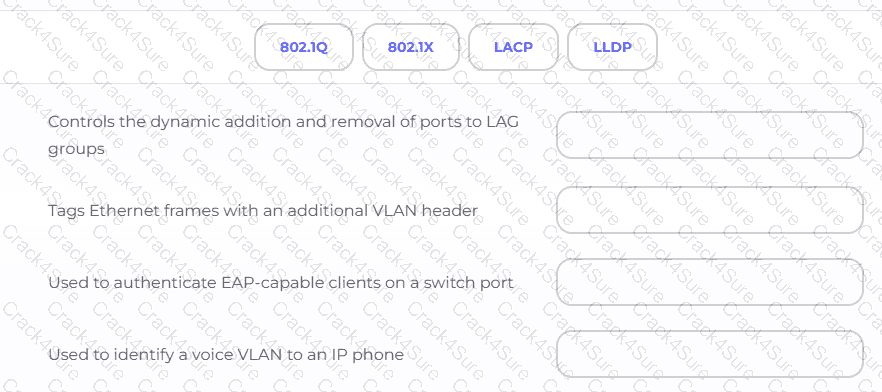
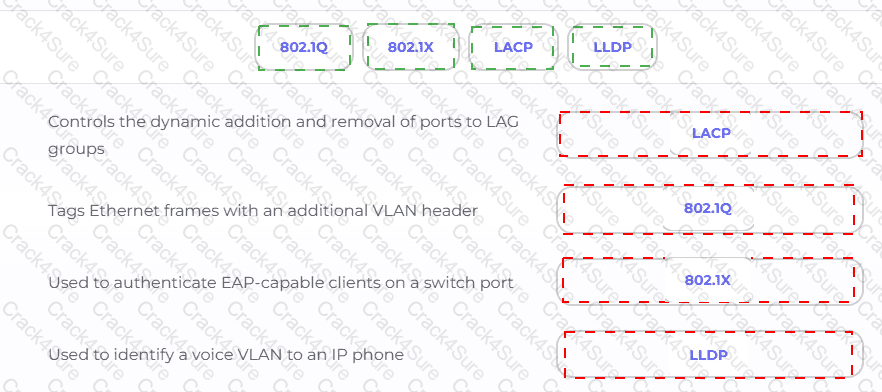
Exhibit item
Correct match
Dynamic addition and removal of LAG members
LACP
Tags Ethernet frames with VLAN header
802.1Q
Authenticates EAP-capable switch-port clients
802.1X
Identifies voice VLAN to an IP phone
LLDP
Comprehensive and Detailed Explanation
HPE Press guide context | PDF page 137 | HPE Press, Aruba Certified Associate – Campus Access Official Certification Study Guide
Technical Deep Dive — Reconstructed (Original Chat Text Not Recoverable)
LACP dynamically negotiates aggregated Ethernet members; IEEE 802.1Q tags Ethernet frames with VLAN identifiers; IEEE 802.1X performs access authentication using EAP; LLDP/LLDP-MED advertises neighbor and voice VLAN details. Each technology operates at a distinct networking function and should not be interchanged.
The exhibit is a matching question: each original item must be paired with the applicable protocol, medium, security function, or address classification. The answer table below records the intended correspondence without changing the source exhibit.
Operational workflows should preserve consistent inventory, authorization, configuration history, and monitoring so that administrators can locate and manage devices predictably.
Consistent RBAC, accurate inventories, and retained audit records simplify support handovers and reduce uncertainty during incident investigations.
For an administrator preparing for the associate certification, the key distinction is the precise protocol or Central workflow involved. Similar-sounding features often operate at different OSI layers or management stages.
The wrong choices may describe real technologies, but they perform different functions, apply to another layer, or omit a required prerequisite. Select the answer that resolves the exact scenario, not a nearby administrative task.
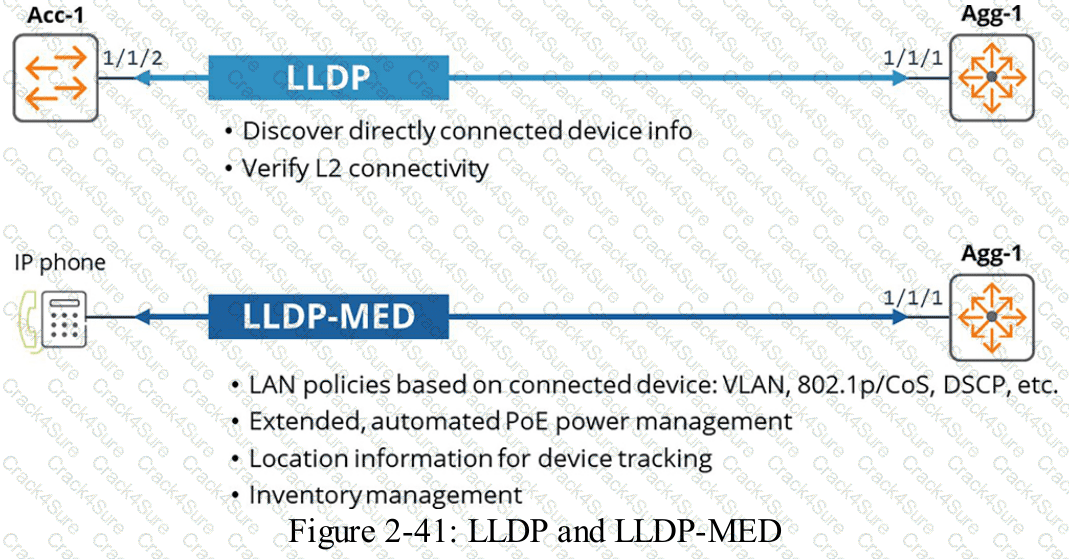
HPE Press study-guide figure / related learning illustration · Q74 LLDP MED
Describe what functionality ARP provides.
ARP uses multicast to build the ARP table.
ARP maps MAC addresses to switch ports.
Clients do not have an ARP cache and always ask for the default gateway
ARP maps layer-3 IP addresses to layer-2 MAC addresses.
Comprehensive and Detailed Explanation
HPE Press guide context | PDF page 50 | HPE Press, Aruba Certified Associate – Campus Access Official Certification Study Guide
Technical Deep Dive — Reconstructed (Original Chat Text Not Recoverable)
Address Resolution Protocol resolves a known local-subnet IPv4 address into a Layer 2 MAC address. An endpoint broadcasts an ARP request and normally receives a unicast ARP reply, then caches the binding. Routers use ARP to resolve the next-hop's MAC address on their outgoing Ethernet network. Switch MAC address tables are learned separately from frame source MACs.
The selected answer corresponds to D: ARP maps layer-3 IP addresses to layer-2 MAC addresses.. This matches the mechanism or management behavior described in the scenario rather than merely a related network feature.
Operational workflows should preserve consistent inventory, authorization, configuration history, and monitoring so that administrators can locate and manage devices predictably.
The operational view should be interpreted together with its underlying records: an alert, subscription count, or device status may describe management state rather than physical availability.
The practical deployment consequence is important: a plausible configuration can still fail when the peer interface, device role, licensing scope, or physical medium is mismatched. Checking that surrounding dependency avoids a misleading diagnosis.
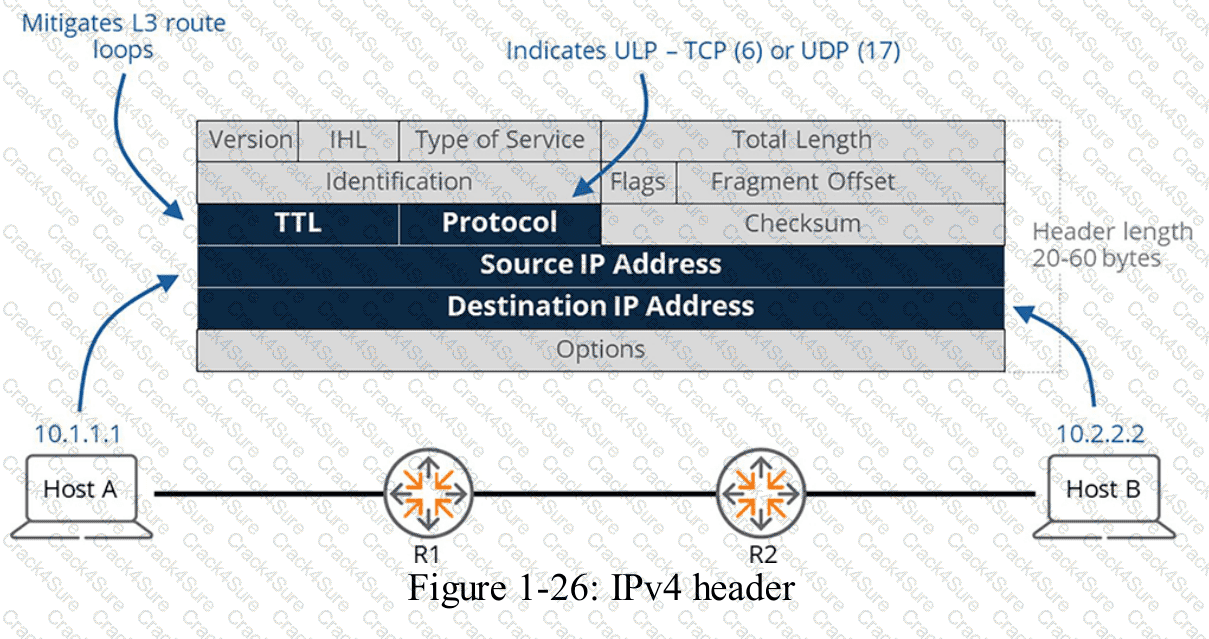
HPE Press study-guide figure / related learning illustration · Fig 1-26 IPv4
Which device configuration group types can a user define in HPE Aruba Networking Central when creating a group?
Choose two
ESP group
UI group
Template group
Default group
Comprehensive and Detailed Explanation
HPE Press guide context | PDF page 588 | HPE Press, Aruba Certified Associate – Campus Access Official Certification Study Guide
Technical Deep Dive — Reconstructed (Original Chat Text Not Recoverable)
Aruba Central group configuration can be template-based or UI-based. Templates permit shared CLI constructs with device-specific variables, while UI groups provide guided graphical workflows. ESP and Default are not the two device-configuration group categories that the question is testing.
The selected answer corresponds to B: UI group; C: Template group. This matches the mechanism or management behavior described in the scenario rather than merely a related network feature.
In an AOS-CX or Aruba Central deployment, the relevant settings must be applied in the correct interface, profile, policy, or management scope and then validated operationally.
A change that is applied to the wrong VRF, VLAN, user role, or device group can be syntactically valid while leaving the original network requirement unmet.
When reviewing alternatives, identify which one directly addresses the stated requirement, rather than selecting a related capability that is useful elsewhere but does not fulfill the requested task.
The wrong choices may describe real technologies, but they perform different functions, apply to another layer, or omit a required prerequisite. Select the answer that resolves the exact scenario, not a nearby administrative task.
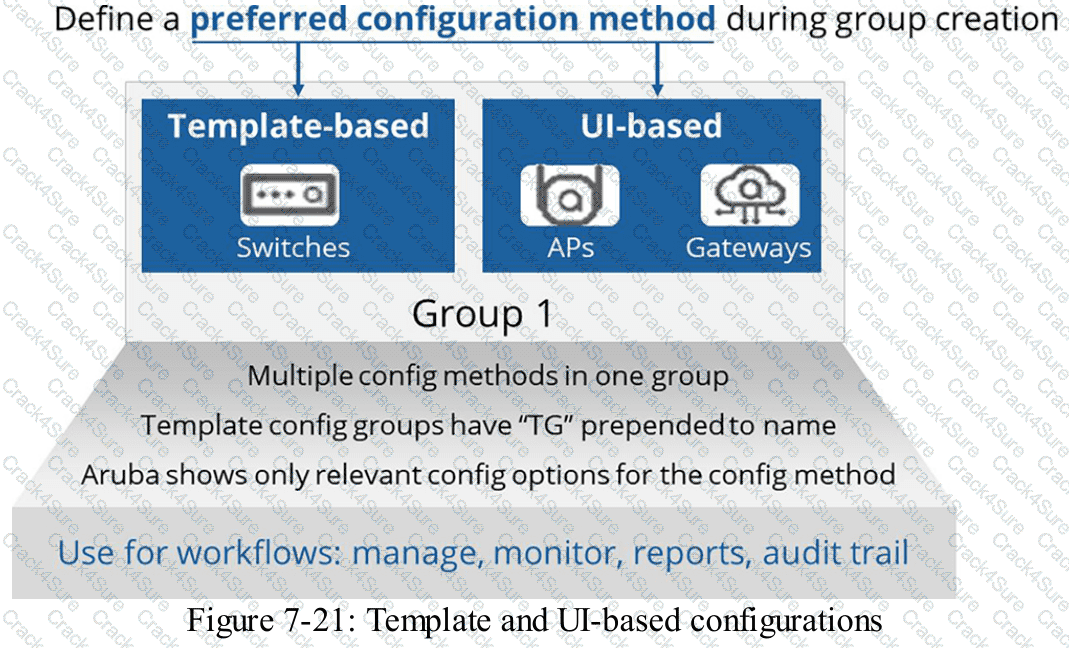
HPE Press study-guide figure / related learning illustration · Q71 UI Template
You are meeting with a customer and are asked to explain the VRRP network-redundancy feature. Which statement about this feature is correct?
Backup role is elected by lowest weight setting.
Backup role is elected by highest MAC address.
Backup role is elected by highest IP defined.
Backup role is elected by lowest priority setting.
Comprehensive and Detailed Explanation
HPE Press guide context | PDF page 390 | HPE Press, Aruba Certified Associate – Campus Access Official Certification Study Guide
Short exact extract: “VRRP members exchange multicast advertisement messages to elect the master DG.”
Technical Deep Dive — Original Chat Wording
Virtual Router Redundancy Protocol (VRRP) provides first-hop gateway redundancy for devices within a VLAN or subnet.
Multiple routers participate in a VRRP group and share a virtual IP address that endpoints use as their default gateway.
Within the group, one router operates as the Master, while the remaining routers operate as Backups.
VRRP uses priority values to determine which eligible router should become Master.
Under normal election conditions, the router with the highest priority becomes the Master.
The router with the lower priority remains in the Backup role.
For example:
Router | VRRP priority | Normal role
Core-1 | 200 | Master
Core-2 | 100 | Backup
If the Master fails, an eligible Backup can assume responsibility for forwarding traffic through the virtual gateway.
VRRP uses a specific virtual MAC address format, but the highest physical MAC address is not an election criterion.
When competing routers have the same VRRP priority, their IP addresses provide the election tie-breaker: the router with the higher IP address wins the Master role.
Therefore, Option C describes a tie-breaker incorrectly and assigns it to the Backup election.
The question's wording is simplified because VRRP formally elects a Master; the other eligible participants remain Backups.
Nevertheless, Option D (Backup role is elected by lowest priority setting) correctly represents the intended master/backup relationship.
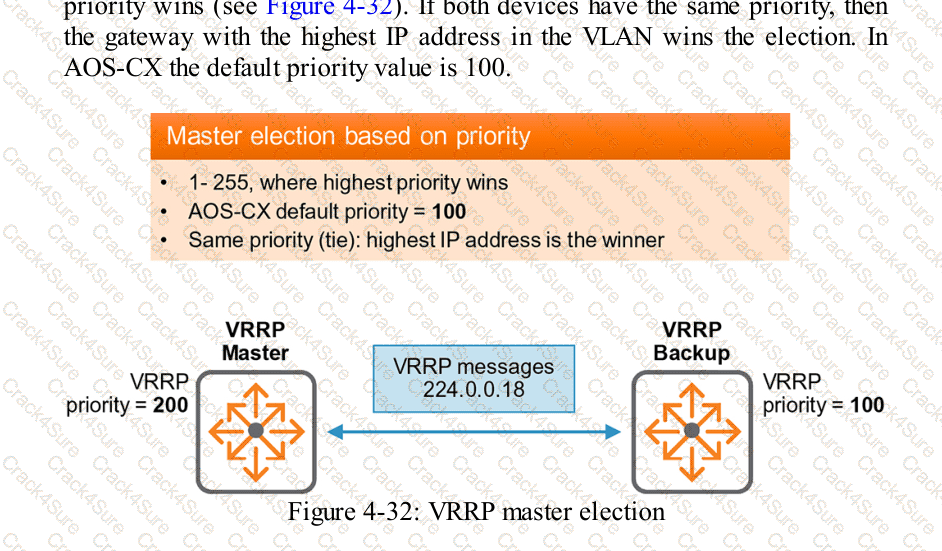
HPE Press study-guide figure / related learning illustration · Q170 Fig 4-32 VRRP
A network administrator with existing IAP-315 access points is considering HPE Aruba Networking Central and needs to know which license is required for specific features.
Match each feature to its required license. Matches may be used more than once.
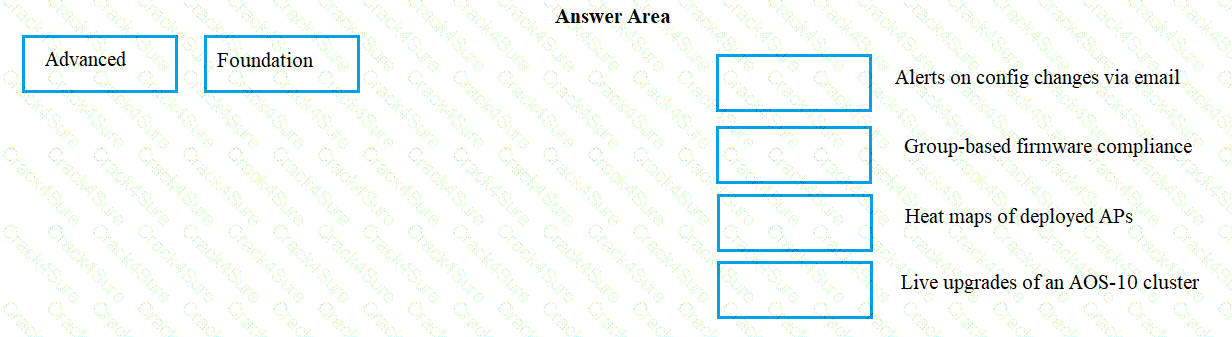
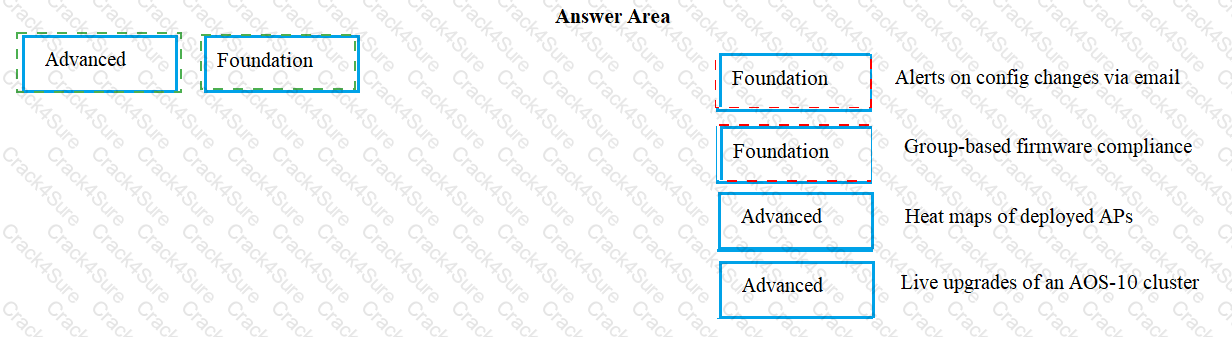
Exhibit item
Correct match
Alerting and email notifications
Foundation
Firmware management and compliance
Foundation
Heatmaps and advanced analytics
Advanced (edition/version-specific)
Live upgrades
Advanced (verify edition)
Comprehensive and Detailed Explanation
HPE Press guide context | PDF page 575 | HPE Press, Aruba Certified Associate – Campus Access Official Certification Study Guide
Technical Deep Dive — Reconstructed (Original Chat Text Not Recoverable)
Foundation and Advanced Central subscriptions differ by generation and supported management features. Basic alert notifications and firmware/compliance workflows are Foundation-level in the question's intended matching. Some heatmap/advanced feature and live-upgrade distinctions vary by Aruba Central release; interpret the provided drag/drop against the release-specific feature matrix rather than assuming immutable tiers.
The exhibit is a matching question: each original item must be paired with the applicable protocol, medium, security function, or address classification. The answer table below records the intended correspondence without changing the source exhibit.
Operational workflows should preserve consistent inventory, authorization, configuration history, and monitoring so that administrators can locate and manage devices predictably.
For example, a cloud-managed infrastructure device may be registered successfully but still require the correct subscription, site, group, and configuration scope.
Technical validation: this item contains a qualification or possible source-version ambiguity. Do not treat the choice as an unrestricted universal rule; retain the original exhibit and compare the exact deployment context with the relevant HPE documentation.
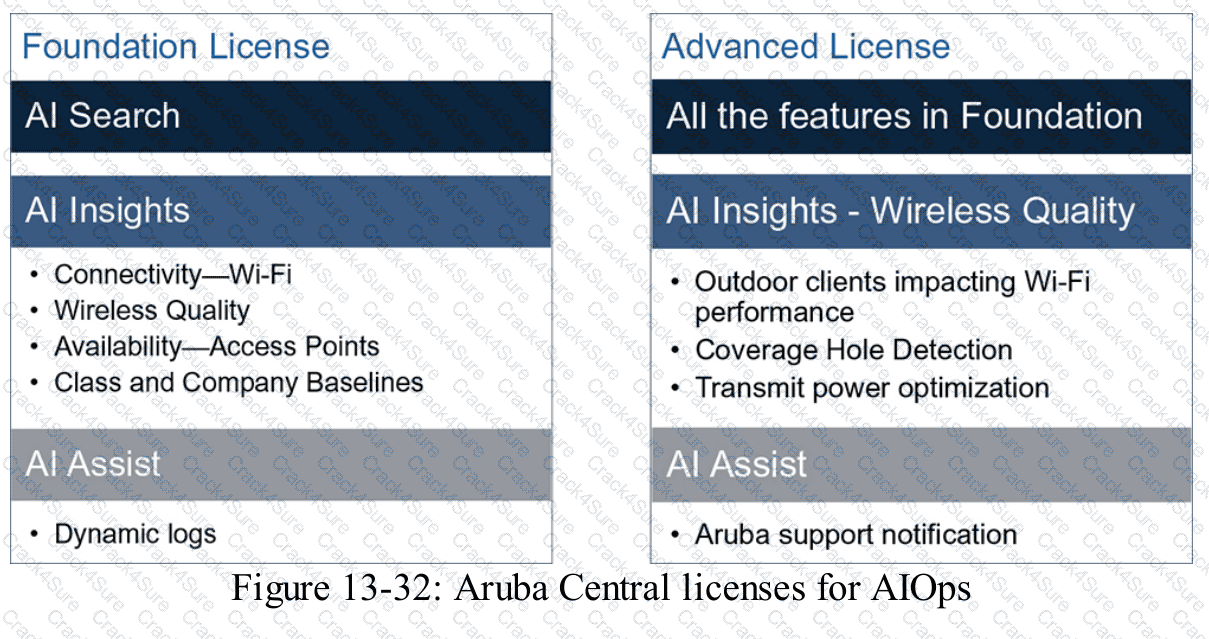
HPE Press study-guide figure / related learning illustration · Fig 13-32 Licensing
Which design information should be reviewed before troubleshooting a wired network?
The settings for each port on the connected switches
The rack locations for all power supply equipment
The network cable colors used throughout the building
The locations of wiring closets and network rooms
Comprehensive and Detailed Explanation
HPE Press guide context | PDF page 40 | HPE Press, Aruba Certified Associate – Campus Access Official Certification Study Guide
Technical Deep Dive — Original Chat Wording
Wired-network troubleshooting begins with understanding the physical and logical architecture of the deployed network.
Physical design documentation identifies the locations of network rooms, wiring closets, patch panels, switches, and cabling routes.
This information is important because a connectivity failure may originate from a physical infrastructure problem rather than an incorrect device configuration.
For example, when several office workstations simultaneously lose connectivity, knowing their associated wiring closet helps a technician identify a possible shared access-switch or uplink failure.
The technician can then trace connectivity from affected endpoints through their patch-panel connections to the serving switch.
Accurate location information also helps technicians determine whether a cable run exceeds supported Ethernet distance limits.
In structured copper Ethernet deployments, a standard channel commonly supports a maximum length of 100 meters, subject to the applicable cabling and Ethernet standard.
Switch-port settings are important during troubleshooting, especially when investigating VLANs, interface status, or authentication failures.
However, Option A describes detailed configuration information rather than the physical network-design information targeted by the question.
Power equipment locations and cable colors can provide supporting information but do not replace a physical connectivity map.
Therefore, Option D (The locations of wiring closets and network rooms) is the best answer.
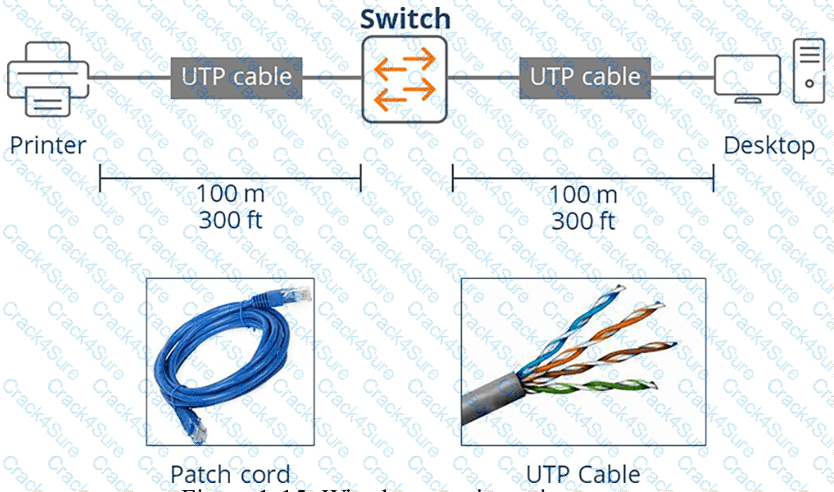
HPE Press study-guide figure / related learning illustration · Q161 Fig 1-15 Copper
Which action can you perform when customizing a floor plan in the Floor Plan Manager?
Set access permissions for each room in the floor plan.
Assign device names directly on the floor plan image.
Edit the floor plan by clicking the floor card.
Draw cable routes directly onto the floor plan preview.
Comprehensive and Detailed Explanation
HPE Press guide context | PDF page 667 | HPE Press, Aruba Certified Associate – Campus Access Official Certification Study Guide
Technical Deep Dive — Original Chat Wording
HPE Aruba Networking Central Floor Plan Manager supports the creation and maintenance of physical network-location information.
Floor plans contain architectural layouts, building-floor details, and the positions of supported network devices.
In the current interface, floors are represented by selectable floor cards.
Clicking a floor card opens a details panel containing information about the selected floor.
This can include the floor name, floor number, ceiling height, and number of assigned devices.
The administrator can then select the appropriate editing action.
The Edit Floor Plan function provides access to supported modifications involving the floor-plan image, boundaries, walls, and zones.
For example, after an office renovation, an administrator may need to update the building layout to reflect relocated walls or changes to room boundaries.
Updating the floor plan helps maintain accurate location and wireless-coverage information.
The floor card is therefore a navigation entry point to the editing workflow.
It should not be interpreted as meaning that every edit occurs immediately when the card is clicked.
Room-level access permissions are part of network security design rather than a floor-plan editing function.
Device naming is managed through infrastructure configuration and inventory functions.
Cable-route drawing is not the specific floor-card editing capability described here.
Therefore, Option C (Edit the floor plan by clicking the floor card) is correct.
You are configuring a network with a stacked pair of CX 6300M switches for distribution and Layer 3 services. You create a new user VLAN that will be used on multiple downstream CX 6200 access-switch stacks connected to the distribution stack. You will create multiple similar VLANs/subnets that will be used across multiple access stacks.
What is the correct way to configure the routable interface for the subnet associated with this VLAN?
Create an SVI in the subnet on each downstream switch.
Create an SVI in the subnet on the CX 6300M stack.
Create an SVI in the subnet on the CX 6300M stack, and assign the management address of each downstream switch stack to a different IP address in the same subnet.
Create a physically routed interface in the subnet on the CX 6300M stack for each downstream switch.
Comprehensive and Detailed Explanation
HPE Press guide context | PDF page 220 | HPE Press, Aruba Certified Associate – Campus Access Official Certification Study Guide
Technical Deep Dive — Reconstructed (Original Chat Text Not Recoverable)
When the CX 6300M distribution VSF stack performs routing for a user VLAN present on multiple downstream access stacks, create the routed SVI on the distribution stack. Downstream switches carry the VLAN via Layer 2 trunks. Giving every access stack a duplicate gateway SVI creates conflicting routing behavior unless a separate designed first-hop model is used.
The selected answer corresponds to B: Create an SVI in the subnet on the CX 6300M stack.. This matches the mechanism or management behavior described in the scenario rather than merely a related network feature.
A disciplined investigation compares the observed symptom with expected behavior, tests the most likely failure stage, and verifies recovery rather than assuming that a single command has resolved the problem.
When possible, test the affected and unaffected paths in parallel; the differences often identify the precise dependency that is failing.
For an administrator preparing for the associate certification, the key distinction is the precise protocol or Central workflow involved. Similar-sounding features often operate at different OSI layers or management stages.
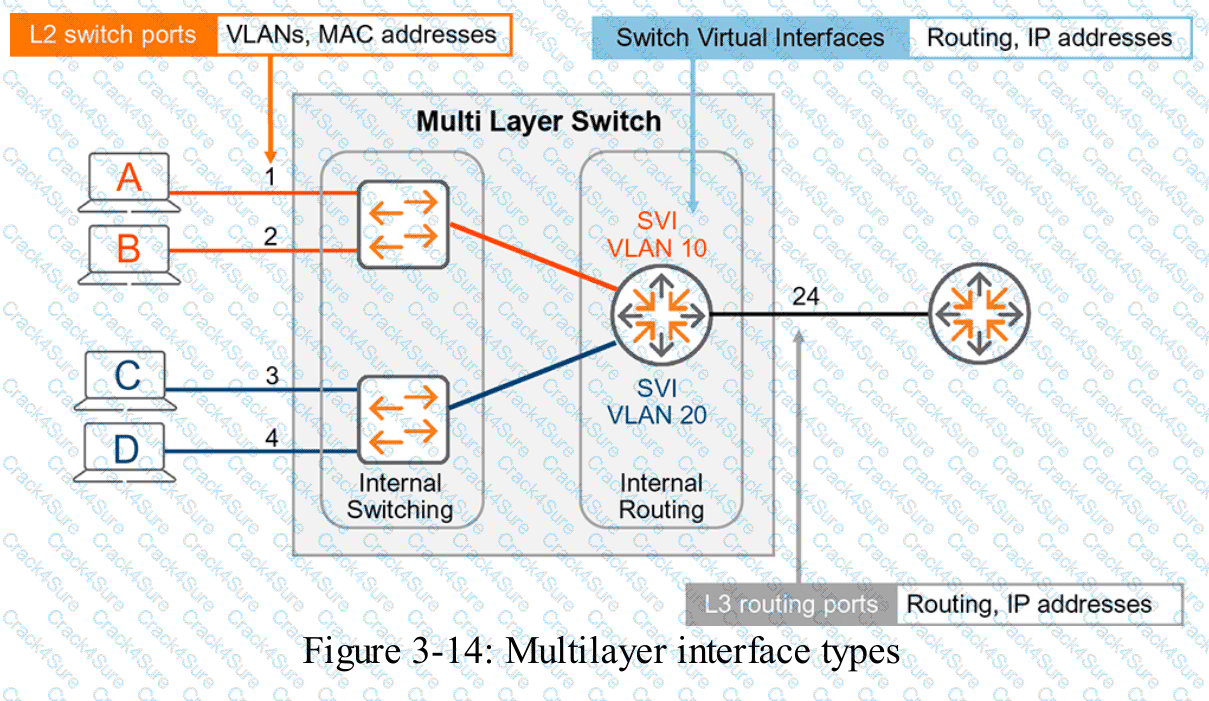
HPE Press study-guide figure / related learning illustration · Fig 3-14 SVI
When you export an audit log from HPE GreenLake, which detail must you provide?
File type
User role
Date range
Recipient email address
Comprehensive and Detailed Explanation
HPE Press guide context | PDF page 573 | HPE Press, Aruba Certified Associate – Campus Access Official Certification Study Guide
Technical Deep Dive — Original Chat Wording
HPE GreenLake provides audit logging to record relevant account-level and administrative activities.
Exporting these logs allows authorized personnel to examine records outside the management interface.
The export workflow begins by navigating to the Audit Log management page and selecting the export function.
Administrators must choose the required output file type.
Supported choices include CSV and PDF.
CSV is suitable for structured analysis, spreadsheet applications, and automated log processing.
PDF is generally more appropriate when records need to be presented in a fixed-layout document.
After selecting the file type, administrators can choose the records and columns to export.
Depending on the interface, they may export the entire audit log or the current search results.
A date range can be useful for filtering records before exporting, but the documented export procedure does not require a date range to be entered as its mandatory selection.
The user's role determines whether the export operation is authorized; it is not normally a parameter that the user must provide in the export dialog.
A recipient email address is also unnecessary for downloading an audit-log file.
Therefore, Option A (File type) is correct.
How does a UXI sensor establish connectivity while being onboarded?
Through Ethernet or Wi-Fi
Through Bluetooth Low Energy
By using LAN over Powerline
By using direct cloud connection
Comprehensive and Detailed Explanation
HPE Press guide context | PDF page 1035 | HPE Press, Aruba Certified Associate – Campus Access Official Certification Study Guide
Technical Deep Dive — Original Chat Wording
HPE Aruba Networking User Experience Insight (UXI) uses dedicated sensors and supported software agents to evaluate network connectivity from an endpoint's perspective.
A physical UXI sensor can test wired Ethernet connections and wireless networks.
When monitoring a wired network, the sensor communicates through its Ethernet interface.
When monitoring a wireless network, it associates with the configured WLAN and performs supported authentication procedures.
The sensor then measures the steps required to obtain functional network connectivity.
These can include DHCP address assignment, DNS resolution, gateway reachability, and application access.
For example, a sensor monitoring an employee WLAN can attempt to associate with the SSID, complete authentication, acquire an IP address, and access a specified application.
If one stage fails, UXI records diagnostic information that helps the administrator identify the likely point of failure.
This provides more useful visibility into user experience than infrastructure availability checks alone.
Bluetooth Low Energy and powerline networking are not the ordinary wired or wireless testing methods described in the question.
Technical distinction: The HPE Press guide also explains that physical UXI sensors may initially use cellular connectivity or standard PoE during provisioning. Cellular connectivity can provide a management bootstrap path, but the monitored network experience is tested through wired Ethernet or Wi-Fi.
Therefore, Option A (Through Ethernet or Wi-Fi) is correct.
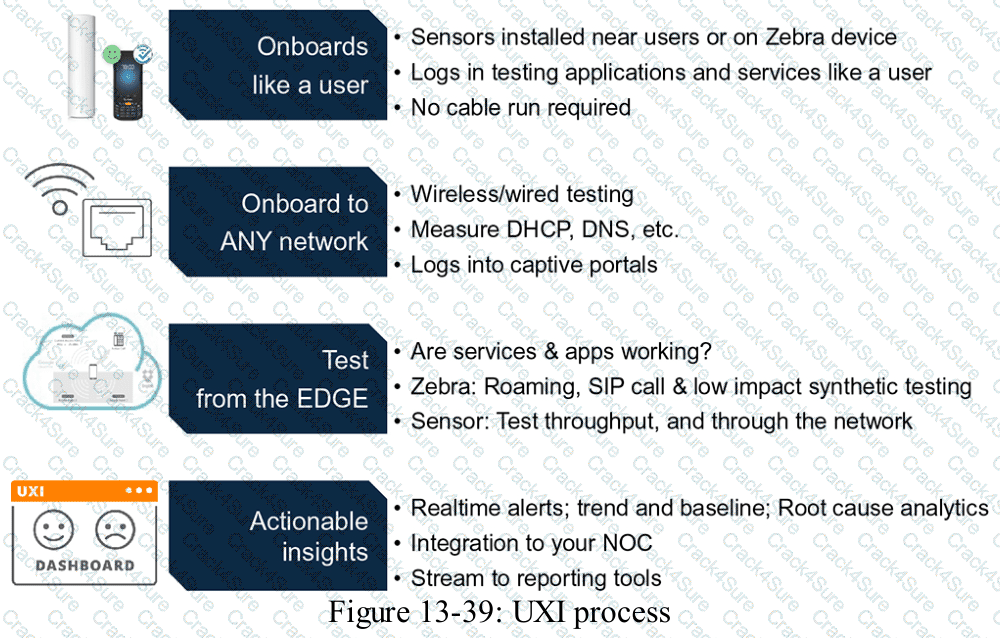
HPE Press study-guide figure / related learning illustration · Q195 Fig 13-39 UXI
Which action helps ensure that the Audit Trail satisfies industry requirements?
Backup logs regularly.
Train all employees.
Understand compliance standards.
Monitor log activity.
Comprehensive and Detailed Explanation
HPE Press guide context | PDF page 1028 | HPE Press, Aruba Certified Associate – Campus Access Official Certification Study Guide
Technical Deep Dive — Original Chat Wording
Audit trails are an important component of network governance, operational accountability, and regulatory compliance.
However, simply enabling audit logging does not automatically satisfy every industry's security requirements.
Different regulatory and standards frameworks impose distinct expectations regarding event collection, access controls, retention, integrity, review, and evidence preservation.
Examples include PCI DSS for payment-card environments, HIPAA-related safeguards in applicable US healthcare organizations, and ISO/IEC 27001 information-security controls.
An organization must first understand which standards and legal requirements apply to its operations.
These requirements determine what information must be logged, how long records must be retained, who may access them, and how their integrity should be protected.
For example, an organization may need to preserve administrative configuration changes for a defined period and demonstrate that unauthorized personnel cannot alter the records.
HPE Aruba Networking Central's Audit Trail can support these objectives by recording administrative and system activities.
However, additional controls may be necessary, including restricted access, external log retention, monitoring, and backup.
Backing up logs and reviewing audit activity are useful operational measures, but neither independently establishes which compliance requirements must be satisfied.
Employee training is also important, but it does not replace the need to identify applicable logging and evidence obligations.
Therefore, Option C (Understand compliance standards) is the best answer.
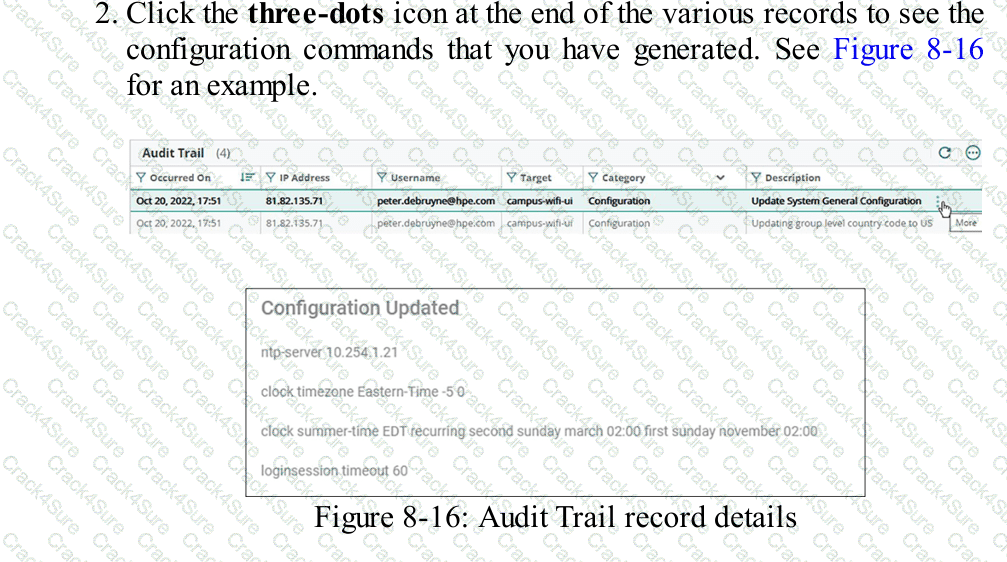
HPE Press study-guide figure / related learning illustration · Q120 Fig 8-16 Audit Records
A hospital relies on extensive mobile equipment to diagnose patients and document patient data. Which access switch is ideal for this large hospital, whose distribution racks have more than 400 ports in a single VSF stack?
CX 6400
CX 6100
CX 6300
CX 6200
Comprehensive and Detailed Explanation
HPE Press guide context | PDF page 535 | HPE Press, Aruba Certified Associate – Campus Access Official Certification Study Guide
Technical Deep Dive — Reconstructed (Original Chat Text Not Recoverable)
The CX 6300 family supports high-density access stacking over standard high-speed interfaces and can support more than 400 endpoint ports across a suitable VSF deployment. CX 6100/6200 have different stacking and feature constraints, while CX 6400 is modular rather than the intended VSF access stack.
The selected answer corresponds to C: CX 6300. This matches the mechanism or management behavior described in the scenario rather than merely a related network feature.
A disciplined investigation compares the observed symptom with expected behavior, tests the most likely failure stage, and verifies recovery rather than assuming that a single command has resolved the problem.
Collecting interface counters, event timestamps, configuration history, and service-test results helps determine whether a symptom originates locally or depends on another device.
The answer should be validated against both the control-plane state and the forwarding or management outcome. A successful individual command alone is not proof that the end-to-end requirement is satisfied.
When troubleshooting or designing a change, verify compatibility between all participating devices, the management scope, and the applicable software release. The most useful evidence is the state observed on both sides of the affected connection.
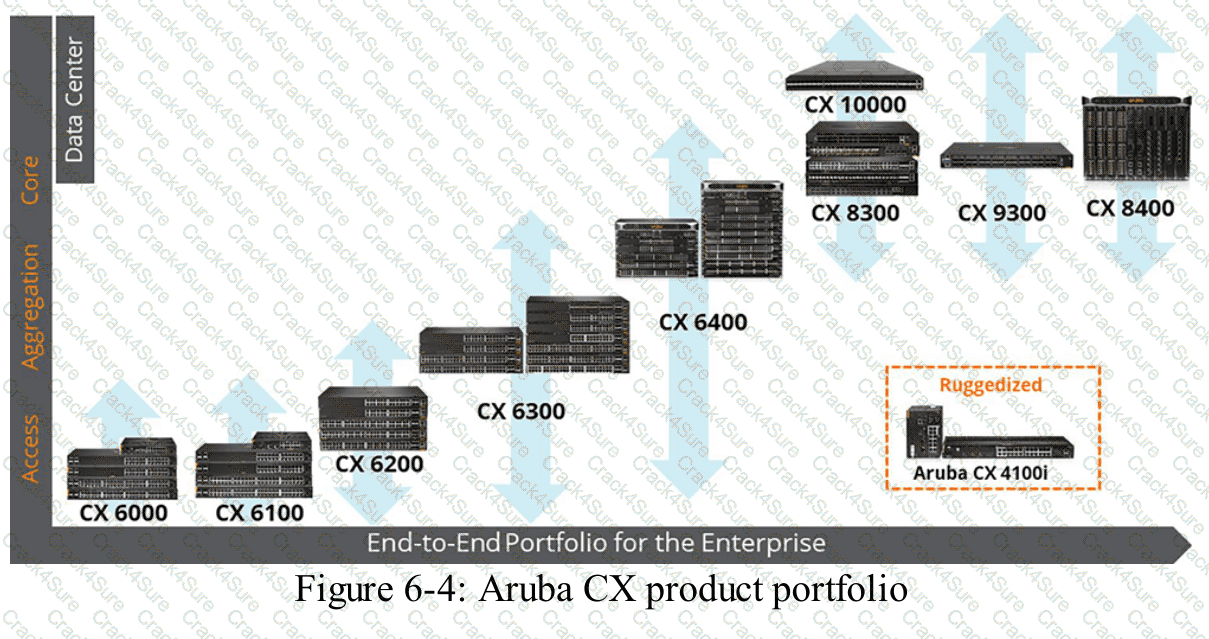
HPE Press study-guide figure / related learning illustration · Fig 6-4 CX
When configuring an AOS firewall role, where can you configure the client’s broadcast domain?
Access Control Rules
WLAN Settings
Role-based VLAN override
Bandwidth Controls
Comprehensive and Detailed Explanation
HPE Press guide context | PDF page 842 | HPE Press, Aruba Certified Associate – Campus Access Official Certification Study Guide
Technical Deep Dive — Reconstructed (Original Chat Text Not Recoverable)
A role-based VLAN override is a role attribute that can influence the client's assigned broadcast domain after authorization. Firewall rules filter permitted traffic and bandwidth controls impose traffic limits, but neither is the role attribute used to place a client in a VLAN. For wireless users the guide recommends setting VLAN through the WLAN where possible.
The selected answer corresponds to C: Role-based VLAN override. This matches the mechanism or management behavior described in the scenario rather than merely a related network feature.
In an AOS-CX or Aruba Central deployment, the relevant settings must be applied in the correct interface, profile, policy, or management scope and then validated operationally.
For example, an apparently healthy physical port may still fail to serve a client when VLAN assignment, AAA policy, or Layer 3 gateway context is wrong.
In production, the decision should be documented and checked against the supported software release and platform model, because interface names, licensing tiers, and management workflows can change across Central and AOS-CX generations.
When using OSPF dynamic routing on an AOS-CX switch, which setting must match between neighboring devices for them to exchange routes?
OSPF network type
OSPF process id
OSPF passive configuration
OSPF router id
Comprehensive and Detailed Explanation
HPE Press guide context | PDF page 241 | HPE Press, Aruba Certified Associate – Campus Access Official Certification Study Guide
Short exact extract: “AOS-CX switches use the following sequence to determine the router ID.”
Technical Deep Dive — Reconstructed (Original Chat Text Not Recoverable)
OSPF neighbors must agree on the interface's area and compatible parameters, including network behavior, hello/dead timers, authentication, and subnet where applicable. Process IDs are local to a routing device and need not match. Router IDs must be unique, not identical. Of the offered choices network type is the intended neighbor compatibility factor.
The selected answer corresponds to A: OSPF network type. This matches the mechanism or management behavior described in the scenario rather than merely a related network feature.
Operational workflows should preserve consistent inventory, authorization, configuration history, and monitoring so that administrators can locate and manage devices predictably.
For example, a cloud-managed infrastructure device may be registered successfully but still require the correct subscription, site, group, and configuration scope.
A strong verification step is to compare the expected outcome with operational status before and after the change. This confirms not only that a configuration was accepted, but also that the required service actually functions.
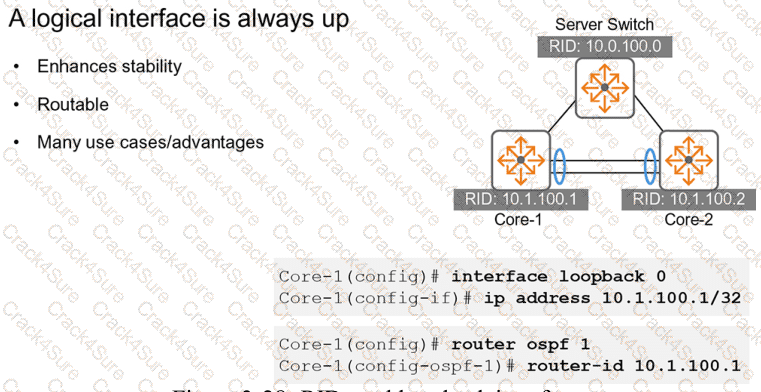
HPE Press study-guide figure / related learning illustration · Fig 3-28 loopback
What is a reason to use access controls for audit logs?
Audit logs contain only non-sensitive information
Logs can be changed anytime by any employee
Everyone should review logs to share the workload
It helps protect sensitive information in the logs
Comprehensive and Detailed Explanation
HPE Press guide context | PDF page 679 | HPE Press, Aruba Certified Associate – Campus Access Official Certification Study Guide
Technical Deep Dive — Original Chat Wording
Audit logs provide evidence of administrative activity, configuration changes, and security-related events.
In HPE Aruba Networking Central, audit trail information can include administrator identities, event timestamps, source IP addresses, affected devices, and descriptions of executed operations.
This information is valuable for troubleshooting and accountability but can also expose sensitive operational details.
For example, audit records might reveal network-management addresses, configuration structures, administrative activities, and security-relevant changes.
Consequently, unrestricted access to audit records would create unnecessary security and privacy risks.
Role-Based Access Control (RBAC) allows organizations to restrict audit-log visibility to authorized personnel.
Security administrators, auditors, and selected operations staff may require different levels of access according to their responsibilities.
Access control also helps prevent inappropriate disclosure and reduces the opportunity for unauthorized modification or deletion where such operations are permitted.
Audit-log security should form part of a broader logging strategy that includes appropriate retention, protected storage, reliable timestamps, and review procedures.
HPE's Central documentation confirms that audit records contain administrative identities, timestamps, source addresses, and configuration-related actions.
Audit logs are not inherently non-sensitive, nor should every employee be granted access simply to distribute the review workload.
Therefore, Option D is correct.
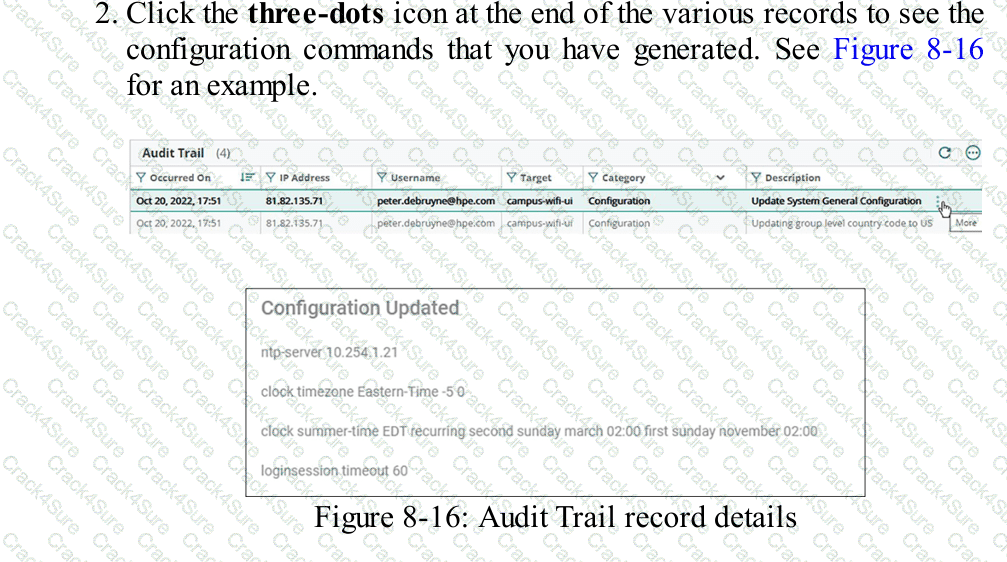
HPE Press study-guide figure / related learning illustration · Q109 Fig 8-16 Audit Records
When using the geo-locate scaling method, which preparation step should be completed before implementation?
Assign devices to the floor before setting up the geo-locate method.
Upload the floor plan file after setting the target points.
Place target points at the comers of the floor plan.
Import a backup floor plan file before setting target points.
Comprehensive and Detailed Explanation
HPE Press guide context | PDF page 689 | HPE Press, Aruba Certified Associate – Campus Access Official Certification Study Guide
Technical Deep Dive — Original Chat Wording
Geo-locate scaling allows HPE Aruba Networking Central to associate a building floorplan with actual geographic coordinates.
This creates a spatial reference between locations on the uploaded drawing and their corresponding positions on a map.
A key requirement is the correct placement of reference targets.
When administrators select the geo-locate scaling method, the system provides target points that can be positioned on the floorplan.
The corresponding geographic locations are then identified on the map.
Placing targets near identifiable corners of the building provides useful reference positions and makes matching the drawing to the map easier.
The points should be accurately aligned rather than placed arbitrarily.
Using well-separated points improves the stability of the resulting scale and geographic alignment.
Inaccurate target placement can produce incorrect floorplan dimensions or positioning errors.
These inaccuracies may affect location-based network visualization and the interpretation of device placement.
The floorplan must already have been uploaded before it can be scaled.
Assigning access points to the floor can take place after the plan has been created and properly scaled.
A backup floorplan is not required merely to establish geo-location reference points.
Therefore, Option C (Place target points at the corners of the floor plan) is correct.
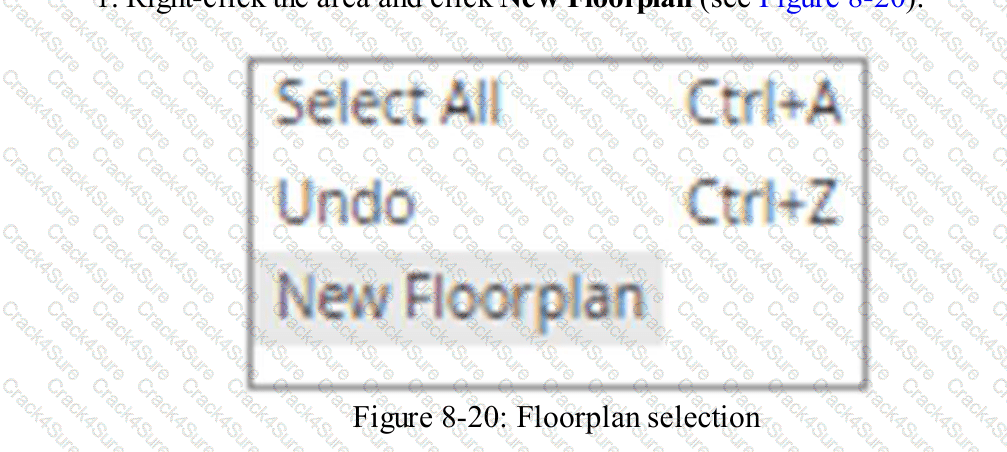
HPE Press study-guide figure / related learning illustration · Q114 Fig 8-20 Floorplan
Which command is used to configure a default route to 10.4.5.1 on an AOS-CX switch when in-band management via an SVI is in use?
ip route 0.0.0.0/0 10.4.5.1 vrf mgmt
default-gateway 10.4.5.1
ip route 0.0.0.0/0 10.4.5.1
ip default-gateway 10.4.5.1
Comprehensive and Detailed Explanation
HPE Press guide context | PDF page 232 | HPE Press, Aruba Certified Associate – Campus Access Official Certification Study Guide
Technical Deep Dive — Reconstructed (Original Chat Text Not Recoverable)
In-band management via an SVI uses the default VRF routing table. Add the default route `ip route 0.0.0.0/0 10.4.5.1` in the normal context. A command specifying `vrf mgmt` changes the management VRF instead, and `ip default-gateway` is not the normal routed AOS-CX syntax.
The selected answer corresponds to C: ip route 0.0.0.0/0 10.4.5.1. This matches the mechanism or management behavior described in the scenario rather than merely a related network feature.
A disciplined investigation compares the observed symptom with expected behavior, tests the most likely failure stage, and verifies recovery rather than assuming that a single command has resolved the problem.
Collecting interface counters, event timestamps, configuration history, and service-test results helps determine whether a symptom originates locally or depends on another device.
The practical deployment consequence is important: a plausible configuration can still fail when the peer interface, device role, licensing scope, or physical medium is mismatched. Checking that surrounding dependency avoids a misleading diagnosis.
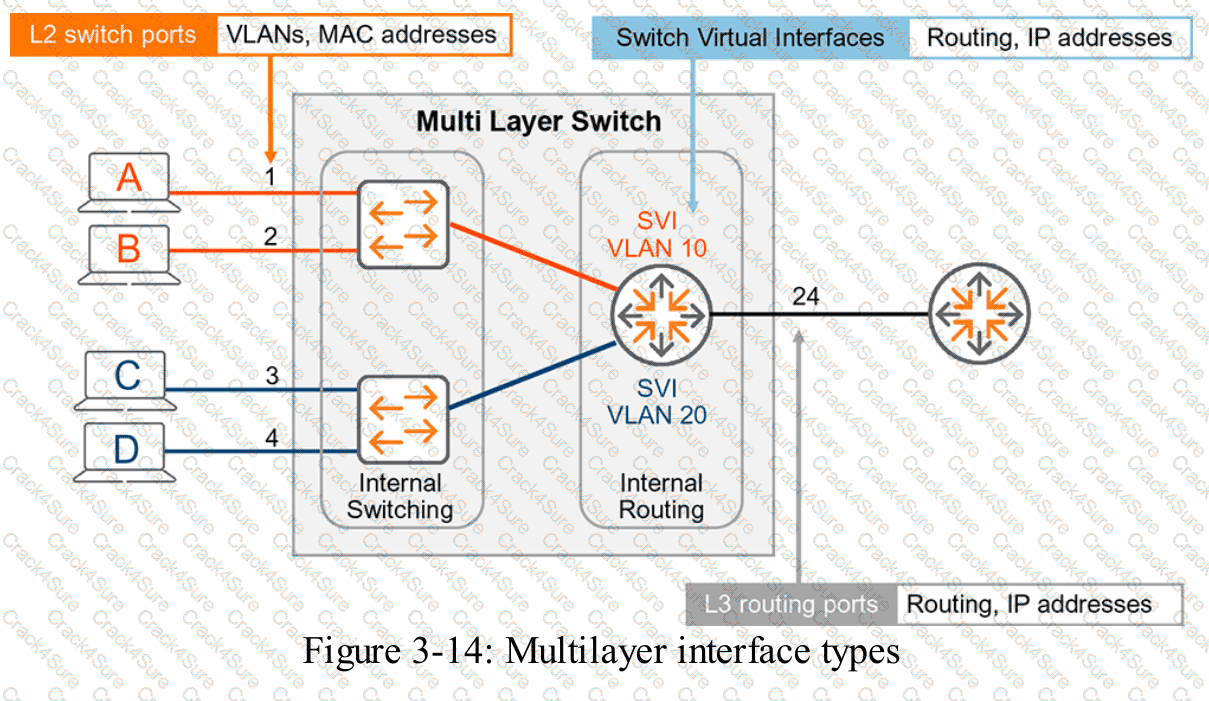
HPE Press study-guide figure / related learning illustration · Fig 3-14 SVI
3 Months Free Update
3 Months Free Update
3 Months Free Update



TESTED 22 Nov 2026