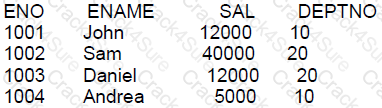
We at Crack4sure are committed to giving students who are preparing for the Oracle 1z0-071 Exam the most current and reliable questions . To help people study, we've made some of our Oracle Database 12c SQL exam materials available for free to everyone. You can take the Free 1z0-071 Practice Test as many times as you want. The answers to the practice questions are given, and each answer is explained.
Which statement is true about the INTERSECT operator used in compound queries?
It processes NULLS in the selected columns.
INTERSECT is of lower precedence than UNION or UNION ALL.
It ignores NULLS.
Multiple INTERSECT operators are not possible in the same SQL statement.
For the question about the INTERSECT operator in SQL:
A. It processes NULLS in the selected columns: The INTERSECT operator compares two SELECT statements and returns rows that exist in both queries. It considers NULLs during this process, and NULLs in corresponding columns must match for rows to be considered equal. This means if both selected columns in the intersecting queries have NULLs, those rows will be included in the output.
Incorrect options:
B: INTERSECT has higher precedence than UNION and UNION ALL, not lower.
C: It does not ignore NULLs; rather, it processes them, as explained.
D: Multiple INTERSECT operators are indeed possible in the same SQL statement, allowing for complex compound queries.
Which two statements are true about * _ TABLES views?
You must have SELECT privileges on a table to view it in ALL _TABLES.
You must have SELECT privileges on a table to view it in DBA TABLES.
USER_ TABLES displays all tables owned by the current user.
ALL TABLES displays all tables owned by the current user.
You must have SELECT privileges on a table to view it in USER TABLES.
All users can query DBA TABLES successfully.
Understanding Oracle's data dictionary views is crucial for database management:
Option C: USER_TABLES displays all tables owned by the current user.
USER_TABLES is a view that shows all tables owned by the user executing the query.
Option F: All users can query DBA_TABLES successfully.
While all users can attempt to query DBA_TABLES, only users with the appropriate privileges can retrieve information from it. This option is tricky; "querying" is possible for all, but "retrieving data" depends on privileges.
Options A, B, D, and E are not entirely correct:
Option A and Option E are incorrect because USER_TABLES shows tables regardless of SELECT privileges.
Option B is incorrect; one does not need SELECT privileges on each table to view them in DBA_TABLES, but they need appropriate system privileges to access DBA_TABLES.
Option D is incorrect as ALL_TABLES displays tables accessible to the current user, not just owned by them.
The CUSTOMERS table has a CUST_CREDT_LIMIT column of data type number.
Which two queries execute successfully?
SELECT TO_CHAR(NVL(cust_credit_limit * .15,'Not Available')) FROM customers;
SELECT NVL2(cust_credit_limit * .15,'Not Available') FROM customers;
SELECT NVL(cust_credit_limit * .15,'Not Available') FROM customers;
SLECT NVL(TO_CHAR(cust_credit_limit * .15),'Not available') from customers;
SELECT NVL2(cust_credit_limit,TO_CHAR(cust_credit_limit * .15),'NOT Available') FROM customers;
A. True - The TO_CHAR function is used correctly here to convert the numeric value to a string, and NVL handles the case where cust_credit_limit might be NULL. The expression inside NVL computes 15% of the credit limit or displays 'Not Available' if the credit limit is NULL. The syntax is correct.
B. False - The NVL2 function requires three parameters: the expression to check for NULL, the value to return if it's not NULL, and the value to return if it is NULL. The given usage lacks the required parameters and syntax.
C. False - The NVL function expects both parameters to be of the same data type. Since the second parameter 'Not Available' is a string, it causes a data type conflict with the numerical result of the first parameter.
D. False - The keyword SELECT is misspelled as SLECT, making the syntax incorrect.
E. True - This query uses NVL2 correctly by checking if cust_credit_limit is not NULL, then applying TO_CHAR to compute 15% of it and converting it to string, or returning 'NOT Available' if it is NULL. The syntax and function usage are correct.
In the PROMOTIONS table, the PROMO_ BEGIN_DATE column is of data type and the default date format is DD-MON-RR
Which two statements are true about expressions using PROMO_ BEGIN_DATE in a query?
TONUMBER (PROMO BEGIN_DATE) - 5 will return a number
PROMO_ BEGIN_DATE - 5 will return a date
PROMO_ BEGIN_DATE - SYSDATE will return a number
PROMO_ BEGIN_DATE - SYSDATE will return an error
TODATE(PROMO BEGIN_DATE *5) will return a date
In Oracle SQL, when you subtract a number from a date, the result is a date. When you subtract one date from another, the result is the number of days between the two dates.
B: PROMO_BEGIN_DATE - 5 will subtract 5 days from the PROMO_BEGIN_DATE, resulting in a new date that is 5 days earlier than PROMO_BEGIN_DATE.
C: PROMO_BEGIN_DATE - SYSDATE will return the number of days between the PROMO_BEGIN_DATE and the current date (SYSDATE).
The incorrect options are:
A: TONUMBER(PROMO_BEGIN_DATE) - 5 will not return a number because PROMO_BEGIN_DATE is a date, and TONUMBER is not a valid function to convert dates to numbers in Oracle.
D: PROMO_BEGIN_DATE - SYSDATE will not return an error; it will return the number of days between the two dates as explained above.
E: TODATE(PROMO_BEGIN_DATE * 5) will not return a date because PROMO_BEGIN_DATE * 5 is not a valid operation in Oracle SQL as you cannot multiply a date by a number, and TODATE is not a valid function. The correct function name is TO_DATE.
References:
Oracle Documentation on Date Arithmetic: Database SQL Language Reference - Datetime Functions
Examine this partial command:
CREATE TABLE cust(
cust_id NUMBER(2),
credit_limit NUMBER(10)
ORGANIZATION EXTERNAL
Which two clauses are required for this command to execute successfully?
the ACCESS PARAMETERS clause
the DEFAULT DIRECTORY clause
the access driver TYPE clause
the LOCATION clause
the REJECT LIMIT clause
When creating an external table, which allows you to access data in a flat file as though it is a table inside the database, certain clauses are required:
A. the ACCESS PARAMETERS clause: This clause specifies the parameters required by the access driver to read the data files.
D. the LOCATION clause: This clause specifies the location of the data files that make up the external table.
References:
Oracle Database SQL Language Reference 12c, particularly the sections detailing the creation and management of external tables.
Which three statements are true about defining relations between tables in a relational database?
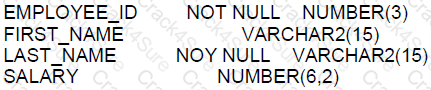
Foreign key columns allow null values.
Unique key columns allow null values
Primary key columns allow null values.
Every primary or unique key value must refer to a matching foreign key value.
Every foreign key value must refer to a matching primary or unique key value.
A. Correct. Foreign key constraints can be nullable. This allows the possibility of a row not having a link to another table. B. Incorrect. Unique key constraints do not allow multiple rows to have null values unless the constraint is defined on multiple columns. C. Incorrect. Primary key columns must be NOT NULL and unique across the table. D. Incorrect. Primary or unique key values do not refer to foreign keys; it's the foreign keys that refer to primary or unique keys. E. Correct. Foreign key constraints enforce referential integrity by requiring that each foreign key value matches a primary or unique key value in the related table.
These are standard rules in relational databases, which can be confirmed in the Oracle Database Concepts Guide.

Which two queries will result in an error?
SELECT FIRST_NAME LAST_NAME FROM EMPLOYEES;
SELECT FIRST_NAME,LAST_NAME FROM EMPLOYEES;
SELECT LAST_NAME,12 * SALARY AS ANNUAL_SALARY
FROM EMPLOYEES
WHERE ANNUAL_SALARY > 100000
ORDER BY 12 * SALARY ;
SELECT LAST_NAME,12 * SALARY AS ANNUAL_SALARY
FROM EMPLOYEES
WHERE 12 * SALARY > 100000
ORDER BY ANNUAL_SALARY;
SELECT LAST_NAME,12 * SALARY AS ANNUAL_SALARY
FROM EMPLOYEES
WHERE 12 * SALARY > 100000
ORDER BY 12 * SALARY;
SELECT LAST_NAME,12 * SALARY AS ANNUAL_SALARY
FROM EMPLOYEES
WHERE ANNUAL_SALARY > 100000
ORDER BY ANNUAL_SALARY;
In Oracle SQL, the following syntactical rules apply:
A. This query will result in an error because there is no comma separating the column names FIRST_NAME and LAST_NAME. The correct syntax should include a comma to separate the column names in the SELECT list.
B. This query is correctly formatted with a comma separating the column names, so it will not result in an error.
C. This query will result in an error because an alias defined in the SELECT list (ANNUAL_SALARY) cannot be used in the WHERE clause of the same query level. It must be repeated in the WHERE clause as 12 * SALARY.
D. This query will execute successfully because 12 * SALARY is directly used in the WHERE clause, and ANNUAL_SALARY is used in the ORDER BY clause, which is allowed.
E. This query is correct and will not result in an error. It uses 12 * SALARY in both the WHERE and ORDER BY clauses.
F. Similar to option C, this query will execute successfully because ANNUAL_SALARY is correctly used in the ORDER BY clause, and the WHERE clause does not attempt to reference the alias.
References:
Oracle Database SQL Language Reference, 12c Release 1 (12.1): "Database Object Names and Qualifiers"
Which three statements are true about single-row functions?
The data type returned can be different from the data type of the argument.
They can be nested to any level.
They return a single result row per table.
They can accept only one argument.
The argument can be a column name, variable, literal or an expression.
They can be used only in the WHERE clause of a SELECT statement.
Single-row functions in SQL return one result per row, and the following statements are true:
A: The data type of the returned value can indeed be different from the data type of the argument provided to the function. For example, the TO_CHAR function can take a numeric input and return a character string.
B: Single-row functions can be nested within each other to any level that is supported by Oracle. This means you can have a function call as an argument to another function, and so on.
E: The argument to a single-row function can be a column name, a variable, a literal, or an expression. This flexibility allows these functions to be very powerful in SQL expressions.
The incorrect options are:
C: Single-row functions do not return a single result row per table; they return a result for each row that is processed.
D: They are not limited to accepting only one argument. Some functions, like NVL, accept multiple arguments.
F: They are not limited to use in the WHERE clause; single-row functions can be used in any part of a SQL statement, including SELECT and ORDER BY clauses.
References:
Oracle Documentation on Single-Row Functions: SQL Functions
Examine the description of the PRODUCT_ DETAILS table:

Which two statements are true?
PRODUCT_ PRICE can be used in an arithmetic expression even if it has no value stored in it.
PRODUCT_ ID can be assigned the PRIMARY KEY constraint.
EXPIRY_ DATE cannot be used in arithmetic expressions.
EXPIRY_ DATE contains the SYSDATE by default if no date is assigned to it.
PRODUCT_ PRICE contains the value zero by default if no value is assigned to it.
PRODUCT_ NAME cannot contain duplicate values.
In reference to the attributes of the PRODUCT_DETAILS table:
A. This statement is false. If PRODUCT_PRICE has no value (i.e., it is NULL), it cannot be used directly in arithmetic expressions because any operation with NULL results in NULL.
B. This statement is true. PRODUCT_ID has the NOT NULL constraint and is of type NUMBER, making it eligible to be a PRIMARY KEY. Primary keys require all values to be unique and not null.
C. This statement is true. EXPIRY_DATE is of type DATE, and it cannot be used in arithmetic expressions directly without a date function that operates on dates.
D. This statement is false. By default, columns of type DATE do not have a default value unless explicitly assigned using the DEFAULT keyword in the column definition.
E. This statement is false. By default, numeric columns do not have a default value unless specified with the DEFAULT keyword.
F. This statement is false. The statement about PRODUCT_NAME not containing duplicate values would be true if it were a UNIQUE or PRIMARY KEY, but there is no such constraint indicated in the provided table description.
Which three are true about multiple INSERT statements?
They can be performed only by using a subquery.
They can be performed on relational tables.
They can be performed on views.
They can be performed on remote tables.
They can be performed on external tables using SQL*Loader.
They can insert each computed row into more than one table.
Multiple INSERT statements allow data insertion into one or more tables based on different conditions or datasets:
Option A: False. Multiple INSERT operations can be performed using direct values, subqueries, or even default values, not exclusively through subqueries.
Option B: True. They can indeed be performed on relational tables, which is the standard use case in most relational databases.
Option C: True. INSERT operations can be performed on updatable views, assuming the view is not complex (involving joins, GROUP BY clauses, etc.).
Option D: True. Oracle allows INSERT operations on remote tables via database links, enabling distributed database interactions.
Option E: False. Direct INSERT statements cannot be performed on external tables. External tables are typically used for read operations, with data loading handled through utilities like SQL*Loader or external data processing tools.
Option F: False. Each INSERT statement inserts data into one table. While a single SQL command block can contain multiple INSERT statements, each one is directed at a single table.
View the Exhibits and examine the structure of the COSTS and PROMOTIONS tables.
You want to display PROD IDS whose promotion cost is less than the highest cost PROD ID in a pro
motion time interval.
Examine this SQL statement:
SELECT prod id
FROM costs
WHERE promo id IN
(SELECT promo id
FROM promotions
WHERE promo_cost < ALL
(SELECT MAX (promo cost)
FROM promotions
GROUP BY (promo_end date-promo_begin_date)) );
What will be the result?
It executes successfully but does not give the required result.
It gives an error because the ALL keyword is not valid.
It gives an error because the GROUP BY clause is not valid
It executes successfully and gives the required result.
This SQL query checks for product IDs (prod_id) from the costs table where the promotion ID (promo_id) is associated with promotions whose costs are less than the maximum promotional cost of all promotions, grouped by the duration of each promotion (calculated as promo_end_date - promo_begin_date). The query is correctly written to fulfill these conditions.
The subquery SELECT MAX(promo_cost) FROM promotions GROUP BY (promo_end_date - promo_begin_date) computes the maximum cost of promotions grouped by their duration, returning the highest cost for each distinct promotion length.
The WHERE promo_cost < ALL (...) clause then filters out the promotions where the promo_cost is less than all of the maximum costs returned by the subquery, ensuring that only promo_ids associated with costs less than the highest cost for any promotion length are considered.
Since this logical structure correctly implements the given requirement, the statement executes successfully and yields the correct results.
Which three are true about privileges?
Schema owners can grant object privileges on objects in their schema to any other user or role.
A combination of object and system privileges can be granted to a role.
All types of schema objects have associated object privileges .
Only users with the DBA role can create roles .
Object privileges granted on a table automatically apply to all synonyms for that table.
Only users with the GRANT ANY PRIVILEGE privilege can grant and revoke system privileges from other users.
A. Schema owners indeed can grant privileges on objects in their schema to other users or roles, making this statement true.
B. Roles in Oracle can be granted both object and system privileges, making this statement true as well.
C. Not all types of schema objects have associated object privileges. For example, synonyms do not have object privileges because they are just aliases for other objects.
D. The DBA role is a powerful role, but creating roles can be done by any user granted the necessary privileges, not just users with the DBA role.
E. Object privileges on a table do not automatically apply to all synonyms for that table. Synonyms are separate objects that must have privileges granted explicitly.
F. The privilege to grant system privileges is controlled by the GRANT ANY PRIVILEGE system privilege, making this statement true.
References:
Oracle Database SQL Language Reference, 12c Release 1 (12.1): "Privileges"
Oracle Database Security Guide, 12c Release 1 (12.1): "Administering User Privileges, Roles, and Profiles"
Choose two
Examine the description of the PRODUCT DETALS table:
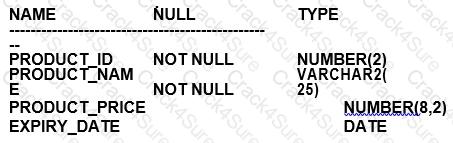
PRODUCT_ID can be assigned the PEIMARY KEY constraint.
EXPIRY_DATE cannot be used in arithmetic expressions.
EXPIRY_DATE contains the SYSDATE by default if no date is assigned to it
PRODUCT_PRICE can be used in an arithmetic expression even if it has no value stored in it
PRODUCT_PRICE contains the value zero by default if no value is assigned to it.
PRODUCT_NAME cannot contain duplicate values.
A. PRODUCT_ID can be assigned the PRIMARY KEY constraint.
In Oracle Database 12c, a PRIMARY KEY constraint is a combination of a NOT NULL constraint and a unique constraint. It ensures that the data contained in a column, or a group of columns, is unique among all the rows in the table and not null. Given the PRODUCT_ID is marked as NOT NULL, it is a candidate for being a primary key because we can assume that it is intended to uniquely identify each product in the table.
Which two are true about using constraints?
A FOREIGN KEY column in a child table and the referenced PRIMARY KEY column in the parenttable must have the same names.
A table can have multiple PRIMARY KEY and multiple FOREIGN KEY constraints.
A table can have only one PRIMARY KEY and one FOREIGN KEY constraint.
PRIMARY KEY and FOREIGNY constraints can be specified at the column and at the table level
A table can have only one PRIMARY KEY but may have multiple FOREIGN KEY constraints.
NOT NULL can be specified at the column and at the table level.
In Oracle Database 12c, it is important to understand the behavior and properties of constraints.
A. This statement is false. A FOREIGN KEY column in a child table does not need to have the same name as the referenced PRIMARY KEY column in the parent table. What is required is that the data type is the same and that the values in the FOREIGN KEY column correspond to values in the PRIMARY KEY column of the parent table.
B. This statement is false. A table cannot have multiple PRIMARY KEY constraints. By definition, a PRIMARY KEY is a unique identifier for a row in a table, and there can only be one such identifier.
C. This statement is false for the same reasons as B; a table can have only one PRIMARY KEY. However, it can have multiple FOREIGN KEY constraints that reference PRIMARY KEYS in other tables.
D. This is true. PRIMARY KEY and FOREIGN KEY constraints can indeed be specified at the column level with the column definition or at the table level with the ALTER TABLE statement.
E. This is true. A table can have only one PRIMARY KEY constraint because it defines a unique row identifier. However, it can have multiple FOREIGN KEY constraints referencing keys in other tables, allowing for complex relational structures.
F. This statement is false. NOT NULL constraints are always defined at the column level, as they apply to individual columns. They cannot be specified at the table level.
References:
Oracle Documentation on Constraints: https://docs.oracle.com/database/121/SQLRF/clauses002.htm#SQLRF52271
Oracle Documentation on NOT NULL Constraints: https://docs.oracle.com/database/121/SQLRF/clauses002.htm#SQLRF52162
Which two queries return the string Hello! we're ready?
SELECT q'! Hello! We're ready! 'FROM DUAL;
SELECT "Hello! We're ready "FROM |DUAL;
SELECT q'[Hello! We're ready]'FROM DUAL;
SELECT 'Hello! we\ re ready' ESCAPE'N'FROMDUAL:
SELECT 'Hello! We're ready' FROM DUAL;
In Oracle SQL, the q quote operator can be used to define string literals that contain single quotes or other special characters without needing to escape them. The queries using the q quote mechanism, like in options A and C, will successfully return the string as it is, including single quotes within the string.
A: Correct, it uses the q quote operator with the exclamation mark ! as the delimiter, which allows the string to contain single quotes.
B: Incorrect, double quotes " in Oracle SQL are used for identifiers such as column names, not string literals.
C: Correct, this also uses the q quote operator, with the square brackets [] as the delimiters.
D: Incorrect, the backslash \ is not used as an escape character in Oracle SQL string literals, and the ESCAPE keyword is used incorrectly here.
E: Incorrect, this does not account for the single quote within the string, which would terminate the string literal prematurely, and it lacks the q quote operator or proper escape mechanism.
Examine this query which executes successfully:
SELECT job, deptno FROM emp
UNION ALL
SELECT job, deptno FROM jobs_ history;
What will be the result?
It will return rows common to both SELECT statements.
It will return rows from both SELECT statements after eliminating duplicate rows.
It will return rows that are not common to both SELECT statements.
It will return rows from both SELECT statements including duplicate rows.
The UNION ALL operator in SQL is used to combine the results of two or more SELECT statements:
Option D: It will return rows from both SELECT statements including duplicate rows.
UNION ALL does not eliminate duplicates; it simply combines all rows from the queries provided.
Options A, B, and C are incorrect as they describe behaviors of other set operators:
Option A: Describes the behavior of INTERSECT, not UNION ALL.
Option B: Describes the behavior of UNION, not UNION ALL.
Option C: Describes the behavior of EXCEPT or MINUS, not UNION ALL.
Which two statements are true about * _TABLES views?
You must have ANY TABLE system privileges, or be granted object privilges on the table, to viewa tabl e in DBA TABLES.
USER TABLES displays all tables owned by the current user.
You must have ANY TABLE system privileges, or be granted object privileges on the table, to view a table in USER_TABLES.
ALL TABLES displays all tables owned by the current user.
You must have ANY TABLE system privileges, or be granted object privileges on the table, to view a table in ALL_TABLES.
All users can query DBA_TABLES successfully.
In Oracle, *_TABLES views provide information about tables.
B. USER_TABLES displays all tables owned by the current user, making this statement true. No additional privileges are required to see your own tables.
D. ALL_TABLES displays all tables that the current user has access to, either through direct ownership or through privileges, making this statement true.
A, C, E, and F are incorrect. Specifically:
A and E are incorrect because you do not need ANY TABLE system privileges to view tables in DBA_TABLES or ALL_TABLES; you need the SELECT_CATALOG_ROLE or equivalent privileges.
C is incorrect because as a user, you do not need additional privileges to see your own tables in USER_TABLES.
F is incorrect because not all users can query DBA_TABLES; this requires specific privileges or roles.
References:
Oracle Database Reference, 12c Release 1 (12.1): "Static Data Dictionary Views"
Which three statements are true about an ORDER BY clause?
An ORDER BY clause always sorts NULL values last.
An ORDER BY clause can perform a binary sort
An ORDER BY clause can perform a linguistic sort
By default an ORDERBY clause sorts rows in ascending order
An ORDR BY clause will always precede a HAVI NG clause if both are used in the same top-level
In Oracle Database 12c, the behavior of the ORDER BY clause is guided by several rules:
Option B: An ORDER BY clause can perform a binary sort.
A binary sort is the default sorting mechanism in Oracle Database, which is based on the binary representation of the data.
Option C: An ORDER BY clause can perform a linguistic sort.
Oracle supports linguistic sorting through the use of the NLS_SORT parameter, which can be set to various linguistic and cultural norms.
Option D: By default, an ORDER BY clause sorts rows in ascending order.
If no ASC or DESC keyword is specified, Oracle will sort the results in ascending order by default.
Options A and E are incorrect:
Option A is not universally true; the position of NULL values in the sort order can be controlled by settings or specific SQL syntax (NULLS FIRST or NULLS LAST).
Option E is incorrect as the HAVING clause filters groups after data has been grouped by the GROUP BY clause and cannot be logically placed before ORDER BY in processing order.
Examine the description of the EMPLOYEES table:
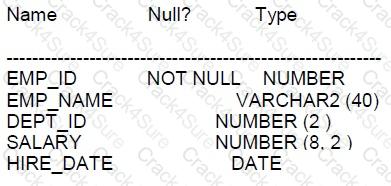
NLS_DATE FORMAT is DD-MON-RR.
Which two queries will execute successfully?
SELECT dept_ id, AVG (MAX(salary)) FROM employees GROUP By dept_id HAVING hire_date> ' O1-JAN-19';
SELECT dept_ id, AVG(MAX(salary)) FROM employees GROUP BY dept_id, salary;
SELECT dept id, MAX (SUM(salary)) FROM employees GROUP BY dept_id;
SELECT dept_ iD, sum(salary) FROM employees WHERE hire_date > '01-JAN-9' GROUP BY dept_id;
SELECT AVG(MAX(salary)) FROM employees GROUP BY salary;
In Oracle SQL, aggregation functions such as AVG and MAX cannot be nested directly inside each other and must be used in conjunction with GROUP BY on the column(s) that are not included in the aggregate function. Also, the HAVING clause filters groups after aggregation is applied.
A. This query will not execute successfully because it improperly nests MAX inside AVG. Oracle SQL does not allow this type of nested aggregation without a subquery.
B. This query will not execute successfully for the same reason as A, it improperly nests MAX inside AVG.
C. Similar to A and B, this query improperly nests SUM inside MAX, which is not allowed without a subquery.
D. This query will execute successfully. It filters rows based on the HIRE_DATE using a correct date format (assuming '9' refers to '09' or '1999' due to the NLS_DATE_FORMAT being 'DD-MON-RR'), then groups the remaining rows by DEPT_ID and calculates the sum of SALARY for each department.
E. This query will not execute successfully because it improperly nests MAX inside AVG without a subquery, and it incorrectly attempts to GROUP BY SALARY, which is already being aggregated.
References:
Oracle Database SQL Language Reference, 12c Release 1 (12.1): "Aggregate Functions"
Oracle Database SQL Language Reference, 12c Release 1 (12.1): "GROUP BY Clause"
Oracle Database SQL Language Reference, 12c Release 1 (12.1): "HAVING Clause"
Which three statements are true regarding indexes?
A SELECT statement can access one or more indices without accessing any tables.
A table belonging to one user can have an index that belongs to a different user,
When a table is dropped and is moved to the RECYCLE BIN, all Indexes built on that table are permanently dropped.
A UNIQUE index can be altered to be non-unique.
An update to a table can result in no updates to any of the table's indexes.
An update to a table can result in updates to any or all of the table's indexes.
Indexes are structures that can improve the retrieval time of data from a database table and have certain characteristics:
A. A SELECT statement can access one or more indices without accessing any tables: If the index contains all the columns needed for the query, Oracle can retrieve the data from the index alone without accessing the table. This is known as an index-only scan.
D. A UNIQUE index can be altered to be non-unique: It is possible to alter a unique index to become non-unique by using the ALTER INDEX command.
F. An update to a table can result in updates to any or all of the table's indexes: If the updated column is part of one or more indexes, those indexes will need to be updated to reflect the change. If the updated column is not part of an index, then no index update is required.
References:
Oracle Database SQL Language Reference 12c, especially sections on index management and the behavior of DML operations with respect to indexes.
Which two statements are true about Entity Relationships?
A Relationship can be mandatory for both entities
A one-to-one relationship is always a self-referencing relationship
A many-to-many relationship can be implemented only by using foreign keys
A table name can be specified just once when selecting data from a table having a selfreferencing relationship
A one-to-many relationship in one direction is a one-to-one relationship in the other direction
A relationship in an Entity-Relationship (ER) model can indeed be mandatory for both entities, meaning that an instance of one entity must relate to one and only one instance of another entity, and vice versa. This is commonly seen in a one-to-one relationship where both sides are mandatory.
Option B is incorrect; a one-to-one relationship does not have to be self-referencing. Self-referencing (or recursive) relationships occur when an entity has a relationship with itself.
Option C is incorrect; a many-to-many relationship typically requires a join table or associative entity with foreign keys that reference the primary keys of the two entities it connects.
Option D is incorrect; in the case of a self-referencing relationship, you may need to use aliases to specify the table more than once to differentiate between the self-referenced columns.
Option E is incorrect because a one-to-many relationship in one direction does not equate to a one-to-one relationship in the opposite direction.
References:
Entity-Relationship Model Concepts: ER Model
Examine the command to create the BOOKS table.
SQL> create table books(book id CHAR(6) PRIMARY KEY,
title VARCHAR2(100) NOT NULL,
publisher_id VARCHAR2(4)?
author_id VARCHAR2 (50));
The BOOK ID value 101 does not exist in the table.
Examine the SQL statement.
insert into books (book id title, author_id values
(‘101’?’LEARNING SQL’,’Tim Jones’)
It executes successfully and the row is inserted with a null PLBLISHER_ID.
It executes successfully only if NULL is explicitly specified in the INSERT statement.
It executes successfully only NULL PUBLISHER_ID column name is added to the columns list in the INSERT statement.
It executes successfully onlyif NULL PUBLISHER ID column name is added to the columns list and NULL is explicitly specified In the INSERT statement.
A. It executes successfully and the row is inserted with a null PUBLISHER_ID: The SQL statement does not specify the publisher_id, and since there is no NOT NULL constraint on this column, Oracle will insert the row with a NULL value for publisher_id. The statement is syntactically correct, assuming the column names and values are properly specified and formatted.
Which statements is true about using functions in WHERE and HAVING?
using single-row functions in the WHERE clause requires a subquery
using single-row functions in the HAVING clause requires a subquery
using aggregate functions in the WHERE clause requires a subquery
using aggregate functions in the HAVING clause requires a subquery
Single-row functions can be used in the WHERE and HAVING clauses without requiring a subquery. However, aggregate functions, which operate on many rows to give one result per group, cannot be used in a WHERE clause unless a subquery is used because the WHERE clause is processed before the individual rows are aggregated into groups.
A. False. Single-row functions can be directly used in the WHERE clause.
B. False. Single-row functions can be directly used in the HAVING clause.
C. True. Aggregate functions cannot be used in the WHERE clause without a subquery because the WHERE clause filters individual rows before they are aggregated.
D. False. Aggregate functions are intended to be used in the HAVING clause, which is specifically for filtering groups of rows after they have been aggregated, and they do not require a subquery to be used there.
Evaluate the following SQL statement
SQL>SELECT promo_id, prom _category FROM promotions
WHERE promo_category=’Internet’ ORDER BY promo_id
UNION
SELECT promo_id, promo_category FROM Pomotions
WHERE promo_category = ‘TV’
UNION
SELECT promoid, promocategory FROM promotions WHERE promo category=’Radio’
Which statement is true regarding the outcome of the above query?
It executes successfully and displays rows in the descend ignore of PROMO CATEGORY.
It produces an error because positional, notation cannot be used in the ORDER BY clause with SBT operators.
It executes successfully but ignores the ORDER BY clause because it is not located at the end of the compound statement.
It produces an error because the ORDER BY clause should appear only at the end of a compound query-that is, with the last SELECT statement.
C. It executes successfully but ignores the ORDER BY clause because it is not located at the end of the compound statement: The ORDER BY clause in a compound query using UNION should be placed at the very end of the final SELECT statement. Since it's located with the first SELECT, it will be ignored.
The INVOICE table has a QTY_SOLD column of data type NUMBER and an INVOICE_DATE column of data type DATE NLS_DATE_FORMAT is set to DD-MON-RR.
Which two are true about data type conversions involving these columns in query expressions?
invoice_date> '01-02-2019': uses implicit conversion
qty_sold ='05549821 ': requires explicit conversion
CONCAT(qty_sold, invoice_date): requires explicit conversion
qty_sold BETWEEN '101' AND '110': uses implicit conversion
invoice_date = '15-march-2019': uses implicit conversion
The statements regarding data type conversions and the treatment of literals in SQL expressions involve understanding implicit and explicit data conversions in Oracle SQL.
Statement A is true as invoice_date > '01-02-2019' involves an implicit conversion of the string literal to a date type, based on the NLS_DATE_FORMAT setting, assuming the format matches.
Statement E is true because, similarly to A, invoice_date = '15-march-2019' involves an implicit conversion where the string is automatically converted to a date type according to the Oracle NLS_DATE_FORMAT or an assumed default date format.
Statements B, C, and D involve incorrect or misleading information:
B (qty_sold = '05549821') is misleading and potentially incorrect as leading zeros in a numeric context do not typically require explicit conversion but the presence of spaces might suggest a need for trimming rather than numeric conversion.
C (CONCAT(qty_sold, invoice_date)) would indeed require explicit conversion because CONCAT expects string types, and thus numerical and date values must be explicitly converted to strings before concatenation.
D (qty_sold BETWEEN '101' AND '110') uses implicit conversion where the string literals '101' and '110' are implicitly converted to numbers if qty_sold is a numeric type.
Examine the description of the EMPLOYEES table:
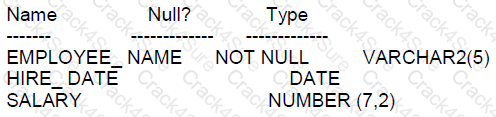
The session time zone is the same as the database server
Which two statements will list only the employees who have been working with the company for more than five years?
SELECT employee_ name FROM employees WHERE (SYSDATE – hire_ data) / 365>5
SELECT employee_ name FROM employees WHERE (SYSTIMESTAMP – hire_ data) / 365>
SELECT employee_ name FROM employees WHERE (CUARENT_ DATE – hire_ data / 365>5
SELECT employee_ name FROM employees WHERE (SYSNAYW – hire_ data / 12> 3
SELECT employee_ name FROM employees WHERE (CUNACV_ DATE – hire_ data / 12> 3
To calculate the length of employment, you would compare the current date to the HIRE_DATE and calculate the difference in years.
A. This is the correct answer. The expression calculates the number of days between the current date (SYSDATE) and the HIRE_DATE, then divides by 365 to convert it to years, and checks if it is greater than 5.
B. SYSTIMESTAMP includes a time component including fractional seconds and time zone information, making this comparison incorrect.
C. There are typos in this option (CUARENT_DATE should be CURRENT_DATE and hire_data should be hire_date). Even with the correct function and column names, CURRENT_DATE returns the current date in the session time zone, not in years.
D. There are typos in this option (SYSNAYW should be SYSDATE). Additionally, dividing by 12 incorrectly assumes that a month is equivalent to a year.
E. This is a repetition of option D with the same issues.
F. There are typos in this option (CUNACV_DATE should be CURRENT_DATE and hire_data should be hire_date). Additionally, dividing by 12 incorrectly assumes that a month is equivalent to a year.
References:
Oracle Database SQL Language Reference, 12c Release 1 (12.1): "Date Functions"
Examine this partial statement:
SELECT ename, sal,comm FROM emp
Now examine this output:
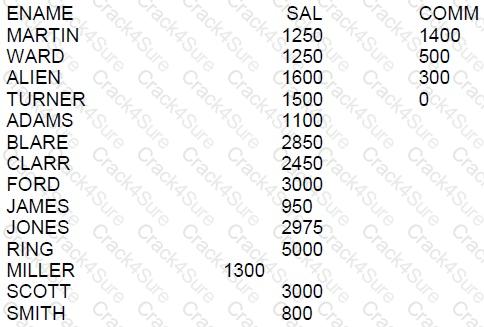
WHICH ORDER BY clause will generate the displayed output?
ORDER BY NVL(enam,0) DESC, ename
ORDER BY NVL(comm,0) ASC NULLS FIRST, ename
ORDER BY NVL(comm,0) ASC NULLS LAST, ename
ORDER BY comm DESC NULLS LAST, ename
The ORDER BY clause is used in a SELECT statement to sort the returned rows by one or more columns.
A. This clause would attempt to order by ename as if it were a numeric column, which is not correct since ename is not numeric.
B. This is the correct answer. The NVL function replaces nulls with the specified value, in this case, 0. This clause sorts by comm, with nulls considered as 0 and appearing first, followed by the actual values, and then sorts by ename.
C. This clause is incorrect because it would place null values at the end, but in the output, rows with null comm appear at the beginning.
D. This clause would sort the comm in descending order with the nulls at the end, which is not consistent with the output shown.
References:
Oracle Database SQL Language Reference, 12c Release 1 (12.1): "ORDER BY Clause"
Oracle Database SQL Language Reference, 12c Release 1 (12.1): "NVL Function"
Please note that the correct formatting of SQL statements and clauses is crucial for the successful execution of queries.
Which two statements about INVISIBLE indexes are true?
an INVISIBLE Index consumes no storage
You can only create one INVISIBLE index on the same column list
The query optimizer never considers INVISIBLE Indexes when determining execution plans
You use AlTER INDEX to make an INVISIBLE Index VISIBLE
All INSERT, UPDATE, and DELETE statements maintain entries in the index
INVISIBLE indexes are a feature in Oracle Database 12c and later versions that allow an index to be maintained but not used by the optimizer unless explicitly hinted.
A. False. An INVISIBLE index still consumes storage space as it is maintained in the background.
B. False. There is no such restriction. You can create multiple INVISIBLE indexes on the same column list.
C. False. The optimizer can consider INVISIBLE indexes if they are hinted at in the query.
D. True. You can alter the visibility of an index using the ALTER INDEX command to make an INVISIBLE index VISIBLE.
E. True. Even though they are invisible to the optimizer by default, all DML operations such as INSERT, UPDATE, and DELETE continue to maintain the index as they would with a VISIBLE index.
Which three statements are true about the Oracle join and ANSI Join syntax?
The Oracle join syntax only supports right outer joins,
The Oracle join syntax supports creation of a Cartesian product of two tables.
The SQL:1999 compliant ANSI join syntax supports natural joins.
The Oracle join syntax supports natural joins.
The Oracle join syntax performs better than the SQL:1999 compliant ANSI join syntax.
The SQL:1999 compliant ANSI join syntax supports creation of a Cartesian product of two tables.
The Oracle join syntax performs less well than the SQL:1999 compliant ANSI Join Answer.
Regarding Oracle join and ANSI join syntax:
B. The Oracle join syntax supports the creation of a Cartesian product of two tables. This is true. In Oracle, if you list tables in the FROM clause without a join condition, it creates a Cartesian product.
C. The SQL:1999 compliant ANSI join syntax supports natural joins. This is true. ANSI syntax supports natural joins, which join tables based on columns with the same names in the joined tables.
F. The SQL:1999 compliant ANSI join syntax supports the creation of a Cartesian product of two tables. This is true. The ANSI standard allows for Cartesian products when tables are listed in the FROM clause without a join condition.
Options A, D, E, and G are incorrect:
A is incorrect because the Oracle join syntax supports all types of joins, including right outer joins.
D is incorrect because Oracle's proprietary join syntax does not use the term "natural join."
E is incorrect because there is no inherent performance difference between Oracle join syntax and ANSI join syntax; performance depends on how the query is written and how the database optimizer handles it.
G is incorrect for the same reason as E.
Examine the description of the ORDERS table:
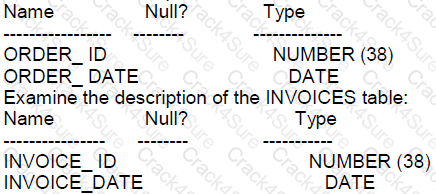
Which three statements execute successfully?
(SELECT * FROM orders
UNION ALL
SELECT* FROM invoices) ORDER BY order _id;
SELECE order _id, order _ date FRON orders
LNTERSECT
SELECT invoice_ id, invoice_ id, order_ date FROM orders
SELECT order_ id, invoice_ data order_ date FROM orders
MINUS
SELECT invoice_ id, invoice_ data FROM invoices ORDER BY invoice_ id;
SELECT * FROM orders ORDER BY order_ id
INTERSEOT
SELECT * FROM invoices ORDER BY invoice_ id;
SELECT order_ id, order_ data FROM orders
UNION ALL
SELECT invoice_ id, invoice_ data FROM invoices ORDER BY order_ id;
SELECT * FROM orders
MINUS
SELECT * FROM INVOICES ORDER BY 1
SELECT * FROM orders ORDER BY order_ id
UNION
SELECT * FROM invoices;
In Oracle SQL, set operations like UNION, UNION ALL, INTERSECT, and MINUS can be used to combine results from different queries:
Option A:
Combining results using UNION ALL followed by ORDER BY will execute successfully because UNION ALL allows duplicate rows and ORDER BY can be used to sort the combined result set.
Option E:
Similar to option A, UNION ALL combines all rows from the two selects and allows ordering of the results.
Option G:
UNION combines the results from two queries and removes duplicates, and ORDER BY can be used to sort the final result set.
Options B, C, D, and F are incorrect because:
Option B: You cannot intersect different columns (ORDER_ID with INVOICE_ID).
Option C: Incorrect column names and syntax with ORDER BY.
Option D: ORDER BY cannot be used before a set operator like INTERSECT.
Option F: ORDER BY cannot be used directly after a MINUS operator without wrapping the MINUS operation in a subquery.
Examine the description of the sales table.
The sales table has 55,000 rows.
Examine this statements:
Which two statements are true?
SALES1 has PRIMARY KEY and UNIQUE constraints on any selected columns which had those constraints in the SALES table.
SALES1 created with 55, 000 rows
SALES1 created with no rows.
SALES1 created with 1 row.
SALES1 has NOT NULL constraints on any I selected columns which had those constraints I in the SALES table.
Assuming the statement involves creating a new table SALES1 from the existing SALES table:
B. SALES1 created with 55,000 rows: If the statement involved creating SALES1 by selecting all rows from SALES (such as with a CREATE TABLE AS SELECT operation), then all 55,000 rows would be copied if no WHERE clause limited the selection.
E. SALES1 has NOT NULL constraints on any selected columns which had those constraints in the SALES table: When creating a table using the CREATE TABLE AS SELECT syntax, any NOT NULL constraints on columns in the original table will also apply to the new table.
Incorrect options:
A: PRIMARY KEY and UNIQUE constraints are not automatically copied with a CREATE TABLE AS SELECT; they must be explicitly redefined.
C: The table is created with rows if the original SELECT statement (assumed here) selected rows.
D: The statement about creating a table with 1 row is incorrect based on the assumed full selection of the original table's rows.
Examine the description of the PRODUCT_INFORMATION table:
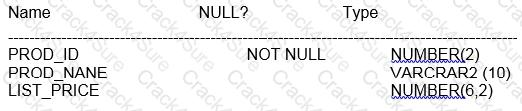
SELECT (COUNT(list_price) FROM Product_intormation WHERE list_price=NULL;
SELECT count(nvl( list_price,0)) FROM product_information WHERE list_price is null;
SELECT COUNT(DISTINCT list_price) FROM product_information WHERE list_price is null.
BELECT COUNT(list_price) FROM product_information where list_price is NULL;
In SQL, when you want to count occurrences of null values using the COUNT function, you must remember that COUNT ignores null values. So, if you want to count rows with null list_price, you have to replace nulls with some value that can be counted. This is what the NVL function does. It replaces a null value with a specified value, in this case, 0.
A, C, and D options attempt to count list_price directly where it is null, but this will always result in a count of zero because COUNT does not count nulls. Option B correctly uses the NVL function to convert null list_price values to 0, which can then be counted. The WHERE list_price IS NULL clause ensures that only rows with null list_price are considered.
The SQL documentation confirms that COUNT does not include nulls in its count and NVL is used to substitute a value for nulls in an expression. So option B will give us the correct count of rows with a null list_price.
Which three statements are true about GLOBAL TEMPORARY TABLES?
A GLOBAL TEMPORARY TABLE cannot have PUBLIC SYNONYM.
A GLOBAL TEMPORARY TABLE can have multiple indexes
A GLOBAL TEMPORARY TABLE can be referenced in the defining query of a view.
Data Manipulation Language (DML) on GLOBAL TEMPORARY TABLES generates no REDO.
A GLOBAL TEMPORARY TABLE can have only one index.
A trigger can be created on a GLOBAL TEMPORARY TABLE
A. Incorrect. There is no such restriction in Oracle that a global temporary table cannot have a public synonym. B. Correct. Global temporary tables can have more than one index, just like permanent tables. C. Correct. Global temporary tables can be referenced in the defining query of a view. However, any data selected by the view will be session-specific if it comes from the global temporary table. D. Correct. DML operations on global temporary tables do not generate redo log entries for the data changes; however, undo information for these tables is stored in the undo tablespace and can generate redo entries. E. Incorrect. As stated in B, global temporary tables can have more than one index. F. Correct. Triggers can be created on global temporary tables.
These properties are documented in the Oracle Database SQL Language Reference and Oracle Database Concepts Guide.
Which three statements are true about the DESCRIBE command?
It can be used from SQL Developer.
It can be used to display the structure of an existing view.
It can be used only from SQL*Plus.
It displays the NOT NULL constraint for any columns that have that constraint.
It displays all constraints that are defined for each column.
It displays the PRIMARY KEY constraint for any column or columns that have that constraint.
A: True. The DESCRIBE command can indeed be used from SQL Developer as well as other Oracle database tools such as SQL*Plus. This command is used to display the structure of a table, view, or other object, showing information such as column names, data types, and whether a column is nullable.
B: True. The DESCRIBE command can be used to display the structure of an existing view, showing similar information as it would for a table. This includes the columns, their data types, and other pertinent details.
D: True. When DESCRIBE is used, it does display the NOT NULL constraints for columns that have this constraint. This is part of the basic information about the structure of a table or view that can help developers understand the requirements of the data stored therein.
Which two statements are true about outer Joins?
The outer join operator (+) can be used on both sides of the join condition in an outer join.
An outer join is used to retrieve only the rows that do not meet the join condition.
The IN operator cannot be used in a condition that Involves an outer join.
A condition representing an outer join cannot be linked to another condition using the or logical operator.
The outer join operator (+) is used next to the column of the table without the matching rows.
Regarding the usage and rules of outer joins in SQL, specifically Oracle SQL:
D. A condition representing an outer join cannot be linked to another condition using the OR logical operator: In SQL, when using the Oracle-specific (+) notation for outer joins, it is not permitted to combine this condition with another using the OR operator. The use of (+) imposes restrictions to ensure the join logic is correctly interpreted.
E. The outer join operator (+) is used next to the column of the table without the matching rows: The (+) symbol in Oracle's SQL syntax denotes the table that should include "null" where data does not exist to satisfy the join condition, effectively including rows that do not have a match in the joined table.
Incorrect options:
A: The (+) operator cannot be used on both sides of a condition within the same join; it can only appear on one side to define which side of the join is the outer part.
B: An outer join is used to retrieve all rows from one table and the matched rows from the other table; it does not solely retrieve rows that do not meet the join condition.
C: The IN operator can be used in conditions involving an outer join, although specific rules and behaviors need to be considered depending on the SQL version and implementation.
Which three actions can you perform by using the ALTER TABLE command?
Drop pseudo columns from a table.
Restrict all DML statements on a table.
Drop all columns simultaneously from a table.
Lock a set of rows in a table CE Rename a table.
Rename a table
Enable or disable constraints on a table.
The actions possible using the ALTER TABLE command:
E. Rename a table: The ALTER TABLE command can be used to rename a table, although the syntax typically involves RENAME TO as part of table management.
F. Enable or disable constraints on a table: This is a standard use of the ALTER TABLE command, allowing for constraints to be enabled or disabled, which is critical for managing table integrity during data loads or maintenance.
Incorrect options:
A: You cannot drop pseudo columns from a table as they are not explicitly defined or managed like regular columns.
B: The ALTER TABLE command does not directly restrict DML statements; this would typically be managed through security roles or other database mechanisms.
C: Dropping all columns from a table simultaneously is not possible; a table must retain at least one column.
D: Locking a set of rows is performed with SQL commands like SELECT FOR UPDATE, not with ALTER TABLE.
Which three are true about scalar subquery expressions?
A scalar subquery expression that returns zero rows evaluates to zoro
They cannot be used in the values clause of an insert statement*
They can be nested.
A scalar subquery expression that returns zero rows evaluates to null.
They cannot be used in group by clauses.
They can be used as default values for columns in a create table statement.
Scalar subquery expressions are used in Oracle SQL to return a single value from a subquery.
Option C: They can be nested.
Scalar subqueries can indeed be nested within another scalar subquery, provided each subquery returns a single value.
Option D: A scalar subquery expression that returns zero rows evaluates to null.
According to Oracle documentation, if a scalar subquery returns no rows, the result is a NULL value, not zero or any other default.
Option F: They can be used as default values for columns in a create table statement.
Scalar subqueries can be specified in the DEFAULT clause of a column in a CREATE TABLE statement to dynamically assign default values based on the result of the subquery.
Options A, B, and E are incorrect based on Oracle SQL standards and functionalities.
Examine the description of the BOOKS table:
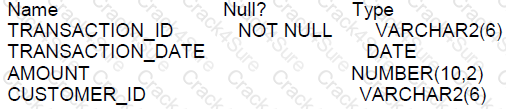
The table has 100 rows.
Examine this sequence of statements issued in a new session;
INSERT INTO BOOKS VALUES (‘ADV112’ , ‘Adventures of Tom Sawyer’, NULL, NULL);
SAVEPOINT a;
DELETE from books;
ROLLBACK TO SAVEPOINT a;
ROLLBACK;
Which two statements are true?
The first ROLLBACK command restores the 101 rows that were deleted, leaving the inserted row still to be committed.
The second ROLLBACK command does nothing.
The first ROLLBACK command restores the 101 rows that were deleted and commits the inserted row.
The second ROLLBACK command replays the delete.
The second ROLLBACK command undoes the insert.
B: True. The second ROLLBACK command would not do anything because the first ROLLBACK TO SAVEPOINT a; already undid the delete operation, and there was no other DML operation between the first and the second ROLLBACK.
E: True. The second ROLLBACK command undoes the insert because after the first ROLLBACK TO SAVEPOINT a; there are no savepoints defined, so a subsequent ROLLBACK would undo all transactions to the beginning of the current session or last COMMIT.
The ROLLBACK command is used to undo transactions that have not yet been committed. Rolling back to a savepoint only undoes transactions up to that savepoint, and a subsequent ROLLBACK without a savepoint name will undo all uncommitted changes since the last COMMIT.
References:Oracle SQL documentation on the ROLLBACK statement provides details on how it interacts with savepoints and the effects it has on the transactions within a session.
Which two statements are true about transactions in the Oracle Database server?
An uncommitted transaction commits automatically if the user exits SQL*Plus
Data Manipulation Language (DML) statements always start a new transaction.
A user can always see uncommitted updates made by the same user in a different session.
A Data Definition Language (DDL) statement does a commit automatically only for the data dictionary updates caused by the DDL
A session can always see uncommitted updates made by itself.
If a session has an uncommitted transaction, then a DDL statement issue a COMMIT before starting a new transaction.
A. Incorrect. An uncommitted transaction is not automatically committed if the user exits SQL*Plus. It is rolled back unless otherwise specified. B. Correct. A DML statement such as INSERT, UPDATE, or DELETE will implicitly start a new transaction if there is no current transaction running in the session. C. Incorrect. A user cannot see uncommitted updates made by another session; a session can only see its own uncommitted changes. D. Incorrect. A Data Definition Language (DDL) statement automatically commits any outstanding transactions in the session, not just the changes to the data dictionary. E. Correct. A session can always see its own uncommitted updates. This is because Oracle uses a multiversion consistency model, allowing each user to see a consistent view of the data including their own changes. F. Incorrect but close. If a session has an uncommitted transaction, then a DDL statement does issue a COMMIT before executing and starting a new implicit transaction, not just for the data dictionary updates but for all pending changes in the session.
This information can be verified in the Oracle Database SQL Language Reference and Oracle Database Concepts documentation, which discuss transaction management and the behavior of DML and DDL statements within transactions.
Which two true about a sql statement using SET operations such as UNION?
The data type of each column returned by the second query must be implicitly convertible to the data type of the corresponding column returned by the first query
The data type of each column retuned by the second query must exactly match the data type of the corresponding column returned by the first query
The number, but not names, of columns must be identical for all SELECT statements in the query
The data type group of each column returned by the second query must match the data type group of the corresponding column returned by the first query
The names and number of columns must be identical for all SELECT statements in the query.
In the context of SQL statements using SET operations like UNION in Oracle Database 12c:
A. The data type of each column returned by the second query must be implicitly convertible to the data type of the corresponding column returned by the first query. This is correct. Oracle allows the union of columns as long as their data types are implicitly convertible, not necessarily identical.
C. The number, but not names, of columns must be identical for all SELECT statements in the query. This is correct. For a UNION operation to be valid, all SELECT statements involved must have the same number of columns, although their names and exact data types need not match.
Options B, D, and E are incorrect:
B is incorrect because exact data type matches are not required, only that they be implicitly convertible.
D is also incorrect for the same reason as B; it's enough that the types are compatible, not identical.
E is incorrect as the names
Which three statements are true about inner and outer joins?
A full outer join returns matched and unmatched rows.
A full outer join must use Oracle syntax.
Outer joins can be used when there are multiple join conditions on two tables.
Outer joins can only be used between two tables per query.
An inner join returns matched rows.
A left or right outer join returns only unmatched rows.
A: True. A full outer join does indeed return both matched and unmatched rows from both tables involved in the join. It combines the results of both left and right outer joins.
E: True. An inner join, by definition, returns rows that have matching values in both tables. Rows from both tables that do not match are not returned in an inner join result set.
Inner joins match rows from the joined tables based on the join condition, while outer joins include all rows from one or both tables regardless of whether a matching row exists in the other table.
References:The Oracle SQL documentation explains different types of joins, including inner joins, left and right outer joins, and full outer joins, clarifying how they differ in the result sets they produce.
Examine the data in the EMP table:

You execute this query:
SELECT deptno AS "Department", AVG(sal) AS AverageSalary, MAX(sal) AS "Max Salary"
FROM emp
WHERE sal >= 12000
GROUP BY "Department "
ORDER BY AverageSalary;
Why does an error occur?
An alias name must not be used in an ORDER BY clause.
An allas name must not contain space characters.
An alias name must not be used in a GROUP BY clause.
An alias name must always be specified in quotes.
C. True. The error occurs because the alias "Department" used in the GROUP BY clause is enclosed in double quotes, which makes it case-sensitive. However, the column deptno is not originally created with double quotes in the table definition, so you cannot refer to it with a case-sensitive alias in the GROUP BY clause. Oracle interprets "Department" as a string literal, not a column alias, in the GROUP BY clause.
A is incorrect because you can use an alias in an ORDER BY clause. B is incorrect because an alias can contain space characters if it is quoted. D is incorrect because an alias does not always have to be specified in quotes, only when it includes special characters or spaces or if it is case-sensitive.
Which two statements are true about an Oracle database?
A table can have multiple primary keys.
A table can have multiple foreign keys.
A NUMBER column without data has a zero value.
A column definition can specify multiple data types.
A VARCHAR2 column without data has a NULL value.
A: This statement is false. A table can only have one primary key, although the primary key can consist of multiple columns (composite key).
B: This statement is true. A table can have multiple foreign keys referencing the primary keys of other tables or the same table.
C: This statement is false. A NUMBER column without data is NULL, not zero.
D: This statement is false. A column definition must specify exactly one data type.
E: This statement is true. A VARCHAR2 column without data defaults to NULL, not an empty string.
Which three are true about the CREATE TABLE command?
It can include the CREATE...INDEX statement for creating an index to enforce the primary key constraint.
The owner of the table should have space quota available on the tablespace where the table is defined.
It implicitly executes a commit.
It implicitly rolls back any pending transactions.
A user must have the CREATE ANY TABLE privilege to create tables.
The owner of the table must have the UNLIMITED TABLESPACE system privilege.
A. False - The CREATE TABLE command cannot include a CREATE INDEX statement within it. Indexes to enforce constraints like primary keys are generally created automatically when the constraint is defined, or they must be created separately using the CREATE INDEX command.
B. True - The owner of the table needs to have enough space quota on the tablespace where the table is going to be created, unless they have the UNLIMITED TABLESPACE privilege. This ensures that the database can allocate the necessary space for the table. Reference: Oracle Database SQL Language Reference, 12c Release 1 (12.1).
C. True - The CREATE TABLE command implicitly commits the current transaction before it executes. This behavior ensures that table creation does not interfere with transactional consistency. Reference: Oracle Database SQL Language Reference, 12c Release 1 (12.1).
D. False - It does not implicitly roll back any pending transactions; rather, it commits them.
E. True - A user must have the CREATE ANY TABLE privilege to create tables in any schema other than their own. To create tables in their own schema, they need the CREATE TABLE privilege. Reference: Oracle Database Security Guide, 12c Release 1 (12.1).
F. False - While the UNLIMITED TABLESPACE privilege allows storing data without quota restrictions on any tablespace, it is not a mandatory requirement for a table owner. Owners can create tables as long as they have sufficient quotas on the specific tablespaces.
Which two statements are true about Oracle databases and SQL?
Updates performed by a database user can be rolled back by another user by using the ROLLBACK command.
The database guarantees read consistency at select level on user-created tablers.
When you execute an UPDATE statement, the database instance locks each updated row.
A query can access only tables within the same schema.
A user can be the owner of multiple schemas In the same database.
B. True. Oracle databases guarantee read consistency at the transaction level, meaning that each query can only see data that has been committed before the query began executing.
C. True. When an UPDATE statement is executed, Oracle locks each row as it is updated to prevent other transactions from modifying it until the transaction is committed or rolled back.
A is incorrect because updates made by one user cannot be rolled back by another user. D is incorrect because a query can access tables in other schemas if proper permissions are granted. E is incorrect because a user can own only one schema, which has the same name as the user in an Oracle database.
Which two queries execute successfully?
SELECT INTERVAL '1' DAY - SYSDATE FROM DUAL;
SELECT SYSTIMESTAMP + INTERVAL '1' DAY FROM DUAL;
SELECT INTERVAL '1' DAY - INTERVAL '1' MINUTE FROM DUAL;
select INTERVAL '1' DAY +INTERVAL '1' MONTH FROM DUAL;
SELECT SYSDATE “INTERRVAL '1' DAY FROM DUAL;
A: This statement will not execute successfully because you cannot subtract a DAY interval from a DATE directly. SYSDATE needs to be cast to a TIMESTAMP first.
B: This statement is correct. It adds an interval of '1' DAY to the current TIMESTAMP.
C: This statement is correct. It subtracts an interval of '1' MINUTE from '1' DAY.
D: This statement will not execute successfully. In Oracle, you cannot add intervals of different date fields (DAY and MONTH) directly.
E: This statement has a syntax error with the quotes around INTERVAL and a misspelling, it should be 'INTERVAL'.
Oracle Database 12c SQL supports interval arithmetic as described in the SQL Language Reference documentation.
Examine the description of the PRODCTS table which contains data:
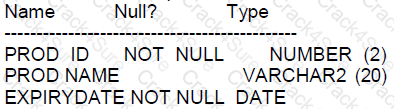
Which two are true?
The PROD ID column can be renamed.
The PROD_ ID column data type can be changed to VARCHAR2 (2).
The EXPIRY DATE column data type can be changed to TIME STAMP.
The EXPIRY DATE column cannot be dropped.
The PROD NAME column cannot have a DEFAULT clause added to it.
A: True, the name of a column can be changed in Oracle using the ALTER TABLE ... RENAME COLUMN command.
B: False, you cannot change a column's data type from NUMBER to VARCHAR2 if the table contains data, unless the change does not result in data loss or inconsistency.
C: True, it is possible to change a DATE data type column to TIMESTAMP because TIMESTAMP is an extension of DATE that includes fractional seconds. This operation is allowed if there is no data loss.
D: False, any column that is not part of a primary key or does not have a non-deferrable constraint can generally be dropped unless it contains data that does not allow for such a change.
E: False, the DEFAULT clause can be added to a column provided there is no data that contradicts the default value or it doesn't violate any constraints.
These statements are verified against the Oracle Database 12c SQL documentation, specifically the sections on data types, the ALTER TABLE command, and the use of literals in SQL expressions.
Which two are true about virtual columns?
They can be referenced In the where clause of an update or debete statement.
They can be referenced in the set clause of an update statement as the name of the column To be updated.
They can be indexed.
They cannot have a data type explicitly specified.
They can be referenced in the column expression of another virtxial column.
Regarding the properties and capabilities of virtual columns in Oracle Database:
C. They can be indexed: In Oracle, virtual columns can indeed be indexed. This allows for performance optimization on queries that utilize these columns, despite the fact that their values are derived and not stored physically.
D. They cannot have a data type explicitly specified: The data type of a virtual column is derived from the expression used to define it. Therefore, it is not specified explicitly but is inferred from the expression itself.
Incorrect options:
A: Virtual columns cannot be referenced in the WHERE clause of UPDATE or DELETE statements because they are not stored and cannot be individually modified.
B: Virtual columns cannot be referenced in the SET clause of an UPDATE statement since they are derived from other column values and cannot be updated directly.
E: Virtual columns cannot reference other virtual columns in their expressions due to the potential for recursive and complex dependencies.
Table ORDER_ITEMS contains columns ORDER_ID, UNIT_PRICE and QUANTITY, of data type NUMBER
Statement 1:
SELECT MAX (unit price*quantity) "Maximum Order FROM order items;
Statement 2:
SELECT MAX (unit price*quantity "Maximum order" FROM order items GROUP BY order id;
Which two statements are true?
Statement 2 returns only one row of output.
Both the statement given the same output.
Both statements will return NULL if either UNIT PRICE or QUANTITY contains NULL,
Statement 2 may return multiple rows of output.
Statement 1 returns only one row of output.
Analyzing the given SQL statements on the ORDER_ITEMS table:
D. Statement 2 may return multiple rows of output: Statement 2 groups the results by ORDER_ID, which means it calculates the maximum UNIT_PRICE * QUANTITY for each ORDER_ID, potentially returning multiple rows depending on the number of unique ORDER_IDs in the table.
E. Statement 1 returns only one row of output: Statement 1 computes the maximum product of UNIT_PRICE and QUANTITY across all entries in the ORDER_ITEMS table, returning a single row with the maximum value.
Incorrect options:
A: Since Statement 2 groups by ORDER_ID, it does not necessarily return just one row; it returns one row per ORDER_ID.
B: These statements do not yield the same output; Statement 1 returns a single maximum value, while Statement 2 returns the maximum value per ORDER_ID.
C: If either UNIT_PRICE or QUANTITY is NULL, the product for that row will be NULL, but the MAX function ignores NULL values in its calculation unless all rows are NULL, in which case it returns NULL.
Examine the data in the PRODUCTS table:
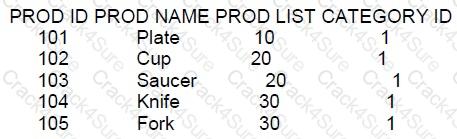
Examine these queries:
1. SELECT prod name, prod list
FROM products
WHERE prod 1ist NOT IN(10?20) AND category _id=1;
2. SELECT prod name, | prod _ list
FROM products
WHERE prod list < > ANY (10?20) AND category _id= 1;
SELECT prod name, prod _ list
FROM products
WHERE prod_ list <> ALL (10? 20) AND category _ id= 1;
Which queries generate the same output?
1 and 3
1, 2 and 3
2 and 3
1 and 2
Based on the given PRODUCTS table and the SQL queries provided:
Query 1: Excludes rows where prod_list is 10 or 20 and category_id is 1.
Query 2: Includes rows where prod_list is neither 10 nor 20 and category_id is 1.
Query 3: Excludes rows where prod_list is both 10 and 20 (which is not possible for a single value) and category_id is 1.
The correct answer is A, queries 1 and 3 will produce the same result. Both queries exclude rows where prod_list is 10 or 20 and include only rows from category_id 1. The NOT IN operator excludes the values within the list, and <> ALL operator ensures that prod_list is not equal to any of the values in the list, which effectively excludes the same set of rows.
Query 2, using the <> ANY operator, is incorrect because this operator will return true if prod_list is different from any of the values in the list, which is not the logic represented by the other two queries.
Which two are true about the NVL, NVL2, and COALESCE functions?
The first expression in NVL2 is never returned.
NVL2 can have any number of expressions in the list.
COALESCE stops evaluating the list of expressions when it finds the first null value.
COALESCE stops evaluating the list of expressions when it finds the first non-null value.
NVL must have expressions of the same data type.
NVL can have any number of expressions in the list.
A. This statement is false. In NVL2, the first expression is returned if it is not null.
B. This statement is false. NVL2 takes exactly three arguments, not any number of expressions.
C. This statement is false. COALESCE stops evaluating its list of expressions as soon as it finds the first non-null value.
D. This is true. COALESCE returns the first non-null expression in its list.
E. This statement is true. NVL requires the first and second expressions to be of the same or compatible data types because it returns the first expression if it is not null, otherwise it returns the second.
F. This statement is false. NVL takes exactly two arguments, not any number.
References:
Oracle Documentation on COALESCE: https://docs.oracle.com/database/121/SQLRF/functions040.htm#SQLRF00625
Oracle Documentation on NVL: https://docs.oracle.com/database/121/SQLRF/functions130.htm#SQLRF00683
Oracle Documentation on NVL2: https://docs.oracle.com/database/121/SQLRF/functions123.htm#SQLRF00682
Examine these requirements:
1. Display book titles for books purchased before January 17, 2007 costing less than 500 or more than 1000.
2. Sort the titles by date of purchase, starting with the most recently purchased book.
Which two queries can be used?
SELECT book_title FROM books WHERE (price< 500 OR >1000) AND (purchase date< '17-JAN-2007') ORDER BY purchase date DESC;
SELECT book_title FROM books WHERE (price IN (500, 1000)) AND (purchase date < '17-JAN-2007') ORDER BY purchase_date ASC;
SELECT book_title FROM books WHERE (price NOT BETWEEN 500 AND 1000) AND (purchase_date< '17-JAN-2007') ORDER BY purchase_date DESC;
SELECT book_title FROM books WHERE (price BETWEEN 500 AND 1000) AND (purchase_date<'17-JAN-2007') ORDER BY purchase_date;
The requirements specify that we need to select book titles based on a price condition and a date condition, and then sort the results by the date of purchase.
A. This query will not execute successfully because there is a syntax error in the price condition. It should be price < 500 OR price > 1000.
B. This query is incorrect. The requirement specifies that the price must be less than 500 or more than 1000, not in a list of values.
C. This query is correct. It selects books where the price is not between 500 and 1000 (thus, less than 500 or more than 1000) and the purchase date is before January 17, 2007, ordered by purchase date in descending order.
D. This query is incorrect because it selects books with prices between 500 and 1000, which is not what the requirement specifies.
Examine the description of the EMPLOYEES table:
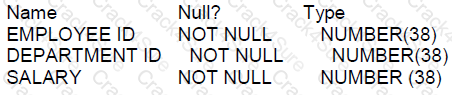
Which statement increases each employee's SALARY by the minimum SALARY for their DEPARTM
ENT_ID?
UPDATE employees e1
SET salary =(SELECT e2. salary + MIN(e2.salary)
FROM employees e2
WHERE e1.department_ id = e2. department_id GROUP BY e2. department_id) ;
UPDATE employees e1
SET salary = salary +
(SELECT MIN(e1. salary)
FROM employees e2
WHERE e1.department_id = e2 .department_id);
UPDATE employees e1
SET salary = salary+(SELECT MIN (salary)
FROM employees e2) ;
UPDATE employees e1
SET salary=
(SELECT e1.salary + MIN(e2.salary)
FROM employees e2
WHERE e1. department_ id = e2.department_id);
The correct statement to increase each employee's salary by the minimum salary for their department is:
D. This option correctly increases each employee's salary by the minimum salary in their department. The subquery calculates the minimum salary for the department of the current row being updated (e1) in the outer UPDATE statement. The subquery does not use GROUP BY since it returns a single value - the minimum salary for the matching department.
A, B, and C are incorrect. Specifically:
A uses a subquery with an aggregate function combined with GROUP BY, which is not needed and will result in an error.
B incorrectly references MIN(e1.salary) within the subquery, which is incorrect since e1 is the alias for the outer query's table and should not be used within the subquery.
C sets the salary to itself plus the minimum salary across all employees, not filtered by the department.
References:
Oracle Database SQL Language Reference, 12c Release 1 (12.1): "UPDATE"
Which two statements are true about the SET VERIFY ON command?
It displays values for variables created by the DEFINE command.
It can be used in SQL Developer and SQL*Plus.
It can be used only in SQL*plus.
It displays values for variables prefixed with &&.
It displays values for variables used only in the WHERE clause of a query.
The SET VERIFY ON command is related to how SQL*Plus and SQL Developer display information about substitution variables:
A. It displays values for variables created by the DEFINE command: When VERIFY is set to ON, SQL*Plus and SQL Developer will display the old and new values of a substitution variable when it is redefined using the DEFINE command or when a new value is provided for it during the session.
B. It can be used in SQL Developer and SQL*Plus: While traditionally associated with SQL*Plus, the SET VERIFY command is also supported in SQL Developer, allowing you to control the display of substitution variable values in both environments.
References:
Oracle SQL*Plus User's Guide and Reference, especially the section on the SET command and substitution variables.
Examine the description of the ENPLOYES table:
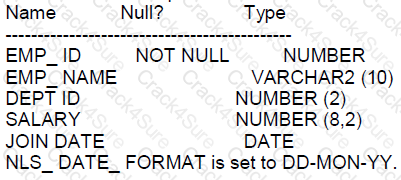
Which query requires explicit data type conversion?
SELECT SUBSTR(join date, 1, 2) - 10 FROM employees;
SELECT join_ date + '20' EROM employees;
SELECT join_ date??‘’?? salary FROM employees;
SELECT join _ date FROM employees WHERE join date > *10-02-2018';
SELECT salary + '120.50' FROM employees;
A look at the queries and how Oracle Database handles data type conversion:
A: This statement takes a substring of the JOIN_DATE column. Since JOIN_DATE is a DATE type and SUBSTR function expects a string, implicit conversion will occur from DATE to string based on the NLS_DATE_FORMAT setting. However, this will not require explicit conversion in the query itself.
B: This statement tries to add '20' to JOIN_DATE. Oracle Database does not support adding a string to a DATE implicitly. An explicit conversion of '20' to a number is required, or using the INTERVAL keyword to add days or years as appropriate.
C: This statement concatenates the date with an empty string and the salary. The database will implicitly convert the JOIN_DATE from a DATE to a string using the NLS_DATE_FORMAT setting and then perform the concatenation.
D: This query attempts to compare a DATE column with a string literal '*10-02-2018'. An explicit conversion using TO_DATE is needed to convert the string to a DATE data type with the appropriate date format mask. In this case, because the string does not follow the NLS_DATE_FORMAT 'DD-MON-YY', it will not be implicitly converted correctly.
E: This statement adds '120.50' to SALARY. Oracle Database will implicitly convert the string '120.50' to a number before performing the arithmetic addition, as SALARY is a NUMBER data type.
Examine the data in the NEW_EMPLOYEES table:
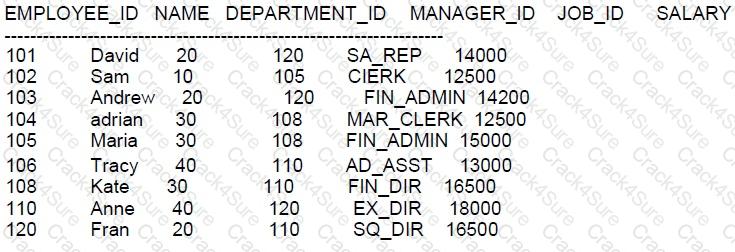
Examine the data in the EMPLOYEES table:
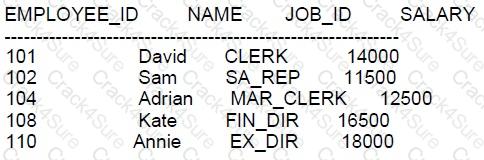
You want to:
1. Update existing employee details in the EMPLOYEES table with data from the NEW EMPLOYEES
table.
2. Add new employee detail from the NEW_ EMPLOYEES able to the EMPLOYEES table.
Which statement will do this:
MERGE INTO employees e
USING new employees ne
WHERE e.employee_id = ne.employee_ id
WHEN MATCHED THEN
UPDATE SET e.name = ne.name, e.job_id = ne.job_id,e.salary =ne. salary
WHEN NOT MATCHED THEN
INSERT VALUES (ne. employee_id,ne.name, ne.job_id,ne.salary) ;
MERGE INTO employees e
USING new_employees n
ON (e.employee_id = ne.employee_id)
WHEN MATCHED THEN
UPDATE SET e.name = ne.name, e.job id = ne.job_id,e.salary =ne. salary
WHEN NOT MATCHED THEN
INSERT VALUES (ne. employee_id,ne.name,ne.job_id,ne.salary);
MERGE INTO employees e
USING new employees ne
ON (e.employee_id = ne.employee_id)
WHEN FOUND THEN
UPDATE SET e.name =ne.name, e.job_id=ne.job_id, e.salary =ne.salary
WHEN NOT FOUND THEN
INSERT VALUES (ne.employee_id,ne.name,ne.job_id,ne.salary) ;
MERGE INTO employees e
USING new_employees n
WHERE e.employee_id = ne.employee_id
WHEN FOUND THEN
UPDATE SET e.name=ne.name,e.job_id =ne.job_id, e.salary=ne.salary
WHEN NOT FOUND THEN
INSERT VALUES (ne.employee_ id,ne.name,ne.job id,ne.salary) ;
The correct answer to perform the specified update and insert operations is to use the MERGE statement, which is designed to facilitate such "upsert" operations (update or insert).
A. The syntax is incorrect; the WHERE clause is not used with MERGE.
B. This is the correct syntax and use of the MERGE statement. It uses the ON clause to specify the join condition, and it provides actions for WHEN MATCHED and WHEN NOT MATCHED situations.
C. The keywords FOUND and NOT FOUND are not valid in the context of the MERGE statement in Oracle SQL.
D. Similar to option A, the syntax is incorrect because MERGE uses an ON clause, not a WHERE clause, and the keywords FOUND and NOT FOUND are incorrect.
The correct syntax of a MERGE statement includes defining a condition using the ON clause to determine how rows from the source and target tables are matched, then specifying the actions for when rows match (WHEN MATCHED) and when they do not match (WHEN NOT MATCHED).
References:
Oracle Documentation on MERGE: https://docs.oracle.com/database/121/SQLRF/statements_9016.htm#SQLRF01606
Examine this data in the EMPLOYERS table?
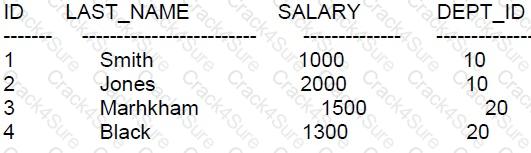
Which statement will execute successfully?
SELECT dept_id, MAX (Last_name), SUM (salary) FROM employees GROUP BY dept_id
SELECT dept_id, LENGTH (last_name), SUM (salary) FROM employees GROUP BY dept_id
SELECT dept_id, STDDEV (last_name), SUM (salary) FROM employees GROUP BY dept_id
SELECT dept_id, INSTR (last_name,'A'), SUM (salary) FROM employees GROUP BY dept_id
In SQL, the GROUP BY clause is used in conjunction with aggregate functions to group the result-set by one or more columns.
A. This statement will execute successfully. MAX() is an aggregate function that can be used to return the highest value of the selected column, and SUM() is an aggregate function used to sum the values. Both are valid in the SELECT statement with a GROUP BY clause grouping the results by dept_id.
B. This statement will not execute successfully when used with GROUP BY because LENGTH(last_name) is not an aggregate function and it doesn't appear in the GROUP BY clause. All selected columns that are not under an aggregate function must be included in the GROUP BY clause.
C. This statement will not execute successfully because STDDEV() is an aggregate function that calculates the standard deviation of a set of numbers, and it can only be used on numeric data types. last_name is not a numeric column.
D. This statement will not execute successfully for the same reason as B: INSTR(last_name, 'A') is not an aggregate function and must appear in the GROUP BY clause if it's in the SELECT clause.
Examine the description of the EMPLOYEES table:
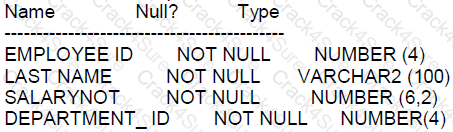
Examine this query:
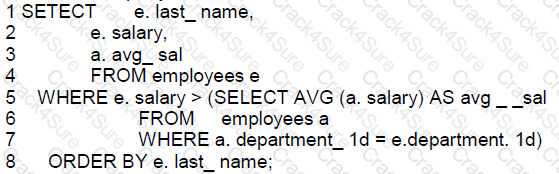
Which line produces an error?
Line 7
Line 8
Line 3
Line 5
In the provided SQL query, the issue arises from the alias 'a.avg_sal' which is defined in the subquery but is being referenced in the SELECT list of the outer query. This is not permitted in SQL as the scope of the alias defined in the subquery is only within that subquery.
Here is the breakdown of the code and the error:
Line 1: Correct syntax for initiating a SELECT statement.
Line 2: Refers to 'e.salary', which is a correct reference to the 'salary' column using alias 'e' for the employees table.
Line 3: 'a.avg_sal' attempts to reference an alias that is defined in the subquery within the outer query, which is not allowed. This is because 'avg_sal' is defined in the subquery's SELECT list and cannot be referenced outside of it. The correct way to include the average salary from the subquery in the SELECT list of the main query would be to repeat the subquery or to use a join that includes the average salary.
Line 5-7: The subquery itself is correctly formed; it computes the average salary for the same department.
Line 8: The ORDER BY clause is properly referencing 'e.last_name', which is defined in the outer query.
Therefore, the error occurs at Line 3 where 'a.avg_sal' is not a valid reference in the SELECT list of the main query because it is defined in the subquery.
The rules of scope for aliases in subqueries are specified in the Oracle Database SQL Language Reference 12c documentation. Subquery aliases cannot be referenced outside their subquery.
Which statement falls to execute successfully?
SELECT *
FROM employees e
JOIN department d
WHERE e.department_id=d.department_id
AND d.department_id=90;
SELECT *
FROM employees e
JOIN departments d
ON e.department_id=d.department_id
WHERE d.department_id=90;
SELECT *
FROM employees e
JOIN departments d
ON e.department_id=d.department_id
AND d.department_id=90;
SELECT *
FROM employees e
JOIN departments d
ON d.departments_id=90
WHERE e.department_id=d.department_id;
Given the statements, the failure to execute would be due to improper SQL syntax or logical structuring of the JOIN clause:
A. SELECT * FROM employees e JOIN department d WHERE e.department_id=d.department_id AND d.department_id=90: This statement will fail because it incorrectly uses the JOIN syntax without an ON clause, which is necessary to specify the condition on which the tables are joined. This statement mistakenly places the join condition in the WHERE clause without using ON.
Correct options (executes successfully):
B: Correctly formulated JOIN with ON and an additional condition in the WHERE clause.
C: Incorporates the filtering directly in the ON clause, which is a valid method to restrict the rows returned by the JOIN based on conditions related to both tables.
D: Although it appears awkward due to the order of conditions in the ON clause, it is syntactically correct.
These answers reflect typical use and constraints in SQL queries and are aligned with Oracle Database 12c standards for SQL syntax and operations.
Examine the description of the CUSTOMERS table:
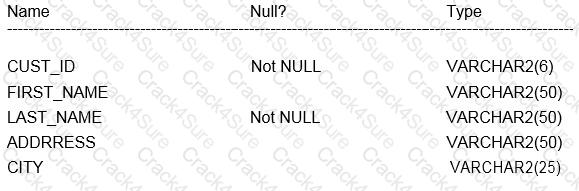
You want to display details of all customers who reside in cities starting with the letter D followed by at least two character.
Which query can be used?
SELECT * FROM customers WHERE city ='D_%';
SELECT * FROM customers WHERE city ='%D_';
SELECT * FROM customers WHERE city LIKE'D %';
SELECT * FROM customers WHERE city LIKE'D_';
The LIKE operator is used in SQL to search for a specified pattern in a column. To find all customers residing in cities starting with 'D' followed by at least two characters, you need to use the LIKE operator with the appropriate wildcard pattern:
A. SELECT * FROM customers WHERE city LIKE 'D_%'; The underscore () wildcard character in SQL represents a single character. The percent (%) wildcard character represents zero or more characters. So 'D%' will match any city starting with 'D' followed by at least one character (as there is one underscore).
References:
Oracle Database SQL Language Reference 12c, specifically the section on pattern matching with the LIKE condition.
Which two statements will return the names of the three employees with the lowest salaries?
SELECT last_ name, salary
FROM employees
FETCH FIRST 3 ROWS ONLY
ORDER BY salary;
SELECT last name, salary
FROM employees
ORDER BY salary
FETCE FIRST 3 RONS ONLY;
SELECT last_ name, salary
FBOM employees
WEERE
ORDER BY SELECT
ROINUM <= 3
salary FROM
employees);
SELECT last_ name, salary
FROM
(SELECT” FROM employees ORDER BY salary)
WHERE ROWNUM <=3
SELECT last_ name, salary
FROM employees
WHERE ROWNUM <=3
ORDER BY salary
A: This statement is correct. It orders the employees by salary and fetches the first 3 rows.
B: This statement has a typo with "FETCE" and "RONS" which should be "FETCH" and "ROWS". Hence, it will not execute successfully.
C: This statement will not execute successfully due to syntactical errors and incorrect use of the ORDER BY clause.
D: This statement is correct. It uses a subquery to order employees by salary and then limits the results to the first 3 using the ROWNUM pseudo-column.
E: This statement will not execute successfully because ROWNUM is evaluated before the ORDER BY clause, so it would return the first 3 rows based on the table's natural order, not the lowest salaries.
The behavior of ROWNUM and the FETCH FIRST syntax are explained in the Oracle Database SQL Language Reference 12c.
Which three queries use valid expressions?
SELECT product_id,(unit_price * 0.15 / (4.75 + 552.25)) FROM products;
SELECT product_id,(expiry_date - delivery_date) * 2 FROM products;
SELECT product_id,unit_price || 5 "Discount" , unit_price + surcharge - discount FROM products;
SELECT product_id, expiry_date * 2 from products;
SELECT product_id,unit_price,5 "Discount", unit_price + surcharge-discount FROM products;
SELECT product_id, unit_price, unit_price + surcharge FROM products;
When evaluating whether expressions in SQL queries are valid, consider data type compatibility and the operations performed:
Option A: Valid. The expression performs arithmetic operations (multiplication and division) on numeric data types (unit_price, constants). These operations are allowed and make sense in a mathematical context.
Option B: Valid. This query calculates the difference between two dates (expiry_date and delivery_date), which results in a numeric value representing the number of days between the dates. The result is then multiplied by 2, which is a valid operation on a numeric result.
Option C: Invalid. The expression unit_price || 5 attempts to concatenate a numeric value with a number, which is not valid without explicit conversion to a string. Moreover, the use of quotes around "Discount" is syntactically incorrect in this context.
Option D: Invalid. The expression expiry_date * 2 attempts to multiply a DATE datatype by a numeric value, which is not a valid operation.
Option E: Invalid. Similar to Option C, it incorrectly attempts to concatenate a number directly with a numeric value without conversion. Additionally, the aliasing with quotes is incorrectly placed.
Option F: Valid. This query simply adds two numeric columns (unit_price and surcharge), which is a valid and commonly used arithmetic operation in SQL.
Examine this description of the PRODUCTS table:
You successfully execute this command:
CREATE TALE new_prices(prod_id NUBER(2),price NUMBER(8,2));
Which two statements execute without errors?
MERGE INTO new_prices n
USING(SELECT*FROM products)p
WHEN MATECHED THEN
UPDATE SET n.price=p.cost*.01
WHEN NOT MATCHED THEN
INSERT(n.prod_id,n.price)VALUES (p.prod_id,cost*01)
WHERE(p.cost<200);
MERGE INTO new_prices n
USING(SELECT*FROM product WHERE cost>150) p
ON (n.prod_id=p.prod_id)
WHEN NATCHED THEN
DELETE WHERE(p.cost<200)
WHEN NOT MATCHED THEN
INSERT (n.prod_id,n.price)VALUES (p.prod_id,p.cost*.01);
MERGE INTO new_prices n
USING (SELECT * FROM products WHERE cost>150) p
ON (n.prod_id=p.prod_id)
WHEN NATCHED THEN
UPDATE SET n.price=p.cost*.01
DELETE WHERE (p.cost<200);
MERGE INTO new_prices n
USING products p
WHEN NOT NATCHED THEN
INSERT (n.prod_id, n.price)VALUES (p.prod_id,cost*.01)
WHERE (p.cost <200);
In the context of the MERGE statement, certain syntax rules and logical sequences must be observed:
Option B:
Correct use of the MERGE statement includes specifying the source and target correctly, and handling cases for matched and unmatched rows. This option properly structures the MERGE command with correct conditions for both matching (on prod_id) and actions (insert for unmatched, and delete under certain conditions for matched rows).
Option D:
While this option has a typographical error with "WHEN NOT NATCHED", assuming it's intended as "WHEN NOT MATCHED", it correctly describes the action for inserting into new_prices when no match is found in the target table based on the condition specified (product cost less than 200).
Options A and C contain syntax errors and logical contradictions (such as attempting to both update and delete in the same matched clause without proper separation or conditions), which are not allowed in a single WHEN MATCHED clause in Oracle SQL.
Examine the description or the BOOKS_TRANSACTIONS table:
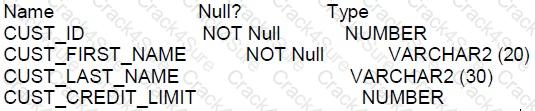
FOR customers whose income level has a value, you want to display the first name and due amount as 5% of their credit limit. Customers whose due amount is null should not be displayed.
Which query should be used?
SELECT cust_first_name, cust_credit_limit * . 05 AS DUE AMOUNT
FROM customers
WHERE cust income_level !=NULL
AND cust credit_level !=NULL;
SELECT cust_first_name, cust_credit_limit * . 05 AS DUE AMOUNT
FROM customers
WHERE cust income_level IS NOT NULL
AND due_amount IS NOT NULL;
SELECT cust_first_name, cust_credit_limit * . 05 AS DUE AMOUNT
FROM customers
WHERE cust income_level <> NULL
AND due_amount <> NULL;
SELECT cust_first_name, cust_credit_limit * . 05 AS DUE AMOUNT
FROM customers
WHERE cust_income_level IS NOT NULL
AND cust_credit_limit IS NOT NULL;
SELECT cust_first_name, cust_credit_limit * . 05 AS DUE AMOUNT
FROM customers
WHERE cust income_level !=NULL
AND due_amount !=NULL;
D: True. This query selects the first name and calculates the due amount as 5% of the credit limit from the customers table where the income level is not null and the credit limit is also not null. The IS NOT NULL operator is used to check for non-null values correctly.
The IS NOT NULL operator is the correct way to check for non-null values in SQL. The <> NULL and != NULL comparisons are incorrect because NULL is not a value that can be compared using these operators; it represents the absence of a value.
There is no due_amount column in the customers table according to the structure provided, so any WHERE clause referencing due_amount is irrelevant and incorrect. The due_amount is a derived column in the SELECT clause.
The correct syntax to check for non-null values is IS NOT NULL, which is used in the WHERE clause of the correct answer.
References:
The use of IS NOT NULL in the WHERE clause to filter out null values is documented in Oracle's SQL reference.
NULL comparisons must be done with IS NULL or IS NOT NULL for correct logical evaluation in SQL.
Examine the description of the EMPLOYEES table:
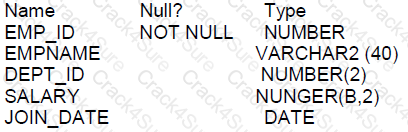
Which query is valid?
SELECT dept_id, join date, SUM(salary) FROM employees GROUP BY dept_id,join_date;
SELECT dept_id, MAX (AVG(salary)) FROM employees GROUP BY dept_id;
SELECT dept_id, AVG(NAX(salary)) FROM employees GROUP BY dept_id;
SELECT dept_id, join_date, SUM(salary) FROM employees GROUP BY dept_id;
When using the GROUP BY clause, every column in the SELECT clause that is not an aggregate function must be included in the GROUP BY clause:
A. SELECT dept_id, join_date, SUM(salary) FROM employees GROUP BY dept_id, join_date: This is a valid query because all non-aggregate columns in the SELECT list (dept_id and join_date) are included in the GROUP BY clause.
Queries B and C are invalid because they attempt to nest aggregate functions, which is not allowed. Query D is invalid because join_date is not included in the GROUP BY clause.
References:
Oracle Database SQL Language Reference 12c, specifically the section on GROUP BY clause constraints.
Which three statements are true about performing DML operations on a view with no Instead of triggers defined?
WITH CHECK clause has no effect when deleting rows from the underlying table through the view.
Insert statements can always be done on a table through a view.
Views cannot be used to add rows to an underlying table if the table has columns with NOT NULL constraints lacking default values which are not referenced in the defining query of the view.
Views cannot be used to add or modify rows in an underlying table if the defining query of the view contains the DISTINCT keyword.
Delete statements can always be done on a table tough a view.
Views cannot be used to query rows from an underlying table if the table has a PRIMARY KEY and the PRIMARY KEY columns are not referenced in the defining query of the view.
When performing DML operations on a view without INSTEAD OF triggers:
Option C: Views cannot be used to add rows to an underlying table if the table has columns with NOT NULL constraints lacking default values which are not referenced in the defining query of the view.
This is true because the view would not provide values for NOT NULL columns without defaults, leading to an error.
Option D: Views cannot be used to add or modify rows in an underlying table if the defining query of the view contains the DISTINCT keyword.
Using DISTINCT in the view’s defining query can make the view non-updatable, as it may aggregate multiple rows into one.
Option E: Delete statements can always be done on a table through a view.
Deletes through a view are typically unrestricted as long as the view does not involve aggregates, DISTINCT, or similar constructs that would logically preclude determining which underlying rows should be deleted.
Which two statements are true about the order by clause when used with a sql statement containing a set operator such as union?
column positions must be used in the order by clause.
The first column in the first select of the compound query with the union operator is used by default to sort output in the absence of an order by clause.
Each select statement in the compound query must have its own order by clause.
only column names from the first select statement in the compound query are recognized.
Each select statement in the compound query can have its own order by clause.
A. True, when using the ORDER BY clause with set operators like UNION, you can refer to the results by column positions. This allows for consistent sorting behavior across potentially heterogeneous SELECT statements.D. True, only the column names or positions from the first SELECT statement are recognized in the ORDER BY clause when used with set operators like UNION, as the result set is treated as if it originated from the first SELECT structure.
References:
Oracle documentation on ORDER BY with set operators: Oracle Database SQL Language Reference
Explanation of ORDER BY usage: Oracle SQL Tips
Top of Form
Examine the description of the PRODUCTS table:
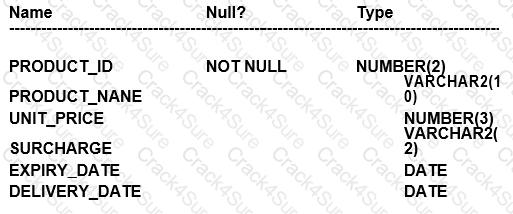
Which three queries use valid expressions?
SELECT produet_id, unit_pricer, 5 "Discount",unit_price+surcharge-discount FROM products;
SELECT product_id, (unit_price * 0.15 / (4.75 + 552.25)) FROM products;
SELECT ptoduct_id, (expiry_date-delivery_date) * 2 FROM products;
SPLECT product_id, expiry_date * 2 FROM products;
SELEGT product_id, unit_price, unit_price + surcharge FROM products;
SELECT product_id,unit_price || "Discount", unit_price + surcharge-discount FROM products;
B. SELECT product_id, (unit_price * 0.15 / (4.75 + 552.25)) FROM products; C. SELECT product_id, (expiry_date - delivery_date) * 2 FROM products; E. SELECT product_id, unit_price, unit_price + surcharge FROM products;
Comprehensive and Detailed Explanation WITH all References:
A. This is invalid because "Discount" is a string literal and cannot be used without quotes in an arithmetic operation. Also, there is a typo in unit_pricer, and 'discount' is not a defined column in the table. B. This is valid. It shows a mathematical calculation with unit_price, which is of NUMBER type. Division and multiplication are valid operations on numbers. C. This is valid. The difference between two DATE values results in the number of days between them, and multiplying this value by a number is a valid operation. D. This is invalid because expiry_date is of DATE type and cannot be multiplied by a number. Also, there's a typo: "SPLECT" should be "SELECT". E. This is valid. Both unit_price and surcharge are NUMBER types, and adding them together is a valid operation. F. This is invalid because concatenation operator || is used between a number (unit_price) and a string literal "Discount", which is not enclosed in single quotes, and 'discount' is not a defined column in the table.
In SQL, arithmetic operations on numbers and date arithmetic are valid expressions. Concatenation is also a valid expression when used correctly between string values or literals. Operations that involve date types should not include multiplication or division by numbers directly without a proper interval type in Oracle SQL.
These rules are detailed in the Oracle Database SQL Language Reference, where expressions, datatype precedence, and operations are defined.
Examine the description of the PROMOTIONS TABLE:
You want to display the unique is promotion costs in each promotion category.
Which two queries can be used?
SELECT DISTINCT promo_category, promo_cost FROM promotions ORDER BY 1;
SELECT promo_cost, promo_category FROM promotions ORDER BY 1
SELECT promo_category, DISTINCT promo_cost FROM promotiong ORDER BY 2:
select DISTINCT promo_categoryIl ‘has’||promol_cost as COSTS FROM promotions ORDER BY 1:
SELECT DISTINCT promo_cost ||’in’IIDISTINCT promo_category promotions ORDER BY1:
For displaying unique promotion costs in each promotion category from the PROMOTIONS table:
A. SELECT DISTINCT promo_category, promo_cost FROM promotions ORDER BY 1: This query correctly retrieves unique combinations of promo_category and promo_cost, sorting the results based on the promo_category.
D. SELECT DISTINCT promo_category || ' has ' || promo_cost AS COSTS FROM promotions ORDER BY 1: This query correctly combines the category and cost into a single string for each unique combination, using string concatenation and the DISTINCT keyword to ensure uniqueness, sorting by the concatenated string.
Incorrect options:
B: This does not ensure that the combinations of promo_cost and promo_category are unique because DISTINCT was not specified for both columns together.
C: The syntax is incorrect; DISTINCT cannot be applied to a single column partway through a SELECT clause.
E: This is syntactically incorrect as DISTINCT cannot be used twice in the way shown; it must apply to all columns if used at the beginning of a SELECT statement.
Which is the default column or columns for sorting output from compound queries using SET operators such as INTERSECT in a SQL statement?
The first column in the last SELECT of the compound query
The first NUMBER column in the first SELECT of the compound query
The first VARCHAR2 column in the first SELECT of the compound query
The first column in the first SELECT of the compound query
The first NUMBER or VARCHAR2 column in the last SELECTof the compound query
For the sorting of output in compound queries (INTERSECT, UNION, etc.):
D. The first column in the first SELECT of the compound query: By default, Oracle does not automatically sort the results of SET operations unless an ORDER BY clause is explicitly stated. However, if an ORDER BY is implied or specified without explicit columns, the default sorting would logically involve the first column specified in the first SELECT statement of the compound query.
Which statements are true regarding primary and foreign key constraints and the effect they can have on table data?
A table can have only one primary key but multiple foreign keys.
It is possible for child rows that have a foreign key to remain in the child table at the time the parent row is deleted.
Primary key and foreign key constraints can be defined at both the column and table level.
Only the primary key can be defined the column and table level.
It is possible for child rows that have a foreign key to be deleted automatically from the child table at the time the parent row is deleted.
The foreign key columns and parent table primary key columns must have the same names.
A table can have only one primary key and one foreign key.
Regarding primary and foreign key constraints:
A. A table can have only one primary key but multiple foreign keys. This is true. A table is constrained to have only one primary key, which can consist of multiple columns, but can have several foreign keys referencing primary keys in other tables.
C. Primary key and foreign key constraints can be defined at both the column and table level. True. Constraints can be defined inline with the column definition or separately at the end of the table definition.
E. It is possible for child rows that have a foreign key to be deleted automatically from the child table at the time the parent row is deleted. This is also true if the foreign key is defined with the ON DELETE CASCADE option.
Options B, D, F, and G are incorrect:
B is incorrect because if a parent row is deleted, the child rows cannot remain without violating the integrity unless the foreign key is defined with ON DELETE SET NULL or similar behavior.
D is incorrect because both primary and foreign key constraints can be defined at both levels.
F is incorrect as the names of the foreign key columns do not need to match the primary key column names.
G is incorrect as a table can have multiple foreign keys.
Which two tasks require subqueries?
Display the total number of products supplied by supplier 102 which have a product status of obsolete.
Display suppliers whose PROD_LIST_PRICE is less than 1000.
Display the number of products whose PROD_LIST_PRICE is more than the average PROD_LIST_PRICE.
Display the minimum PROD_LIST_PRICE for each product status.
Display products whose PROD_MIN_PRICE is more than the average PROD_LIST_PRICE of all products, and whose status is orderable.
C: True. To display the number of products whose PROD_LIST_PRICE is more than the average PROD_LIST_PRICE, you would need to use a subquery to first calculate the average PROD_LIST_PRICE and then use that result to compare each product’s list price to the average.
E: True. Displaying products whose PROD_MIN_PRICE is more than the average PROD_LIST_PRICE of all products and whose status is orderable would require a subquery. The subquery would be used to determine the average PROD_LIST_PRICE, and then this average would be used in the outer query to filter the products accordingly.
Subqueries are necessary when the computation of a value relies on an aggregate or a result that must be obtained separately from the main query, and cannot be derived in a single level of query execution.
References:Oracle's SQL documentation provides guidelines for using subqueries in scenarios where an inner query's result is needed to complete the processing of an outer query.
Examine this statement which executes successfully:
Which three are true?
Regardless of salary,only if the employee id is less than 125,insert EMPLOYEE_ID,NANAGER_ID,SALARY into the MGR_HISTORY table.
If the salary is more than 20000 and the employee is less than 125,insert EMPLOYEE_ID and SALARY into the SPECIAL_SAL table.
Only if the salary is 20000 or less and the employee id is less than 125,insert EMPLOYEE_ID,MANAGER_ID,and SALARY into the MGR_HISTORY table.
Regardless of salary and employee id,insert EMPLOYEE_ID,MANAGER_ID,and SALARY into the MGR_HISTORY table.
If the salary is 20000 or less and the employee id is less than 125,insert EMPLOYEE_ID,HIRE_DATE,and SALARY into the SAL_HISTORY table.
Only if the salary is 20000 or less and the employee id is 125 or higher,insert EMPLOYEE_ID,MANAGER_ID,and SALARY into the MDR_HISTORY table.
The question describes a scenario with multiple conditional statements about data manipulation based on certain criteria related to employee_id and salary. The options detail different conditions and corresponding actions (insertions into various tables). Given the conditions specified in each option, here are the accurate answers based on logical deduction as Oracle SQL does not directly define these scenarios; instead, it provides the mechanisms (like IF conditions, WHERE clauses, etc.) to implement such logic:
Option A: Regardless of salary, only if the employee id is less than 125, insert EMPLOYEE_ID, MANAGER_ID, SALARY into the MGR_HISTORY table.
This is logically plausible as it specifies a simple condition on the employee ID without regard to salary. If true, it directs an insertion of specific columns into a history table, which is a common practice for recording details of a subset of employees based on certain criteria (like employee_id in this case).
Option C: Only if the salary is 20000 or less and the employee id is less than 125, insert EMPLOYEE_ID, MANAGER_ID, and SALARY into the MGR_HISTORY table.
Similar to option A, this statement combines two conditions (on salary and employee_id), focusing on a specific subset of employees for history recording. The combined conditionality aligns with typical SQL practices for managing and logging specific data subsets based on multiple criteria.
Option E: If the salary is 20000 or less and the employee id is less than 125, insert EMPLOYEE_ID, HIRE_DATE, and SALARY into the SAL_HISTORY table.
This condition again deals with specific attributes (salary and employee_id) to determine which data (including the HIRE_DATE) goes into another history table. The inclusion of HIRE_DATE suggests tracking changes or states over time, which is common in employee management systems.
Examine these two queries and their output:
SELECT deptno, dname FROM dept;
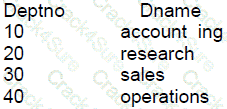
SELECT ename, job, deptno FROM emp ORDER BY deptno;
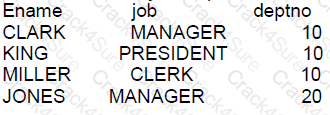
Now examine this query:
SELECT ename, dname
FROM emp CROSS JOIN dept WHERE job = 'MANAGER'
AND dept.deptno IN (10, 20) ;
64
6
3
12
In a CROSS JOIN (also known as a Cartesian join), each row from the first table (emp) is joined to every row of the second table (dept). When we apply the filter for job = 'MANAGER' and dept.deptno IN (10, 20), we are restricting the results to managers in departments 10 and 20.
From the given data:
There are 2 managers in department 10 (CLARK and KING).
There is 1 manager in department 20 (JONES).
With a cross join, each of these emp records will join with each dept record where deptno is 10 or 20. Since there are two departments (10 and 20) in the dept table, each employee will match with two departments.
Therefore, the result set will be:
CLARK with accounting (dept 10) and research (dept 20)
KING with accounting (dept 10) and research (dept 20)
JONES with accounting (dept 10) and research (dept 20)
That gives us a total of 6 rows, which means the correct answer is B: 6.
Examine the description of the CUSTONERS table
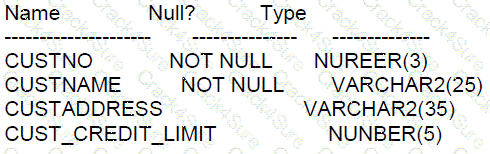
CUSTON is the PRIMARY KEY.
You must derermine if any customers’derails have entered more than once using a different
costno,by listing duplicate name
Which two methode can you use to get the requlred resuit?
RIGHT OUTER JOIN with seif join
FULL OUTER JOIN with seif join
SUBQUERY
seif join
LEFT OUTER JOIN with seif join
To determine if customer details have been entered more than once using a different custno, the following methods can be used:
SUBQUERY: A subquery can be used to find duplicate names by grouping the names and having a count greater than one.
SELECT custname FROM customers GROUP BY custname HAVING COUNT(custname) > 1;
Self Join: A self join can compare rows within the same table to find duplicates in the custname column, excluding matches with the same custno.
SELECT c1.custname FROM customers c1 JOIN customers c2 ON c1.custname = c2.custname AND c1.custno != c2.custno;
These methods allow us to find duplicates in the custname column regardless of the custno. Options A, B, and E are not applicable methods for finding duplicates in this context.
References:
Oracle Documentation on Group By: Group By
Oracle Documentation on Joins: Joins
which is true about the round,truncate and mod functions>?
ROUND(MOD(25,3),-1) IS INVALID
ROUND(MOD(25,3),-1) AND TRUNC(MOD(25,3),-1) ARE BOTH VALID AND GIVE THE SAME RESULT.
ROUND(MOD(25,3),-1) AND TRUNC(MOD(25,3),-1) ARE BOTH VALID AND GIVE THE DIFFERENT RESULTS.
TRUNC(MOD(25,3),-1) IS INVALID.
Both ROUND and TRUNC functions can be applied to numbers, and MOD is a function that returns the remainder of a division. The ROUND function rounds a number to a specified number of decimal places, which can be positive, zero, or negative. The TRUNC function truncates a number to a specified number of decimal places.
ROUND(MOD(25,3),-1) rounds the result of MOD(25,3), which is 1, to tens place, which results in 0. TRUNC(MOD(25,3),-1) truncates the result of MOD(25,3), which is 1, to tens place, which also results in 0.
Both are valid, but in this specific case, they give the same result because the remainder (1) when rounded or truncated to tens place (-1) will be 0.
What is true about non-equijoin statement performance?
The between condition always performs less well than using the >= and <= conditions.
The Oracle join syntax performs better than the SQL: 1999 compliant ANSI join syntax.
The join syntax used makes no difference to performance.
The between condition always performs better than using the >= and <= conditions.
Table aliases can improve performance.
Performance implications related to non-equijoin SQL statements in Oracle Database are often a topic of optimization:
C. The join syntax used makes no difference to performance: In Oracle Database, the performance of a query involving joins is typically more dependent on factors like the underlying data distribution, indexes, optimizer statistics, and system configuration rather than the syntax (ANSI vs Oracle traditional syntax). The optimizer in Oracle is sophisticated enough to interpret different syntactical expressions of joins and optimize them accordingly.
References:
Oracle Database Performance Tuning Guide 12c, which discusses the impact of different join syntaxes and how Oracle's optimizer handles them.
Examine the description of the BOOKS_TRANSACTIONS table:
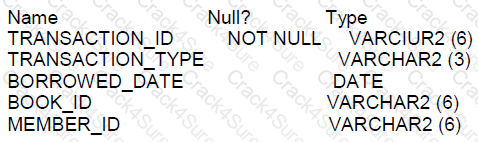
Examine this partial SQL statement:
SELECT * FROM books_transactions
Which two WHERE conditions give the same result?
WHERE (borrowed_date = SYSDATE AND transaction_type = 'RM') OR member_id IN ('A101','A102');
WHERE borrowed_date = SYSDATE AND transaction_type = 'RM' OR member_id IN('A101','A102');
WHERE borrowed_date = SYSDATE AND transaction_type = 'RM' AND (member_id = 'A101' OR member_id = 'A102'));
WHERE borrowed_date = SYSDATE AND transaction_type = 'RM' AND member_id = 'A101' OR member_id = 'A102');
When writing SQL statements with multiple conditions in the WHERE clause, it's important to understand how logical operators like AND and OR work. These operators are used to filter records based on more than one condition:
The AND operator displays a record if all the conditions separated by AND are TRUE.
The OR operator displays a record if any of the conditions separated by OR is TRUE.
The precedence of these operators is also important: AND operations are always evaluated before OR operations unless parentheses are used to explicitly define the order of operations. Therefore, conditions enclosed in parentheses are evaluated first as per the standard SQL operator precedence.
Given this understanding, let's evaluate the options:
Option A uses parentheses to group the borrowed_date and transaction_type conditions together, ensuring these are evaluated first before the OR operator. This means the query will return records that meet both of these conditions or records with member_id 'A101' or 'A102', regardless of other conditions.
Option D does not use parentheses around the borrowed_date and transaction_type conditions but does use them to group the member_id conditions. Since the AND operator has higher precedence than the OR, this query will first evaluate the borrowed_date and transaction_type conditions, then evaluate the grouped member_id conditions. The outcome is records that have a borrowed_date of SYSDATE, a transaction_type of 'RM', and a member_id of either 'A101' or 'A102'.
The results of Options A and D are effectively the same, even though the use of parentheses is different. This is because in both cases, the evaluation of the borrowed_date and transaction_type conditions will be performed first due to their grouping by parentheses in Option A and the precedence of AND over OR in Option D. Therefore, they will both return all records where borrowed_date equals SYSDATE and transaction_type equals 'RM', plus any records where member_id is either 'A101' or 'A102'.
For further details on SQL operator precedence and logical operators, you can refer to Oracle Database SQL Language Reference 12c documentation, specifically the sections on conditional expressions.
Which three statements are true about Data Manipulation Language (DML)?
delete statements can remove multiple rows based on multiple conditions.
insert statements can insert nulls explicitly into a column.
insert into. . .select. . .from statements automatically commit.
DML statements require a primary key be defined on a table.
update statements can have different subqueries to specify the values for each updated column.
Data Manipulation Language (DML) operations in Oracle 12c are critical for handling data within tables. Here’s the validity of each statement based on Oracle SQL documentation:
Option A: True. The DELETE statement can remove multiple rows from a table and supports the use of multiple conditions in the WHERE clause to specify which rows should be removed. This allows for flexibility in managing data deletion based on various criteria.
Option B: True. The INSERT statement can explicitly insert NULL values into a column, assuming there are no constraints (like NOT NULL) preventing such entries. This is useful for representing the absence of data or when data is unknown.
Option C: False. DML statements like INSERT INTO...SELECT...FROM do not automatically commit in Oracle. Transactions in Oracle require explicit COMMIT commands to finalize changes, unless in an autocommit mode set by a client tool or environment, which is generally not the default behavior for server-side operations.
Option D: False. DML statements do not require a primary key to be defined on a table. While having a primary key is a best practice for identifying each row uniquely, it's not a prerequisite for performing DML operations like INSERT, UPDATE, or DELETE.
Option E: True. The UPDATE statement can include different subqueries within the SET clause to determine the values for each column being updated. This allows for complex calculations and data retrieval to be part of an update, increasing the power and flexibility of data modification.
Examine this SQL statement:
SELECT cust_id, cust_last_name "Last Name
FROM customers
WHERE countryid=10
UNION
SELECT custid CUSTNO, cust_last_name
FROM customers
WHERE countryid=30
Identify three ORDER BY clauses, any one of which can complete the query successfully.
ORDER BY“CUST NO"
ORDER BY 2, cust_id
ORDERBY2, 1
ORDER BY "Last Name"
ORDER BY CUSTNO
Examine the description of the EMPLOYEES table:
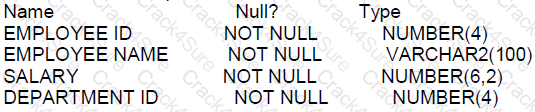
Which statement will fail?
SELECT department_id, COUNT (*)
FROM employees
HAVING department_ id <> 90 AND COUNT(*) >= 3
GROUP BY department_id;
SELECT department_id, COUNT (*)
FROM employees
WHERE department_ id <> 90 AND COUNT(*) >= 3
GROUP BY department_id;
SELECT department_id, COUNT(*)
FROM employees
WHERE department_id <> 90 HAVING COUNT(*) >= 3
GROUP BY department_id;
SELECT department_id, COUNT(*)
FROM employees
WHERE department_id <> 90 GROUP BY department_id
HAVING COUNT(*) >= 3;
The statement that will fail is B. In Oracle SQL, the WHERE clause cannot contain aggregate functions directly. The HAVING clause is used instead to apply conditions that involve aggregates, but it is applied after the GROUP BY clause.
A. While the HAVING clause is used before the GROUP BY clause which is not standard SQL syntax, Oracle SQL may still execute it successfully due to its flexibility in syntax.
B. This statement will fail because it uses an aggregate function, COUNT(*), in the WHERE clause, which is not allowed. The correct approach is to use the HAVING clause to filter the results of aggregate functions after the GROUP BY clause.
C. This statement is correct; it places the HAVING clause after the GROUP BY clause, applying the filter on the aggregated count.
D. This is a correctly constructed statement with the WHERE clause filtering individual records before grouping, and the HAVING clause filtering groups based on the aggregate function.
References:
Oracle Database SQL Language Reference, 12c Release 1 (12.1): "WHERE Clause"
Oracle Database SQL Language Reference, 12c Release 1 (12.1): "HAVING Clause"
Examine this Statement which returns the name of each employee and their manager,
SELECT e.last name AS emp,,m.last_name AS mgr
FROM employees e JOIN managers m
ON e.manager_ id = m. employee_ id ORDER BY emp;
You want to extend the query to include employees with no manager. What must you add before JOIN to do this?
CROSS
FULL OUTER
LEFT OUTER
RIGHT OUTER
To include employees with no manager in the query results, a LEFT OUTER JOIN should be used. This type of join returns all records from the left table (employees), and the matched records from the right table (managers). The result is NULL from the right side if there is no match.
Here's the modified query:
SELECT e.last_name AS emp, m.last_name AS mgr FROM employees e LEFT OUTER JOIN managers m ON e.manager_id = m.employee_id ORDER BY emp;
This ensures that even if an employee does not have a manager (i.e., e.manager_id is NULL or there is no corresponding m.employee_id), that employee will still be included in the results.
Examine the data in the CUST NAME column of the CUSTOMERS table:
CUST_NAME
------------------------------
Renske Ladwig
Jason Mallin
Samuel McCain
Allan MCEwen
Irene Mikkilineni
Julia Nayer
You want to display the CUST_NAME values where the last name starts with Mc or MC. Which two WHERE clauses give the required result?
WHERE INITCAP (SUBSTR(cust_name, INSTR(cust_name,'') +1)) IN ('MC%','Mc%)
WHERE UPPER (SUBSTR(cust_name, INSTR(cust_name, '') +1)) LIKE UPPER('MC%')
WHERE INITCAP(SUBSTR(cust_name, INSTR(cust_name,'') +1)) LIKE'Mc%'
WHERE SUBSTR(cust_name,INSTR(cust_name,'') +1) LIKE'Mc%' OR'MC%'
WHERE SUBSTR(cust_name, INSTR(cust_name,'') +1) LIKE'Mc%'
To find customers whose last names start with "Mc" or "MC", we need to ensure our SQL query correctly identifies and compares these prefixes regardless of case variations. Let's analyze the given options:
Option B: WHERE UPPER(SUBSTR(cust_name, INSTR(cust_name, ' ') + 1)) LIKE UPPER('MC%')This clause uses UPPER to convert both the extracted substring (starting just after the first space, assuming it indicates the start of the last name) and the comparison string 'MC%' to uppercase. This ensures case-insensitive comparison. The LIKE operator is used to match any last names starting with "MC", which will correctly capture both "Mc" and "MC". This option is correct.
Option C: WHERE INITCAP(SUBSTR(cust_name, INSTR(cust_name, ' ') + 1)) LIKE 'Mc%'This clause applies INITCAP to the substring, which capitalizes the first letter of each word and makes other letters lowercase. The result is compared to 'Mc%', assuming only the last name follows the space. This approach will match last names starting with "Mc" (like "McEwen"), but not "MC". However, considering we're looking for "Mc" specifically, this clause works under the assumption that "Mc" is treated as proper capitalization for these last names. Thus, it can also be considered correct, albeit less inclusive than option B.
The other options either use incorrect syntax or apply case-sensitive matches without ensuring that both "Mc" and "MC" are captured:
Option A: Contains syntax errors (unmatched quotes and wrong use of IN).
Option D: Uses case-sensitive match without combining both "Mc" and "MC".
Option E: Only matches "Mc", which is too specific.
The PRODUCT_INFORMATION table has a UNIT_PRICE column of data type NUMBER(8, 2).
Evaluate this SQL statement:
SELECT TO_CHAR(unit_price,'$9,999') FROM PRODUCT_INFORMATION;
Which two statements are true about the output?
A row whose UNIT_PRICE column contains the value 1023.99 will be displayed as $1,024.
A row whose UNIT_PRICE column contains the value 1023.99 will be displayed as $1,023.
A row whose UNIT_PRICE column contains the value 10235.99 will be displayed as $1,0236.
A row whose UNIT_PRICE column contains the value 10235.99 will be displayed as $1,023.
A row whose UNIT_PRICE column contains the value 10235.99 will be displayed as #####
The TO_CHAR function is used to convert a number to a string format in Oracle SQL. In this format mask '$9,999', the dollar sign is a literal, and the 9 placeholders represent a digit in the output. The comma is a digit group separator.
A. This statement is incorrect because the format model does not have enough digit placeholders to display the full number 1023.99; it would round it to $1,023 not $1,024. B. This statement is correct. Given the format '$9,999', the number 1023.99 will be formatted as $1,023 because the format rounds the number to no decimal places. C. This is incorrect because the format '$9,999' cannot display the number 10235.99; it exceeds the format's capacity. D. This is incorrect for the same reason as C, and the format would not change the thousands to hundreds. E. This statement is correct. If the number exceeds the maximum length of the format mask, which is 4 digits in this case, Oracle SQL displays a series of hash marks (#) instead of the number.
These formatting rules are described in the Oracle Database SQL Language Reference, which covers the TO_CHAR function and its number formatting capabilities.
Examine the description of the CUSTOMERS table:

Which two SELECT statements will return these results:
CUSTOMER_ NAME
--------------------
Mandy
Mary
SELECT customer_ name FROM customers WHERE customer_ name LIKE ' % a % ’ ;
SELECT customer_ name FROM customers WHERE customer name LIKE 'Ma%' ;
SELECT customer_ name FROM customers WHERE customer_ name='*Ma*';
SELECT customer_ name FROM customers WHERE UPPER (customer_ name ) LIKE 'MA*. ;
SELECT customer_ name FROM customers WHERE customer name LIKE 'Ma*';
SELECT customer_ name FROM customers WHERE UPPER (customer name) LIKE 'MA&';
SELECT customer_ name FROM customers WHERE customer_ name KIKE .*Ma*';
The SQL LIKE operator is used in a WHERE clause to search for a specified pattern in a column. Here are the evaluations of the options:
A: The pattern ' % a % ’ will match any customer names that contain the letter 'a' anywhere in the name, not necessarily those starting with 'Ma'.
B: This is correct as 'Ma%' will match any customer names that start with 'Ma'.
C: In SQL, the wildcard character is '%' not '*', therefore, the pattern 'Ma' is incorrect.
D: This is the correct syntax. 'UPPER (customer_ name ) LIKE 'MA%'' will match customer names starting with 'Ma' in a case-insensitive manner.
E: Again, '*' is not a valid wildcard character in SQL.
F: The character '&' is not a wildcard in SQL.
G: The operator 'KIKE' is a typo, and '.Ma' is not valid SQL pattern syntax.
The EMPLOYEES table contains columns EMP_ID of data type NUMBER and HIRE_DATE of data type DATE
You want to display the date of the first Monday after the completion of six months since hiring.
The NLS_TERRITORY parameter is set to AMERICA in the session and, therefore, Sunday is the first day of the week Which query can be used?
SELECT emp_id,NEXT_DAY(ADD_MONTHS(hite_date,6),'MONDAY') FROM employees;
SELECT emp_id,ADD_MONTHS(hire_date,6), NEXT_DAY('MONDAY') FROM employees;
SELECT emp_id,NEXT_DAY(MONTHS_BETWEEN(hire_date,SYSDATE),6) FROM employees;
SELECT emp_id,NEXT_DAY(ADD_MONTHS(hire_date,6),1) FROM employees;
The function ADD_MONTHS(hire_date, 6) adds 6 months to the hire_date. The function NEXT_DAY(date, 'day_name') finds the date of the first specified day_name after the date given. In this case, 'MONDAY' is used to find the date of the first Monday after the hire_date plus 6 months.
Option A is correct as it accurately composes both ADD_MONTHS and NEXT_DAY functions to fulfill the requirement.
Options B, C, and D do not provide a valid use of the NEXT_DAY function, either because of incorrect syntax or incorrect logic in calculating the required date.
The Oracle Database SQL Language Reference for 12c specifies how these date functions should be used.
Which two are SQL features?
providing graphical capabilities
providing variable definition capabilities.
providing database transaction control
processing sets of data
providing update capabilities for data in external files
SQL (Structured Query Language) is a domain-specific language used in programming and designed for managing data held in a relational database management system.
A. False. SQL does not have graphical capabilities; it is a textual language for database interaction.
B. False. SQL supports variable definition, but it is not a core feature of the language. Variables are more commonly defined in procedural extensions to SQL, such as PL/SQL in Oracle.
C. True. SQL provides database transaction control through statements like COMMIT, ROLLBACK, and SAVEPOINT.
D. True. SQL is designed for processing sets of data, allowing for operations such as selection, projection, and joins on sets of rows.
E. False. SQL does not provide capabilities to update data in external files. It operates on data within the database.
Which three statements about roles are true?
Roles are assigned to roles using the ALTER ROLE statement.
A single user can be assigned multiple roles.
Roles are assigned to users using the ALTER USER statement.
A single role can be assigned to multiple users.
Privileges are assigned to a role using the ALTER ROLE statement.
A role is a named group of related privileges that can only be assigned to a user.
Privileges are assigned to a role using the GRANT statement.
Roles in Oracle Database are designed to simplify the management of privileges. The following statements about roles are true:
B: A single user can indeed be assigned multiple roles. This allows for easy management of user privileges as they can be grouped into roles, and these roles can be granted to users.
D: A single role can be assigned to multiple users. This is one of the primary purposes of roles, to provide an efficient way to grant the same set of privileges to different users.
G: Privileges are granted to a role using the GRANT statement. This allows the role to encapsulate the privileges which can then be granted to users.
The incorrect options are:
A: Roles cannot be assigned to other roles using the ALTER ROLE statement; they are granted to other roles using the GRANT statement.
C: Roles are not assigned to users using the ALTER USER statement; roles are granted to users using the GRANT statement.
E: Privileges are not assigned to a role using the ALTER ROLE statement; they are granted using the GRANT statement.
F: A role is not limited to being assigned to just one user; it can be assigned to multiple users.
References:
Oracle Documentation on Roles: Database Security Guide - Roles
Oracle Documentation on the GRANT statement: SQL Language Reference - GRANT
You execute this command:
TRUNCATE TABLE dept;
Which two are true?
It drops any triggers defined on the table.
It retains the indexes defined on the table.
It retains the integrity constraints defined on the table.
A ROLLBACK statement can be used to retrieve the deleted data.
It always retains the space used by the removed rows.
A FLASHBACK TABLE statement can be used to retrieve the deleted data.
When using the TRUNCATE TABLE command in Oracle, several aspects of the table's structure and associated database objects are impacted. Here's an explanation of each option:
A: Incorrect. TRUNCATE TABLE does not drop triggers associated with the table; they remain defined.
B: Correct. Indexes on the table are retained and not dropped when you truncate a table. However, if the index is a domain index, it may be dropped depending on its type.
C: Correct. Integrity constraints such as primary keys, foreign keys, etc., are retained unless they are on a disabled state where truncation can lead to constraint being dropped.
D: Incorrect. A TRUNCATE TABLE operation cannot be rolled back. It is a DDL (Data Definition Language) operation and commits automatically.
E: Incorrect. The TRUNCATE TABLE operation deallocates the space used by the data unless the REUSE STORAGE clause is specified.
F: Incorrect. TRUNCATE TABLE operation removes all the rows in a table and does not log individual row deletions, thus FLASHBACK TABLE cannot be used to retrieve the data.
Examine the description of the BOOKS_TRANSACTIONS table:
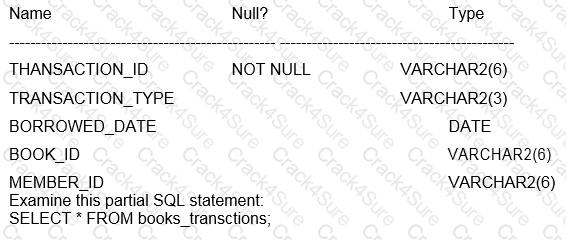
Which two WHERE conditions give the same result?
WHERE borrowed_date = SYSDATE AND (transaction_type ='RM' OR member_id IN ('A101','A102'));
WHERE borrowed_date = SYSDATE AND transaction_type ='RM' OR member_id IN ('A101','A102');
WHERE borrowed_date = SYSDATE AND (transaction_type ='RM' AND member_id='A101' OR member_id ='A102'));
WHERE (borrowed_date = SYSDATE AND transaction_type ='RM') OR member_id IN ('A101','A102');
WHERE borrowed_date = SYSDATE AND (transaction_type ='RM' AND (member_id ='A101' OR member_id ='A102') );
The WHERE clause in SQL filters the rows returned by the SELECT statement. The result of logical operators and conditions can change significantly depending on the use of parentheses.
Options A and E both use parentheses to ensure that borrowed_date = SYSDATE is evaluated with transaction_type ='RM' as one group and the member_id conditions as another group. The parentheses ensure that both conditions within each set of parentheses must be true for the rows to be included.
Option B is incorrect because it does not use parentheses to enforce the grouping of conditions, leading to potentially different results due to the way logical OR works.
Option C is incorrect because it has a syntax error; it is missing a parenthesis.
Option D is incorrect because it will return rows where either borrowed_date = SYSDATE AND transaction_type ='RM' is true or member_id IN ('A101','A102') is true, which is a broader condition than what's specified in options A and E.
Examine the description of the ENPLYEES table:
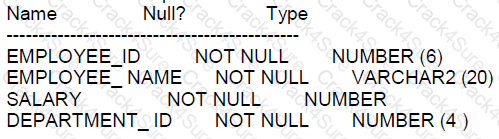
Which two queries return all rows for employees whose salary is greater than the average salary in their department?
SELECT ”
FROM employees
WHERE salary > ANY
SELECT AVG (salary)
EROM employees
GROUP BY department_ id);
SELECT
FROM employees
WHERE salary > AVG (salary) OVER (PARTITION BY department _ id);
SELECT”
FROM employees e1
WHERE salary >!
SELECT AVG (salary)
FROM employees e2
WHERE e1. Department _id = e2, department_ id
SELECT.
FROM
SELECT e.", AVG (salary) OVER (PARTITION BY department id) avg_ sal
FROM employees e
WHERE salary > avg_ sal;
SELECT”
FROM employees
WHERE salary >
( SELECT AVG
(salary) FROM
employees
GROUP BY department _ id
To return all rows for employees whose salary is greater than the average salary in their department, you would use either a subquery or an analytic function:
Option B:
SELECT ... FROM employees WHERE salary > AVG(salary) OVER (PARTITION BY department_id);
This uses the window function AVG with PARTITION BY to calculate the average salary per department, and it compares each employee’s salary to this average.
Option C:
SELECT ... FROM employees e1 WHERE salary > (SELECT AVG(salary) FROM employees e2 WHERE e1.department_id = e2.department_id);
This correlated subquery compares each employee's salary to the average salary in their department using a subquery to calculate the average salary for that department.
Options A, D, and E are incorrect because:
Option A: The use of ANY with the subquery does not ensure comparison with the average salary of their respective department.
Option D: This is syntactically incorrect; the subquery alias avg_sal is not accessible outside the subquery.
Option E: The subquery does not correlate with the outer query to ensure that each employee's salary is compared to the average salary of their respective department.
Which two statements are true about INTERVAL data types
INTERVAL YEAR TO MONTH columns only support monthly intervals within a range of years.
The value in an INTERVAL DAY TO SECOND column can be copied into an INTERVAL YEAR TO MONTH column.
INTERVAL YEAR TO MONTH columns only support monthly intervals within a single year.
The YEAR field in an INTERVAL YEAR TO MONTH column must be a positive value.
INTERVAL DAY TO SECOND columns support fractions of seconds.
INTERVAL YEAR TO MONTH columns support yearly intervals.
Regarding INTERVAL data types in Oracle Database 12c:
A. INTERVAL YEAR TO MONTH columns only support monthly intervals within a range of years. This is true. The INTERVAL YEAR TO MONTH data type stores a period of time using years and months.
E. INTERVAL DAY TO SECOND columns support fractions of seconds. This is true. The INTERVAL DAY TO SECOND data type can store days, hours, minutes, seconds, and fractional seconds.
Options B, C, D, and F are incorrect:
B is incorrect because data types between INTERVAL DAY TO SECOND and INTERVAL YEAR TO MONTH are not compatible.
C is incorrect as it incorrectly limits INTERVAL YEAR TO MONTH to a single year.
D is incorrect; the YEAR field can be negative to represent a past interval.
F is incorrect as INTERVAL YEAR TO MONTH supports intervals that can span multiple years, not just annual increments.
3 Months Free Update
TESTED 15 Dec 2025