New Year Special Sale - 70% Discount Offer - Ends in 0d 00h 00m 00s - Coupon code: spcl70

Practice Free PEGACPRSA22V1 Certified Pega Robotics System Architect 22 Exam Questions Answers With Explanation

We at Crack4sure are committed to giving students who are preparing for the Pegasystems PEGACPRSA22V1 Exam the most current and reliable questions . To help people study, we've made some of our Certified Pega Robotics System Architect 22 exam materials available for free to everyone. You can take the Free PEGACPRSA22V1 Practice Test as many times as you want. The answers to the practice questions are given, and each answer is explained.

Question # 6

You are using the Interaction framework for your project solution.

Where in the solution do you add an Interaction Manager component?

A.

In the project configuration file.

B.

As a local component of the automation.

C.

In the global container of the project.

D.

As a global component of the automation.

Question # 7

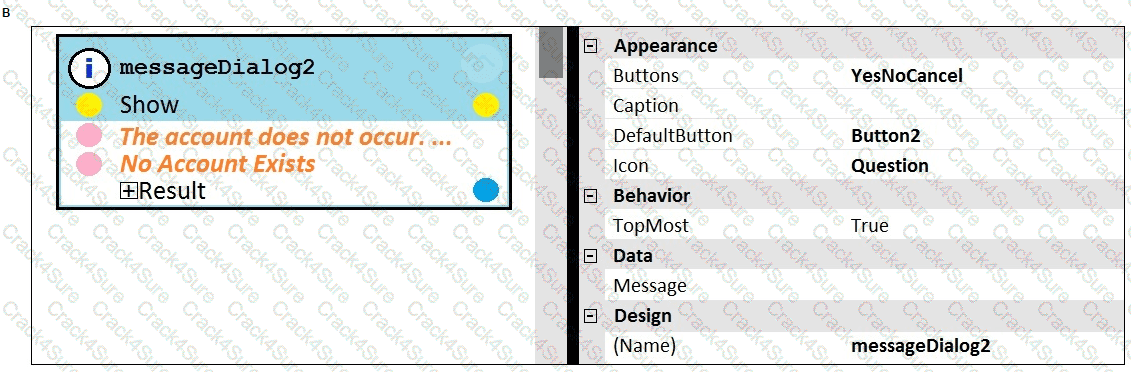
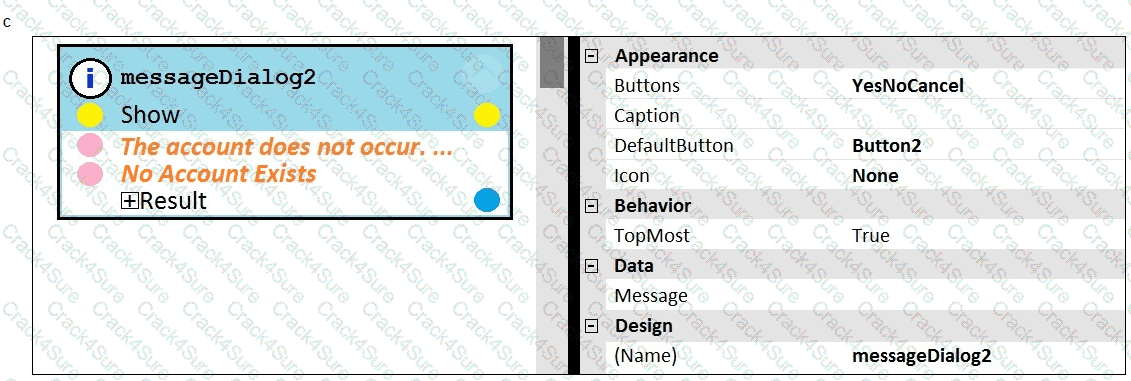
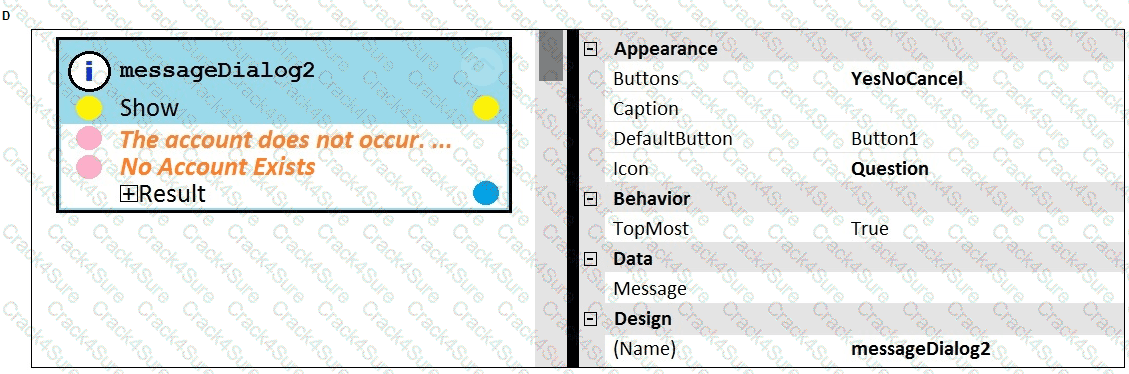
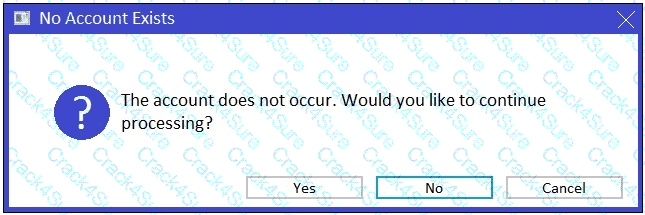
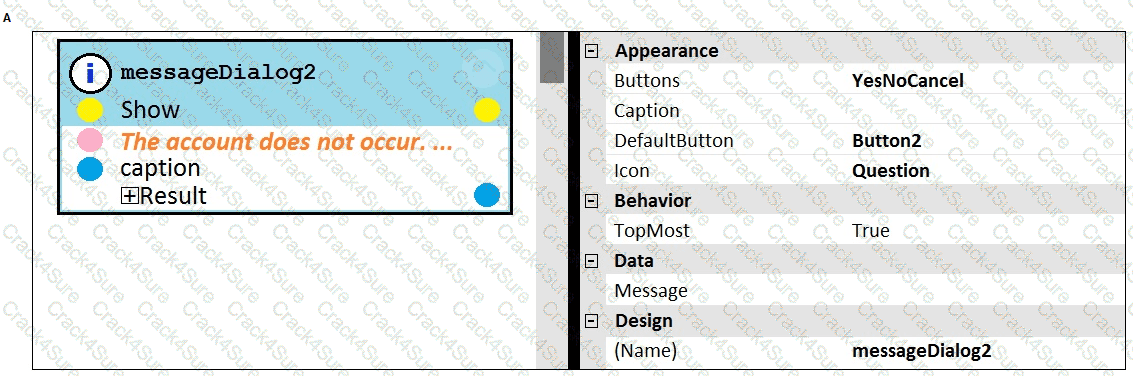
You add a MessageDialog component to an automation. Based on the following image, which option shows the configuration settings that generates the message dialog?
PEGACPRSA22V1 question answer

PEGACPRSA22V1 question answer

PEGACPRSA22V1 question answer

PEGACPRSA22V1 question answer

PEGACPRSA22V1 question answer

A.

Exhibit A

B.

Exhibit B

C.

Exhibit C

D.

Exhibit D

Question # 8

You are designing an attended project for a banking customer. This project requires you to add new customers from an application to a combo box in a custom user surface.

Which steps do you take to gain access to the methods of the combo box items within an automation?

A.

Drag the combo box to the automation surface to open the Select action dialog box, and then filter for the method that you want to access.

B.

Open the Globals tab, filter for the method that you want to access, and then drag the method to the design surface.

C.

Select the combo box in a design form of the user interface to open the Select action window.

D.

Select the combo box in the Palette tab of an automation, and then filter for the method that you want to access in the properties grid.

Question # 9

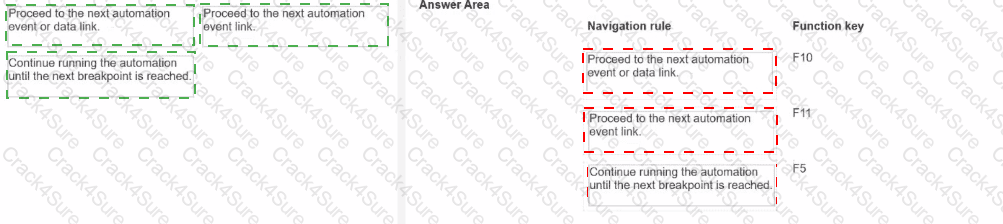
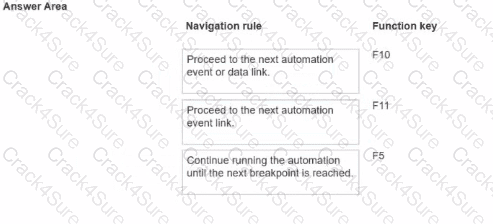
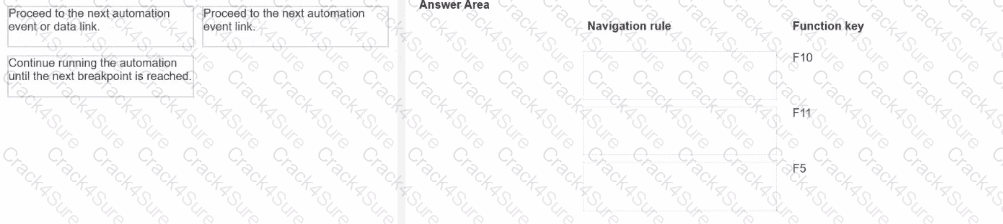
When you debug an automation, you have three function keys to use for navigating the breakpoints. Drag each navigation rule on the left to the box next to the correct function key on the right.
PEGACPRSA22V1 question answer

Question # 10

You are designing an attended project for a banking customer. This project requires you to import new customers from a text file to a lookup table.

Which steps do you take to gain access to the ImportDelimitedFile method of the lookup table within an automation?

A.

Select the ImportDelimitedFile method in a design form of the user interface to open the Select action window.

B.

Drag the lookup table from the Locals section of the Palette to the automation surface to open the Select action window, and then filter for the ImportDelimitedFile method.

C.

Open the Globals tab, filter for the ImportDelimitedFile method, and then drag it to the design surface.

D.

Drag the lookup table from the Globals section of the Palette to the automation surface to open the Select action window, and then filter for the ImportDelimitedFile method.

Question # 11

During application discovery, what three things must the developer notice about the application to help design the automation? (Choose three.)

A.

How users interact with the applications

B.

How the adapter process data

C.

How the application responds during use

D.

How the application processes data

E.

How the automation responds to the process

Question # 12

After setting up Start My Day, the end user makes some changes in the Manage Applications window to prioritize and manage the applications configured to launch using the Start My Day functionality.
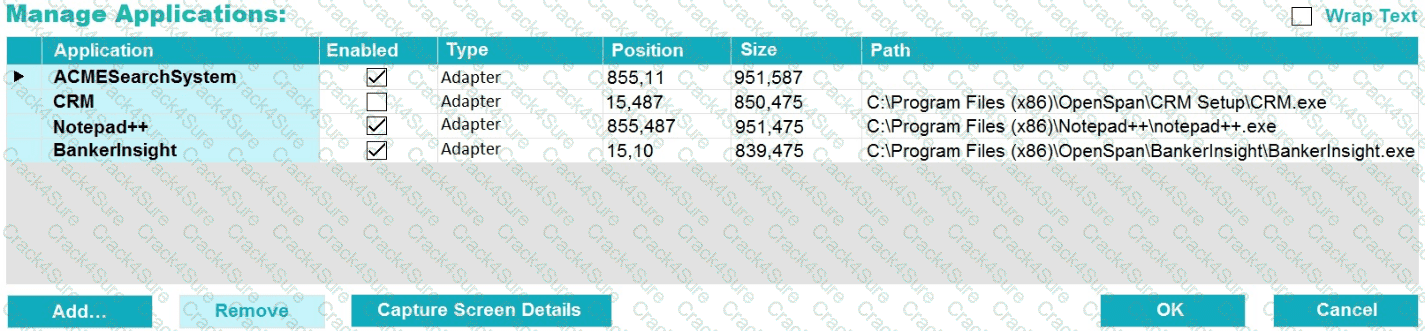
PEGACPRSA22V1 question answer

Which of the following applications does the user see on the desktop after using the Start My Day functionality?

A.

ACMESearchSystem, Notepad++, BankerInsight

B.

CRM, BankerInsight

C.

ACMESearchSystem, CRM, Notepad++, BankerInsight

D.

CRM, Notepad++, BankerInsight

Question # 13

Your log on automation is failing and you cannot proceed because the Submit button is not enabled. After searching the HTML code, you discover that the Submit button is enabled only after the Password field experiences a key press.

How do you resolve the automation issue?

A.

On the Password field, add an Enabled property and set it to True.

B.

On the Password field, add a RaiseEvent method with onkeypress.

C.

On the Submit button, add a Disabled property and set it to True.

D.

On the Submit button, add a RaiseEvent method with onkeypress.

Question # 14

You are assigned to develop a set of activities by using a popular HR application. The application loads automatically after you start interrogation from Pega Robot Studio, but you notice that you are unable to use the bullseye on the Robot Studio Interrogation Form to drag and drop over the desired controls.

Why are you unable to interrogate the desired application controls?

A.

The StartMethod on the application is set to StartAndWait, but the TargetPath property is undefined.

B.

The StartOnProject property of the application is set to false.

C.

The StartMethod on the application is set to Start, but the TargetPath property is undefined.

D.

The StartMethod on the application is set to MonitorAll, but the Path property is undefined.

Question # 15

You interrogated a web application. All controls and objects matched, and the automations worked as coded. During the pilot, the solution failed on the web application. The IT department had released a new version of the web application. Upon review of the new version, you determined that the web page hierarchy changed.

Which interrogation option do you use to correct the solution?

A.

Debug Matching

B.

Replace Control

C.

Default

D.

Select Element

Question # 16

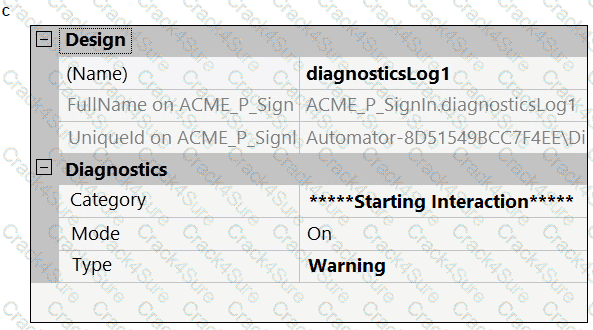
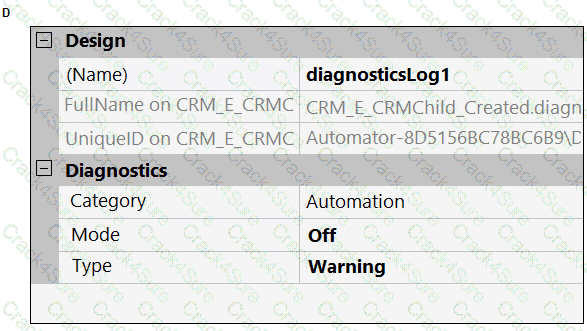
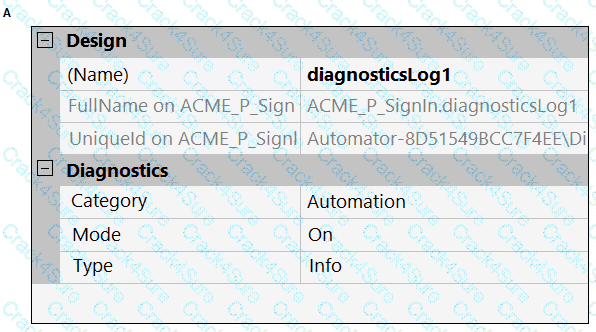
A developer adds a diagnostic log component to an automation and checks the log file.

PEGACPRSA22V1 question answer

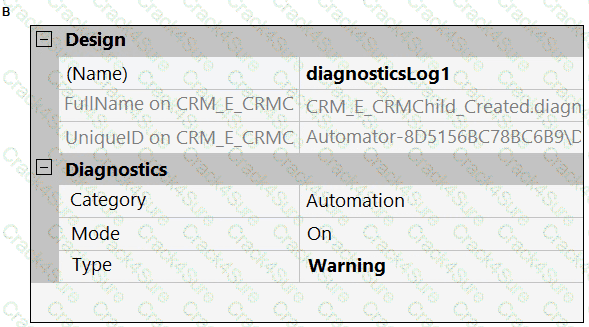
Based on the image, how did the developer configure the diagnostic log component settings?
PEGACPRSA22V1 question answer

PEGACPRSA22V1 question answer

PEGACPRSA22V1 question answer

PEGACPRSA22V1 question answer

A.

Exhibit A

B.

Exhibit B

C.

Exhibit C

D.

Exhibit D

Question # 17

Automation you are working on creates a data collection, so you have extracted a Data Table proxy. What action occurs when you drag the DataTableProxy from the Globals section of the Palette to the automation surface?

A.

A This property is added to the automation surface.

B.

A Quick Add dialog box opens.

C.

A proxy design block is added to the automation surface.

D.

A Select Action dialog box opens.

E.

A GetTable method is added to the automation surface.

Question # 18

You must configure an application to store encrypted login credentials in the user's local profile. You also need to automate the login using the encrypted credentials. How do you fulfill this requirement without creating an automation?

A.

Create a robot activity that performs the application login.

B.

Set the necessary application credential properties before interrogating the target controls.

C.

Interrogate the target controls and set the necessary application credential properties.

D.

Interrogate the target controls and create a script to perform the login functionality.

Question # 19

The Automation Playback window allows you to ______________.

A.

open a log file and step through it as if you were running your solution in debug mode

B.

replay your last Runtime session where the applications are provided with the same account numbers automatically

C.

open a log file and debug any exceptions

D.

rerun the last automation that ran with the same values as inputs automatically entered

Question # 20

You interrogated a page using Create Global Web Page with the title:

Customer: B Norton| Financial ABC Application

During debugging of an automation using the interrogated web page, you ran the first test using the account B Norton. On the second test, you used S Whitfield. The second debugging failed. After checking the matching of the controls, you recognize the issue.

How do you correct the matching issue?

A.

Modify the Window Text Match Rule.

B.

Modify the Document Title Match Rule.

C.

Modify the Document URL Match Rule.

D.

Reinterrogate the control using Replace Control on the Interrogation Form.

Question # 21

Lines in the RuntimeLog containing the text “ExecutionLink From:” refer specifically to what item from your solution?

A.

Blue data lines

B.

Automation entry points

C.

Automation execution threads

D.

Yellow execution lines

Question # 22

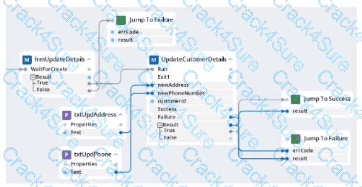
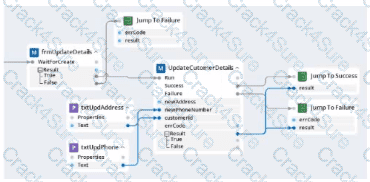
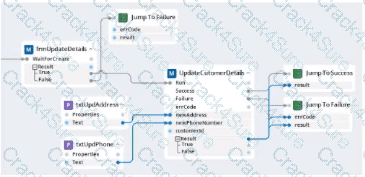
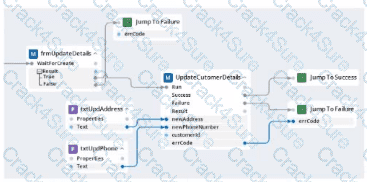
Within your project for a car renting company, you create an automation that reads data From an online form and calls a subautomation that saves that data in the company's application. The UpdateCustomerDetails subautomation has two exit points, Success and Failure, and two output parameters. Result and errCode.

Which figure represents this subautomation?

A)
PEGACPRSA22V1 question answer

B)

PEGACPRSA22V1 question answer

C)

PEGACPRSA22V1 question answer

D)

PEGACPRSA22V1 question answer

A.

Option A

B.

Option B

C.

Option C

D.

Option D

Question # 23

When maintaining a robotic project, you encounter two separate issues with matching. In the first issue, the hierarchy of a web page has changed, and the control no longer matches. In the other issue, the control has multiple match rules, and one fails to match the control. Which two of the following interrogation methods can you use to resolve the matching issues in the project? (Choose Two)

A.

Refresh Matching

B.

Debug Control

C.

Debug Matching

D.

Replace Matching

E.

Replace Control

Question # 24

A project requirement is to run the solution in multiple environments: Development and Production.

Which two items can be added to the two Project Configuration files? (Choose two.)

A.

Variable values

B.

Citrix Context properties

C.

Adapter Text MatchRules

D.

Project properties

Question # 25

A service request manager, who responds to 1000 active service tickets per week, receives a ticket for new account creation. This ticket has been marked as the highest priority and contains all the necessary details for an account creation.

The manager creates an activity and assigns all the context values with appropriate values.

Which two activity methods of the account creation ticket can be used to close the ticket within priority? (Choose two.)

A.

StartNowAndWait

B.

Start

C.

StartAndWait

D.

StartNow

Question # 26

An attended automation sources a data page to populate properties in your Pega application. Though several debugging tests show the automation executing fully, the automation does not properly source the data page in time to return the values to the Pega application.

This issue may be a result of which one of the options below?

A.

The automation runs longer than the default data page timeout of 60 seconds.

B.

The robot activity ClassName property value is incorrect.

C.

The automation runs faster than the data page can perform a data transform.

D.

The automation does not return the proper SetCompletionStatus.

Question # 27

Your Pega Robot Manager indicates that one of your robots has an unhealthy status and has failed several assignments.

What is the first step in troubleshooting an unhealthy robot?

A.

Open the Developer Toolbar and use the Tracer to review a log of all the robot’s actions.

B.

Modify the File Publisher Diagnostics settings to review a studio log of all the robot’s actions.

C.

Open the Developer Toolbar and use the Clipboard tool to review the data available in the pyWorkPage.

D.

Confirm that the File Publisher Diagnostics settings are enabled and review a run-time log of all the robot’s actions.

Question # 28

You are working on a team project with several other architects. Each architect is assigned to create activities for several applications. You are ready to add your HR adapter project to the controller project.

Which three steps are required to add the HR project to the main solution? (Choose three.)

A.

Create an activity to make a call to the HR project to log in to the application.

B.

Import the HR project to the controller project using the manage imported projects window.

C.

Update the controlling project’s .Net framework property to match the HR adapter project.

D.

Add an existing project from the solution file using the solution explorer window.

E.

Add an assembly reference to the HR project from the controller project.

Question # 29

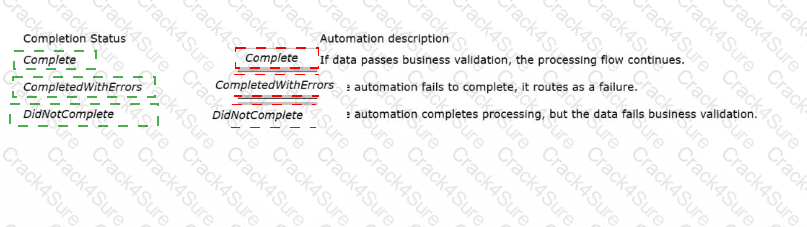
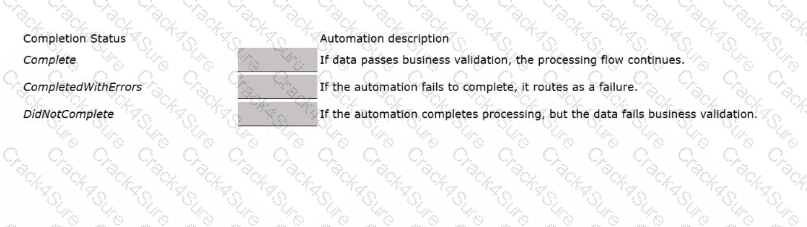
Match this robot activity completion status on the left to the unattended automation scenario on the right.
PEGACPRSA22V1 question answer

Question # 30

You are automating the login process for a web application. There are three possible scenarios that may occur: (1) You may successfully login, (2) you may not be successful logging in, or (3) you may log in but go to the change password screen.

Which control from the Toolbox do you use to determine which page you were on after performing the login function?

A.

WaitAll

B.

Switch

C.

WaitAny

D.

Signal

PEGACPRSA22V1 PDF

$33

$109.99

3 Months Free Update

  • Printable Format
  • Value of Money
  • 100% Pass Assurance
  • Verified Answers
  • Researched by Industry Experts
  • Based on Real Exams Scenarios
  • 100% Real Questions

PEGACPRSA22V1 PDF + Testing Engine

$52.8

$175.99

3 Months Free Update

  • Exam Name: Certified Pega Robotics System Architect 22
  • Last Update: Dec 25, 2025
  • Questions and Answers: 101
  • Free Real Questions Demo
  • Recommended by Industry Experts
  • Best Economical Package
  • Immediate Access

PEGACPRSA22V1 Engine

$39.6

$131.99

3 Months Free Update

  • Best Testing Engine
  • One Click installation
  • Recommended by Teachers
  • Easy to use
  • 3 Modes of Learning
  • State of Art Technology
  • 100% Real Questions included