Crack4sure Logo

We at Crack4sure are committed to giving students who are preparing for the RedHat EX300 Exam the most current and reliable questions . To help people study, we've made some of our Red Hat Certified Engineer – RHCE (v6+v7) exam materials available for free to everyone. You can take the Free EX300 Practice Test as many times as you want. The answers to the practice questions are given, and each answer is explained.
There were two systems:
SMTP Configuration.
http://station.network0.example.com/system1
http://station.network0.example.com/system2
Deploying your exam system: link to the iscsi target in the instructor.example.com and distinguish it well, then format as ext3 file system. You must be able to mount the file system of the iscsi target to the /mnt/iscsi directory in your own system and make this file system can automatically mount (permanently mount) after system restart.
Configure the samba server, share /common, which can be browsed. The user harry can only read it. If it is needed, the password for harry is harryuser.
In accordance with the following requirements to deploy ssh login service:
Please open the ip_forward and take effect permanently.
There were two systems:
Customize the User Environment
Make Secondary belongs the jeff and marion users on sysusers group. But harold user should not belongs to sysusers group.
There are Mail servers, Web Servers, DNS Servers and Log Server. Log Server is already configured.
You should configure the mail server, web server and dns server to send the logs to log server.
Install the Cron Schedule for jeff user to display "Hello" on daily 5:30.
Make on /storage directory that only the user owner and group owner member can fully access.
Create the users named jeff, marion, harold
Create the directory /storage and group owner should be the sysusers group.
There are two different networks 192.168.0.0/24 and 192.168.1.0/24. Where 192.168.0.254 and 192.168.1.254 IP Address are assigned on Server. Verify your network settings by pinging 192.168.1.0/24 Network's Host.
RHCE Test Configuration Instructions
Information for the two systems you will use in test is the following:
system1.group3.example.com: is one of the main sever. system2.group3.example.com: mainly used as a client.
Password for both of the two systems is atenorth
System’s IP is provided by DHCP, you can regard it as normal, or you can reset to Static IP in accordance with the following requirements:
system1.group3.example.com: 172.24.3.5
system2.group3.example.com: 172.24.3.10
The subnet mask is 255.255.255.0
Your system is a member of DNS domain group3.example.com. All systems in DNS domain group3.example.com are all in subnet 172.24.3.0/255.255.255.0, the same all systems in this subnet are also in group3.example.com, unless specialized, all network services required to be configured can be accessed by systems of domain group3.
host.group3.example.com provides a centralized authentication service domain
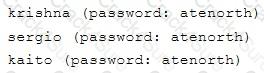
GROUP3.EXAMPLE.COM, both system1 and system2 have already been pre-configured to be the client for this domain, this domain provides the following user account:
Firewall is enabled by default, you can turn it off when deemed appropriate, other settings about firewall may be in separate requirements.
Your system will be restarted before scoring, so please ensure that all modifications and service configurations you made still can be operated after the restart without manual intervention, virtual machine instances of all examinations must be able to enter the correct multi-user level after restart without manual assistance, it will be scored zero if the test using virtual machine system cannot be restarted or be properly restarted.
Corresponding distribution packages for the testing using operating system Red Hat Enterprise Linux version can be found in the following link:
http://server1.group3.example.com/rhel
Part of the requirements include host security, ensure your host security limit does not prevent the request to allow the host and network, although you correctly configured the network service but would have to allow the host or network is blocked, this also does not score.
You will notice that some requirements which clearly do not allow services be accessed by service domain my133t.org, systems of this domain are in subnet 172.25.1.0/252.255.255.0, and systems of these subnets also belong to my 133t.org domain.
PS: Notice that some test questions may depend on other exam questions, for example, you might be asked to perform a series of restrictions on a user, but this user creation may be required in other questions. For convenient identification, each exam question has some radio buttons to help you identify which questions you have already completed or not completed. Certainly, you do not need to care these buttons if you don’t need them.
Mount a NFS Share
Mount a NFS Share to system1.domain11.example.com on the system2, as required:
1. Mount the /public to the directory /mnt/nfsmount
2. Mount the /protected to the directory /mnt/nfssecure, in a security way, key download from the following URL:
http://host.domain11.example.com/materials/nfs_client.keytab
3. User deepak can create files in /mnt/nfssecure/project
4. These file systems automatically hang up when the system is started
There were two systems:
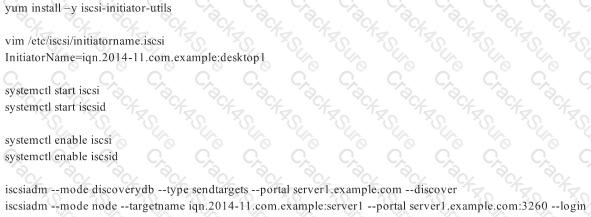
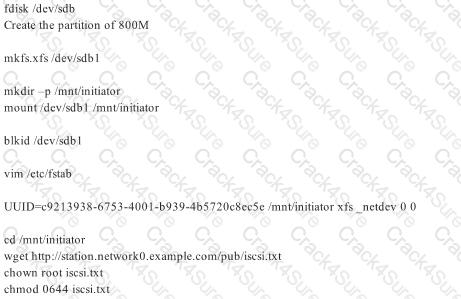
iSCSI Initiator
There were two systems:
Configure SCSI storage.
.
There were two systems:
Smb multiuser mount
RHCE Test Configuration Instructions
Information for the two systems you will use in test is the following:
system1.group3.example.com: is one of the main sever. system2.group3.example.com: mainly used as a client.
Password for both of the two systems is atenorth
System’s IP is provided by DHCP, you can regard it as normal, or you can reset to Static IP in accordance with the following requirements:
system1.group3.example.com: 172.24.3.5
system2.group3.example.com: 172.24.3.10
The subnet mask is 255.255.255.0
Your system is a member of DNS domain group3.example.com. All systems in DNS domain group3.example.com are all in subnet 172.24.3.0/255.255.255.0, the same all systems in this subnet are also in group3.example.com, unless specialized, all network services required to be configured can be accessed by systems of domain group3.
host.group3.example.com provides a centralized authentication service domain
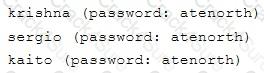
GROUP3.EXAMPLE.COM, both system1 and system2 have already been pre-configured to be the client for this domain, this domain provides the following user account:
Firewall is enabled by default, you can turn it off when deemed appropriate, other settings about firewall may be in separate requirements.
Your system will be restarted before scoring, so please ensure that all modifications and service configurations you made still can be operated after the restart without manual intervention, virtual machine instances of all examinations must be able to enter the correct multi-user level after restart without manual assistance, it will be scored zero if the test using virtual machine system cannot be restarted or be properly restarted.
Corresponding distribution packages for the testing using operating system Red Hat Enterprise Linux version can be found in the following link:
http://server1.group3.example.com/rhel
Part of the requirements include host security, ensure your host security limit does not prevent the request to allow the host and network, although you correctly configured the network service but would have to allow the host or network is blocked, this also does not score.
You will notice that some requirements which clearly do not allow services be accessed by service domain my133t.org, systems of this domain are in subnet 172.25.1.0/252.255.255.0, and systems of these subnets also belong to my 133t.org domain.
PS: Notice that some test questions may depend on other exam questions, for example, you might be asked to perform a series of restrictions on a user, but this user creation may be required in other questions. For convenient identification, each exam question has some radio buttons to help you identify which questions you have already completed or not completed. Certainly, you do not need to care these buttons if you don’t need them.
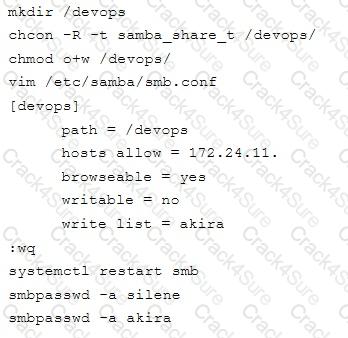
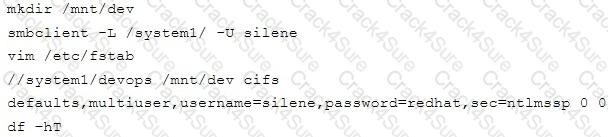
Configure Multi-User SMB Mounts.
Share the directory /devops through SMB on the systeml, as required:
1. The share name is devops
2. The shared directory devops just can be used by clients in domain11.example.com
3. The shared directory devop must be able to be browsed
4. User silene must be able to access this share through read, access code is redhat
5. User akira must be able to access this share through read and write, access code is redhat
6. This share permanently mount to system2. domain11.example.com the user /mnt/dev, make user silene as authentication any users can get temporary write permissions from akira
RHCE Test Configuration Instructions
Information for the two systems you will use in test is the following:
system1.group3.example.com: is one of the main sever. system2.group3.example.com: mainly used as a client.
Password for both of the two systems is atenorth
System’s IP is provided by DHCP, you can regard it as normal, or you can reset to Static IP in accordance with the following requirements:
system1.group3.example.com: 172.24.3.5
system2.group3.example.com: 172.24.3.10
The subnet mask is 255.255.255.0
Your system is a member of DNS domain group3.example.com. All systems in DNS domain group3.example.com are all in subnet 172.24.3.0/255.255.255.0, the same all systems in this subnet are also in group3.example.com, unless specialized, all network services required to be configured can be accessed by systems of domain group3.
host.group3.example.com provides a centralized authentication service domain
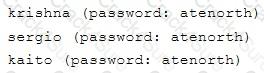
GROUP3.EXAMPLE.COM, both system1 and system2 have already been pre-configured to be the client for this domain, this domain provides the following user account:
Firewall is enabled by default, you can turn it off when deemed appropriate, other settings about firewall may be in separate requirements.
Your system will be restarted before scoring, so please ensure that all modifications and service configurations you made still can be operated after the restart without manual intervention, virtual machine instances of all examinations must be able to enter the correct multi-user level after restart without manual assistance, it will be scored zero if the test using virtual machine system cannot be restarted or be properly restarted.
Corresponding distribution packages for the testing using operating system Red Hat Enterprise Linux version can be found in the following link:
http://server1.group3.example.com/rhel
Part of the requirements include host security, ensure your host security limit does not prevent the request to allow the host and network, although you correctly configured the network service but would have to allow the host or network is blocked, this also does not score.
You will notice that some requirements which clearly do not allow services be accessed by service domain my133t.org, systems of this domain are in subnet 172.25.1.0/252.255.255.0, and systems of these subnets also belong to my 133t.org domain.
PS: Notice that some test questions may depend on other exam questions, for example, you might be asked to perform a series of restrictions on a user, but this user creation may be required in other questions. For convenient identification, each exam question has some radio buttons to help you identify which questions you have already completed or not completed. Certainly, you do not need to care these buttons if you don’t need them.
Configure the SSH Access as required:
Users can visit your two virtual machine systems via clients of domain group3.example.com through SSH remote.
RHCE Test Configuration Instructions
Information for the two systems you will use in test is the following:
system1.group3.example.com: is one of the main sever. system2.group3.example.com: mainly used as a client.
Password for both of the two systems is atenorth
System’s IP is provided by DHCP, you can regard it as normal, or you can reset to Static IP in accordance with the following requirements:
system1.group3.example.com: 172.24.3.5
system2.group3.example.com: 172.24.3.10
The subnet mask is 255.255.255.0
Your system is a member of DNS domain group3.example.com. All systems in DNS domain group3.example.com are all in subnet 172.24.3.0/255.255.255.0, the same all systems in this subnet are also in group3.example.com, unless specialized, all network services required to be configured can be accessed by systems of domain group3.
host.group3.example.com provides a centralized authentication service domain
GROUP3.EXAMPLE.COM, both system1 and system2 have already been pre-configured to be the client for this domain, this domain provides the following user account:
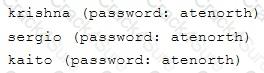
Firewall is enabled by default, you can turn it off when deemed appropriate, other settings about firewall may be in separate requirements.
Your system will be restarted before scoring, so please ensure that all modifications and service configurations you made still can be operated after the restart without manual intervention, virtual machine instances of all examinations must be able to enter the correct multi-user level after restart without manual assistance, it will be scored zero if the test using virtual machine system cannot be restarted or be properly restarted.
Corresponding distribution packages for the testing using operating system Red Hat Enterprise Linux version can be found in the following link:
http://server1.group3.example.com/rhel
Part of the requirements include host security, ensure your host security limit does not prevent the request to allow the host and network, although you correctly configured the network service but would have to allow the host or network is blocked, this also does not score.
You will notice that some requirements which clearly do not allow services be accessed by service domain my133t.org, systems of this domain are in subnet 172.25.1.0/252.255.255.0, and systems of these subnets also belong to my 133t.org domain.
PS: Notice that some test questions may depend on other exam questions, for example, you might be asked to perform a series of restrictions on a user, but this user creation may be required in other questions. For convenient identification, each exam question has some radio buttons to help you identify which questions you have already completed or not completed. Certainly, you do not need to care these buttons if you don’t need them.
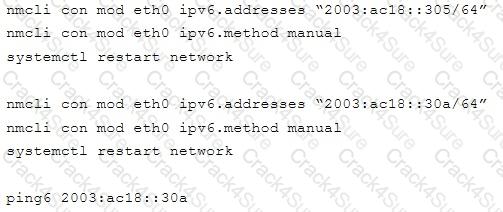
Configure IPV6 Address
Configure interface eth0 on your test system, using the following IPV6 addresses:
1) The address of system1 should be 2003:ac18::305/64
(2) The address of system2 should be 2003:ac18::30a/64
(3) Both two systems must be able to communicate with systems in network 2003:ac18/64
(4) The address must still take effect after restart
(5) Both two systems must maintain the current Ipv4 address and can communicate
RHCE Test Configuration Instructions
Information for the two systems you will use in test is the following:
system1.group3.example.com: is one of the main sever. system2.group3.example.com: mainly used as a client.
Password for both of the two systems is atenorth
System’s IP is provided by DHCP, you can regard it as normal, or you can reset to Static IP in accordance with the following requirements:
system1.group3.example.com: 172.24.3.5
system2.group3.example.com: 172.24.3.10
The subnet mask is 255.255.255.0
Your system is a member of DNS domain group3.example.com. All systems in DNS domain group3.example.com are all in subnet 172.24.3.0/255.255.255.0, the same all systems in this subnet are also in group3.example.com, unless specialized, all network services required to be configured can be accessed by systems of domain group3.
host.group3.example.com provides a centralized authentication service domain
GROUP3.EXAMPLE.COM, both system1 and system2 have already been pre-configured to be the client for this domain, this domain provides the following user account:
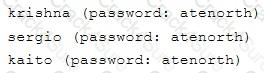
Firewall is enabled by default, you can turn it off when deemed appropriate, other settings about firewall may be in separate requirements.
Your system will be restarted before scoring, so please ensure that all modifications and service configurations you made still can be operated after the restart without manual intervention, virtual machine instances of all examinations must be able to enter the correct multi-user level after restart without manual assistance, it will be scored zero if the test using virtual machine system cannot be restarted or be properly restarted.
Corresponding distribution packages for the testing using operating system Red Hat Enterprise Linux version can be found in the following link:
http://server1.group3.example.com/rhel
Part of the requirements include host security, ensure your host security limit does not prevent the request to allow the host and network, although you correctly configured the network service but would have to allow the host or network is blocked, this also does not score.
You will notice that some requirements which clearly do not allow services be accessed by service domain my133t.org, systems of this domain are in subnet 172.25.1.0/252.255.255.0, and systems of these subnets also belong to my 133t.org domain.
PS: Notice that some test questions may depend on other exam questions, for example, you might be asked to perform a series of restrictions on a user, but this user creation may be required in other questions. For convenient identification, each exam question has some radio buttons to help you identify which questions you have already completed or not completed. Certainly, you do not need to care these buttons if you don’t need them.
Database Query
Use database Contacts on the system1, and use the corresponding SQL to search and answer the following questions:
3 Months Free Update
3 Months Free Update
3 Months Free Update



TESTED 08 Oct 2026