Crack4sure Logo

We at Crack4sure are committed to giving students who are preparing for the RedHat EX407 Exam the most current and reliable questions . To help people study, we've made some of our Red Hat Certified Specialist in Ansible Automation exam exam materials available for free to everyone. You can take the Free EX407 Practice Test as many times as you want. The answers to the practice questions are given, and each answer is explained.
===================================================================================
control.realmX.example.com _ workstation.lab.example.com
node1.realmX.example.com _ servera.lab.example.com
node2.realmX.example.com _ serverb.lab.example.com
node3.realmX.example.com _ serverc.lab.example.com
node4.realmX.example.com _ serverd.lab.example.com
node5.realmX.example.com
- username:root, password:redhat
- username:admin, password:redhat
note1. don’t change ‘root’ or ‘admin’ password.
note2. no need to create ssh-keygen for access, its pre-defined
note3. SELinux is in enforcing mode and firewalld is disabled/stop on whole managed hosts.
===================================================================================
Create a playbook called hwreport.yml that produces an output file called /root/
hwreport.txt on all managed nodes with the following information:
------------------------------------------------------------------------------------------------------
--> Inventory host name
--> Total memory in MB
--> BIOS version
--> Size of disk device vda
--> Size of disk device vdb
Each line of the output file contains a single key-value pair.
* Your playbook should:
--> Download the file hwreport.empty from the URL http://classroom.example.com/
hwreport.empty and
save it as /root/hwreport.txt
--> Modify with the correct values.
note: If a hardware item does not exist, the associated value should be set to NONE
----------------------------------------------------------------------------------------------
while practising you to create these file hear. But in exam have to download as per
questation.
hwreport.txt file consists.
my_sys=hostname
my_BIOS=biosversion
my_MEMORY=memory
my_vda=vdasize
my_vdb=vdbsize
===================================================================================
control.realmX.example.com _ workstation.lab.example.com
node1.realmX.example.com _ servera.lab.example.com
node2.realmX.example.com _ serverb.lab.example.com
node3.realmX.example.com _ serverc.lab.example.com
node4.realmX.example.com _ serverd.lab.example.com
node5.realmX.example.com
- username:root, password:redhat
- username:admin, password:redhat
note1. don’t change ‘root’ or ‘admin’ password.
note2. no need to create ssh-keygen for access, its pre-defined
note3. SELinux is in enforcing mode and firewalld is disabled/stop on whole managed hosts.
===================================================================================
Install and configure Ansible on the control-node control.realmX.example.com as
follows:
-------------------------------------------------------------------------------------------
--> Install the required packages
--> Create a static inventory file called /home/admin/ansible/inventory as follows:
node1.realmX.example.com is a member of the dev host group
node2.realmX.example.com is a member of the test host group
node3.realmX.example.com & node4.realmX.example.com are members of the prod
host group
node5.realmX.example.com is a member of the balancers host group.
prod group is a member of the webservers host group
--> Create a configuration file called ansible.cfg as follows:
--> The host inventory file /home/admin/ansible/inventory is defined
--> The location of roles used in playbooks is defined as /home/admin/ansible/ roles
Create a file called mysecret.yml on the control host using ansible vault in home/bob/ansible. Set the password to 'notasafepass' and inside the file create a variable called dev_pass with the value of devops. Save the file. Then go back in the file and change dev_pass value to devops123. Then change the vault password of mysecret.yml to verysafepass
===================================================================================
control.realmX.example.com _ workstation.lab.example.com
node1.realmX.example.com _ servera.lab.example.com
node2.realmX.example.com _ serverb.lab.example.com
node3.realmX.example.com _ serverc.lab.example.com
node4.realmX.example.com _ serverd.lab.example.com
node5.realmX.example.com
- username:root, password:redhat
- username:admin, password:redhat
note1. don’t change ‘root’ or ‘admin’ password.
note2. no need to create ssh-keygen for access, its pre-defined
note3. SELinux is in enforcing mode and firewalld is disabled/stop on whole managed hosts.
===================================================================================
Install the RHEL system roles package and create a playbook called timesync.yml that:
--> Runs over all managed hosts.
--> Uses the timesync role.
--> Configures the role to use the time server 192.168.10.254 ( Hear in redhat lab
use "classroom.example.com" )
--> Configures the role to set the iburst parameter as enabled.
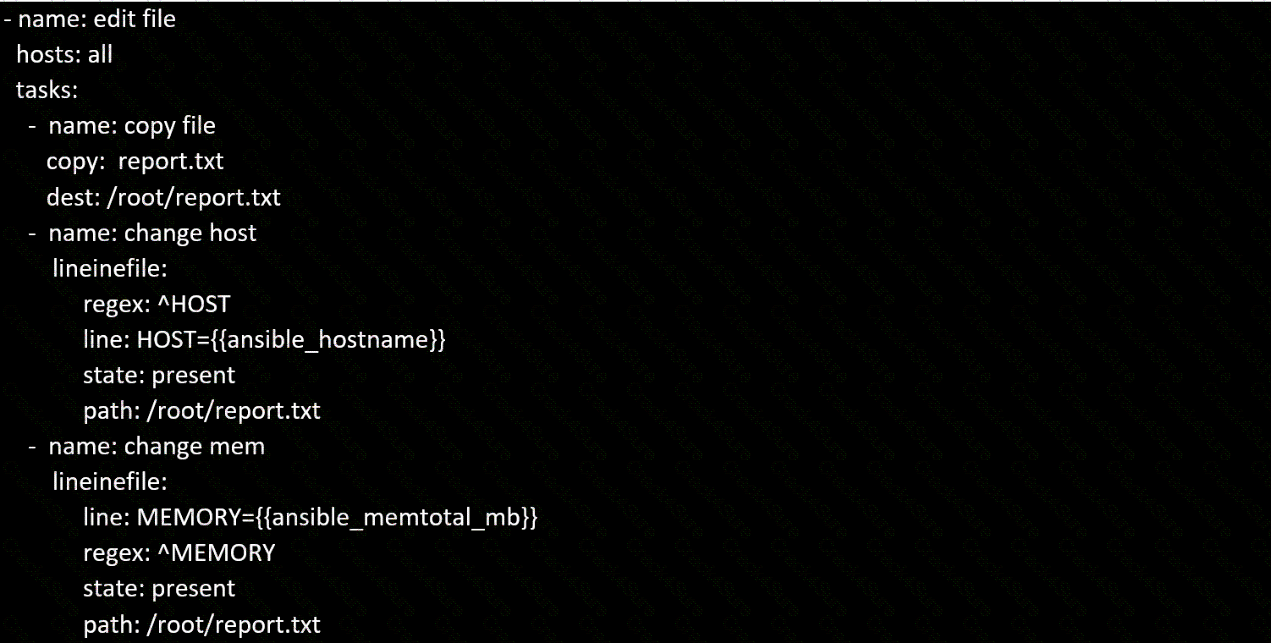
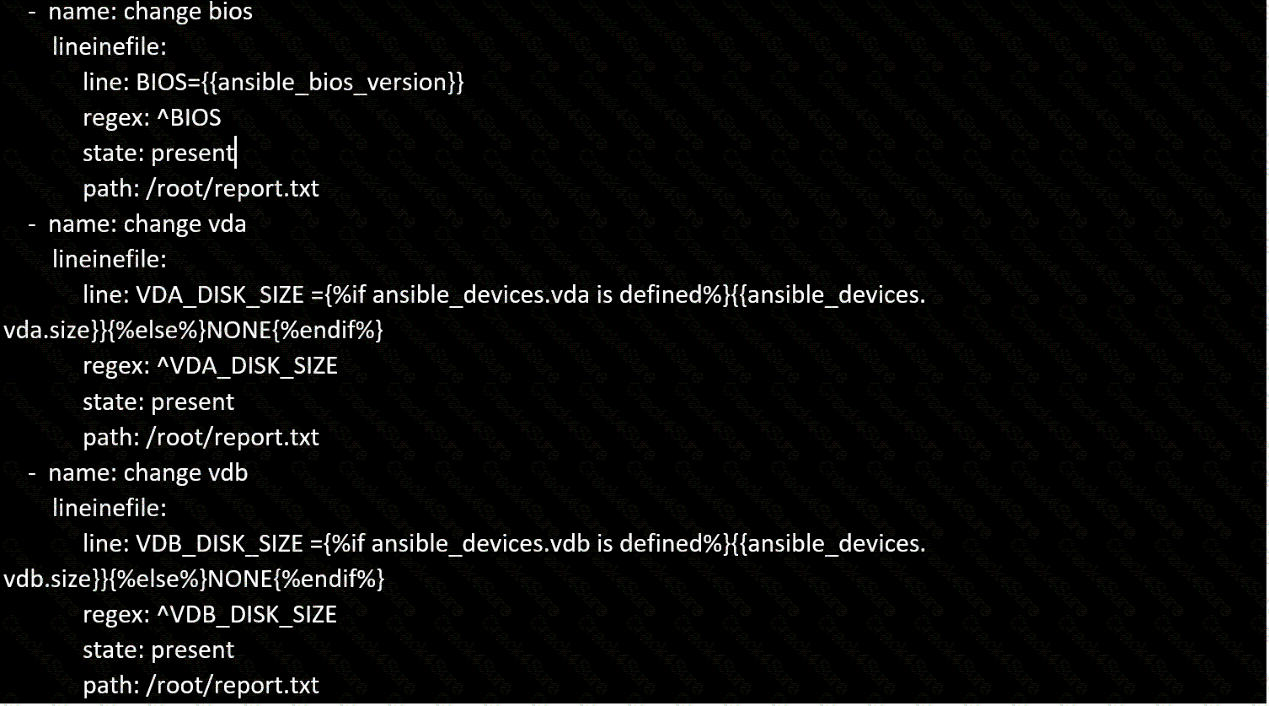
Create a file in /home/sandy/ansible/ called report.yml. Using this playbook, get a file called report.txt (make it look exactly as below). Copy this file over to all remote hosts at /root/report.txt. Then edit the lines in the file to provide the real information of the hosts. If a disk does not exist then write NONE.

Create a playbook that changes the default target on all nodes to multi-user tarqet. Do this in playbook file called target.yml in /home/sandy/ansible
===================================================================================
control.realmX.example.com _ workstation.lab.example.com
node1.realmX.example.com _ servera.lab.example.com
node2.realmX.example.com _ serverb.lab.example.com
node3.realmX.example.com _ serverc.lab.example.com
node4.realmX.example.com _ serverd.lab.example.com
node5.realmX.example.com
- username:root, password:redhat
- username:admin, password:redhat
note1. don’t change ‘root’ or ‘admin’ password.
note2. no need to create ssh-keygen for access, its pre-defined
note3. SELinux is in enforcing mode and firewalld is disabled/stop on whole managed hosts.
===================================================================================
Create Logical volumes with lvm.yml in all nodes according to following
requirements.
----------------------------------------------------------------------------------------
* Create a new Logical volume named as 'data'
* LV should be the member of 'research' Volume Group
* LV size should be 1500M
* It should be formatted with ext4 file-system.
--> If Volume Group does not exist then it should print the message "VG Not found"
--> If the VG can not accommodate 1500M size then it should print "LV Can not be
created with
following size", then the LV should be created with 800M of size.
--> Do not perform any mounting for this LV.
3 Months Free Update
3 Months Free Update
3 Months Free Update



TESTED 08 Oct 2026