
We at Crack4sure are committed to giving students who are preparing for the SAP C_THR84_2311 Exam the most current and reliable questions . To help people study, we've made some of our SAP Certified Application Associate - SAP SuccessFactors Recruiting: Candidate Experience 2H/2023 exam materials available for free to everyone. You can take the Free C_THR84_2311 Practice Test as many times as you want. The answers to the practice questions are given, and each answer is explained.
Which of the following encrypts personal data used in the recruiting process?
Identity Authentication Service (IAS)
Data Retention Time Management (DRTM)
Secure Socket Layer (SSL)
Data Privacy Consent Statement (DPCS)
Secure Socket Layer (SSL) is a protocol that encrypts personal data used in the recruiting process. SSL ensures that the data transmitted between the candidate’s browser and the career site is secure and protected from unauthorized access or tampering1. SSL also helps to improve the candidate’s trust and confidence in the career site and the recruiting process2.
References:
Fields defined on the job requisition and mapped to Career Site Builder can be used for which purposes?Note: There are 3 correct answers to this question.
Display on search results
Add to data capture forms
Display in the site header or footer
Use to create category page rules
Display on the job layout
Fields defined on the job requisition and mapped to Career Site Builder can be used for the following purposes:
References: Career Site Builder Pages and Components, Other Career Site Setup, HR832 - SAP SuccessFactors Recruiting: Candidate Experience Administration
Why is it important to set up CSB Role Based Permission from CSB > Users > Roles?Note: There are 2 correct answers to this question.
Until CSB Role Based Permission is enabled, NO users can access CSB.
Until CSB Role Based Permission is enabled, all users with access to CSB have all permissions in the tool.
Only one CSB role can be assigned per user, so additional roles may need to be created to satisfy your customer’s permission requirements.
Site setup settings are located within CSB and should only be accessed by trained administrators.
It is important to set up CSB Role Based Permission from CSB > Users > Roles because:
The other two options are incorrect because:
References:
Career Site Builder Pages and Components
What are some leading practices when creating Category pages?Note: There are 3 correct answers to this question.
Page titles should end with the word Jobs or Careers for better search engine optimization (SEO).
Category pages use the same design layout to provide a consistent user experience.
Category pages contain different headers and footers than the Home page.
Category pages do NOT contain jobs that appear on other Category pages.
Category pages host minimal content to allow candidates to find jobs quickly and easily.
Some leading practices when creating Category pages are:
The other options are not leading practices when creating Category pages:
References:1:SAP Help Portal - SEO Best Practices2:SAP Help Portal - Guidelines3:SAP Learning Journey - Reviewing the Candidate Experience in SAP SuccessFactors Recruiting: [SAP Training - HR832 - SAP SuccessFactors Recruiting: Candidate Experience Administration] : [SAP Certification - C_THR84_2305 - SAP Certified Application Associate - SAP SuccessFactors Recruiting: Candidate Experience 1H/2023]
Career Site Design and Accessibility
What are some leading practices to ensure that a website is accessible? Note: There are 3 correct answers to this question.
Ask people with disabilities to test the site.
Ask people in your IT department to test the site.
Use an online accessibility checker, such as WAVE, to test the site.
Review the site using assistive technology such as a screen reader like JAWS or NVDA.
Carefully review the site's code to look for issues with tagging and other elements.
References:
Candidate Relationship Management
Assume that your customer owns a chain of retail stores. They require talent pools based on attributes of the stores, such as Goods Sold, Store Size, and Location.What are the steps to achieve this use case? Note: There are 3 correct answers to this question.
Use the standard filter fields in SAP SuccessFactors HXM Suite to represent the attributes.
When naming the talent pool, list all of the attributes and their values.
Edit the talent pool and select values for the additional attributes.
Ensure that the location foundation object is enabled and that all required locations have been created.
Create custom generic objects for Goods Sold and Store Size.
To achieve this use case, you need to do the following:
References:
Consultants can create standard or custom XML feeds to meet their customers' job distribution requirements. Which of the following are associated with a standard XML feed?Note: There are 2 correct answers to this question.
All of the customer’s jobs are included in a standard XML Feed.
Customers need to renew XML job feeds annually.
One standard XML feed is included in the statement of work for a standard recruiting implementation.
The leading practice is to push the delivery of XML feeds using the FTP Scheduler in Command Center.
A standard XML feed is a predefined format of job data that can be used to distribute jobs to external job boards or aggregators. The following are associated with a standard XML feed:
Configure Locales
Under which conditions will you enable Limit Search by Locale under Global Search options in Career Site Builder (CSB)?Note: There are 2 correct answers to this question.
The customer wants to host multiple locales on their CSB site, and Limit Search by Locale is required for that.
The customer plans to translate the title and description for all job requisitions that are relevant for a specific locale.
The customer wants job alerts that the candidate receives to be restricted to the locale the candidate selects on the CSB site.
The customer wants jobs returned in a search to be restricted to the locale the candidate selects on the CSB site.
You will enable Limit Search by Locale under Global Search options in Career Site Builder (CSB) under the following conditions:
The other options are not valid conditions for enabling Limit Search by Locale in CSB:
References:1:SAP Help Portal - Translate Job Requisition Fields2:SAP Help Portal - Configure Global Search Options3:SAP Help Portal - Create a New Locale4:SAP Help Portal - Manage Job Alerts
Job Delivery
As part of their sales2023 campaign, your customer wishes to post a link to YouTube that directs candidates to the Sales Jobs category page.
Which URL contains the correct tracking links for this scenario?
https://jobs.company.com/go/Sales- Jobs/597140/?utm_source=sales2023 &utm_campaign=youtube
https://jobs.company.com/go/Sales-Jobs/597140/?utm_source=youtube &utm_campaign=sales2023
https://jobs.company.com/go/Sales-Jobs/597140/ &utm_source=sales2023&utm_campaign=youtube
https://jobs.company.com/go/Sales-Jobs/597140/?utm_source=youtube?utm_campaign=sales2023
The correct URL for the scenario is:
https://jobs.company.com/go/Sales-Jobs/597140/?utm_source=youtube &utm_campaign=sales2023
This URL contains the correct tracking links for the following reasons:
The other options are incorrect for the following reasons:
References:1:SAP Help Portal - Job Delivery
Career Site Design and Accessibility
What are some of the search engine optimization (SEO) leading practices achieved by creating a career site with Career Site Builder (CSB)?Note: There are 3 correct answers to this question.
A new site map is created and delivered to Google and Bing weekly.
CSB supports creating Category pages to host jobs, which helps build SEO value more than specific job postings.
CSB uses metadata to help ensure that jobs and pages are search engine-friendly.
The jobs posted to CSB sites are accessible to website crawlers.
CSB automatically populates hidden text on every page with the keywords provided in the metadata.
Some of the search engine optimization (SEO) leading practices achieved by creating a career site with Career Site Builder (CSB) are:
The other options are not valid SEO leading practices achieved by CSB:
References:1:SAP Help Portal - SEO Best Practices2:SAP Help Portal - Guidelines3:SAP Help Portal - Metadata4:SAP Help Portal - Accessibility5:SAP Help Portal - Hidden Text
When configuring Advanced Analytics, which applicant statuses do NOT need to be mapped?Note: There are 2 correct answers to this question.
Invited to Apply
Auto Disqualified
Forwarded
Withdrawn by Candidate
When configuring Advanced Analytics, you need to map the applicant statuses from the Recruiting Management module to the corresponding statuses in the Advanced Analytics module. This allows you to track and report on the candidate journey and the effectiveness of your sourcing channels and campaigns. However, some applicant statuses do not need to be mapped, as they are either not relevant or automatically mapped by the system. These statuses are:
The other statuses, Invited to Apply and Forwarded, do need to be mapped, as they are important for measuring the candidate experience and the recruiter performance. The Invited to Apply status is assigned to candidates who are invited to apply for a job requisition by the recruiter. This status should be mapped to the Sourced status in Advanced Analytics, to indicate that the candidate was sourced by the recruiter.The Forwarded status is assigned to candidates who are forwarded to another job requisition by the recruiter. This status should be mapped to the Forwarded status in Advanced Analytics, to indicate that the candidate was moved to another opportunity. References:
Based on leading practices, which of the following page types can contain job listings?
Category page
Landing page
Home page
Content page
Category pages are designed to display job listings based on predefined criteria, such as location, function, or industry. They allow candidates to browse and filter jobs that match their interests and qualifications. Category pages can also include components such as banners, videos, or testimonials to showcase the employer brand and culture.
What are some of the ways that candidates can be added to a talent pool?Note: There are 3 correct answers to this question.
Add from the Candidate Workbench (Talent Pipeline page).
Add from an email campaign.
Auto-populate from a saved search.
Add from a Candidate Search.
Candidates can add themselves.
Candidates can be added to a talent pool from the following sources:
You cannot add candidates to a talent pool from an email campaign or allow candidates to add themselves. Email campaigns are used to communicate with candidates who are already in a talent pool1 . Candidates can only join a talent community, which is a broader group of candidates who have expressed interest in your company, but not a specific job or talent pool1 . References: SAP SuccessFactors Recruiting: Candidate Experience Administration, Unit 5: Candidate Relationship Management, Lesson: Talent Pools, pages 5-3 to 5-9.
Which of the following is an SAP leading practice regarding the blackout period?
When the update code is pushed to Preview, you CANNOT move the Career Site Builder site to Production until after the Production release is complete.
When a change is made to a job requisition, you can expect a delay of up to 24 hours for the job to be moved to the Career Site Builder site via Real-time Job Sync.
After a Career Site Builder page is published, you may need to wait a few minutes before you can publish additional changes to that page.
After the release information is updated in the What’s New Viewer, you may NOT discuss with customers what is included in the release.
According to the SAP SuccessFactors Recruiting: Candidate Experience Administration course1, the blackout period is a time frame during which you should not move your Career Site Builder site to Production. This is because the update code is pushed to Preview first, and then to Production later, usually within a week. If you move your site to Production during this time, you may encounter issues or inconsistencies due to the different code versions. Therefore, the SAP leading practice is to wait until the Production release is complete before moving your site to Production1.
The other options are not related to the blackout period, but rather to other aspects of the Career Site Builder functionality. For example:
How is defaulted/system text, such as text on the search bar, translated or changed on a Career Site Builder site?

Note: There are 3 correct answers to this question.
System text translations can be changed from Career Site Builder > Tools > Translations.
System text translations are only possible for the site's default language.
System text translations are made from Career Site Builder > Global Settings.
System text translations are exported from the Stage site and imported to Production separately from other site imports and exports.
System text is translated when the locale is enabled.
System text is the text that is displayed by default on the Career Site Builder site, such as the text on the search bar, the buttons, the labels, and the messages. You can translate or change the system text on a Career Site Builder site by using the following methods:
References:
Your customer has defined 10 categories. They require 2 languages and 2 brands on their career site, and want the same Category pages represented for all brands and languages.How many Category pages should be created?
10
20
30
40
The number of Category pages that should be created for a career site with 10 categories, 2 languages, and 2 brands is 40. This is because each Category page needs to be created for each combination of language and brand, to ensure that the content and layout are consistent and appropriate for each audience. For example, if the categories are Accounting, Engineering, Marketing, Sales, IT, HR, Finance, Operations, Customer Service, and Legal, and the languages are English and French, and the brands are Brand A and Brand B, then the following Category pages need to be created:
Therefore, the total number of Category pages is 10 x 2 x 2 = 40. References:
Move to Production
What are some leading practices regarding SSL certificates for Career Site Builder (CSB) sites? Note: There are 3 correct answers to this question.
It is critical to prevent the SSL certificate from expiring so that candidates are NOT blocked from accessing the CSB site.
Rather than setting up a certificate specifically for the CSB subdomain, a wildcard certificate can be used.
Using CSB, customers and consultants can manage the entire SSL certificate renewal process without assistance from Product Support.
SSL certificates must be installed for both the stage and production CSB environments.
The implementation consultant begins the SSL certificate process as soon as the site is moved to production.
Some leading practices regarding SSL certificates for Career Site Builder (CSB) sites are:
The other options are not valid leading practices regarding SSL certificates for CSB sites:
References:1:SAP Help Portal - SSL Certificate Expiration2:SAP Help Portal - Wildcard SSL Certificate3:SAP Help Portal - SSL Certificate Installation: [SAP Help Portal - SSL Certificate Renewal] : [SAP Help Portal - SSL Certificate Process]
Other Career Site Setup
What is the recommended naming convention when setting up a subdomain for a customer’s Career Site Builder site?Note: There are 2 correct answers to this question.
careers.
jobs.
When setting up a subdomain for a customer’s Career Site Builder site, the recommended naming convention is to use either careers.
The other two options are incorrect because:
References:
When you test the customer's Career Site Builder (CSB) site with an accessibility checker, two of the footer links display Redundant Title Text alerts.How can you correct this?
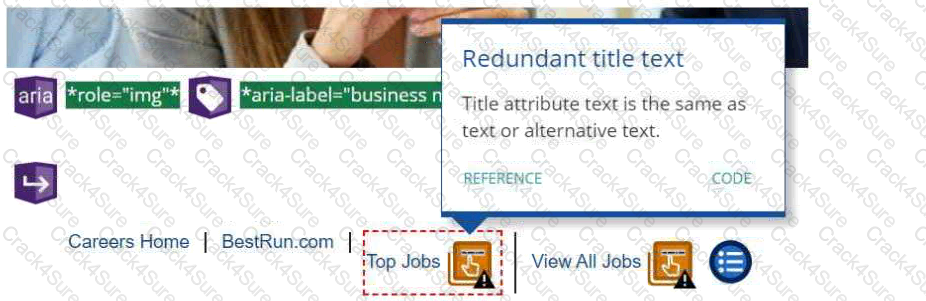
Replace the footer link with one that does NOT require a title tag.
Click the CODE link for suggestions to correct the issue.
Rename the link using different text for the Title and Text.
The Redundant Title Text issue CANNOT be corrected in the footer of CSB sites.
In SAP SuccessFactors Recruiting: Candidate Experience, when an accessibility checker identifies Redundant Title Text alerts, it indicates that the title attribute text is identical to the link or alternative text. This redundancy can be corrected by renaming the link using different texts for the Title and Text fields to ensure that they are not identical, enhancing website accessibility. References: SAP SuccessFactors Recruiting: Candidate Experience documents available at SAP Training)
What are some leading practices regarding text on websites?Note: There are 3 correct answers to this question.
Use high contrast text, for example, black text on a white background.
Use half the word count or less than conventional writing.
Avoid using bulleted or numbered lists.
Break up lengthy content and separate with headings.
Use a serif font (such as Times New Roman), rather than a sans-serif font (such as Arial).
Text on websites is an important element of the candidate experience, as it conveys information, instructions, and messages to the visitors. Some leading practices regarding text on websites are:
TESTED 07 Mar 2026
