We at Crack4sure are committed to giving students who are preparing for the UiPath UiPath-AAPv1 Exam the most current and reliable questions . To help people study, we've made some of our UiPath Agentic Automation Professional Exam exam materials available for free to everyone. You can take the Free UiPath-AAPv1 Practice Test as many times as you want. The answers to the practice questions are given, and each answer is explained.
A company is deploying a UiPath agentic AI to automate invoice processing, customer support responses, and marketing campaign recommendations.
In which of the following scenarios is Human-in-the-Loop validation recommended?
The agent processes recurring invoices that match historical patterns and predefined approval criteria.
The agent generates customer responses using validated knowledge sources and established communication guidelines.
The agent recommends campaign adjustments based on consolidated performance data and prior approved strategies.
The agent processes invoices containing data discrepancies and policy deviations beyond standard approval conditions.
Option D identifies the scenario with the strongest requirement for Human-in-the-Loop validation because it involves discrepancies and exceptions outside established business approval conditions.
UiPath recommends human escalation when agents encounter ambiguous decisions, missing information, tool failures, or regulatory and business-rule exceptions.
Invoice processing frequently involves financial controls, supplier verification, purchase-order reconciliation, and approval thresholds.
When an invoice contains discrepancies or policy deviations, autonomous processing may result in unauthorized payments, incorrect accounting records, or compliance violations.
A suitable agentic workflow should detect the exception, assemble the relevant supporting information, and request human review before proceeding with the affected transaction.
UiPath Agents can initiate escalations using Action Apps and Action Center. The reviewer can examine the disputed information, approve or reject the exception, or supply corrected values.
After the escalation is resolved, the agent can continue according to the configured outcome behavior.
Option A describes predictable invoice processing within predefined approval criteria. Option B concerns responses generated from validated information. Option C involves recommendations consistent with previously approved strategies.
These scenarios can also warrant human oversight depending on organizational policy, but they do not inherently present the explicit exception condition described in D.
Official UiPath references/topics: Agents — Escalations; Agents — Human-in-the-Loop Best Practices.
An insurance company needs to automate end-to-end policy validation by ingesting customer records from its CRM, invoking multiple REST APIs to verify coverage and eligibility against external data sources, and reconciling results for audit compliance. The process must handle authentication challenges, intermittent API outages, and changing response schemas, while providing clear progress and error reporting for business users.
Which workflow design approach is best?
Create a modular UiPath workflow with centralized API authentication, schema validation/adaptation for varying responses, resiliency (auto-retries, graceful outage handling), and real-time progress/error logs for business users.
Organize the workflow so each API call operates independently, with hardcoded credentials; in case of outages, aggregate error codes for later manual investigation, and generate a single compliance summary after all processing is complete.
Use separate UiPath workflows for each stage, CRM ingestion, API verification, and reconciliation, allowing manual intervention if an authentication failure or schema mismatch occurs, and emailing stakeholders occasional audit summaries for review.
Configure the workflow to only process customer records during periods of known API uptime, skipping records and deferring validation when external data sources are unavailable, then batch process any skipped validations later and compile a multi-stage report.
Option A represents the most appropriate enterprise integration architecture because it addresses reliability, security, maintainability, and operational transparency together.
UiPath Integration Service provides a centralized mechanism for establishing authenticated connections with external applications. These connections can be reused across automation activities, reducing credential duplication and supporting controlled authentication lifecycle management. Where a suitable connector is unavailable, custom API integrations can implement equivalent authentication controls.
A modular architecture separates CRM ingestion, eligibility verification, response transformation, and reconciliation into independently maintainable components. Schema validation is particularly important because external APIs may introduce optional properties, modify response structures, or return unexpected payloads. Normalizing these responses before downstream processing reduces integration failures.
Resilience can be implemented through exception handling, bounded retries, and appropriate recovery procedures. UiPath's Retry Scope activity supports retrying eligible operations. However, retry behavior must consider API rate limits, timeouts, and transaction idempotency to prevent duplicate changes.
Centralized logging and transaction-level status reporting allow administrators and business stakeholders to identify failed records, investigate exceptions, and support audit requirements.
Options B, C, and D introduce avoidable operational risks through hardcoded credentials, excessive manual intervention, or incomplete exception handling.
Official UiPath references/topics: Integration Service — Connections; Authentication Configuration; System Activities — Retry Scope.
In UiPath Maestro's Single Instance view, what happens when you perform the Retry action on an instance?
It restarts all the current activities in the workflow from the first step in the process.
It restarts all the current activities in the workflow from the last completed step.
It upgrades the instance to a different version of the process, applying the latest logic and configurations and then retries the execution of the instance.
It re-executes the instance, using a different set of input data and provides a comparison of the outputs after the execution ends.
Option B precisely describes the documented Retry behavior in UiPath Maestro's instance management interface.
Maestro provides centralized orchestration for processes involving AI agents, robotic automations, human activities, and enterprise services.
When a process instance encounters an execution failure, administrators can investigate the affected step through the Single Instance view.
The Retry action restarts the current workflow activities from the last completed step rather than initiating a completely new process execution.
This allows the orchestration engine to recover from operational failures while retaining the relevant execution history and process state.
A typical recovery scenario involves a failed API request caused by an expired connection or temporary external-service interruption. After the underlying issue is corrected, the administrator can retry the faulted instance.
Option A is incorrect because Retry does not normally restart the entire workflow from its first activity.
Option C describes the separate Migrate functionality, which upgrades an instance to a different process version.
Option D describes an alternative test execution rather than instance recovery.
Maestro records instance management actions and associated comments in Action History, supporting troubleshooting and auditability.
Administrators must still consider transaction side effects and idempotency before repeating operations that modify external systems.
Official UiPath references/topics: Maestro Orchestrate — Working with Instance Management — Single Instance View and Retry.
Which factor should most influence your choice to use an agent rather than a workflow in an automation design?
The stability of the environment: agents are recommended only when tasks are strictly rule-based, with minimal variation between executions and predictable control flow.
The number of process steps involved: agents should always be used when an automation contains more than five steps, regardless of complexity or input type.
The governance model: agents are chosen mainly for their ability to provide strict compliance across every automation run.
The level of input ambiguity and need for runtime reasoning: agents excel when inputs are unstructured and decisions must adapt dynamically to changing context.
Option D identifies the principal architectural distinction between agentic execution and deterministic workflow automation.
UiPath describes agents as goal-oriented systems capable of interpreting context, selecting actions, invoking tools, and adapting execution behavior when the appropriate path cannot be completely predefined.
Agents are particularly appropriate when inputs are unstructured, business conditions vary, or decision-making requires contextual interpretation.
For example, a support-ticket classification process may receive free-form customer descriptions containing incomplete information, ambiguous terminology, and multiple possible underlying causes.
An agent can analyze these inputs, determine their probable meaning, request clarification, and select an appropriate response or routing action.
A conventional workflow is generally more suitable when business rules and execution paths are stable, predictable, and explicitly defined.
Option A reverses this distinction by assigning strictly deterministic activities to agents. Option B incorrectly bases architecture selection on a numerical step threshold. Option C treats compliance capabilities as the primary reason for choosing an agent, despite the additional governance considerations associated with probabilistic systems.
UiPath recommends combining agents and workflows rather than treating them as mutually exclusive architectural models.
In hybrid solutions, agents handle dynamic judgment while deterministic workflows execute predictable activities under explicit process controls.
Official UiPath references/topics: Agents — Agents and Workflows, Choosing the Right Model.
In a UiPath agent evaluation, you want to assess whether the agent followed the expected behavior throughout its run history and decision-making steps, rather than comparing only final outputs.
Which evaluator type should you select?
Trajectory evaluator
Exact match
JSON similarity
LLM-as-a-Judge (semantic similarity on final output)
Option A correctly identifies the Trajectory evaluator as the appropriate mechanism for assessing an agent's overall execution behavior rather than only its final response.
UiPath's evaluation framework distinguishes between deterministic output validation, LLM-based response assessment, and trajectory evaluation.
A Trajectory evaluator uses a language model to examine the agent's execution history against predefined behavioral expectations. This includes intermediate decisions, tool invocations, execution sequences, and the overall approach taken to accomplish the objective.
For example, an invoice-processing agent may produce a correct payment-status result but fail to perform mandatory supplier verification. A final-output evaluator might accept the answer, whereas a trajectory evaluation can identify the missing verification step.
Option B, Exact Match, evaluates strict equality between actual and expected outputs. Option C, JSON Similarity, compares structured output representations. Option D evaluates semantic correspondence between natural-language responses and expected results.
None of these alternatives directly evaluates the agent's complete execution path.
Trajectory evaluation is especially useful when compliance, tool-selection discipline, or mandatory process steps matter independently of the final result.
For stricter verification of specific tool interactions, UiPath also provides runtime tool-call evaluators that assess arguments, invocation counts, execution order, and outputs.
Official UiPath references/topics: Agents — Evaluations, Trajectory Evaluators; Runtime Evaluation and Tool Call Evaluators.
In UiPath Maestro, which of the following conditions must a variable meet to be usable in the Monitoring tab’s filter builder?
The variable must be linked to a BPMN gateway decision
The variable must be declared in the global scope of the automation project
The variable must be used in at least one completed process instance
The variable must be explicitly configured as searchable in the Maestro canvas
Option D is the answer indicated by the uploaded practice material, but it cannot be considered correct against the current UiPath Maestro documentation.
UiPath Maestro Orchestrate supports filtering process instances by variable values to investigate execution patterns, business outcomes, and operational exceptions.
The current documentation explains that variable filters are configured directly within the Monitoring view using the Configure filtering action.
Administrators select variables from those defined in the deployed process version, specify comparison operators, and apply the appropriate filter values.
Importantly, UiPath explicitly states that canvas-level configuration is not required to make variables available for filtering.
This directly contradicts option D's requirement to mark variables as searchable on the Maestro canvas.
Option A is not required because filtering is independent of BPMN gateway associations. Option B introduces an unsupported global-scope condition. Option C incorrectly requires prior use in a completed instance.
Consequently, none of the four options accurately describes the current configuration requirement.
For the current product, the relevant prerequisite is that the variable exists in the selected deployed process version and is available through Monitoring's variable selector.
Variable filtering applies to process instances executed after the filter is enabled, which should also be considered when analyzing historical execution data.
Official UiPath references/topics: Maestro Orchestrate — Variables and Element Filtering — Configure Element and Variable Filters.
Technical qualification: Outdated question: D is the legacy intended answer; current documentation does not require a canvas-level searchable-variable setting. None of the presented options is correct under the current product.
When configuring the Search Strategy for a context in UiPath, what does the "Relevance score threshold" setting do?
It establishes how frequently the index should be synced to ensure the agent references up-to-date information.
It determines how many chunks are returned from a user's query, helping to control the overall token size of the LLM call.
It filters out retrieved chunks that score below the threshold, making results more precise by only including the best-scored content.
It sets the minimum number of documents that must be retrieved for the agent to provide a response.
Option C accurately describes the function of the Relevance score threshold in UiPath Context Grounding.
Context Grounding retrieves potentially relevant portions of indexed enterprise documents and supplies them to an agent as supporting context.
When the Semantic search strategy is configured, the Relevance score threshold controls which retrieved chunks qualify for inclusion in the grounding results.
UiPath applies this threshold after retrieval and re-ranking. Chunks with relevance scores below the configured value are excluded from the returned results.
Increasing the threshold generally improves retrieval precision by reducing the number of low-relevance passages supplied to the language model.
However, excessively high thresholds can exclude useful information, reducing recall and potentially leaving the agent without sufficient supporting context.
Option A describes index synchronization rather than relevance filtering.
Option B describes the Max results generated setting, which determines the maximum number of chunks returned and helps control the token size of the grounding payload.
Option D incorrectly describes a minimum document requirement.
Effective Context Grounding configuration requires balancing relevance filtering, retrieval quantity, content quality, and agent context limitations.
Administrators should inspect retrieved passages in execution traces and adjust the threshold according to measured performance rather than assuming that higher settings always produce better answers.
Official UiPath references/topics: Agents — Contexts — Semantic Search Strategy, Relevance Score Threshold and Max Results Generated.
In the illustrated insurance-claim automation, the agent analyzes incoming emails and escalates uncertain cases for confirmation before proceeding.
When configuring Human-in-the-Loop for this process, which configuration best ensures accurate claim identification while maintaining automation efficiency?
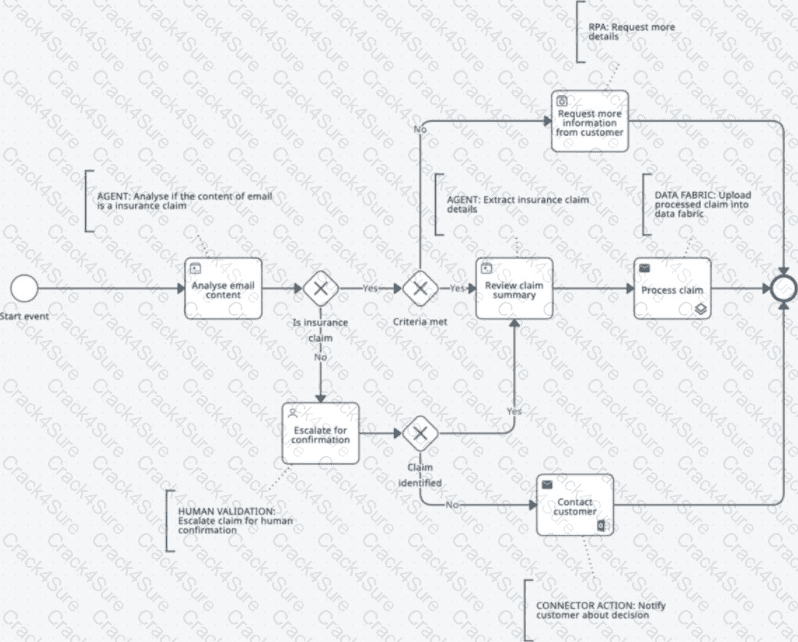
Original exhibit — Question 2
Configure human approval before notifying the customer of the final claim decision, regardless of how the claim was classified.
Configure human validation for a subset of processed claims selected based on predefined business priority categories.
Configure escalation to a human reviewer when the agent can't confidently confirm the email is an insurance claim.
Configure human review after the claim summary is generated to validate extracted details prior to uploading the processed claim into the data fabric.
Option C implements selective Human-in-the-Loop escalation at the point where uncertainty directly affects the insurance-claim workflow.
UiPath Agents support escalations that allow an autonomous agent to request human validation, approval, or additional information while executing a business process. Escalations are implemented using Action Apps and Action Center, enabling human reviewers to supply decisions that determine whether processing should continue.
In the illustrated process, the initial agent analyzes incoming email content to determine whether the message represents an insurance claim. When the classification is uncertain, the agent should request human confirmation before extracting detailed claim information or advancing to claim processing.
This approach establishes a controlled decision boundary. Clearly identified claims can follow the automated processing route, while ambiguous cases receive additional validation.
Option A requires approval regardless of classification confidence, introducing unnecessary workload. Option B selects cases using business priority rather than classification uncertainty. Option D delays validation until downstream processing has already occurred, potentially propagating an incorrect classification.
For reliable implementation, the escalation should define explicit triggering conditions, the information provided to reviewers, permitted outcomes, and the continuation behavior following human intervention.
Official UiPath references/topics: Agents — Escalations; Action Center — Creating Agent Escalations with Action Apps; Best Practices for Building Agents.
Technical qualification: Source attribution correction: The uploaded file cites Appian rather than UiPath for the claim-escalation rationale.
A company wants to apply different Agent governance settings across multiple departments.
Which approach should it take to manage Agent access efficiently?
Create a master AI Trust Layer policy template and instruct each department administrator to clone and customize it through their local admin console.
Create an AI Trust Layer policy with the appropriate Agent settings and deploy it selectively to the tenants corresponding to each department.
Generate separate governance files from Studio for each department and upload them directly to the department's folder in Automation Cloud.
Create a single organization-wide AI Trust Layer policy and configure department-specific exceptions within the policy's advanced settings.
Option B correctly describes the tenant-scoped governance model available through UiPath Automation Ops and AI Trust Layer policies.
UiPath Automation Ops allows administrators to create governance policies that control access to agent capabilities and other AI-related functionality across supported tenants.
The AI Trust Layer policy contains an Enable Agents product toggle that determines whether users in a governed tenant can access UiPath Agents.
Administrators configure the required settings, save the policy, and deploy it to the appropriate tenants through Automation Ops governance deployment.
Where departments operate in separate tenants, policies can be configured and deployed according to their respective governance requirements. This allows administrators to establish different agent access rules without requiring developers to maintain security configurations independently.
The arrangement also supports centralized administration and more consistent policy enforcement.
Option A assumes a decentralized policy-cloning model that is not the documented deployment procedure. Option C incorrectly treats Studio project files as governance policy artifacts. Option D assumes that a single policy provides arbitrary department-specific exceptions rather than using the supported governance deployment model.
It is important to distinguish tenant-level agent access controls from agent-specific tool permissions, publishing restrictions, and runtime guardrails. These are related but separately governed responsibilities.
Official UiPath references/topics: Agents — Agents Governance; Automation Ops — AI Trust Layer Policies and Deploy Governance Policies.
An agent can access multiple connector-based tools that have similar functionality.
How should the prompt help the agent select the correct tool?
Assign similar descriptions to all tools so the agent can choose based on runtime confidence.
Emphasize response formatting requirements instead of clarifying tool usage boundaries.
Avoid detailed tool descriptions and rely on the model to interpret connector metadata.
Differentiate each tool by clearly specifying its intended use case, scope, and triggering conditions.
Option D directly follows UiPath's recommendations for effective agent tool design and reliable tool selection.
UiPath Agents select tools according to their names, descriptions, available context, and instructions established in the system prompt.
When multiple tools provide similar capabilities, poorly differentiated descriptions can cause the agent to select an inappropriate operation.
For example, an agent may have separate tools for retrieving customer account information, updating customer records, and creating support requests.
Although these tools interact with related business information, they perform different operations and carry different execution risks.
The system prompt should clearly identify each tool's intended purpose, supported scenarios, input requirements, and conditions under which invocation is appropriate.
Tool descriptions should also identify potential side effects, including changes to enterprise records, destructive operations, or repeated transactions.
Option A encourages ambiguity by assigning similar descriptions to different tools. Option B prioritizes output formatting while neglecting execution correctness. Option C assumes connector metadata alone provides sufficient guidance.
UiPath recommends concise but informative tool descriptions and representative input-output examples when necessary.
For high-risk tools, developers should combine descriptive instructions with authorization controls, guardrails, and execution tracing.
This ensures that appropriate tool selection is supported by both prompt-level guidance and enforceable operational restrictions.
Official UiPath references/topics: Agents — Tools; Building Effective Agent Tools, Writing Effective Tool Descriptions.
A conversational agent is deployed with detailed behavioral rules in its initial configuration. A user then submits a request that shifts the topic of discussion.
Which statement best describes the situation?
The user prompt permanently modifies the behavioral rules established by the system prompt.
The topic is defined by the user prompt, while the behavioral rules remain controlled by the system prompt.
The system prompt becomes inactive once a user introduces a new topic.
The topic and behavioral rules are both controlled by the system prompt once deployed.
Option B accurately describes the distinction between persistent system instructions and user-provided conversational requests in UiPath Agents.
The system prompt establishes the agent's operating identity, responsibilities, permitted scope, behavioral restrictions, and interaction rules. These instructions govern how the agent responds throughout its execution.
The user prompt introduces the current conversational objective, question, or information that requires processing. A user can change the discussion topic without automatically modifying the agent's system-level instructions.
For example, a customer-support conversational agent may initially answer questions about invoice payments. A subsequent user request may concern refund eligibility. If both subjects fall within the agent's configured scope, it can address the new request while retaining its existing behavioral rules.
If the new request conflicts with a system-level restriction, the agent should continue following the higher-priority instructions rather than accepting an unauthorized behavioral modification.
Option A incorrectly assumes user input permanently changes the system prompt. Option C wrongly suggests the system prompt becomes inactive. Option D incorrectly prevents the user from changing the conversational topic.
UiPath recommends explicit system-prompt definitions covering role, scope, tool usage, escalation conditions, and response format to maintain consistent behavior across multiple interactions.
Official UiPath references/topics: Agents — Prompts; Conversational Agents — Designing the Agent.
An internal audit team creates a prompt requiring an agent to determine whether control descriptions are Adequate or Inadequate. The prompt contains the agent’s role, evaluation criteria, two labeled control examples, and a new description.
What is the primary advantage of this few-shot structured prompt?
It removes the need to define success criteria because the examples implicitly establish them.
It sets clear criteria and examples before evaluating the new control description.
It allows the agent to modify the evaluation criteria based on similarities to the examples.
It focuses primarily on formatting output instead of demonstrating how to apply the criteria.
Option B correctly identifies the benefit of combining explicit evaluation criteria with representative labeled examples in a few-shot prompt.
Few-shot prompting provides a language model with a small number of examples demonstrating how a task should be performed.
For an internal audit classification task, the agent must distinguish control descriptions that satisfy defined requirements from those that do not.
The prompt should first establish the agent's role and the criteria used to classify a control as Adequate or Inadequate.
Labeled examples then demonstrate how those criteria apply to representative control descriptions.
For example, an adequate control may specify a responsible owner, execution frequency, evidence requirements, and a clearly defined verification procedure.
An inadequate control might omit accountability, provide vague operating instructions, or fail to establish measurable compliance requirements.
The examples help the agent recognize the expected classification behavior when evaluating a new description.
Option A incorrectly suggests that examples eliminate the need for explicit success criteria. Option C would permit inconsistent modification of audit requirements. Option D overlooks the instructional value of the labeled examples.
UiPath recommends including representative input-output examples while avoiding excessive examples that unnecessarily increase prompt size.
A reliable implementation should also evaluate borderline descriptions and ensure that classification criteria remain consistent across executions.
Official UiPath references/topics: Agents — Prompts, Writing Effective Prompts; Best Practices for Building Agents.
During the automation potential identification phase, which combination of factors should be analyzed to properly understand process variations?
Process steps for each pattern and the number of human touch points, without considering error rates or completion duration factors
Process steps for each pattern, including systems used, human touch steps, completion duration factors, and error rates per step
Annual labor effort and process volume trends, while assuming all variations follow similar patterns
Consumer satisfaction metrics and output format preferences, without mapping the specific steps in each process variation
Option B represents the most comprehensive approach to evaluating process variations during automation discovery.
Before introducing agentic automation, an organization should understand how the existing business process operates across different scenarios and exception paths.
Each variation should be mapped according to the activities performed, applications involved, human intervention requirements, execution duration, and frequency of errors.
The systems used determine integration complexity and available automation mechanisms. Human touch points reveal where employees perform manual actions, interpret unstructured information, resolve exceptions, or make decisions.
Completion duration identifies delays and potential bottlenecks. Error rates help quantify process instability, rework, and opportunities for quality improvement.
This information allows automation architects to distinguish deterministic activities suitable for conventional RPA from judgment-intensive activities where AI agents can add value.
For example, a standard invoice approval may follow a predictable sequence, while invoices with missing purchase-order references may require contextual analysis and human escalation.
Option A omits performance and quality measurements. Option C assumes process variants are equivalent. Option D concentrates on business outcomes without examining the operational causes.
A properly documented process baseline supports solution design, automation prioritization, and measurable comparisons between current-state and future-state performance.
Official UiPath references/topics: Agents — Best Practices for Building Agents; Process Mining — Process Analysis; Automation Hub — Opportunity Assessment.
How does Data Fabric’s integration with external data sources improve the outcomes of agentic automation?
It requires manually copying data into a centralized repository to standardize schemas before agents can access and use it.
It eliminates migrations and provides real-time, connected data so agents act on the most current business context.
It caches nightly ETL snapshots so agents work with near-real-time data without changing source systems.
It migrates selected fields on demand to reduce latency while agents operate on partially replicated data.
Option B describes the primary architectural benefit of UiPath Data Fabric's integration with external enterprise data sources.
UiPath Data Fabric provides a unified data-access layer that allows automation components to interact with information originating from multiple business systems.
Its external connectivity capabilities support access to live source information without requiring conventional bulk migration or continuous replication into a separate centralized repository.
This reduces the operational complexity associated with maintaining duplicated business data and enables agents to make decisions using more current enterprise information.
For example, a customer service agent may need account status from a CRM, transaction information from a financial platform, and order details from an enterprise resource planning system.
Using Data Fabric, these sources can be represented through a connected entity model that exposes relevant business information to supported automation components.
UiPath's Data Fabric architecture also incorporates access controls and governance mechanisms that help organizations manage interactions with enterprise information.
Option A incorrectly requires manual copying. Option C assumes a mandatory nightly ETL architecture. Option D describes partial data migration rather than the fundamental external connectivity model.
A technical qualification is necessary: Data Fabric does not guarantee identical freshness or true real-time behavior for every connector. Availability, query behavior, and freshness depend on the configured source and deployment.
Official UiPath references/topics: Data Fabric — June 2025 Release Notes; Data Fabric Feature Availability; Agents — September 2026 Release Notes.
Technical qualification: Data freshness qualification: “real-time” is source-dependent and not guaranteed by every connection.
An agent needs to synthesize information from multiple documents and include source citations in its answer.
Which configuration best meets this requirement?
Select Structured (Preview) and map CSV columns for multi-document synthesis
Select DeepRAG and enable citations in the context properties
Keep Semantic and only lower Max results generated to encourage citations
Select Semantic and set a high relevance score threshold for citation output
Option B correctly identifies the Context Grounding configuration designed for complex document synthesis with source traceability.
UiPath provides multiple Context Grounding search strategies for different retrieval requirements.
Semantic search retrieves relevant document chunks and is generally appropriate for targeted information retrieval.
DeepRAG supports more extensive research by planning retrieval operations, examining relevant information across multiple documents, and synthesizing the findings into a comprehensive response.
This makes DeepRAG particularly appropriate when an agent must compare policies, consolidate evidence, or produce detailed findings supported by several source documents.
Within the Context properties, developers can select the DeepRAG search strategy and enable citations for the resulting queries.
Citations allow the generated response to reference the documents supporting its conclusions, improving traceability and reviewability.
Option A uses Structured search, which targets tabular information such as CSV files rather than complex document synthesis.
Option C reduces retrieval quantity without establishing comprehensive research capabilities. Option D modifies semantic retrieval precision but does not provide the same multi-document synthesis behavior.
An important distinction is that UiPath also offers a separate just-in-time DeepRAG tool. That tool has its own citation configuration, while the question specifically concerns the Context Grounding search strategy.
For index-based DeepRAG, the context-level configuration described in B is appropriate.
Official UiPath references/topics: Agents — Contexts, DeepRAG Search Strategy; Automation Cloud — Using DeepRAG.
Which of the following options includes all formats supported by Context Grounding in the 2025.10 release?
PDF, TIFF, DOCX, CSV, XLSX, PNG files
PDF, TIFF, CSV, XLSX, DOCX, TXT files
PDF, JSON, DOCX, CSV, XLSX, PNG files
PDF, JSON, CSV, XLSX, DOCX, TXT files
Option D matches the supported Context Grounding file formats documented for UiPath Automation Suite 2025.10.
The documented formats are PDF, JSON, CSV, XLSX, DOCX, and TXT.
Context Grounding provides managed ingestion and indexing capabilities that allow agents to retrieve relevant information from enterprise documents and structured business data.
PDF and DOCX support document-oriented knowledge retrieval, while TXT provides a straightforward format for unstructured textual information.
JSON supports structured content, and CSV and XLSX support tabular business information. UiPath also documents advanced structured querying for CSV data when Context Grounding is configured within an agent.
Options A and B incorrectly include TIFF. Option C introduces PNG while excluding TXT.
An important distinction is that the question explicitly references the 2025.10 release. The answer must therefore be evaluated against that version rather than the latest cloud service capabilities.
Current Automation Cloud documentation includes additional image formats in its supported-file list, but that does not change the historical release-specific answer.
Furthermore, support for file ingestion should not be confused with support for every search strategy. For example, particular DeepRAG configurations may impose narrower file-type requirements.
Option D is therefore the correct selection for the stated release.
Official UiPath references/topics: Automation Suite 2025.10 — About Context Grounding — Multi-Document Support.
When designing an agent, which of the following practices best helps ensure that it remains maintainable, debuggable, and low-risk in production?
Allow the agent to handle several closely related tasks (for example "extract invoice data" + "classify invoice type") so you reduce switching overhead and reuse large context in one agent.
Design the agent to replace an entire workflow end-to-end (including many decision points and process branches) so it becomes autonomous and requires minimal oversight.
Use the same agent design pattern for all tasks across your organization to scale quickly, regardless of workflow structure or complexity.
Limit the agent's scope to a single task (for example "classify customer intent"), instead of combining multiple roles, so debugging and iteration are easier.
Option D follows UiPath's documented principle of narrowly scoped, specialized agent design.
An autonomous agent performs best when its objective, responsibilities, and permissible actions are clearly bounded. Assigning a single primary responsibility reduces prompt complexity, limits unnecessary tool usage, and simplifies the evaluation of execution results.
For example, an agent responsible exclusively for classifying customer intent can be evaluated against a clearly defined classification schema. Its accuracy, failure patterns, and response consistency can be measured independently from unrelated business operations.
When one agent performs extraction, classification, approval, reconciliation, and customer communication simultaneously, diagnosing an incorrect outcome becomes more difficult because several reasoning and execution stages contribute to the result.
Narrow responsibilities also help establish the principle of least privilege. Each agent can receive only the tools and enterprise data access necessary for its assigned objective.
Option A increases responsibility breadth, even though the tasks may be related. Option B attempts to replace deterministic process orchestration with unrestricted agent behavior. Option C ignores the different risk profiles and requirements of individual business processes.
Specialized agents can still collaborate through workflows, tool invocation, or multi-agent orchestration without each agent assuming responsibility for the entire process.
Official UiPath references/topics: Agents — Best Practices for Building Agents — Scope Narrowly and Specialize.
A team wants an evaluation dataset that reflects real-world complexity for a multi-branch agent that uses tools and has several input parameters.
Which approach best aligns with the documented coverage principles for building evaluation cases?
Map input combinations and edge cases, then create 3-5 evaluations per logically equivalent case while prioritizing meaningful tests.
Focus on reaching 30+ evaluations by duplicating the same successful run across multiple sets to raise the Agent Score.
Create a large single set of evaluations only after production feedback arrives, so runtime traces fully replace design-time cases.
Build one evaluation per input parameter, keeping each case isolated, and avoid combining parameters to reduce variability.
Option A accurately reflects UiPath's documented evaluation coverage principles for agents with multiple parameters, decision branches, and tool interactions.
Evaluation coverage should be designed around the actual complexity of the agent rather than an arbitrary number of test executions.
For a multi-branch agent, developers should identify meaningful combinations of input values, optional parameters, boundary conditions, error scenarios, and alternative tool-execution paths.
UiPath recommends logical coverage that includes combinations of inputs and edge cases.
The documentation also advises creating three to five distinct evaluations for each logically equivalent case. This provides variation within representative scenario groups without repeatedly duplicating identical successful runs.
For example, an invoice-processing agent might require separate cases for valid invoices, missing identifiers, contradictory payment information, unavailable tools, and transactions requiring escalation.
Each category should contain representative variations that test the agent's ability to generalize.
Option B prioritizes evaluation quantity over meaningful coverage. Option C delays testing until production and incorrectly treats runtime feedback as a complete replacement for design-time validation. Option D ignores interactions between parameters, potentially missing failures that occur only when particular conditions coincide.
Although UiPath recommends approximately 30 evaluations for simple agents, more complex agents generally require broader coverage. Evaluation quality and business-risk relevance remain essential.
Official UiPath references/topics: Agents — Evaluations — Number of Evaluations, Coverage Principles and Evaluation Sets.
An automation developer needs an agent to extract the invoice number from incoming emails without being given any examples.
How should the zero-shot system prompt be written for this simple task?
Provide a short and direct instruction telling the agent to read the email content and return the invoice number if present.
Include multiple example emails and expected invoice numbers to demonstrate the correct extraction pattern.
Define several optional tools and escalation rules even though the task only requires simple text extraction.
Add a long explanation about different invoice formats and detailed reasoning steps for every possible variation.
Option A correctly applies zero-shot prompting to a narrowly defined information-extraction task.
Zero-shot prompting instructs a language model to perform a task without including demonstrations of the expected input-output relationship. This technique is appropriate when the task is sufficiently familiar and can be communicated through direct, unambiguous instructions.
In this scenario, the agent must read incoming email content, identify an invoice number, and return the extracted identifier when present.
A suitable instruction would define the source text, extraction objective, and expected output while avoiding unnecessary procedural complexity.
For production use, the prompt should also specify the behavior when no invoice number exists, such as returning a defined null value or an explicitly designated status. This prevents the agent from inventing identifiers when the required information is absent.
Option B describes few-shot prompting because it introduces example emails and expected outputs.
Option C adds tool and escalation complexity that is unnecessary for the stated extraction requirement. Option D increases instruction volume without necessarily improving reliability.
UiPath's prompting guidance emphasizes clear objectives, focused responsibilities, and explicit output requirements. These principles are especially important when an agent performs narrowly scoped extraction or classification operations.
Official UiPath references/topics: Agents — Prompts — System Prompt; Best Practices for Building Agents — Scope Narrowly and Specialize.
While designing a few-shot structured prompt for a customer support agent, you want the agent to handle refunds and send confirmation messages.
Which of the following is the best instruction for formatting the confirmation message?
Send a formal response including general refund details without specifying the estimated refund time or enclosing the output within structured XML tags.
Only mention the refund amount, excluding any other details or formatting in the response.
Include order ID, refund amount, estimated refund time, and a polite message enclosed within tags.
Provide the customer with a generic acknowledgment of the refund request without using any defined schema or structured output tags.
Option C provides the most complete instruction for producing structured refund confirmations through few-shot prompting.
Few-shot prompting supplies representative examples of inputs and expected outputs to demonstrate the required behavior. The examples help establish consistent formatting, information selection, and response structure across different customer requests.
For refund processing, the confirmation should include the order identifier, approved refund amount, estimated refund processing time, and an appropriate customer-facing message.
Each field serves a distinct business requirement. The order identifier provides transaction traceability, the refund amount confirms the financial value, and the estimated refund time establishes an expectation for the customer.
Using explicit XML-style tags provides recognizable boundaries around the generated content. This is useful when downstream systems must parse individual fields or validate the output against a predefined structure.
However, the prompt should define the actual tag names and provide representative examples rather than merely instructing the model to use unspecified tags.
Options A, B, and D omit important transaction information or fail to establish a predictable output structure.
UiPath recommends explicit task instructions and output formatting requirements to reduce ambiguity. Few-shot examples complement these instructions by demonstrating the desired result.
Official UiPath references/topics: Agents — Prompts; Best Practices for Building Agents — Output Formatting.
Technical qualification: Wording qualification: The source does not define actual XML tag names; a reliable few-shot implementation should specify them.
An agent has several tools configured, but during testing it takes actions unrelated to its defined objective.
What adjustment would most effectively improve alignment with that objective?
Remove tools whose capabilities extend beyond what is required to fulfill the defined objective.
Refine the agent's instructions while keeping all existing tools available for flexibility.
Add complementary tools so the agent can better determine which action is appropriate.
Increase the detail of the objective without modifying the current tool selection.
Option A applies the principle of least privilege to agent tool configuration and directly limits the actions available to the agent.
UiPath Agents execute business operations through explicitly configured tools, including Integration Service activities, published automations, other agents, and MCP capabilities.
Each additional tool expands the range of operations the agent can potentially select during execution. Tools that are unrelated to the agent's objective introduce unnecessary decision complexity and may increase the risk of unintended actions.
When an agent performs activities outside its defined responsibilities, removing unnecessary tools establishes an enforceable capability boundary.
For example, an agent responsible for determining invoice payment status may require read-only invoice retrieval and validation tools. Providing invoice deletion, supplier-account modification, or unrestricted payment-processing tools creates unnecessary operational exposure.
Refining the system prompt can improve tool-selection decisions, but prompt instructions alone do not prevent an agent from invoking an available capability incorrectly.
Option B retains excessive privileges. Option C expands the available capabilities further. Option D clarifies the objective without restricting execution permissions.
An appropriate implementation combines focused tools, well-defined descriptions, least-privilege credentials, and guardrails. Evaluation sets should then verify that the agent selects only authorized tools and avoids unrelated actions.
Official UiPath references/topics: Agents — Tools; Building Effective Agent Tools; MCP Servers Compliance.
When should a UiPath developer create evaluations for an agent?
When arguments are stable, the use case is defined and the prompt, tools, and context are finalized.
At the beginning of agent development to establish a baseline for performance before implementing any functionality.
After the agent has been deployed to production to capture real-world usage patterns for testing.
Only when errors are detected in production to reproduce and fix specific issues that users encounter.
Option A directly matches UiPath's documented guidance regarding the appropriate stage for creating structured agent evaluations.
UiPath recommends establishing evaluation sets once the agent's input and output arguments are stable, the business use case is well defined, and the principal configuration components are sufficiently finalized.
These components include the system prompt, user prompt, available tools, and Context Grounding sources.
The reason for this recommendation is that evaluations depend on the agent's input schema, expected outputs, and operational behavior.
Changing argument definitions after creating evaluation cases may require corresponding modifications to evaluation inputs, assertions, and expected results.
Similarly, substantial changes to tool interfaces or context configuration can invalidate previously established test expectations.
Option B proposes constructing formal evaluations before the agent's behavior or interfaces are defined. Early exploratory testing is useful, but complete evaluation datasets are more maintainable after the principal design is stable.
Options C and D incorrectly postpone validation until production.
UiPath encourages developers to create representative evaluation sets before deployment, then expand them as new scenarios and runtime evidence become available.
The resulting evaluations support regression detection, configuration comparisons, and systematic improvement throughout the agent lifecycle.
Official UiPath references/topics: Agents — Evaluations: When to Create Evaluations.
What role does the FastMCP("Finance") declaration play in the MCP server setup?
It configures a metadata registry used for automatic tool introspection and remote capability advertisement to connected agents
It instantiates a named MCP application context that serves as a logical container for registering and exposing tools under the "Finance" namespace
It initializes a transport-bound MCP endpoint preconfigured for financial workflow routing and tenant-aware isolation
It establishes a scoped execution runtime that enforces financial-domain middleware policies across all registered tools
Option B most closely describes the purpose of the FastMCP declaration when implementing a coded MCP server.
UiPath supports coded MCP servers developed in Python using the FastMCP framework from the MCP Python package.
The expression FastMCP("Finance") creates an MCP server instance whose configured name is Finance.
That server instance provides the registration context for tools exposed through the FastMCP tool decorator.
For example, a developer can define financial operations such as invoice retrieval, payment-status validation, or account-balance queries and register them using the server object's tool decorator.
Once the coded server is packaged, published, and configured in UiPath Orchestrator, its registered tools can be discovered and made available to compatible MCP clients and agents.
Option A focuses on introspection rather than initialization. Option C incorrectly assumes the constructor configures transport routing and tenant isolation. Option D incorrectly assigns automatic finance-specific policy enforcement to the declaration.
The server name is descriptive metadata. It does not independently establish financial authorization policies, access boundaries, or specialized middleware behavior.
Although B uses the term namespace, the declaration does not automatically prefix every registered tool name with Finance.
Official UiPath references/topics: Orchestrator — MCP Server Types; Troubleshooting MCP Servers; UiPath Python SDK — Coded MCP Servers Quickstart.
Technical qualification: B is intended, but Finance is a named server context rather than automatically prefixed tool names.
A team wants to improve an agent’s reliability while keeping its prompt efficient and focused.
Which iteration strategy best follows effective prompt design principles?
Continuously add more contextual details and constraints without tracking measurable performance indicators.
Replace structured instructions with broader goals to encourage more flexible agent interpretations.
Adjust prompt elements methodically and document results to find the minimal effective prompt.
Keep the same prompt version and evaluate only whether responses appear complete.
Option C directly reflects UiPath's recommended approach to iterative prompt engineering.
Effective agent prompts should provide sufficient instructions for reliable execution without introducing unnecessary complexity, contradictory requirements, or excessive context.
UiPath recommends systematically varying prompt components, including role instructions, task decomposition, reasoning approaches, output formatting, and contextual information.
Each modification should be evaluated against representative test scenarios.
Developers should record the effect of changes on measurable outcomes such as response accuracy, completeness, constraint adherence, and task success.
For example, an invoice-processing agent may repeatedly misclassify partially paid invoices. Instead of rewriting its entire prompt, the developer can introduce a specific payment-status interpretation rule and evaluate the resulting behavior.
If the revision improves performance across relevant scenarios without causing regressions, it can be retained.
Option A encourages uncontrolled prompt expansion. Option B removes structure required for reliable execution. Option D prevents meaningful experimentation and relies on subjective output assessment.
The objective is not necessarily the shortest possible prompt, but the minimal collection of instructions that consistently produces the required behavior.
Evaluation sets provide the evidence needed to determine which instructions contribute to reliability and which introduce unnecessary complexity.
Official UiPath references/topics: Agents — Prompts: Writing Effective Prompts and Iterations; Best Practices for Building Agents.
A team wants an agent to be selectable in the Run Job activity within Studio Web workflows.
Which lifecycle step best makes it available?
Observe the agent after it is tested, evaluated, and refined for intended behavior
Simulate the agent after it is tested, evaluated, and refined for intended behavior
Publish the agent after it is tested, evaluated, and refined for intended behavior
Debug the agent after it is tested, evaluated, and refined for intended behavior
Option C correctly identifies publishing as the lifecycle operation required to make a completed UiPath Agent available for orchestration and invocation from other automation workflows.
UiPath recommends testing, evaluating, and refining an agent before releasing it into a production environment.
During development, the agent exists within its design environment, where developers can debug prompts, evaluate responses, simulate tools, and inspect execution traces.
Publishing packages the agent and registers the published artifact within UiPath Orchestrator.
However, publishing alone does not complete the entire deployment lifecycle. The published solution must also be deployed before the agent becomes available as an executable resource.
Following deployment, supported Studio Web workflows can invoke the agent through the Run Job activity.
This enables developers to combine agent reasoning with conventional workflows and larger orchestration processes.
Option A refers to observing execution behavior rather than releasing the agent. Option B concerns simulated testing. Option D supports troubleshooting during development.
None of these operations substitutes for publishing and deployment.
The release process should also validate input/output arguments, runtime permissions, required connections, and dependencies to ensure successful invocation by downstream workflows.
Official UiPath references/topics: Agents — Publishing and Deploying the Agent — Publishing to Orchestrator.
An organization is designing a customer-facing service agent using the agent story blueprint format.
To align with UiPath agent components, which story structure best reflects proper instruction and interaction design?
Specify the agent department and reporting line, define desired customer outcomes, reference historical feedback as context, integrate chat interfaces, and measure performance using satisfaction surveys alone.
Specify the agent role and operating environment, define explicit behavioral instructions in the prompt, identify relevant contextual sources, integrate appropriate tools, and define measurable success criteria with escalation paths.
Specify the automation goal and system owner, define high-level service objectives, reference general organizational policies as context, integrate notification channels, and measure performance using system uptime metrics.
Specify the process category and compliance scope, define expected efficiency targets, reference archived cases as context, integrate analytics dashboards, and measure performance using quarterly audit reviews.
Option B provides the most complete agent story structure because it aligns with UiPath's principal agent design components and operational recommendations.
An agent story should begin with a defined role and operating environment, establishing what the agent is responsible for and the business context in which it operates.
The prompt should specify the agent's objectives, behavioral instructions, constraints, task sequence, and expected output structure.
Context identifies the information sources required for informed decisions. UiPath Context Grounding can provide access to relevant enterprise documents and knowledge repositories.
Tools define how the agent interacts with external systems, executes automations, or retrieves operational information.
Measurable success criteria establish how performance will be evaluated, including accuracy, response consistency, completion rates, and adherence to business requirements.
Escalation paths identify circumstances requiring human validation, approval, or exception handling.
Option A omits essential execution and governance components. Option C lacks detailed agent instructions and relies on incomplete performance indicators. Option D focuses on administrative and analytical characteristics without sufficiently defining agent behavior.
A well-designed agent story connects responsibilities, instructions, knowledge, execution capabilities, performance measurements, and human oversight into a coherent operational design.
Official UiPath references/topics: Agents — Best Practices for Building Agents; Escalations; Contexts.
3 Months Free Update
TESTED 22 Nov 2026