Crack4sure Logo

We at Crack4sure are committed to giving students who are preparing for the Cisco 100-140 Exam the most current and reliable questions . To help people study, we've made some of our Cisco Certified Support Technician (CCST) IT Support exam materials available for free to everyone. You can take the Free 100-140 Practice Test as many times as you want. The answers to the practice questions are given, and each answer is explained.
You receive a phone call from a customer who reports they are unable to print. They have already tried printing a test page with no success. They indicate that the printer icon in the taskbar says the job is pending.
You suspect that the networked printer is unavailable.
What should you do next?
What is the purpose of a queue management system for a help desk?
An employee is struggling with using Google Drive for storing Microsoft Office files that they create and edit on their PC using custom templates. Company policy encourages all employees to store their files on Google Drive, which is available as part of the company’s Google Workspace subscription.
What should you recommend to help the employee more easily manage files on Google Drive?
A help desk technician is troubleshooting Wi-Fi connectivity issues on a user ' s mobile phone. Restarting the phone and router did not resolve the issue.
Which next step should a help desk technician take to attempt to resolve the issue?
You are working from home over a weekend to resolve a backlog of employee help desk tickets. A user issue requires you to access their Windows 11 computer in the home office to check its settings. You have verified that the machine is available, but the user is not present.
Which remote access application is best suited for this task?
Which steps are part of the problem-solving process? (Choose three.)
Note: You will receive partial credit for each correct response.
Which three pieces of information would be considered Personally Identifiable Information (PII)? (Choose three.)
Note: You will receive partial credit for each correct selection.
Which action must a service desk technician take to resolve a printer driver failure on a desktop PC?)
A help desk technician is using Windows Device Manager to troubleshoot a hardware issue reported by a user.
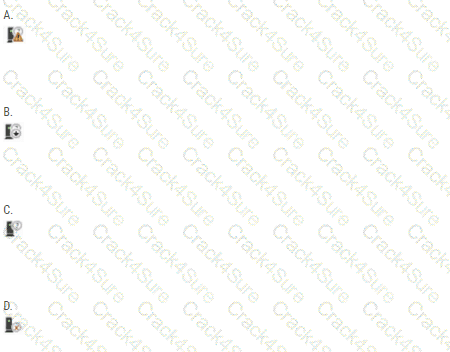
Which indicator identifies a device that might be malfunctioning?
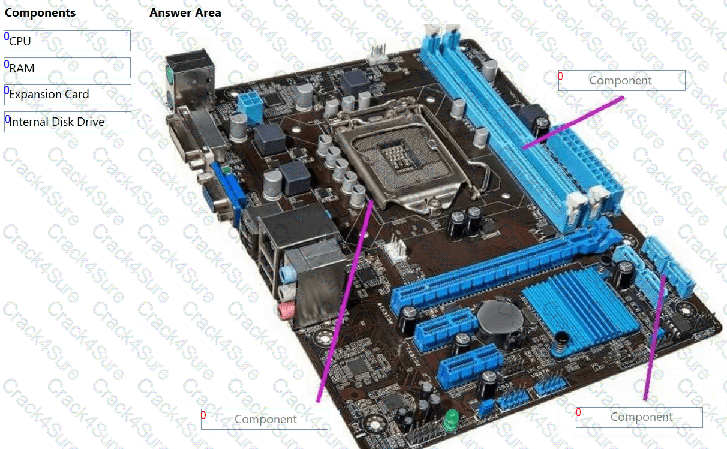
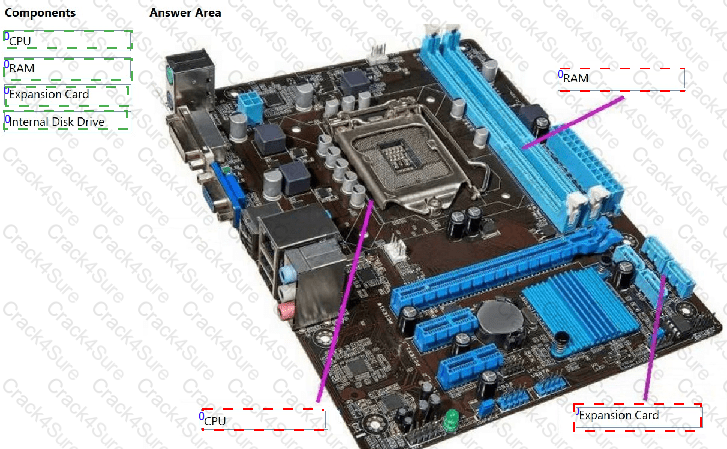
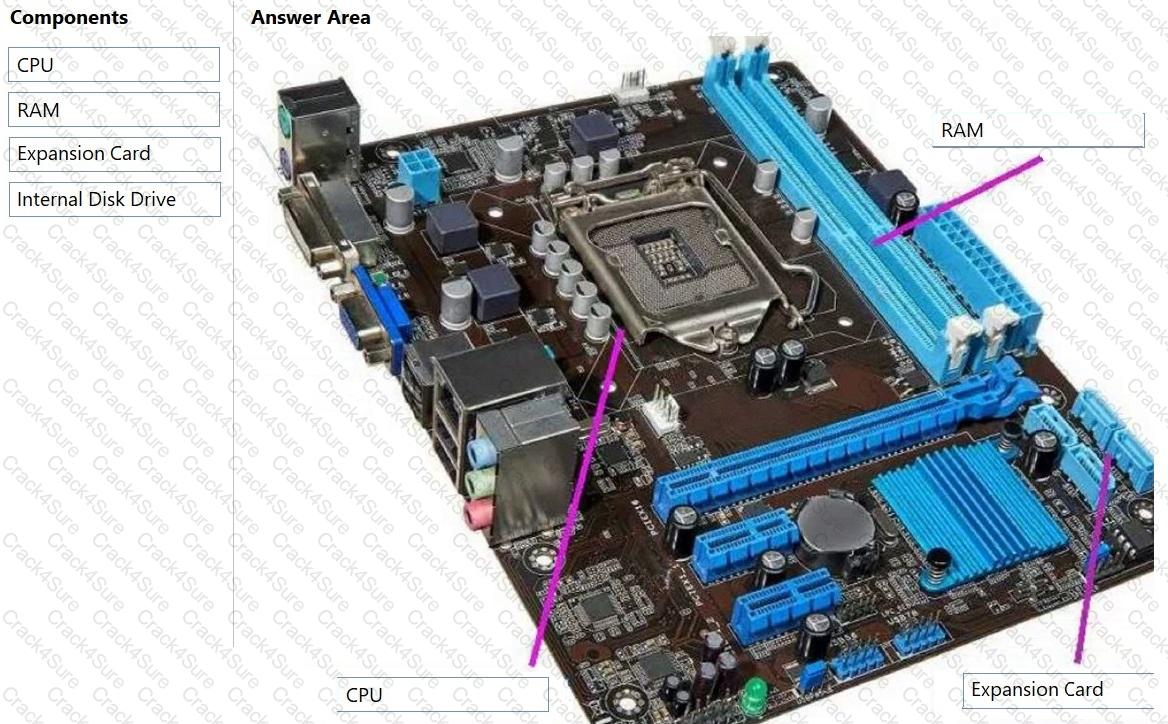
A customer purchased a new motherboard for a desktop computer. The customer needs help installing the correct components. The customer sends you a picture of the motherboard, which is shown in the answer area.
You need to assist the customer in identifying the installation location of three components.
To answer, move the appropriate components from the list on the left to the correct locations on the right. You may use each component once more than once, or not at all.
Note: You will receive partial credit for each correct response.
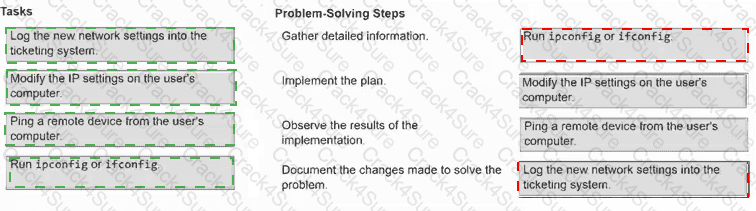
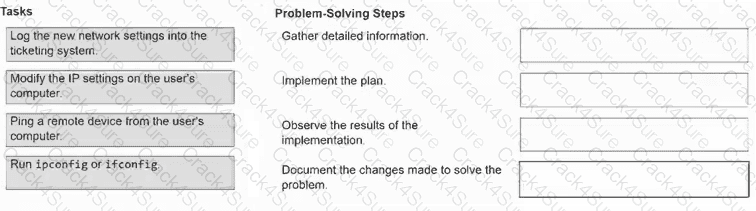
A user at your company is unable to connect to any other computers on the network or the internet. You suspect the cause might be an IP configuration issue.
You need to apply a problem-solving methodology to describe how you would go about solving the problem.
To answer, move each task from the list on the left to its problem-solving step on the right.
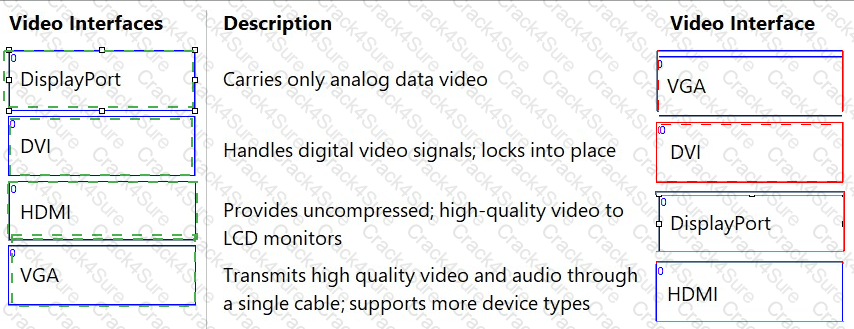
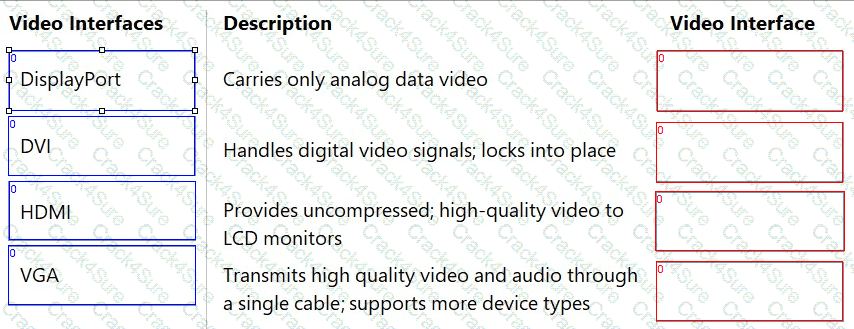
A user calls with questions about the type of display they should purchase for their new home office.
You need to provide them with an explanation of the characteristics of the various video interfaces available.
To answer, move each video interface on the left to its description on the right.
Note: You will receive partial credit for each correct response.
3 Months Free Update
3 Months Free Update
3 Months Free Update



TESTED 22 Nov 2026
 C:\Users\Waqas Shahid\Desktop\Mudassir\Untitled.jpg